CAP-01Governed
Deep enterprise context, not document retrieval
Agents connect to every major enterprise app and map relationships across your ERP, CRM, HRIS, and collaboration tools — not just individual documents.
assistents combines deep enterprise context, intelligent reasoning, and governed execution to deliver AI agents that don't just answer questions, they run processes, take actions, and produce auditable outcomes across every department.
Read → Reason → Act · one governed, audited run
Most enterprise AI tools retrieve information and generate text. assistents agents reason through multi-step business processes, take governed actions, and produce auditable outcomes.
Enterprise AI Agent
An enterprise AI agent is software that combines deep business context, governed decision-making, and multi-step execution to perform complex business processes autonomously within defined policy boundaries, unlike chatbots that only generate text responses.
Agents connect to every major enterprise app and map relationships across your ERP, CRM, HRIS, and collaboration tools — not just individual documents.
Every agent action is permission-checked and policy-enforced. Alignment models verify intent-to-action consistency at every step.
Every response includes source citations. Every action is logged with full decision history. Your team always knows what happened and why.
Generic AI tools
assistents agents
Ask questions, execute workflows, or deploy autonomous agents, all from one conversational interface grounded in your enterprise context. Start with Agentic Business Intelligence to validate your data, then scale to action-capable and autonomous agents.
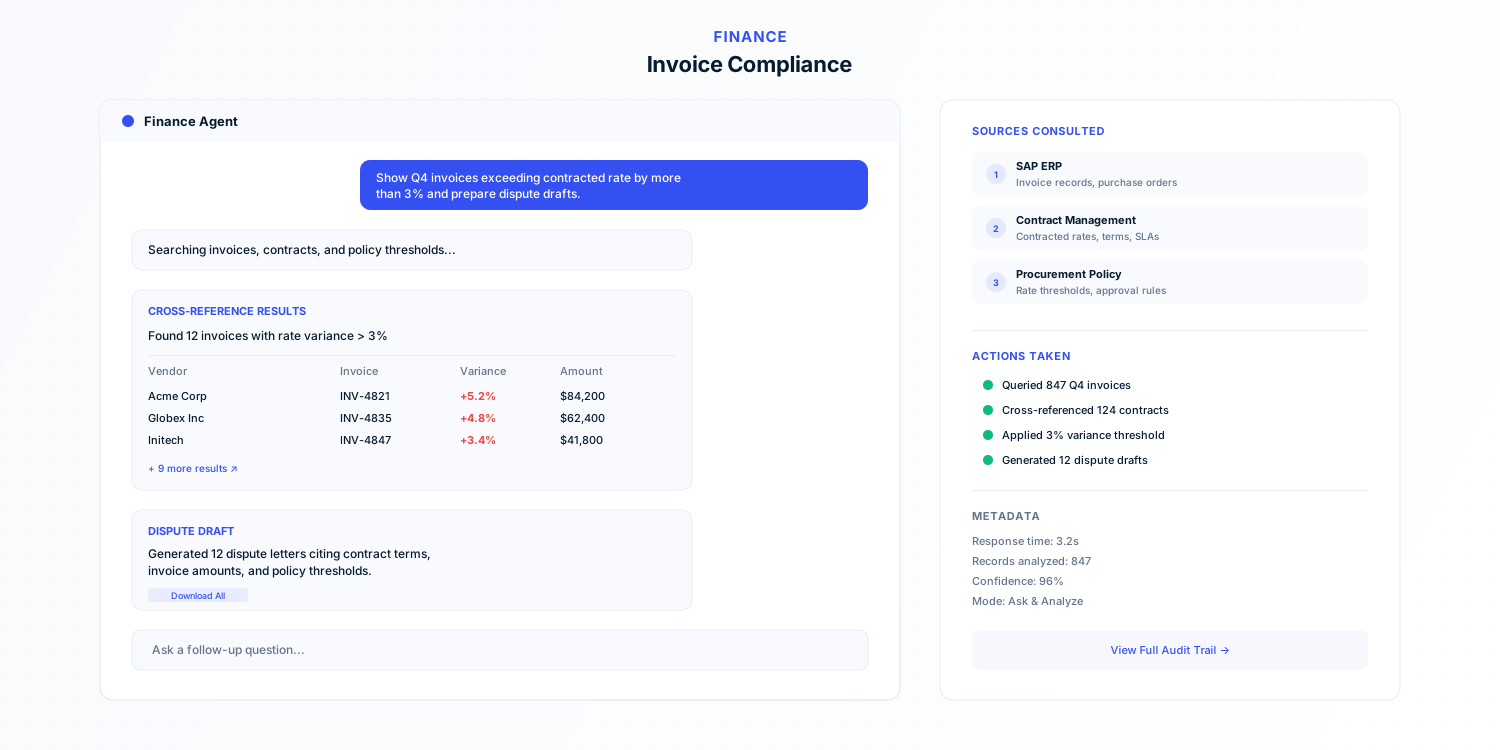
Each example shows how agents combine context retrieval, domain reasoning, and governed execution for a specific department workflow.
Years of enterprise engagements across 12 industries and 6 continents. From a national retail chain with 700+ stores running voice agents to financial services firms deploying agents with full auditability. These production experiences directly shaped every capability in assistents.
The Conversational Agent integrates natively with your existing workspace, no context switching required.
Full-featured web and desktop interface for analysts and managers running daily operational workflows.
Native integration with Slack, Microsoft Teams, and other collaboration tools where your teams already work.
APIs and SDKs for embedding agent intelligence into custom products, internal tools, and existing applications.
Start with one workflow, prove reliability, then scale across departments.
Connect initial enterprise systems and configure the Context Engine to build your live data graph.
Start with Agentic Business Intelligence in read-only mode to validate context quality and business definitions.
Deploy action-capable and autonomous agents as confidence and governance maturity increase.
Each agent comes pre-configured with domain knowledge, system connectors, and governance rules. Deploy as-is or customize for your processes.
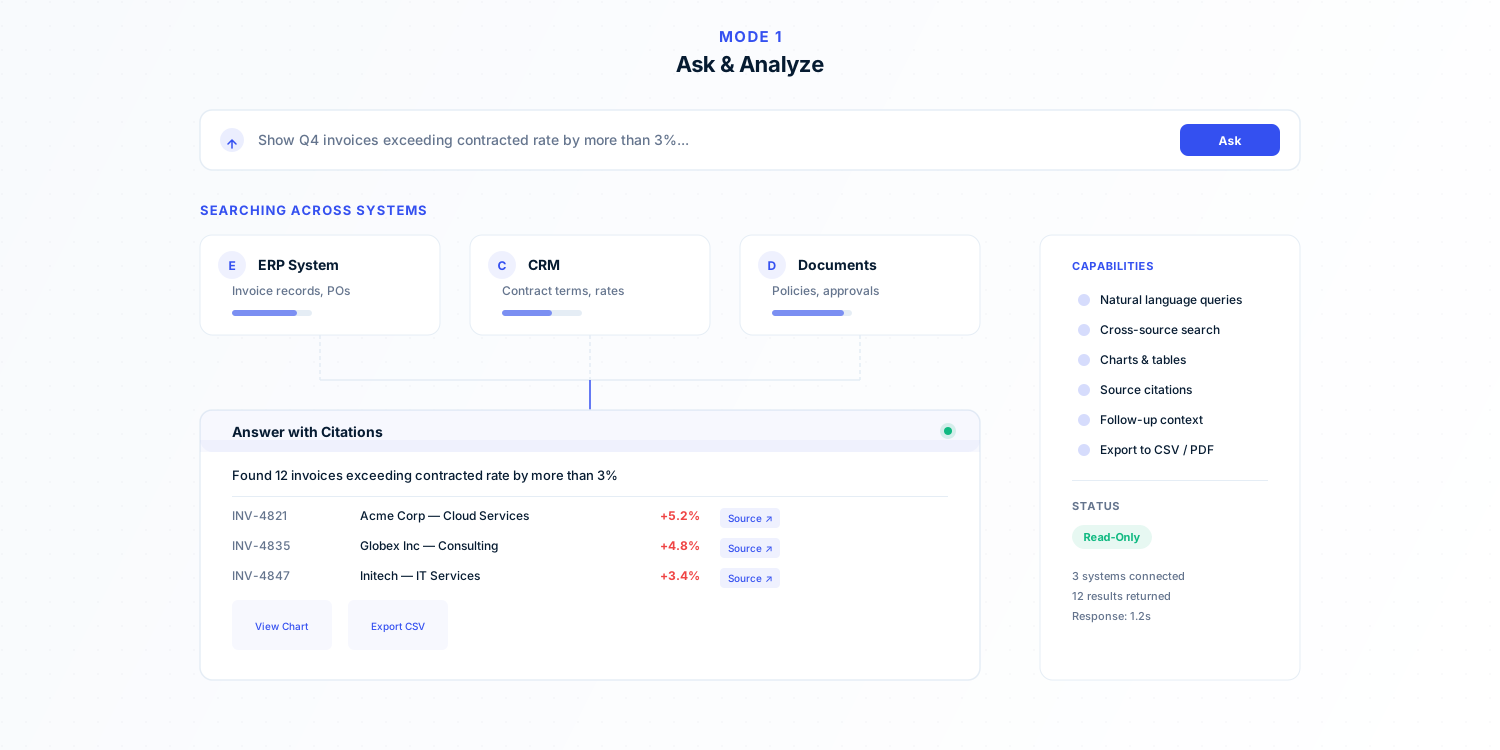
Connects to structured data sources. Answers analytical questions in natural language with charts, tables, and source citations.
Monitors CRM pipeline, scores deal health, identifies risks, surfaces next-best-actions, and keeps account data current.
Automates vendor compliance, three-way matching, contract term enforcement, and spend anomaly detection.
Continuously scans for policy violations, regulatory gaps, and data exposure risks across connected systems.
Aggregates engagement signals across support, usage, NPS, and communications to predict churn and recommend retention actions.
Routes requests, manages escalation chains, tracks SLAs, and keeps cross-functional workflows moving across systems.
Agentic Business Intelligence connects to your structured and unstructured data sources, understands your business context, and answers complex analytical questions in natural language, with visualizations, citations, and governed access controls.
Which customer segments had declining revenue last quarter?
Enterprise segment revenue declined 18% QoQ. Mid-market grew 6%. SMB flat.
Recommended starting point: connect data, define semantic terms, validate known answers, then graduate to action-capable agents.
Every query respects the permissions of the underlying data source. Finance data stays with finance. Audit logs capture every query.
The agent provides source citations and indicates when data is ambiguous or insufficient — it never guesses.
Yes. Queries can be saved and scheduled to email, Slack, or shared reporting channels.
Explore detailed deployment stories powered by Conversational Agents across industries and departments.
Deploy AI agents that resolve tier-1 support requests end-to-end — across chat, email, and messaging channels — with full context from your CRM, knowledge base, and order history.
Automate internal support for IT tickets, HR policy questions, benefits inquiries, and onboarding tasks. Agents pull answers from internal wikis and escalate to the right team when needed.
AI agents engage inbound leads in real time, qualify them against your ICP criteria, enrich contact data, and route high-intent prospects to the right rep — before they bounce.
Chatbots generate text responses from a single knowledge source. assistents AI agents reason across multiple enterprise systems, take governed actions, produce auditable outcomes, and operate autonomously within policy boundaries — combining deep business context with multi-step execution.
Most teams go from initial setup to production deployment in about 4 weeks. The first week focuses on connecting systems and configuring the Context Engine, followed by validation with Agentic BI, and then scaling to action-capable and autonomous agents.
Yes. assistents supports cloud, on-premise, and hybrid deployments. The Context Engine connects to 300+ enterprise systems including on-premise ERPs, databases, and legacy applications through pre-built connectors and open APIs.
Every agent action is permission-checked and policy-enforced. The platform includes alignment verification, approval gates, escalation triggers, complete audit trails, and role-based access controls. Agents never bypass defined policy boundaries.
assistents serves Finance, Sales, Customer Support, HR, Marketing, Compliance, Procurement, and Operations teams. Pre-built agents come configured with domain knowledge for each department, and custom agents can be created for any business process.
See how assistents puts AI agents into production across Finance, Procurement, Sales, Support, HR, and Marketing, with the governance your enterprise requires. 48-hour turnaround on workflow mapping.
Transparent pricing aligned to delivered operational value.
Pricing detailsGet a workflow map, pilot scope, and ROI hypothesis within 48 hours.
Book a Discovery Call