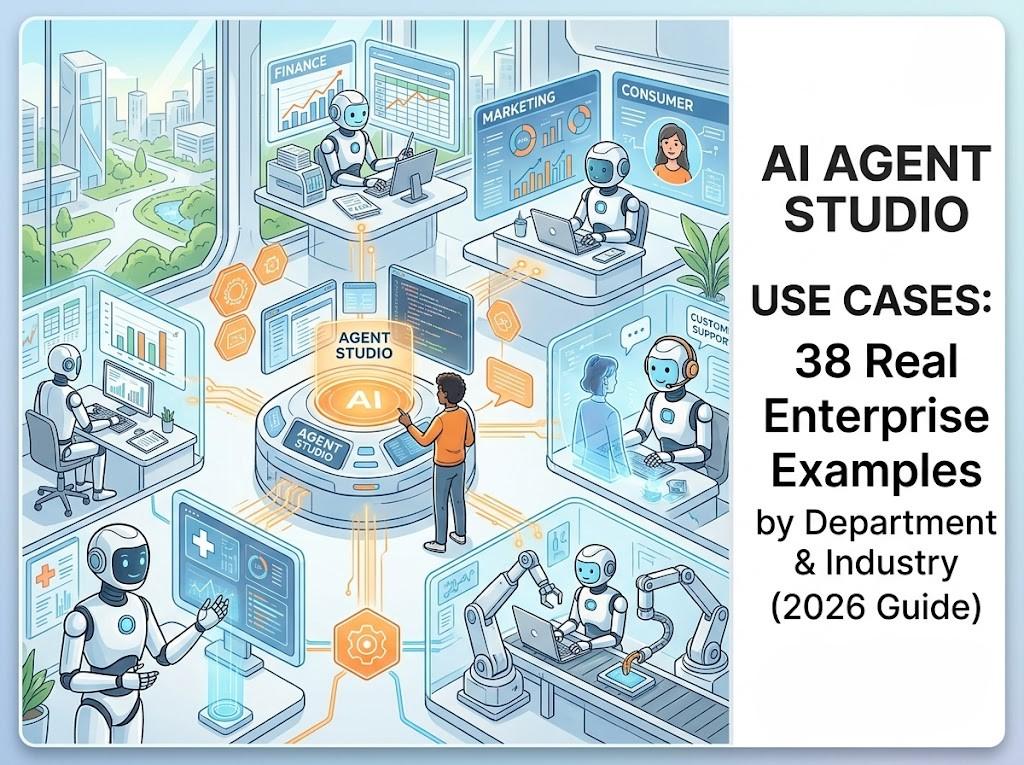
Most enterprises don't have a shortage of AI pilots. They have a shortage of somewhere governed to run them.
Over the past two years, "build an agent" stopped being the hard part. Any team can wire a prompt to a tool call in an afternoon. The hard part is everything after that: giving the agent the right business context, making sure it can't do anything it isn't allowed to do, connecting it to systems that actually matter, and proving it worked. That's the job of an AI agent studio — and it's why the term now shows up in the product lineup of nearly every major enterprise software vendor, from Salesforce and ServiceNow to Oracle, Google, and Cognigy.
An AI agent studio is the environment where teams design, test, govern, and deploy AI agents that read live business context and take real action inside enterprise systems — as distinct from a chatbot builder, which only answers questions, or a robotic process automation (RPA) tool, which only follows fixed rules.
This guide covers what that actually means in practice: a clear definition, a maturity framework for how much autonomy to grant, and 38 real use cases across nine departments and industries — plus how to pick your first one and what separates a studio that survives contact with production from one that doesn't.
None of this is theoretical. The use cases below are drawn from live enterprise deployments across hospitality, retail, banking, healthcare, real estate, logistics, insurance, and energy — described by industry and scale rather than by name, since the point here is the pattern, not the logo.
What is an AI agent studio, exactly?
"Agent studio" has become the generic name for the build-test-deploy-govern environment behind an AI agent, the same way "CRM" describes a category rather than one product. ServiceNow calls its version AI Agent Studio. So does Oracle, Cognigy, and Google's Customer Experience platform. Salesforce, Appian, and Lyzr each ship something functionally identical under a different name.
What separates a studio from a simple chatbot tool or an RPA platform is autonomy with guardrails: the ability to reason over ambiguous input, choose a next step, and act — without either scripting every branch in advance or acting with no oversight at all.
| Chatbot builder | RPA | AI agent studio | |
|---|---|---|---|
| How it works | Scripted flows, waits for input at each step | Rules-based, fixed sequence of steps | Reasons, plans, and adapts within defined guardrails |
| Handles exceptions | No — breaks or escalates immediately | No — fails unless explicitly reprogrammed | Yes, within a defined authority envelope |
| Takes real action in systems | Rarely, and only through pre-built widgets | Yes, but only along pre-defined paths | Yes — permission-checked, logged, and auditable |
| Governance | Minimal | Basic role-based access | Native: audit trail, approvals, escalation rules |
A chatbot answers a question and stops. An agent built in a proper studio can be told "process this invoice" or "onboard this new hire," and it will plan the steps, use the right tools, and complete the goal — escalating to a human only when it hits something outside its authority.
Why enterprises are standardizing on an agent studio now
The shift underway isn't from "no AI" to "AI." It's from AI that answers to AI that acts. Copilots and chatbots reduce individual effort but leave the operating model unchanged — a person still has to initiate the task, judge the output, and remember what happens next. Agents change who owns that loop.
The market data backs up how fast this is moving, and how uneven adoption still is. Gartner has projected that roughly 40% of enterprise applications will embed task-specific AI agents by the end of 2026, up from under 5% just a year earlier. McKinsey's most recent State of AI research found that fewer than 10% of organizations have actually scaled agents in any single function, even though the large majority are already using AI somewhere in the business — a gap between experimentation and real deployment that hasn't closed as quickly as the hype suggests.
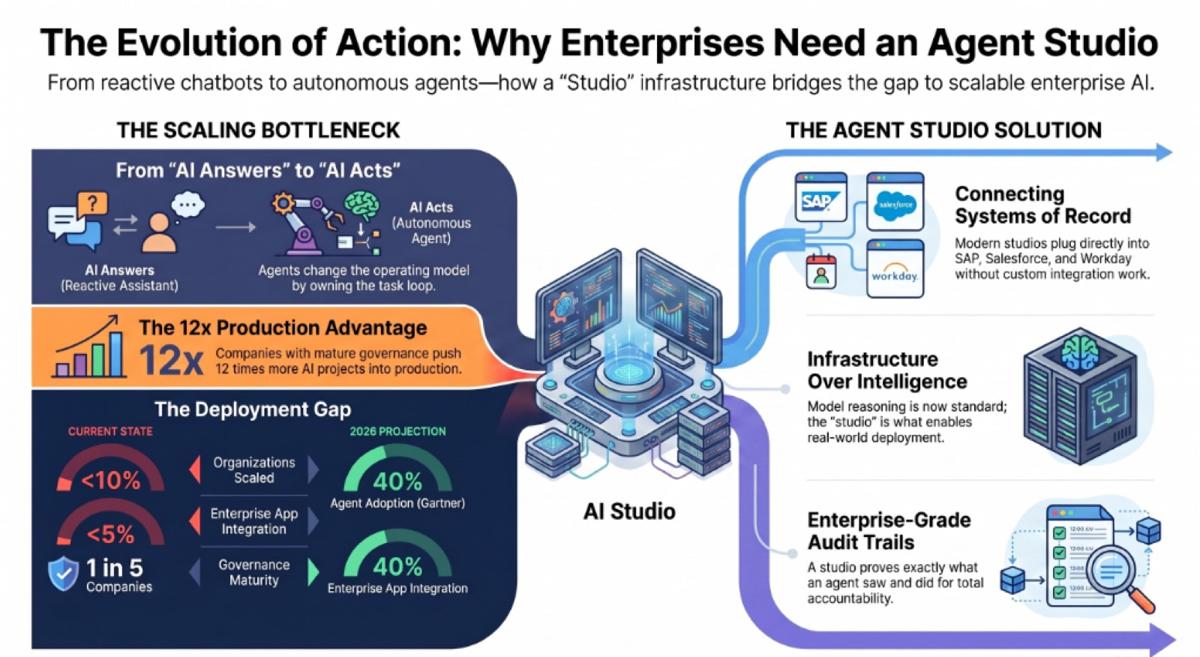
The honest reason for that gap isn't model quality. Deloitte's most recent State of AI research found that only about one in five companies has a mature governance model for its agents, and separate research from Databricks found that companies with real AI governance in place pushed roughly 12 times more projects into production than those without it. The bottleneck is almost never the reasoning. It's the studio underneath — whether it can connect to real systems, enforce real permissions, and produce a real audit trail.
That's also why "which model is best" is the wrong first question for most enterprise buyers in 2026. Most foundation models now clear the reasoning bar for standard business tasks. What separates a stalled pilot from a production deployment is whether the surrounding studio can plug into the systems of record that already run the business — SAP, Salesforce, Workday, ServiceNow — without months of custom integration work, and whether it can prove, after the fact, exactly what an agent saw and did.
The AI Agent Studio Autonomy Maturity Model
Before looking at use cases, it's worth answering the question every enterprise buyer eventually asks: how autonomous should this actually be? The honest answer is a ladder, not a switch. Below is a practical maturity model for scoping any agent studio deployment.
| Level | Name | What the agent does | What the human does | What the studio must provide |
|---|---|---|---|---|
| 0 | Digitized | Nothing — systems just record activity | Performs and coordinates all the work | Systems of record only |
| 1 | Assist | Drafts, advises, retrieves | Initiates, validates, and acts | Context retrieval, copilots |
| 2 | Co-work | Performs bounded steps | Owns the work, collaborates with the agent | Work items, handoffs, approvals |
| 3 | Delegate | Plans and completes assigned tasks | Sets the objective, handles escalation | Identity, permissions, evaluation |
| 4 | Exception-managed | Owns the normal operating path end-to-end | Manages policy and handles exceptions | Governed action layer, oversight dashboard |
| 5 | Adaptive | Proposes operating improvements | Approves goals, policy, and releases | Outcome tracking, simulation, governed learning |
Most enterprises should be targeting Level 2 through 4 in 2026, not Level 5 — and a well-built studio should let a team choose the level per use case, rather than forcing an all-or-nothing autonomy setting across the whole deployment. A finance team might run invoice matching at Level 4 while keeping contract negotiation at Level 2. That flexibility, more than any single feature, is what separates a studio built for production from one built for demos.
The anatomy of a modern AI agent studio
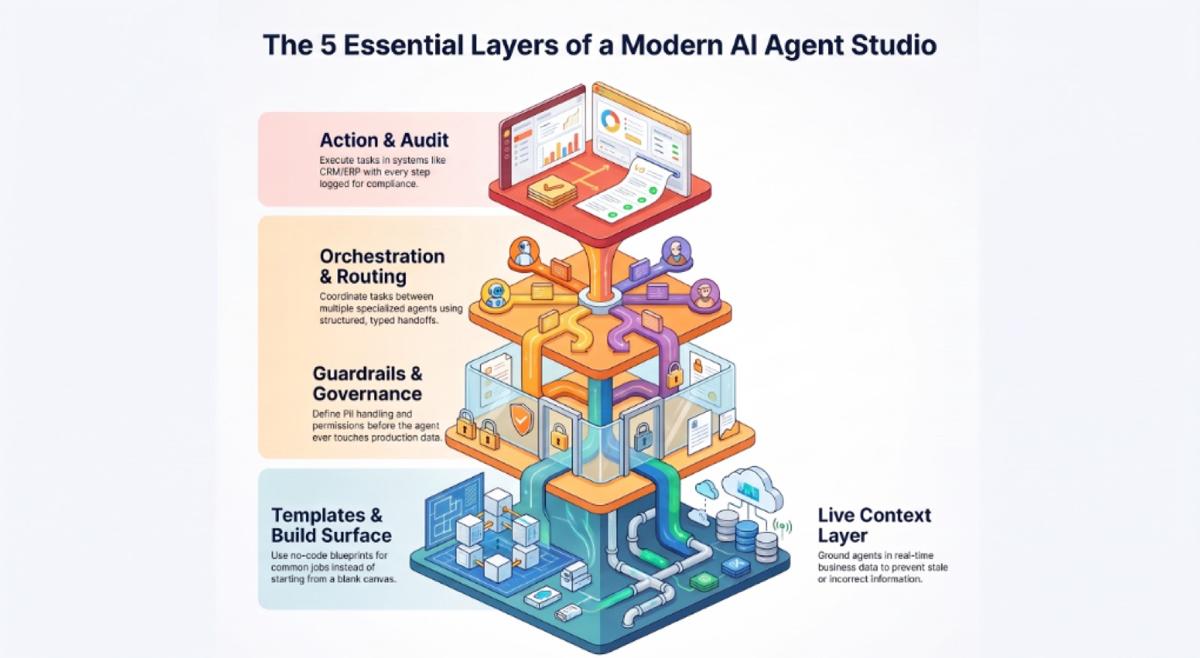
Every use case below gets built the same way, through five layers:
- Templates and a build surface — no-code or low-code agent creation, with pre-built blueprints for common jobs instead of a blank canvas every time. This is the layer most "agent studio" marketing pages actually show in a demo, and the layer that matters least on its own.
- A context layer — grounding in live business data, structured and unstructured, not a static knowledge base that goes stale the week after launch. Without this, an agent can hold a fluent conversation and still be wrong about the account balance it's discussing.
- Guardrails and governance — permissions, approval gates, escalation rules, and PII handling defined before the agent ever touches production data, not added after a compliance review flags a problem.
- Orchestration — routing between a single agent and a coordinated multi-agent team when a task genuinely crosses specialties, with typed handoffs instead of agents passing free-text notes to each other.
- Action and audit — the agent actually executes inside ERP, CRM, or HR systems, with every step permission-checked and logged, so a compliance officer can reconstruct exactly what happened and why.
Skip any one of these layers and the agent either can't do anything useful, or it can do too much unsupervised. The 38 use cases below assume all five are in place.
38 AI agent studio use cases by department and industry
Finance & Procurement
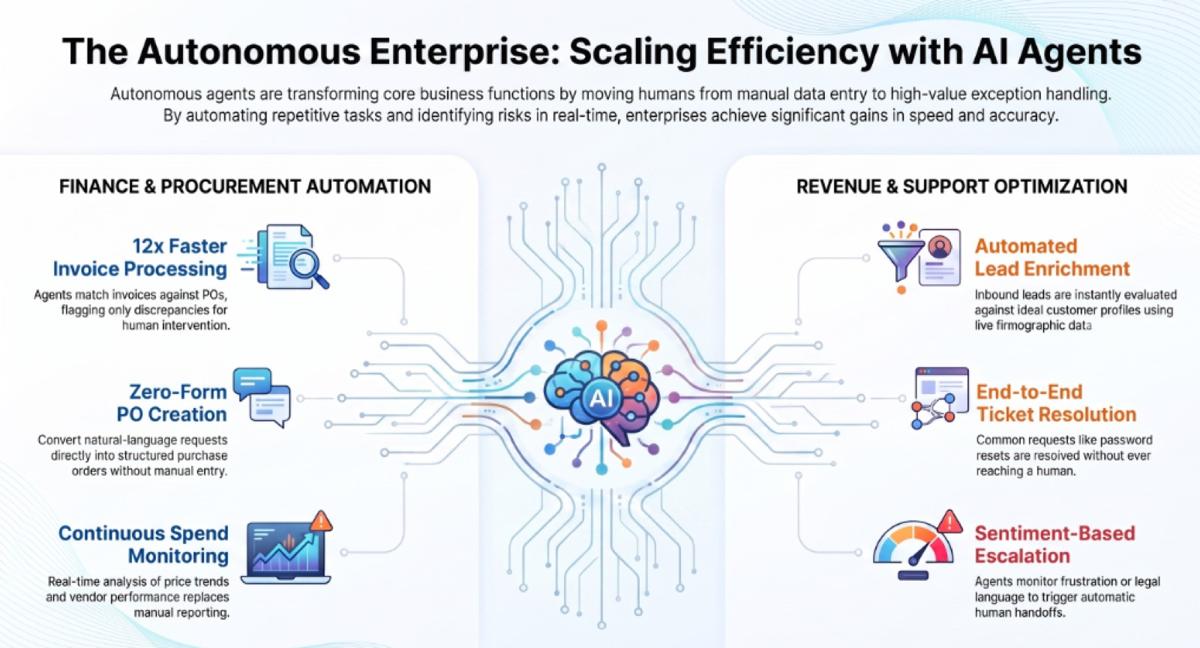
- Three-way invoice matching and exception routing. Agents match invoices against purchase orders and receipts, flag discrepancies, and send only the exceptions to a human — the pattern behind reported 12x gains in invoice-processing speed at enterprise scale.
- Automated PO creation from natural-language requests. A request like "order 200 units of X for the Chicago warehouse" becomes a structured purchase order without a form.
- RFQ automation and supplier discovery. Agents scout, download, and pre-fill responses to relevant requests for proposal before a human ever sees them.
- Contract and agreement review. Standard-terms checks, compliance flags, and risk highlighting compress redlines from hours to minutes.
- Spend anomaly detection and procurement KPI alerts. Continuous monitoring of purchase price trends, margin impact, and vendor delivery performance, with scheduled insight packs replacing manual reporting.
- Early-payment and vendor-performance analysis. Agents flag early-payment discount opportunities and score suppliers on delivery reliability without a monthly manual pull.
Sales & Revenue Operations
- Lead scoring and enrichment. Inbound leads are scored against ideal-customer-profile criteria and enriched with firmographic data automatically.
- Deal-risk flagging and next-best-action. Agents surface stalled deals and recommend the specific next step, grounded in live CRM and engagement data rather than a stale forecast.
- Sales forecasting and pipeline hygiene. Continuous pipeline scoring replaces the quarterly scramble to figure out which deals are actually still alive.
- Always-on account monitoring. Agents watch enterprise accounts for renewal risk, expansion signals, and follow-up gaps around the clock, not just before a QBR.
Customer Support & Service
- Tier-1 ticket triage and routing. Requests are classified by type, urgency, and complexity, then routed automatically — removing the manual first-line sort that adds no value for the customer.
- End-to-end resolution of common requests. Order status checks, password resets, and refund processing get resolved without a ticket ever reaching a queue.
- Agent-assisted drafting for complex tickets. For anything not fully autonomous yet, the agent drafts a response and surfaces the relevant knowledge, keeping a human in the loop while cutting handle time.
- Omnichannel support with sentiment-based escalation. The same context follows a customer across chat, voice, and email, with frustration or legal language triggering an automatic human handoff.
HR & People Operations
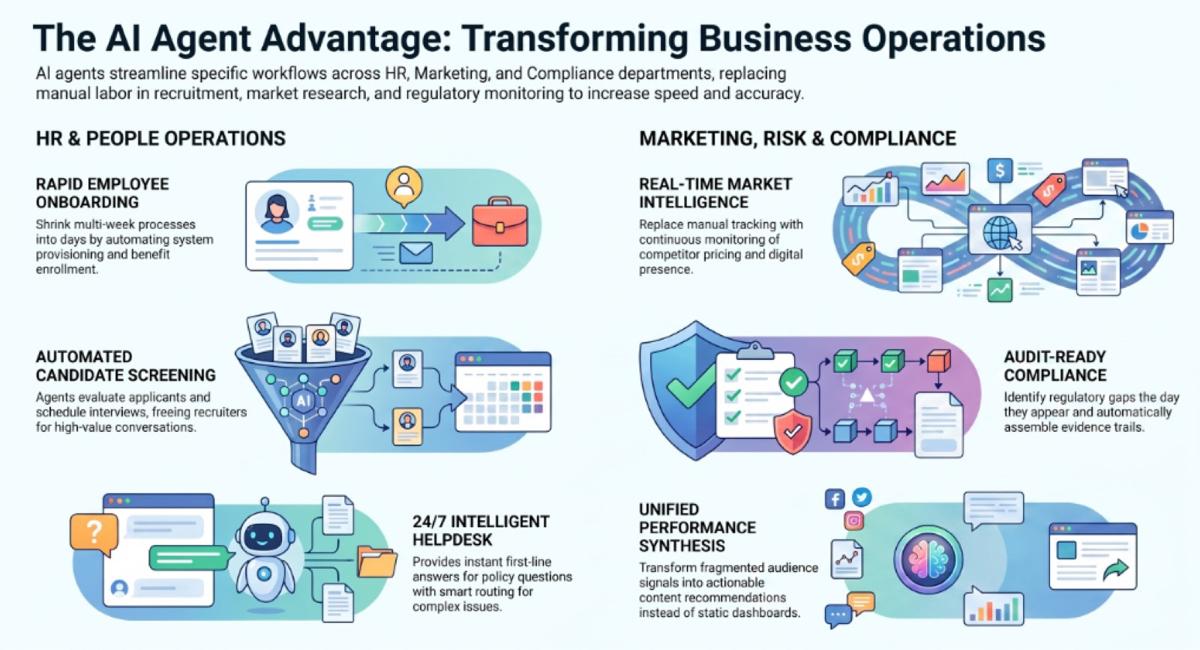
- Candidate screening and interview scheduling. Agents evaluate applicants against job requirements and coordinate interview logistics, freeing recruiters for the shortlist conversation.
- Employee onboarding orchestration. Offer letters, system provisioning, benefits enrollment, and training schedules get coordinated across HRIS, IT, and collaboration tools — turning a multi-week process into a matter of days.
- HR helpdesk for policy and benefits questions. A 24/7 first line for common questions, with intelligent routing to a specialist for anything genuinely complex.
- Staffing, credentialing, and shift-matching. In healthcare and other credential-heavy industries, agents manage onboarding, facility-staffing requests, and compliance notifications to shrink fill-cycle time.
Marketing & Growth
- Competitor and market-intelligence tracking. Continuous monitoring of competitor pricing, promotions, and digital presence replaces hours of manual portal-checking.
- Campaign performance analysis. Agents monitor spend and engagement across channels and recommend budget reallocation based on real-time signals, not last month's report.
- Brand and creative insight synthesis. Multi-source signals — creative, performance, audience — get unified into themes and next-content recommendations instead of a dashboard nobody reads.
Compliance, Risk & Security
- Continuous compliance monitoring with audit-ready evidence. Instead of discovering a gap during an audit, agents flag it the day it appears and assemble the evidence trail automatically.
- Regulatory gap detection. Policy scanning across every connected application, not just the systems someone remembered to check.
- Security-operations triage. Agents help classify alerts, gather context, and prepare incident evidence — reducing the noise a human analyst has to wade through first.
- Cross-border transaction risk pre-screening. Early flags for withholding-tax, VAT mismatch, and permanent-establishment risk before a deal reaches a deadline crunch.
IT Operations & Document Processing
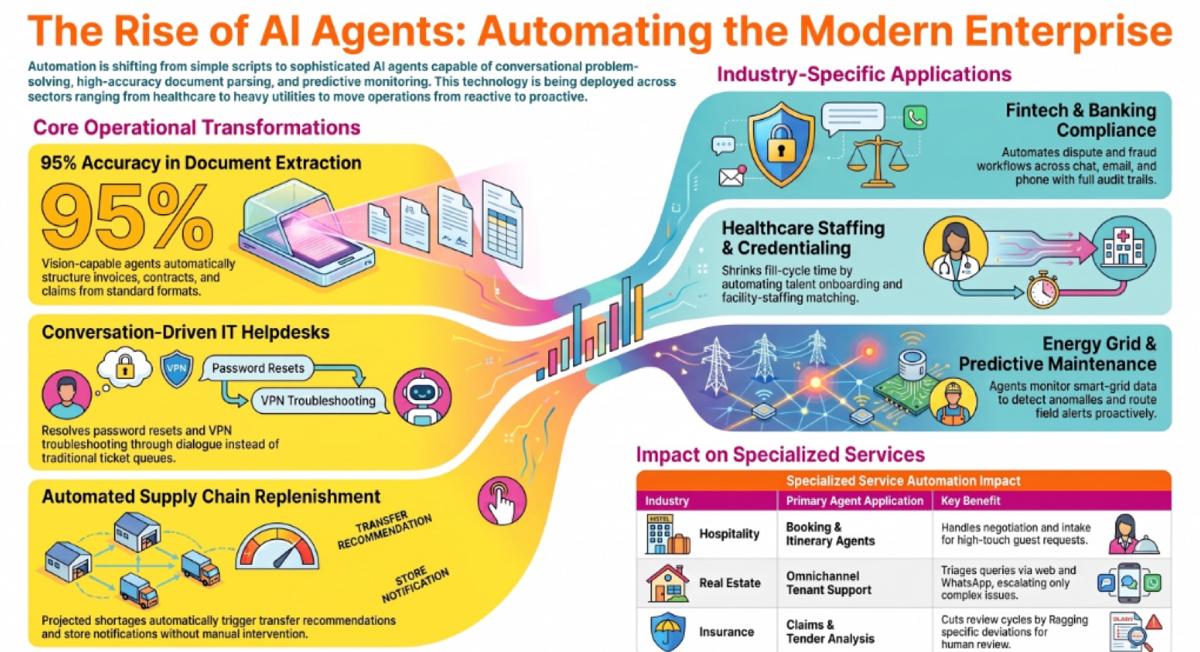
- IT and employee helpdesk automation. Password resets, VPN troubleshooting, and access requests resolved through conversation instead of a ticket queue.
- Document intake, classification, and extraction. Invoices, contracts, claims, and tender documents get parsed and structured automatically, with vision-capable extraction hitting roughly 95% accuracy on standard formats in production deployments.
- Predictive infrastructure monitoring. Agents analyze logs and performance metrics to surface risk before it becomes an incident, shifting IT from reactive ticketing toward prevention.
Operations, Supply Chain & Retail
- Stockout prediction and automated replenishment. A projected shortage becomes a transfer or expedite recommendation automatically, with the transaction created and stores notified without a planner manually working the exception.
- Store-level customer service and inventory knowledge agents. Frontline staff get instant, on-demand answers to pricing, stock, and SOP questions instead of escalating to a helpdesk.
- Terminal and logistics scheduling. Yard, rail, and shipment coordination with automatic exception management when a disruption hits the plan.
- Continuous competitive pricing intelligence. Ongoing monitoring of e-commerce pricing, discounting, and availability across thousands of SKUs, with anomaly alerts reaching category managers within minutes of a shift.
Industry Spotlight
- Hospitality: end-to-end booking and itinerary agents. A luxury lodge and camp operator across East Africa uses agents to handle intake, availability negotiation, and document generation for high-touch guest requests, with a human stepping in only for the final curated itinerary.
- Real estate: tenant and customer support automation. A large multi-asset real estate portfolio deploys omnichannel service agents to triage tenant queries and rental questions across web, WhatsApp, and email, escalating only what a knowledge base genuinely can't answer.
- Banking and fintech: omnichannel dispute and compliance workflows. A global fintech automation provider builds agents that combine chat, email, and phone intake with agent-assist summarization, cutting the manual work in dispute and fraud workflows while keeping a full audit trail.
- Healthcare and staffing: credentialing and fill-cycle automation. A healthcare staffing platform uses agents to manage talent onboarding, credential capture, and facility-staffing matching — shrinking fill-cycle time and improving utilization visibility.
- Energy and utilities: grid monitoring and predictive maintenance. A state power transmission utility runs agents over smart-grid data for anomaly detection and automated alert routing, shifting field operations from reactive to proactive.
- Insurance and legal: claims intake and tender-document analysis. Agents extract and structure claims documents, contracts, and tender submissions, cutting review cycles while flagging the deviations a human still needs to see.
How to choose your first agent studio use case
Not every use case above is a good place to start. Four questions narrow it down fast:
- Volume and repetition. Does this workflow happen dozens or hundreds of times a week? Low-frequency work rarely justifies the setup cost.
- Exception rate. Is it too irregular for RPA, but too repetitive to keep paying a human to do it the same way every time? That's the sweet spot for an agent.
- Data readiness. Is the underlying system data clean, current, and accessible? Agents inherit the quality of the data they're given — a fragmented CRM produces a fragmented agent.
- Blast radius if it's wrong. Start with reversible, internal, low-stakes workflows before moving to anything customer-facing or regulated. Internal knowledge access and document processing are consistently the fastest, lowest-risk starting points.
Why you need a governed studio, not just a build canvas
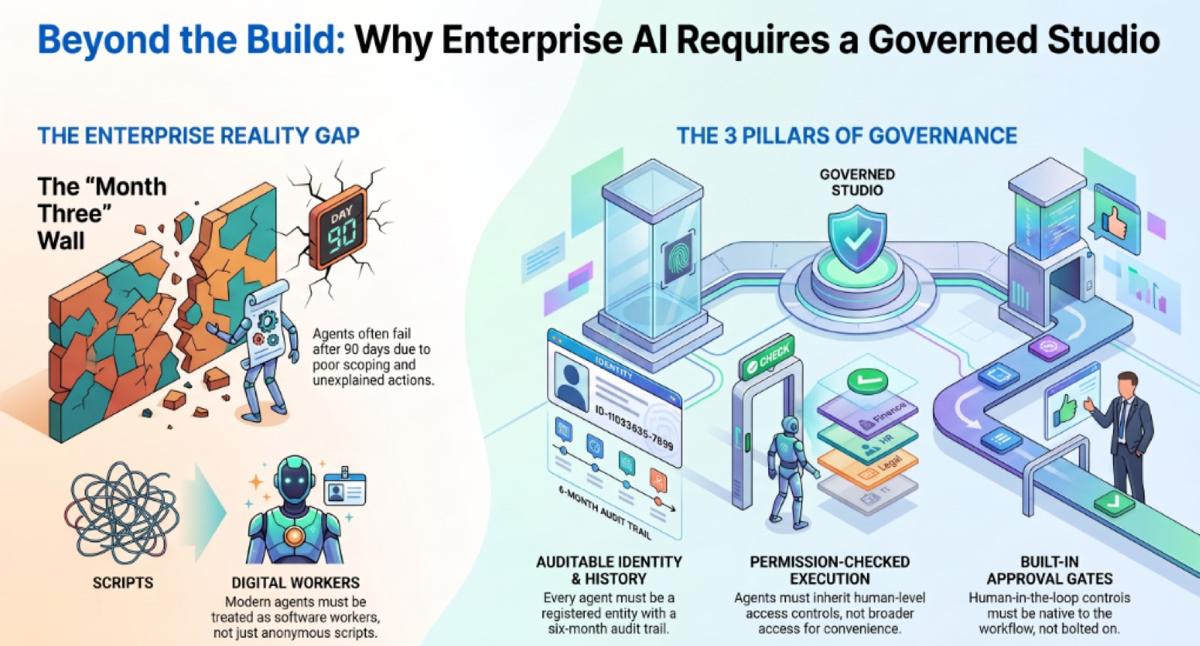
Most "agent studios" are fast to demo and slow to survive production. The gap almost never shows up on day one — it shows up around month three, when an agent that was never scoped properly touches data it shouldn't, or takes an action nobody can explain after the fact.
A studio that's actually ready for enterprise use needs to provide, as a baseline and not an add-on:
- Agent identity — every agent is a registered, ownable, auditable entity, not an anonymous script.
- Permission-checked execution — agents inherit the same access controls as the humans they work alongside, not broader access for convenience.
- A complete audit trail — every decision, data access, and action logged with enough detail to answer an auditor's question six months later.
- Human-in-the-loop approval gates — built into the workflow, not bolted on after a near-miss.
- Model flexibility — the ability to swap the underlying model without rebuilding the agent, so the studio isn't a single point of vendor lock-in.
None of this is exotic. It's the same operating discipline enterprises already apply to human employees — defined roles, scoped access, a manager, and a record of what they did. The mistake most first-generation agent tools make is treating an agent like a script instead of like a new kind of worker who happens to be software.
Why assistents.ai is the AI agent studio enterprises choose
assistents.ai's Agent Builder is built around three layers working together rather than three separate tools: a Context Engine that ingests and reasons across structured and unstructured data from 300+ connected systems, a Semantic Layer that maps the relationships between that data — vendors to contracts, deals to contacts, tickets to products — and an Action Engine that executes multi-step workflows with permission checks on every step. That combination is what turns a use case on the list above into something that runs unattended in production, rather than a demo that needs a developer standing by.
| Capability | Typical AI agent studio | assistents.ai |
|---|---|---|
| Context | Basic retrieval from a single data source | Structured + unstructured data, relational reasoning across 300+ systems |
| Agent types | Chat only, or one agent type | Conversational, voice, document, autonomous, and BI agents on one platform |
| Governance | Bolted on after deployment | Native audit trail, human-in-the-loop approvals, permissions inherited from source systems |
| Deployment | Cloud-only | Cloud, private cloud, on-premise, air-gapped, or hybrid |
| Model flexibility | Locked to 1–3 models | 200+ models through a model-agnostic gateway, with zero data retention |
| Time to production | Weeks to months | Days to weeks — a published 4-week average from pilot to production |
That architecture is also why assistents.ai is currently running in production across more than 12 industries, with a reported 97% agent task accuracy including full audit trails and 90% faster processing on the workflows it automates. Those aren't projected numbers from a pilot; they're the platform's current production record.
It's also worth being direct about where the category is heading, because it changes how to evaluate a studio today. The next stage past building individual agents is managing a whole hybrid workforce of humans and agents against measurable business outcomes — assigning work, not just running agents, and measuring whether the intended result actually happened, not just whether the agent completed a task. A studio built with agent identity, governed action, and outcome measurement from day one is positioned for that shift. One that's just a prompt-and-chat wrapper is not.
Rolling out your first use case: a practical path
- Land. Pick one contained, measurable workflow using proven capabilities — document processing, voice, or analytics are usually the fastest wins.
- Prove it. Measure time saved, accuracy, and human rework before expanding to anything else.
- Expand the team around it. Add the adjacent human roles, escalation paths, and policies around the same operation rather than starting a second unrelated pilot.
- Widen autonomy carefully. Move up the maturity model above only after evaluation, a shadow-mode run, and a limited canary rollout — not all at once.
- Connect what's live. Once two or three use cases are running, link them through shared identity, shared context, and a single operations view instead of managing each in isolation.
The bottom line
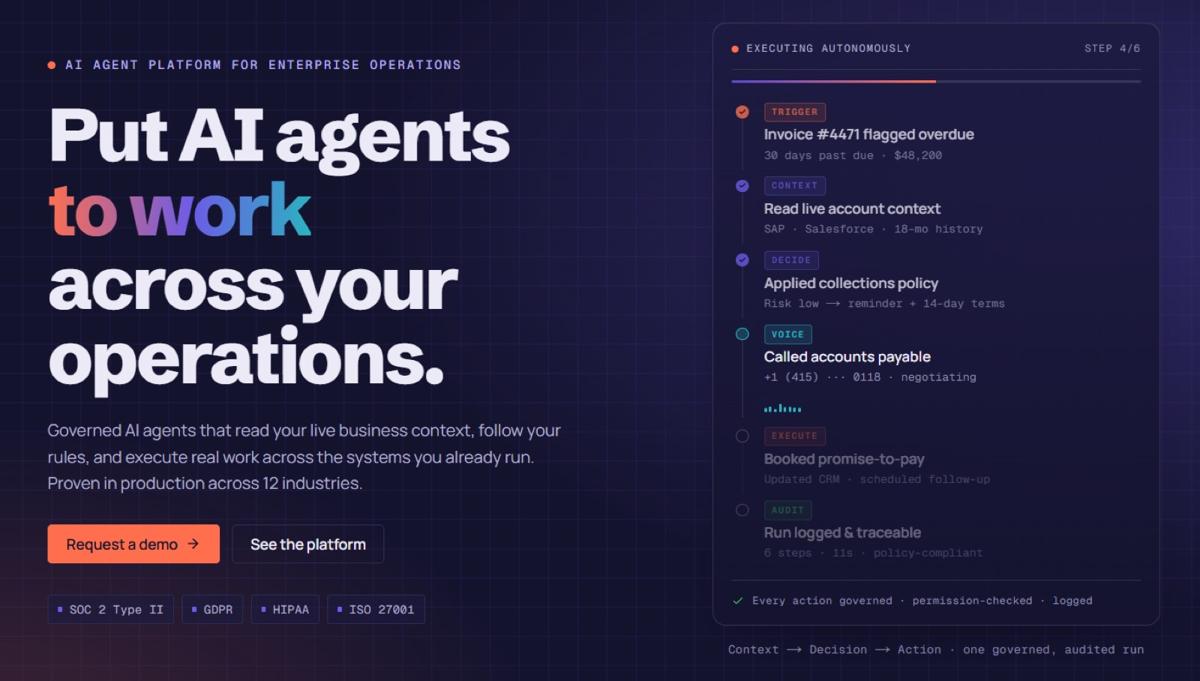
The studio matters less than what governs it. Thirty-eight use cases across nine departments prove agents can touch almost every operational workflow in an enterprise — but the deployments that actually stick are the ones built on a studio with identity, permissions, an audit trail, and model flexibility from the start, not bolted on after something went wrong.
If you're evaluating where to start, see how assistents.ai's Agent Builder governs context, decisions, and action in one platform, or book a 30-minute discovery call and bring the workflow that frustrates your team most.
FAQs
What is the difference between an AI agent builder and an AI agent studio?
In practice, none — both describe the same category: an environment for designing, testing, governing, and deploying AI agents. Some vendors use "builder," others use "studio." What matters is whether the product includes governance and action, not just a build canvas.
What is the difference between an AI agent and a chatbot?
A chatbot answers a question within a scripted or conversational flow and stops. An AI agent can be given a multi-step goal, plan the steps, use tools, and take action across systems without being re-prompted at every stage.
What is the difference between an AI agent and RPA?
RPA follows a fixed, pre-programmed path and fails on anything it wasn't explicitly built to handle. An AI agent can navigate exceptions and unstructured input within defined guardrails, which is what makes it suited to work that's too irregular for RPA but too repetitive for constant human handling.
What are the best AI agent studio use cases to start with?
Internal, high-volume, low-stakes workflows: document processing, internal knowledge access, and IT helpdesk automation consistently deliver the fastest, lowest-risk results before moving to customer-facing or regulated use cases.
How long does it take to get an AI agent studio use case into production?
On assistents.ai, the average is about four weeks from initial pilot to production, starting with a focused workflow and expanding once results are proven.
Can AI agents built in a studio integrate with systems like SAP, Salesforce, or Workday?
Yes — a production-grade studio should connect to ERP, CRM, and HRIS systems through pre-built connectors rather than requiring custom API work for every integration.
Are AI agent studios secure enough for regulated industries like finance and healthcare?
They can be, provided the studio enforces permission checks, maintains a full audit trail, and supports the deployment model regulated industries require — including private cloud or on-premise, not cloud-only.
What is a multi-agent system, and do I need one?
A multi-agent system is a coordinated team of specialized agents working on one process — for example, one agent that classifies a document, a second that extracts data, and a third that updates a CRM. Most use cases don't need one; reserve multi-agent coordination for genuinely cross-specialty work rather than defaulting to it.
Is assistents.ai an AI agent studio?
Yes, in function. assistents.ai's Agent Builder provides the same build-test-deploy environment the term "agent studio" describes, combined with native governance, multiple agent types, and flexible deployment — the pieces that separate a production-ready studio from a demo tool.
Do AI agent studios replace existing enterprise systems?
No. A properly built studio operates as a layer across ERP, CRM, and HR systems rather than replacing them — reading and acting through those systems while leaving them authoritative for their own data and transactions.
How much does an AI agent studio cost?
Pricing typically combines a platform subscription with usage-based costs for model calls, voice minutes, or documents processed, plus implementation for the first use case. The more useful comparison than sticker price is total cost per completed workflow once volume scales — a slower, unsupported studio often costs more once the exception-handling burden is factored in.