AI agent use cases in software development have moved well past autocomplete. The first wave of AI in engineering was reactive — a coding assistant suggested the next line while you typed. The current wave is different: AI agents take a goal, plan the steps, call your tools, run the tests, and check their own work before handing it back. That shift, from assistant to agent, is quietly rewriting how software gets built, reviewed, shipped, and operated.
This guide does two things. First, it walks through 20+ real AI agent use cases across the full software development lifecycle (SDLC) — from requirements all the way to production monitoring — with concrete example tasks and the payoff for each. Second, it tackles the part most listicles skip: how you actually run these agents in production without hallucinated outputs, ungoverned actions, or a data-privacy incident.
Because in real engineering orgs, the hard part isn't getting an agent to write code once. It's trusting it to act on your systems every day.
What are AI agents in software development?
An AI agent in software development is a goal-driven system, built on a large language model, that can observe its environment (your repo, tickets, CI pipeline, data), reason about what to do, take action through tools, and evaluate the result — iterating with minimal human prompting at each step. Unlike a chatbot or an autocomplete tool, it pursues a multi-step objective rather than answering a single request.
The practical test is simple. If you have to prompt every step yourself, you're using an assistant. If you hand over a goal and the system decomposes it, executes across multiple files and tools, and reports back for approval, you're using an agent.
AI agent vs. AI coding assistant
This is the single most common question people bring to this topic, so it's worth settling early.
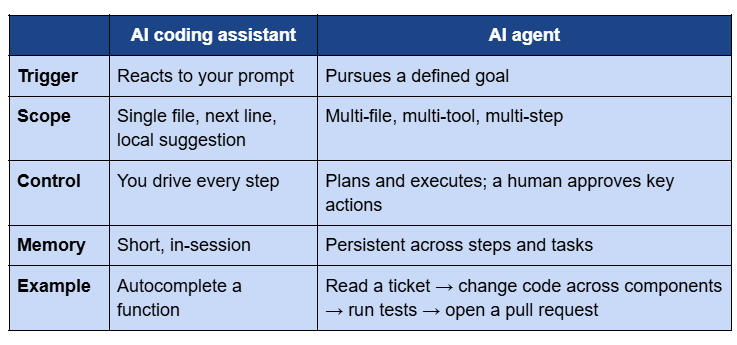
In practice, mature teams run both. Assistants keep individual developers in flow; agents take on the multi-step, long-running work — refactors, migrations, test generation, incident triage — so engineers can spend their attention on architecture and judgment.
Two layers hide inside "AI agents in software development"
Here's a distinction that saves a lot of confusion, because the phrase covers two genuinely different jobs:
- Layer A — agents that write your code. These live in the IDE and the pipeline: they generate, refactor, review, and test code. This is the territory of tools like GitHub Copilot, Cursor, Claude Code, and Devin.
- Layer B — agents you build and ship into production. These are the agents your team creates and embeds into your product or enterprise operations: a support agent, a data-analysis agent, a voice agent, a workflow agent that reads a record, decides, and acts on your systems under governance.
Layer A speeds up how software is made. Layer B changes what the software is — increasingly, the applications you ship are themselves agentic. Both matter, and this guide covers use cases across both. The difference becomes critical when you get to production, because Layer B agents touch real data and take real actions, which is exactly where governance stops being optional.
How AI agents work in the SDLC
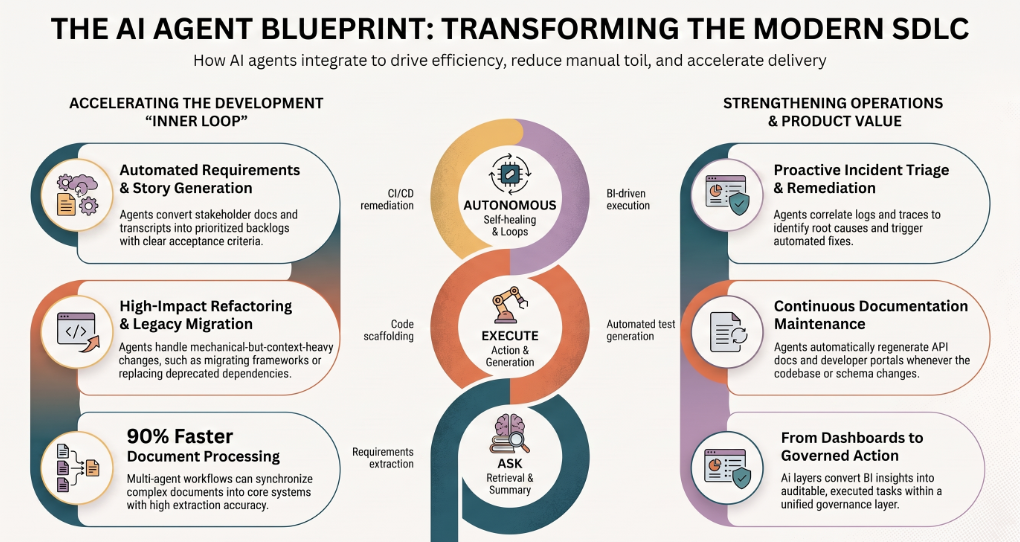
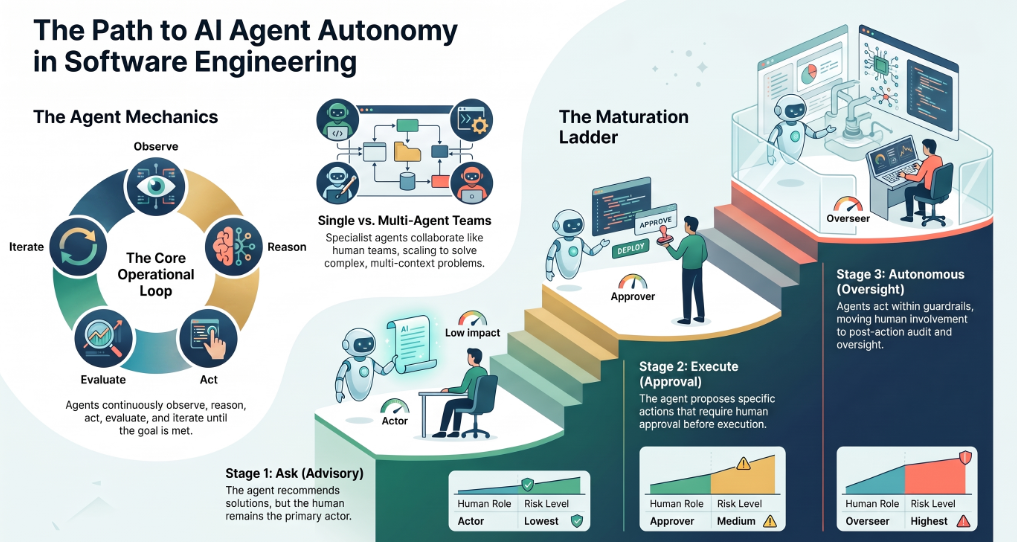
Under the hood, almost every AI agent runs the same loop: observe → reason → act → evaluate → iterate. It observes context (a ticket, a failing test, a codebase, a dataset), reasons about a plan by decomposing the goal into steps, acts by calling tools (read a file, run a command, query a database, open a PR), evaluates whether the result matches the objective, and loops until the goal is met or it needs a human.
Single agent vs. multi-agent orchestration
A single agent handles one bounded job well. More ambitious workflows use multi-agent orchestration, where specialist agents collaborate the way a human team does — one agent plans, another writes code, a third runs tests, a fourth handles deployment — coordinating through an agent-to-agent (A2A) pattern. This mirrors how real engineering teams divide labour and scales to problems a single agent can't hold in context.
Human-in-the-loop and the Ask → Execute → Autonomous ladder
Autonomy isn't a switch you flip; it's a ladder you climb. A useful way to frame any use case is the Ask → Execute → Autonomous maturity ladder:
- Ask: the agent answers and recommends, but a human does the acting. Lowest risk, fastest to adopt.
- Execute: the agent proposes a specific action and a human approves before it runs (human-in-the-loop, or a maker-checker pattern for writes).
- Autonomous: the agent acts within defined guardrails, with audit and oversight after the fact.
The smart rollout starts every use case at Ask, proves it, then graduates it. That single framing tells you how much control to keep at each stage — and it's the honest answer to "how autonomous should this be?"
20+ AI agent use cases across the software development lifecycle
Here are the highest-value AI agent use cases in software development, grouped by SDLC phase. For each, you get what it does, an example task, the payoff, and where it typically sits on the maturity ladder.
Planning & requirements
1. Requirements extraction and user-story generation. An agent reads discovery notes, transcripts, and stakeholder docs, then drafts structured user stories with acceptance criteria. Example: turn a 40-minute product call transcript into a prioritized backlog of stories. Payoff: less ambiguity entering sprint planning, faster alignment. Maturity: Ask.
2. Backlog triage and effort estimation. An agent clusters incoming tickets, flags duplicates, and suggests story-point estimates based on historical velocity. Example: triage a week of inbound issues and propose an ordered sprint candidate list. Payoff: engineers spend planning time deciding, not sorting. Maturity: Ask → Execute.
Design & architecture
3. Architecture review and security/scalability assessment. An agent analyses a system design or codebase and produces a structured risk register — scalability bottlenecks, security gaps, integration concerns. Example: assess whether a service will hold up under a 10x load and where it breaks first. Payoff: earlier, cheaper design corrections. Maturity: Ask.
In production: a long-term investment holding company used agent-assisted technical due diligence — architecture, scalability, and security assessment — to de-risk a mobile-banking acquisition, turning a slow manual review into a structured, repeatable risk read before signing.
4. API design and contract-first scaffolding. An agent proposes API contracts (OpenAPI/GraphQL schemas) from requirements, then scaffolds request/response shapes and mock servers. Example: generate a contract-first spec plus a mock so frontend and backend can build in parallel before the real service exists. Payoff: fewer integration mismatches later. Maturity: Execute.
Build / code
5. Code generation and scaffolding. The most familiar use case: an agent generates functions, boilerplate, and whole modules from a natural-language goal, grounded in your existing patterns. Example: "add a JWT-based auth service with role-based access control" → the agent scaffolds the service, wires the routes, and stubs the tests. Payoff: implementation time drops on well-specified work. Maturity: Execute.
6. Frontend component generation. An agent builds UI components against your indexed design system, using only approved tokens and patterns rather than arbitrary styles. Example: generate a data-table component that matches your existing theme and accessibility rules. Payoff: consistent UI without manual enforcement. (For a deeper treatment, see our guide to AI agents for frontend development.) Maturity: Execute.
7. Refactoring, legacy migration, and modernization. Agents excel at large, mechanical-but-context-heavy change: migrating a framework version, replacing a deprecated dependency, or moving off an end-of-life system. Example: migrate a module to a new ORM and update every call site. Payoff: modernization that would take weeks compresses into supervised iterations. Maturity: Execute → Autonomous.
In production: a UAE engineering and technology group (30+ operating companies) replaced an end-of-life enterprise document/ECR system with agentic automation that interprets order triggers, validates them, and creates SAP sales orders under explicit rules and audit logs — cutting manual order processing and legacy dependency while improving auditability for every order created.
Test / QA
8. Automated test-case and unit-test generation. An agent reads code behaviour and requirements, then writes unit and integration tests, including edge cases a human might skip. Example: generate a full test suite for a payments module and flag the untested branches. Payoff: higher coverage, faster. Maturity: Execute.
9. API testing and synthetic test data. An agent generates API test scripts and realistic fake data — names, transactions, edge-case payloads — so you can validate behaviour without touching real user data. Example: create 20 mock user profiles plus malformed inputs to stress-test validation. Payoff: faster, safer, more thorough testing. Maturity: Execute.
10. Contract testing and schema-drift detection. An agent parses your API specs and auto-generates contract tests, then flags mismatches when a schema changes. Example: detect that a downstream service dropped a required field before it breaks production. Payoff: fewer integration surprises in distributed systems. Maturity: Execute → Autonomous.
Review
11. Automated code review and PR summarization. An agent reviews pull requests, summarizes changes, flags risky modifications against historical patterns, and suggests fixes. Example: summarize a 30-file PR and surface the three changes most likely to cause regressions. Payoff: faster reviews, less reviewer fatigue. Maturity: Ask → Execute.
12. Security and vulnerability scanning. An agent scans code and dependencies for known vulnerabilities and insecure patterns, then proposes remediations in bulk. Example: run a coordinated security pass across a repo and open fix PRs for the low-risk findings. Payoff: security shifts left without a dedicated manual sweep. Maturity: Execute.
Deploy / DevOps
13. CI/CD pipeline automation. Agents manage build/test/deploy pipelines, diagnose failures, and suggest or apply fixes. Example: when a build fails, the agent identifies the root cause, proposes a fix, and reruns the pipeline. Payoff: less pipeline babysitting, more stable releases. Maturity: Execute → Autonomous.
14. Infrastructure-as-code and config generation. An agent drafts Terraform, Kubernetes manifests, or CI configs from a described target state. Example: generate the IaC for a new staging environment that mirrors production. Payoff: faster, more consistent environment setup. Maturity: Execute.
Operate / observe
15. Incident triage and root-cause analysis. When something breaks, an agent correlates logs, traces, and recent deploys to propose a probable cause and next step. Example: on a latency spike, the agent points to the deploy and config change most likely responsible. Payoff: shorter time-to-resolution. Maturity: Ask → Execute.
16. Observability, alerting, and auto-remediation. Agents watch operational data continuously, detect anomalies, route alerts, and — under guardrails — trigger remediation. Example: detect an emerging outage pattern and open a routed, context-rich ticket automatically. Payoff: proactive operations instead of reactive firefighting. Maturity: Execute → Autonomous.
In production: a city-scale smart-infrastructure operator (2M+ connected assets) runs agentic analytics and automated operational alerting on top of smart-utility systems, shifting grid operations from periodic manual checks to continuous monitoring with faster exception detection.
Documentation & knowledge
17. Auto-documentation and API docs. An agent generates and maintains documentation from code, schemas, and collections — endpoint summaries, usage examples, multi-language snippets — and regenerates it when the API changes. Example: turn a Postman collection or OpenAPI spec into a published developer portal. Payoff: docs stay current; onboarding and support load drop. Maturity: Execute.
18. Onboarding and codebase Q&A. An agent runs retrieval-augmented Q&A over your repos, SOPs, and internal docs so new engineers can ask "where does X happen?" and get grounded answers. Example: a new hire asks how auth flows through the system and gets a sourced walkthrough. Payoff: faster ramp, preserved institutional knowledge. Maturity: Ask.
Cross-cutting / product engineering (Layer B)
19. Building agentic features into your product. Increasingly, the software you ship is agentic — voice agents, chat agents, analytics agents embedded in your product. Example: an AI voice agent that lets users rehearse and interact in real time; an AI-CFO feature delivering continuous cashflow forecasting and scenario planning; omnichannel support agents with auditable workflow automation. Payoff: new product capability, not just internal speed. Maturity: Execute → Autonomous.
20. Insights-to-action: turning dashboards into governed actions. Instead of dashboards that only show, an agent layer reads the insight, decides the next best action, and executes it under controls. Example: an agent that spots margin erosion in BI and opens the corrective task — with an audit trail. Payoff: the gap between insight and action closes. Maturity: Execute.
In production: a privately held retail holding group layered insights-to-action agents over its existing dashboards, converting BI into governed, auditable tasks through a unified context engine and a semantic governance layer — moving from reactive reporting to proactive execution loops.
21. System integration and the document workbench. Multi-agent workflows ingest complex documents, extract structure, and sync into core systems with full read-write integration and audit logging. Example: ingest tender documents, determine the right workflow, and push validated data into operational systems automatically. Payoff: a slow, error-prone manual pipeline becomes fast and traceable. Maturity: Execute → Autonomous.
In production: an Australian remedial-building specialist deployed multi-agent document ingestion that synchronises complex tender documents into core systems with deep full-CRUD integration, quote locking, and audit logs — engineered for up to roughly 90% faster document processing with high extraction accuracy on standard formats.
Why Assistents by Ampcome — where these agents actually run
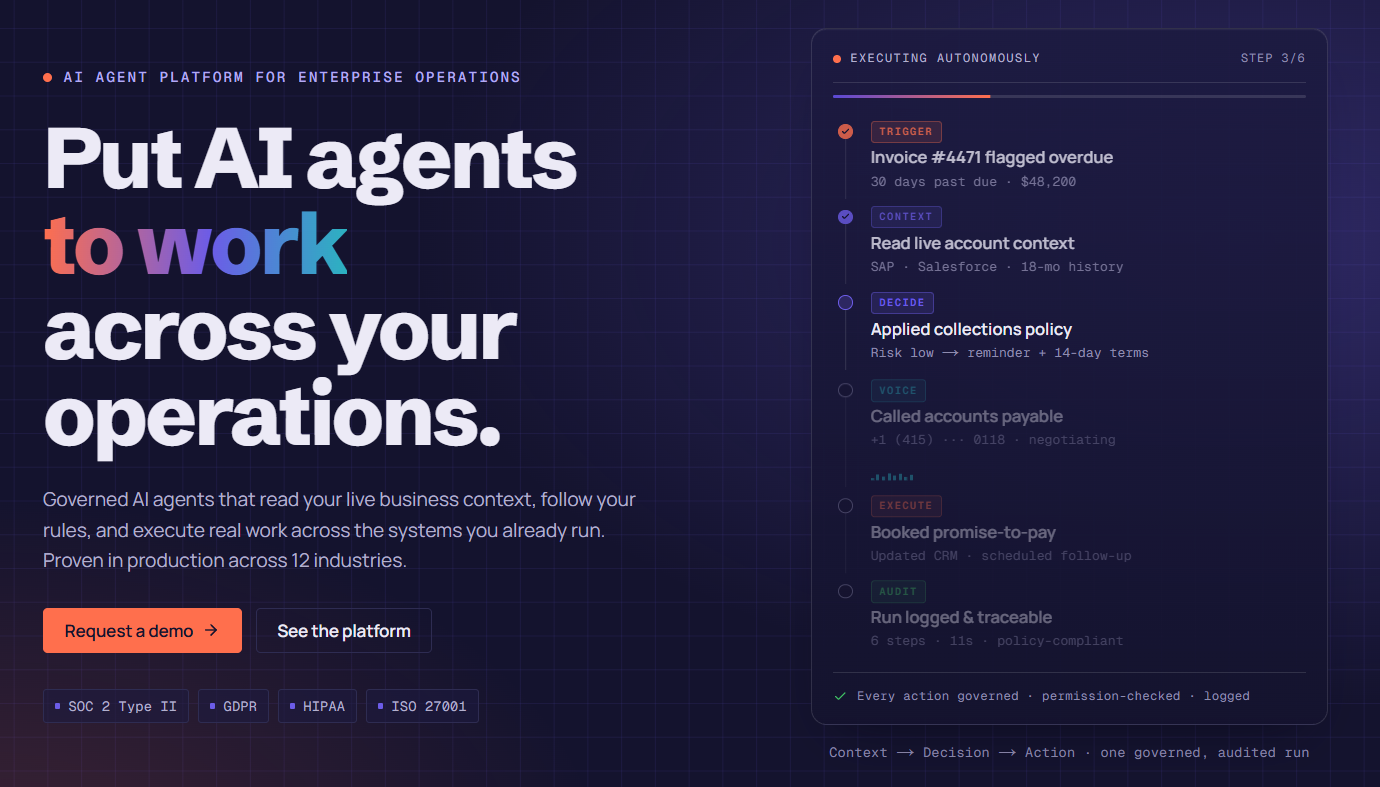
Most of the use cases above split into two jobs: agents that help you write software (Layer A), and agents you build and ship into production (Layer B). For Layer A, your team will reach for IDE tools — and should. Assistents.ai (built by Ampcome) is the governed platform for Layer B: building and deploying the production agents you ship into your product and operations.
The reason that matters is trust. An agent that summarizes a PR can afford to be occasionally wrong; an agent that answers a leadership question with a number, or updates a customer record, or creates an order, cannot. Assistents is built around that distinction:
- No hallucinated numbers. BI and analytics answers run text-to-SQL over a semantic layer defined with your metric definitions — so an agent reports figures it can actually derive from your data, not ones it invented.
- Governed action, not blind action. Writes follow a maker-checker model: the agent proposes, a human confirms, and the server re-checks before anything commits. This is human-in-the-loop by design, mapped to the Ask → Execute → Autonomous ladder.
- Data stays scoped. Row-level security (RLS) and attribute-based access control (ABAC) keep every agent inside the data each user is allowed to see, with an immutable audit trail over what was asked and done.
- Model-agnostic and BYOK. Route to the right LLM for the job (OpenAI, Anthropic, Google, and others) through a single gateway, with bring-your-own-key per organization — no lock-in.
- Built to orchestrate and integrate. Multi-agent orchestration, a Context Engine over structured and unstructured data, and support for MCP and A2A patterns, with warehouse connectors including Postgres, MSSQL, BigQuery, ClickHouse, Athena, and DuckDB.
The short version: Assistents is where you take a promising agent idea and make it safe to run every day.
AI agents in production: governance, risk, and how to deploy safely
Here's the part the demos skip. Autonomous agents look spectacular in a controlled demo and frequently struggle in production, because real environments are hostile to unchecked autonomy: permissions are inherited and hard to observe, APIs change without warning, data is messy, and business rules conflict across systems. The two concerns engineering leaders raise most often about adopting agents are accuracy and data privacy — and both are governance problems, not model problems. (Cite a current developer survey here for the exact figures.)
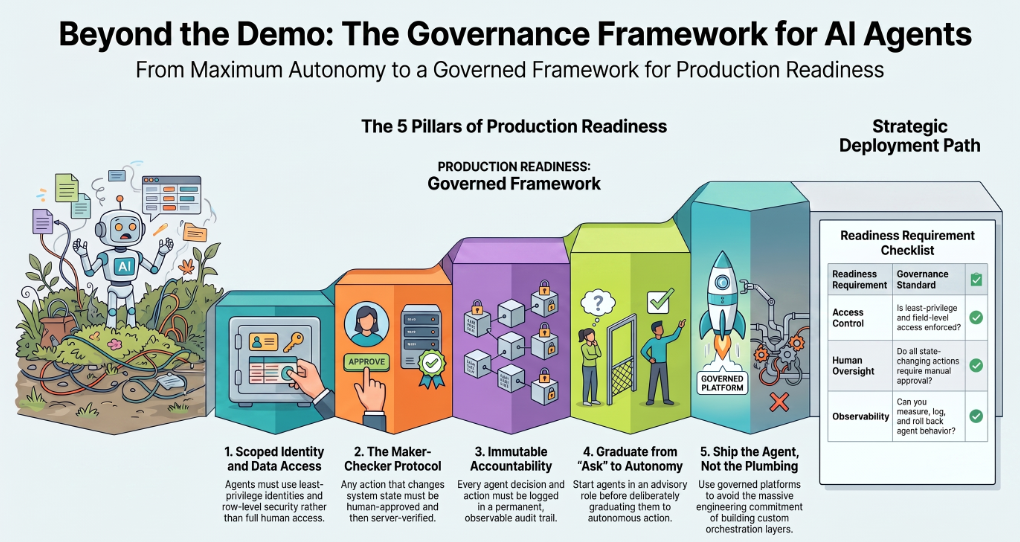
That's why the successful pattern isn't "maximum autonomy." It's iterative rollout with instrumentation, governance, and outcome tracking. Practically, every production agent needs five things:
- Identity and permissions. The agent operates as a scoped identity, not with a human's full access.
- Data scoping (RLS/ABAC). It sees only the rows and fields it's entitled to.
- Maker-checker on writes. Any action that changes state is proposed, then human-approved, then server-verified.
- A full audit trail. Every request, decision, and action is logged immutably.
- Observability. You can watch what agents do, catch drift, and roll back.
Build vs. buy
You can wire this yourself with a framework — and for pure Layer-A coding workflows, IDE tools already handle it. But for Layer-B agents that act on enterprise data and systems, rebuilding governance, RLS, audit, and orchestration from scratch is a large, ongoing engineering commitment. A governed platform exists so you ship the agent, not the plumbing.
A quick governance checklist for AI agents in the SDLC
- Does each agent run with least-privilege access?
- Is row- and field-level data access enforced, not assumed?
- Do all state-changing actions require human approval before they commit?
- Is there an immutable audit trail for every action?
- Can you observe, measure, and roll back agent behaviour?
- Did you start the use case at Ask and graduate it deliberately?
If you can't answer yes to those, the agent isn't ready for autonomy yet — and that's fine. Start at Ask.
Why teams choose Assistents to run agents in production
The use cases in this guide aren't hypothetical. Teams across very different industries and geographies have put governed agents into production on Assistents — here's a cross-section, described by industry, region, and scale rather than name:
- A global fintech serving banks and credit unions shipped omnichannel AI support agents with auditable workflow automation and SLA monitoring — faster case handling with the compliance trail regulators expect.
- A pan-India value retailer with 700+ stores rolled out voice, inventory-intelligence, and knowledge agents (RAG over POS and SOP documents) behind an admin console with analytics and ticketing — built for high concurrency across a national footprint.
- A UAE engineering and technology group (30+ operating companies) moved off a legacy document/ECR system to agentic SAP sales-order automation governed by rules, exceptions, and audit logs.
- An Australian remedial-building specialist deployed a multi-agent document workbench with deep full-CRUD system integration, quote locking, and audit logs.
- A city-scale smart-infrastructure operator (2M+ connected assets) runs agentic analytics and automated operational alerting on smart-utility systems.
- A long-term investment holding company uses agent-assisted technical due diligence — architecture, scalability, and security review — to de-risk acquisitions.
The through-line: none of these are "autocomplete." They're agents that read real data, decide, and act — under governance the whole way. That's the job Assistents is built for. Start in Ask, graduate to Execute, reach Autonomous — with RLS, maker-checker, and an audit trail at every rung.
Can AI agents replace software developers?
No — not now, and not on the current trajectory. AI agents are excellent at bounded, repetitive, well-specified work: boilerplate, tests, documentation, migrations, triage. They are not a substitute for architecture, product judgment, cross-system problem-solving, or the accountability a human owns when something goes wrong.
What's actually happening is augmentation: agents absorb the repetitive implementation work while developers move up the stack toward design, orchestration, and verification. The role shifts from writing every line to directing, reviewing, and approving what agents produce.
How to get started with AI agents in software development
You don't adopt "AI agents" — you adopt one use case and earn the next.
- Pick one bounded, high-repetition task with a clear success signal — test generation, PR summarization, incident triage, or a governed data-analysis agent.
- Add governance from day one. Least-privilege identity, data scoping, human approval on writes, and an audit trail — not as a later phase.
- Start at Ask. Let the agent recommend before it acts. Measure accuracy and time saved.
- Graduate deliberately to Execute, then Autonomous, only where the evidence supports it.
- Expand along the SDLC once the pattern is proven.
If the use case is Layer B — an agent that acts on your data and systems — Assistents gives you the governed foundation to skip the plumbing and ship the agent. (Talk to us about a scoped pilot.)
Conclusion
The 20+ use cases here show how far AI agents in software development now reach — across planning, coding, testing, review, deployment, operations, and the agentic features you ship to customers. But breadth isn't the real story.
The teams getting durable value aren't the ones with the most autonomous demo; they're the ones who paired each use case with governance and climbed the Ask → Execute → Autonomous ladder deliberately. Speed is easy to demo and hard to trust.
Governed speed is the thing that ships. Start with one bounded use case, keep a human in the loop where it counts, and expand from proof — and when you're building agents that act on your own data and systems, build them on a foundation that treats governance as the default, not the afterthought.
FAQ
What are AI agents in software development?
AI agents in software development are goal-driven systems, built on large language models, that observe context (code, tickets, data), plan a set of steps, act through tools, and evaluate results — completing multi-step tasks with minimal prompting at each step, rather than answering single requests like a chatbot.
What is the difference between an AI agent and an AI coding assistant?
An AI coding assistant is reactive: it responds to your prompt and hands control back, like intelligent autocomplete. An AI agent is proactive: you give it a goal and it plans, executes across multiple files and tools, and reports back for approval. Assistants speed up individual coding; agents own multi-step workflows.
What are examples of AI agents in software development?
Common examples include agents for code generation, automated code review and PR summaries, test-case generation, API testing, CI/CD automation, security scanning, incident triage, auto-documentation, legacy migration, and building agentic features (support, voice, analytics) into products under governance.
How do AI agents work in the SDLC?
They run an observe → reason → act → evaluate loop: they read context, decompose the goal into steps, call tools to execute, check the result, and iterate. Advanced setups use multi-agent orchestration, where specialist agents (coder, tester, reviewer, deployer) collaborate through agent-to-agent patterns.
What is agentic AI in software development?
Agentic AI refers to systems that pursue goals autonomously — decomposing tasks, using tools, maintaining memory, and acting with minimal human intervention — as opposed to first-generation generative AI that only responds to prompts. In the SDLC it enables governed, multi-step delivery rather than isolated suggestions.
What are the risks of AI agents in software development?
The main risks are inaccurate outputs, ungoverned actions on real systems, and data-privacy exposure. Enterprise environments also bring messy data, changing APIs, and inherited permissions. These are governance problems, mitigated with least-privilege identity, row-level security, human-in-the-loop approvals, and audit trails.
How do enterprises govern AI agents in production?
By enforcing five controls: scoped agent identities, row- and field-level data access (RLS/ABAC), maker-checker approval on any state-changing action, an immutable audit trail, and observability with rollback. Governed platforms like Assistents.ai build these in so teams ship the agent, not the plumbing.
Can AI agents replace software developers?
No. Agents handle bounded, repetitive work — tests, docs, migrations, triage — but not architecture, product judgment, or accountability. The realistic outcome is augmentation: developers shift toward design, orchestration, and verification while agents absorb routine implementation.