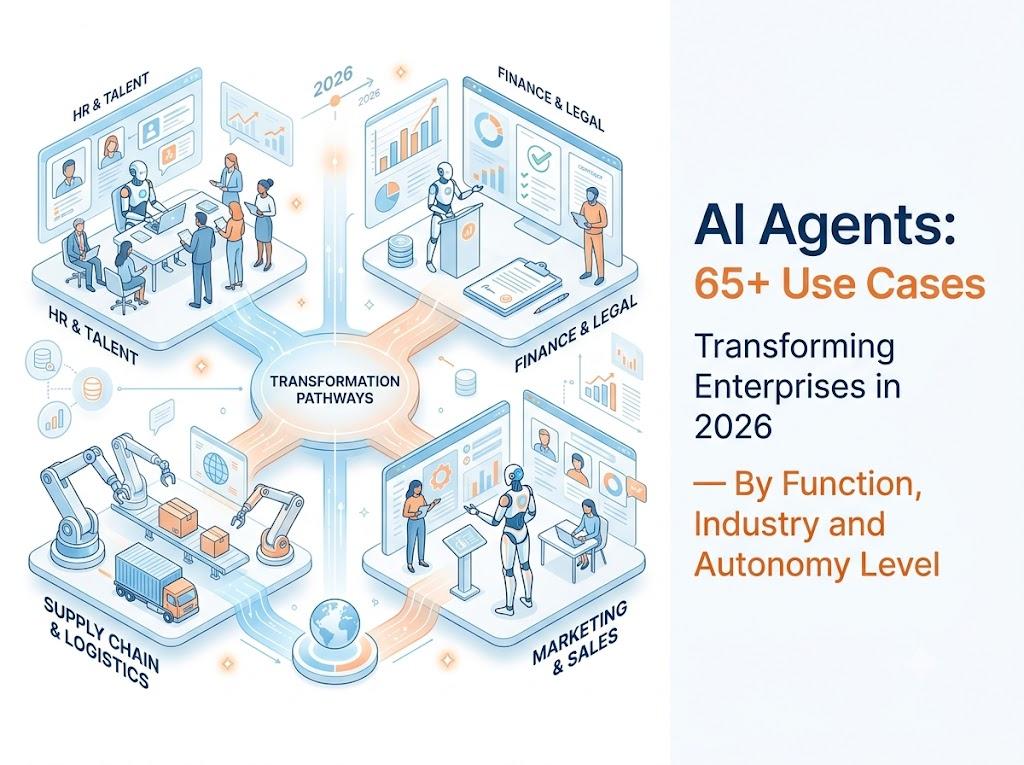
Enterprise AI agents are autonomous software workers that perceive business events, reason across multi-step workflows, and take governed actions inside the systems a company already runs. The 65+ AI agent use cases below span eight business functions and eight industries. Each one is graded by the level of autonomy it can safely run at, the human checkpoint it still needs, and the metric that proves it worked.
Every list tells you what AI agents can do. This one tells you what you can safely let them do.
That distinction matters more than the length of the list. Gartner has projected that fewer than 5% of enterprise applications featured AI agents in 2025, and that the figure will reach roughly 40% by the end of 2026. McKinsey research has found 62% of organisations at least experimenting with agents, but only around 23% reporting full-scale deployment. The gap between experimentation and deployment is not a model-quality problem. It is a governance, context and action problem — and it shows up use case by use case.
So this guide is organised differently from the others. You get the complete menu, then the selection criteria, then the list of things you should not automate yet.
What counts as an AI agent use case (and what doesn't)
A genuine AI agent use case is a recurring, multi-step piece of work that an agent can carry from trigger to outcome across real systems, with a human owning the decisions that matter. It is not a question answered in a chat window.
The four-part test
Before anything goes on your roadmap, it should pass all four:
- A defined trigger. Something creates the work — an invoice crossing an ageing threshold, a tender arriving by email, a KPI breaching a limit, a customer calling. If nothing creates the work automatically, you have a tool, not an agent.
- A bounded action space. You can write down every action the agent is permitted to take, and every action it is not.
- A named human checkpoint. There is a specific person or role who owns the decisions the agent is not allowed to make alone.
- A verifiable success signal. You can tell, after the fact and without arguing, whether the work was done correctly.
Use cases that fail this test are the ones that stall in pilot. Open-ended autonomy over ambiguous work with no ground truth and no rollback path is where most agent programmes go to die.
Agent vs copilot vs chatbot vs RPA
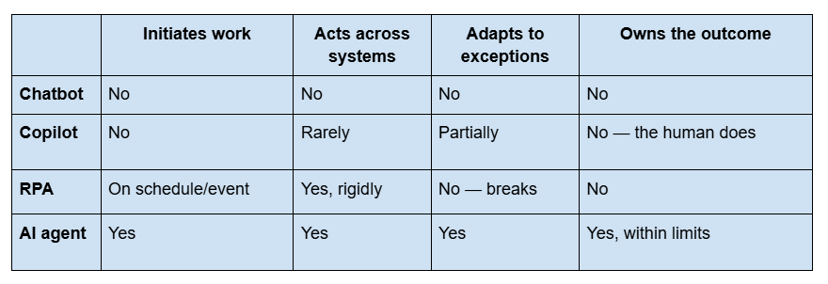
RPA is still the right answer when inputs are structured, rules are stable and exceptions are rare. Agents earn their place when work depends on documents, ambiguous language, changing context or cross-functional reasoning — the work that was never economically automatable as rigid process logic.
"Agentic" is not a synonym for "autonomous"
This is the most expensive misunderstanding in enterprise AI right now. Agentic describes an architecture: the software can plan, select tools, and revise its approach. Autonomous describes a permission: how much the software is allowed to do without asking. A system can be fully agentic and operate at almost zero autonomy — preparing work for a human every time. Most successful enterprise deployments start exactly there.
How to read this list: the autonomy ladder
Autonomy is not a switch you flip. It is a level you earn, per use case, per scope, per value band.
Use this six-level ladder to place any use case in this guide against your own risk appetite:
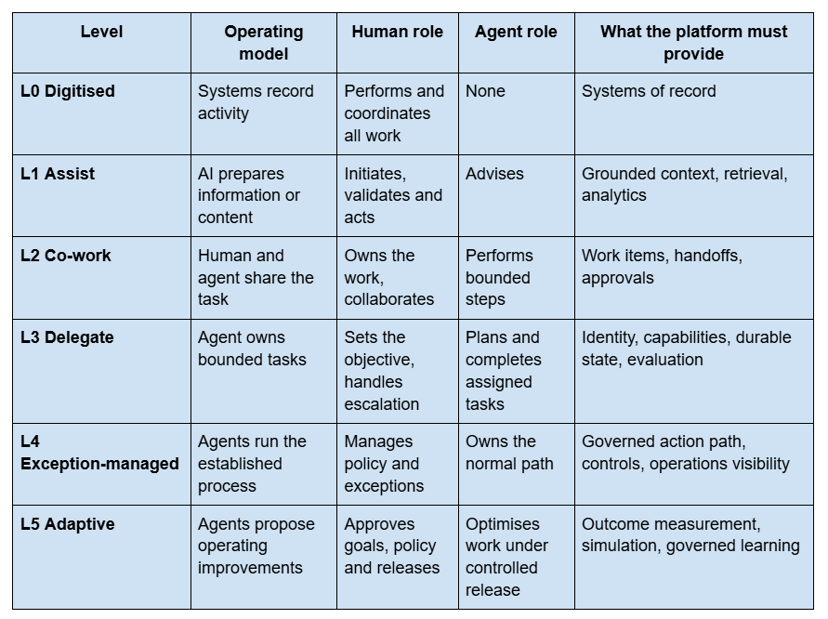
Two rules that follow from this:
Autonomy is a contract, not a setting. Real authority is the intersection of seven things: the work type, the business scope, the capability being invoked, the object being affected, the value limit, the time window and the risk class. "This agent may send standard payment reminders to SME accounts with balances under a defined threshold, no more than three contacts per customer per week, escalating on any dispute or legal language, valid until year end" is an autonomy contract. autonomous = true is not.
Commercialise at Levels 2 to 4; design for Level 5. Almost all the value available to enterprises in 2026 sits between co-work and exception-managed operations. Nobody needs to accept broad autonomy to get a return.
Throughout this guide, each use case carries the level at which it is realistically deployable today in a governed environment.
3. 50 AI agent use cases by business function
3.1 Customer service and experience (7 use cases)
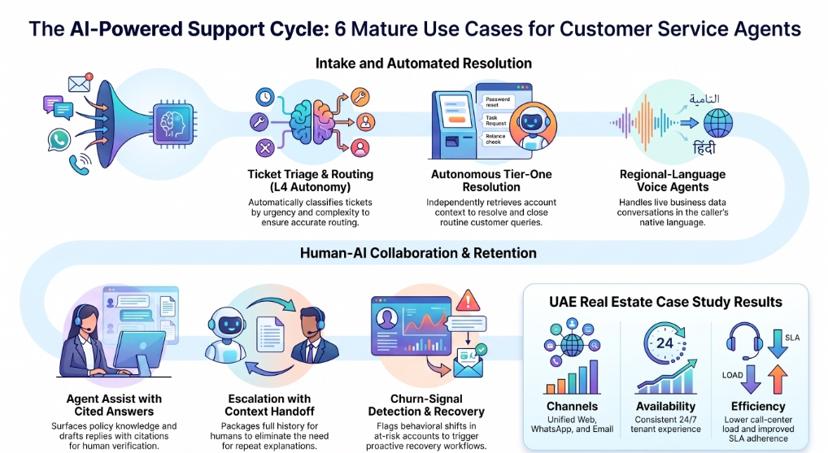
Support is the most mature agent domain because volume is high, patterns repeat, and success is measurable within weeks.
1. Ticket triage and routing. Trigger: inbound ticket. Does: classifies by type, urgency and complexity, then routes. Autonomy: L4. Checkpoint: misroute audit. Metric: first-contact resolution, routing accuracy.
2. Autonomous tier-one resolution. Trigger: routine query. Does: retrieves account context, resolves and closes. Autonomy: L3–L4. Checkpoint: escalation thresholds. Metric: autonomous resolution rate.
3. Omnichannel intake. Trigger: chat, email, web form or call. Does: unifies the request into one case regardless of channel. Autonomy: L3. Checkpoint: identity verification. Metric: channel-switch rework.
4. Regional-language voice agents. Trigger: inbound or outbound call. Does: handles the conversation in the caller's language against live business data. Autonomy: L2–L3. Checkpoint: commitments made on the call. Metric: containment rate, call handling time.
5. Agent assist with cited answers. Trigger: human agent working a case. Does: surfaces policy and knowledge with citations, drafts the reply. Autonomy: L1. Checkpoint: every send. Metric: handle time, quality score.
6. Escalation with context handoff. Trigger: confidence or sentiment threshold. Does: packages the full history and hands to a named human. Autonomy: L4. Checkpoint: the human receiving it. Metric: repeat-explanation rate.
7. Churn-signal detection and recovery. Trigger: behavioural pattern shift. Does: flags at-risk accounts, triggers a recovery workflow. Autonomy: L2. Checkpoint: any offer or concession. Metric: retained accounts.
In production: a UAE real estate portfolio owner deployed an omnichannel tenant service agent across web, WhatsApp and email, with ticketing and escalation to human teams. Outcome: faster response times, lower call-centre load, and a consistent 24×7 tenant experience with improved SLA adherence.
Deeper: see our guide to agentic AI use cases in customer service.
3.2 Finance, accounting and receivables (8 use cases)
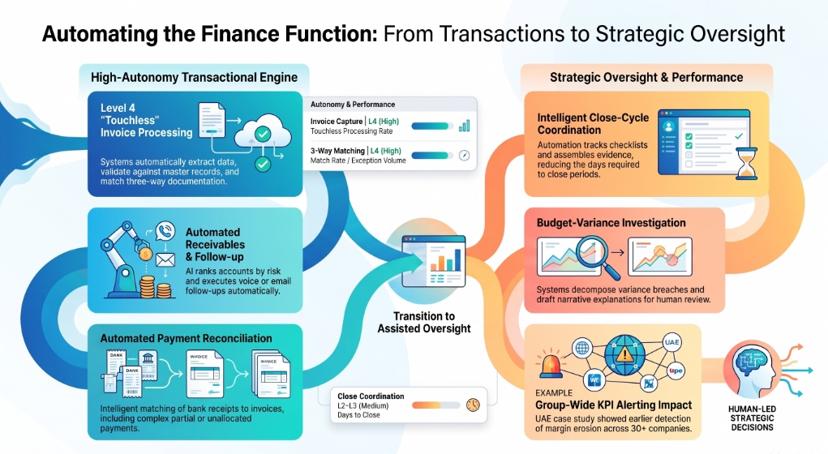
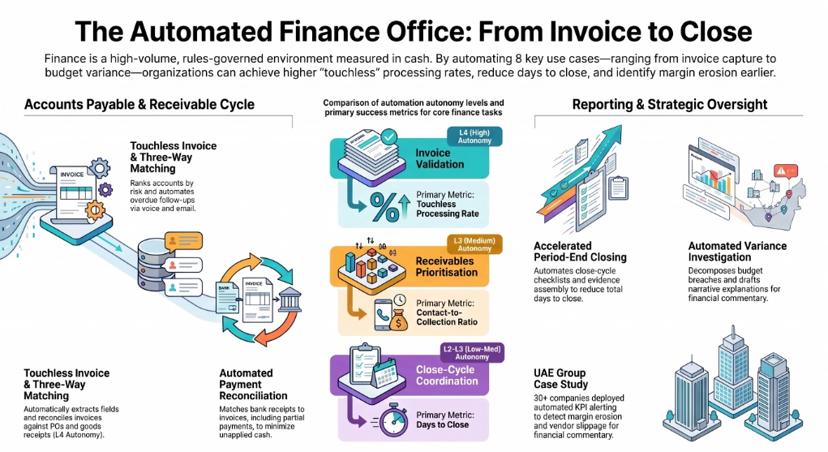
Finance is the highest-density cluster in this guide: rules-governed, high-volume, and measured in cash.
8. Invoice capture and validation. Trigger: invoice arrives. Does: extracts fields, validates against master data, flags discrepancies. Autonomy: L4. Checkpoint: low-confidence extractions. Metric: touchless processing rate.
9. Three-way matching. Trigger: invoice, PO and goods receipt present. Does: reconciles all three, routes mismatches. Autonomy: L4. Checkpoint: value-threshold exceptions. Metric: match rate, exception volume.
10. Receivables prioritisation. Trigger: daily ageing refresh. Does: ranks accounts by balance, risk and collectability. Autonomy: L3. Checkpoint: strategic accounts. Metric: contact-to-collection ratio.
11. Overdue follow-up by voice and email. Trigger: invoice crosses an ageing band. Does: contacts the customer with approved messaging, logs the outcome. Autonomy: L4 within value and frequency limits. Checkpoint: disputes, negative sentiment, legal language. Metric: cash collected, DSO.
12. Promise-to-pay monitoring. Trigger: a customer commits to a date. Does: tracks the commitment, reconciles the receipt, reopens follow-up on breach. Autonomy: L4. Checkpoint: repeat breaches. Metric: promise-kept rate.
13. Payment-receipt reconciliation. Trigger: bank or gateway settlement. Does: matches receipts to invoices, including partial and unallocated payments. Autonomy: L4. Checkpoint: unmatched residuals. Metric: unapplied cash.
14. Close-cycle coordination. Trigger: period end. Does: tracks the close checklist, chases owners, assembles evidence. Autonomy: L2–L3. Checkpoint: all journal postings. Metric: days to close.
15. Budget-variance investigation. Trigger: variance breaches a threshold. Does: decomposes the variance, assembles the explanation, drafts the commentary. Autonomy: L1–L2. Checkpoint: the reported narrative. Metric: time to explanation.
In production: a UAE family business group spanning 30+ companies deployed automated procurement and finance KPI alerting — purchase-price trend, gross-margin impact, early-payment analysis and vendor delivery performance — across group entities. Outcome: earlier detection of margin erosion and vendor slippage, and standardised finance intelligence across entities.
3.3 Procurement and supply chain (7 use cases)
16. Purchase-request intake and policy check. Trigger: a request is raised. Does: validates against budget, category policy and approved suppliers. Autonomy: L4. Checkpoint: policy exceptions. Metric: requisition cycle time.
17. Supplier discovery and validation. Trigger: a sourcing need with no incumbent. Does: identifies and screens candidate suppliers. Autonomy: L1–L2. Checkpoint: supplier onboarding. Metric: time to shortlist.
18. RFQ generation and follow-up. Trigger: approved sourcing event. Does: prepares the RFQ, distributes it, chases non-responders. Autonomy: L3. Checkpoint: the RFQ content. Metric: response rate, cycle time.
19. Quotation extraction and comparison. Trigger: quotes received. Does: extracts line items from mixed formats, normalises and compares. Autonomy: L3. Checkpoint: award recommendation. Metric: evaluation turnaround.
20. PO creation with maker-checker. Trigger: approved award. Does: creates the purchase order in the ERP. Autonomy: L3 with mandatory checker. Checkpoint: every ERP write. Metric: data-entry error rate.
21. Delivery and fill-rate exception handling. Trigger: delivery deviates from schedule. Does: investigates, contacts the supplier, escalates. Autonomy: L4. Checkpoint: contractual remedies. Metric: on-time in-full.
22. Supplier-risk monitoring. Trigger: continuous. Does: watches financial, compliance and delivery signals, raises situations. Autonomy: L2. Checkpoint: supplier status changes. Metric: disruptions anticipated.
In production: a pharma sourcing and excipients platform automated RFQ workflows and supplier matching across a very large SKU catalogue. Outcome: faster procurement cycles, reduced manual vendor follow-up, and better price and lead-time visibility.
Deeper: see our guide to agentic AI use cases in procurement.
3.4 Sales and revenue operations (6 use cases)
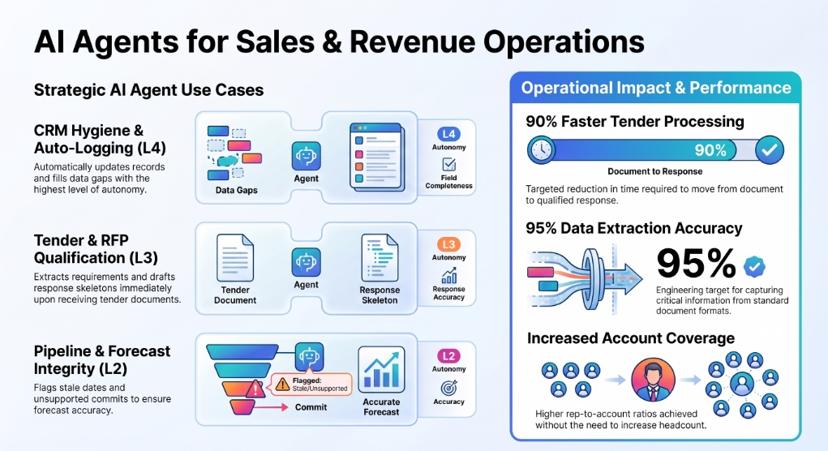
23. Multi-signal lead scoring. Trigger: any prospect engagement. Does: aggregates behaviour across channels and re-scores. Autonomy: L3. Checkpoint: routing rules. Metric: conversion by score band.
24. Always-on account monitoring. Trigger: continuous. Does: watches accounts for opportunity, risk and renewal signals; proposes next-best actions. Autonomy: L2–L3. Checkpoint: customer-facing outreach. Metric: accounts covered per rep.
25. Tender and RFP qualification. Trigger: tender document received. Does: retrieves, classifies, extracts requirements, determines workflow, drafts the response skeleton. Autonomy: L3. Checkpoint: bid/no-bid and pricing. Metric: document-to-qualified-response time.
26. CRM hygiene and auto-logging. Trigger: any interaction. Does: updates records, logs activity, fills gaps. Autonomy: L4. Checkpoint: stage changes. Metric: field completeness.
27. Pipeline and forecast integrity. Trigger: forecast cycle. Does: flags stale dates, single-threaded deals and unsupported commits. Autonomy: L2. Checkpoint: the submitted forecast. Metric: forecast accuracy.
28. Proposal and collateral assembly. Trigger: qualified opportunity. Does: assembles tailored material from approved content. Autonomy: L2. Checkpoint: anything sent externally. Metric: time to proposal.
In production: a UAE engineering and technology solutions provider deployed an agentic sales agent for always-on account monitoring, rule-governed opportunity identification and follow-up orchestration. Outcome: higher account coverage without increasing headcount, and faster response cycles on opportunities and renewals. Separately, an Australian remedial building specialist deployed a multi-agent tender document workbench with vision-LLM extraction, deep project-system integration and full audit logs — engineered for up to roughly 90% faster tender document processing, with a ~95% extraction accuracy target for standard formats. (Both figures are engineered design targets, not guaranteed outcomes.)
Deeper: see our 12 best AI agent use cases for sales teams.
3.5 Data, analytics and decision support (6 use cases)
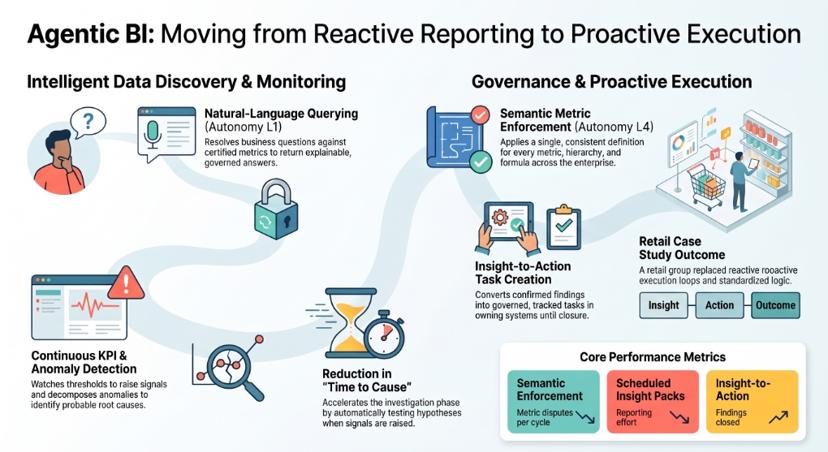
29. Natural-language querying over governed data. Trigger: a business question. Does: resolves it against certified metrics and returns an explainable answer. Autonomy: L1. Checkpoint: metric definitions. Metric: analyst queue depth.
30. Semantic metric enforcement. Trigger: any analytical request. Does: applies one consistent definition of every metric, hierarchy and formula. Autonomy: L4. Checkpoint: definition changes. Metric: metric disputes per cycle.
31. Continuous KPI monitoring. Trigger: continuous. Does: watches metrics against thresholds and forecasts, raises signals with evidence. Autonomy: L4. Checkpoint: alert policy. Metric: detection lead time.
32. Anomaly detection and root-cause investigation. Trigger: signal raised. Does: decomposes the anomaly, tests hypotheses, reports the probable driver. Autonomy: L2. Checkpoint: the diagnosis. Metric: time to cause.
33. Scheduled insight packs. Trigger: cadence. Does: assembles the leadership pack with variance explanations. Autonomy: L3. Checkpoint: commentary. Metric: reporting effort.
34. Insight-to-action task creation. Trigger: a confirmed finding. Does: creates a governed, tracked task in the owning system and follows it to closure. Autonomy: L3–L4. Checkpoint: action policy. Metric: findings closed.
In production: a privately-held retail holding group deployed a unified context engine over structured and unstructured data, a semantic governance layer for rules, hierarchies and formulas, and insight-to-action agents layered on existing dashboards. Outcome: a shift from reactive reporting to proactive execution loops, with standardised decision logic and automated task tracking.
Deeper: see our guide to agentic BI for data analysis.
3.6 Document and contract operations (6 use cases)
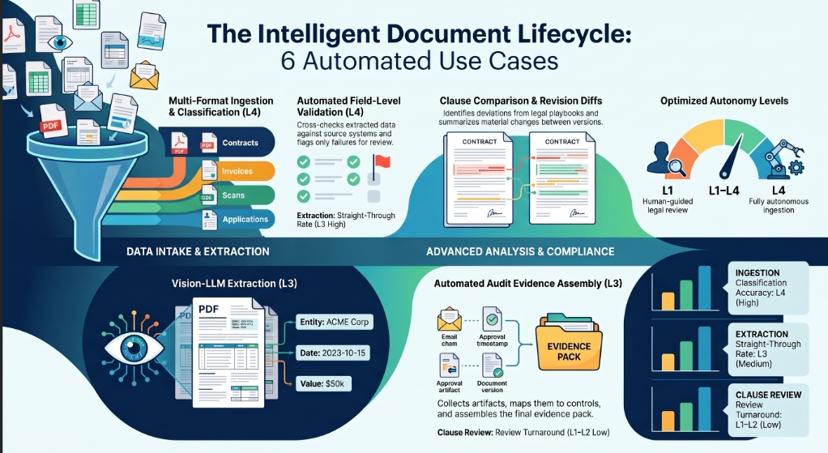
35. Multi-format ingestion and classification. Trigger: document arrives by any channel. Does: identifies type and routes to the right workflow. Autonomy: L4. Checkpoint: unknown types. Metric: classification accuracy.
36. Vision-LLM extraction from complex PDFs. Trigger: classified document. Does: extracts structured data from tables, scans and mixed layouts. Autonomy: L3. Checkpoint: confidence-banded review queue. Metric: straight-through rate.
37. Field-level validation with review queue. Trigger: extraction complete. Does: cross-checks against source systems, queues only what fails. Autonomy: L4. Checkpoint: the queue. Metric: correction rate.
38. Clause comparison against a playbook. Trigger: contract received. Does: compares against approved positions, flags deviations by severity. Autonomy: L1–L2. Checkpoint: every legal position. Metric: review turnaround.
39. Revision and change detection. Trigger: a new version arrives. Does: diffs against the prior version and summarises what moved. Autonomy: L4. Checkpoint: material changes. Metric: missed-change incidents.
40. Audit evidence assembly. Trigger: audit or control test. Does: collects artefacts, maps them to controls, assembles the pack. Autonomy: L3. Checkpoint: sign-off. Metric: evidence preparation time.
3.7 HR and employee operations (5 use cases)
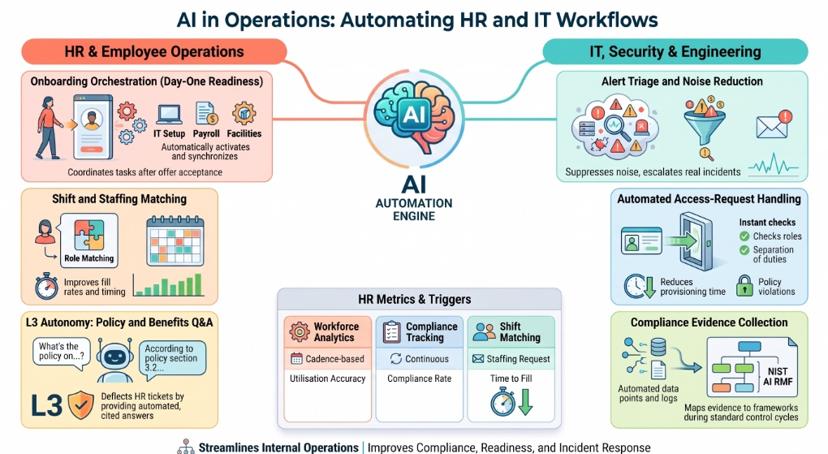
41. Policy and benefits Q&A. Trigger: employee question. Does: answers from current internal policy with citations. Autonomy: L3. Checkpoint: entitlement decisions. Metric: HR ticket deflection.
42. Onboarding orchestration. Trigger: offer accepted. Does: coordinates IT provisioning, payroll, training and facilities, chasing each owner. Autonomy: L4. Checkpoint: access grants. Metric: day-one readiness.
43. Credential and compliance tracking. Trigger: continuous. Does: monitors expiry, requests renewals, blocks non-compliant assignment. Autonomy: L4. Checkpoint: exceptions. Metric: compliance rate.
44. Shift and staffing matching. Trigger: a staffing request. Does: matches availability, skills and credentials, notifies candidates. Autonomy: L3. Checkpoint: final assignment. Metric: fill rate, time to fill.
45. Workforce and utilisation analytics. Trigger: cadence. Does: reports utilisation, capacity and variance drivers. Autonomy: L1. Checkpoint: people decisions. Metric: utilisation accuracy.
In production: a US healthcare staffing platform deployed talent onboarding and credential capture, facility staffing-request intake with matching logic, and scheduling, notification and compliance workflows. Outcome: faster fill cycles, lower scheduling friction, and better workforce utilisation.
3.8 IT, security and engineering operations (5 use cases)
46. Alert triage and noise reduction. Trigger: monitoring alert. Does: correlates, deduplicates, suppresses noise, escalates real incidents. Autonomy: L4. Checkpoint: suppression rules. Metric: alert-to-incident ratio.
47. Incident context assembly. Trigger: incident declared. Does: gathers logs, recent changes, affected services and prior similar incidents. Autonomy: L4. Checkpoint: remediation. Metric: time to first meaningful action.
48. Access-request handling. Trigger: access request. Does: checks role, policy and separation of duties, routes for approval. Autonomy: L3. Checkpoint: every grant. Metric: provisioning time, policy violations.
49. Compliance evidence collection. Trigger: control cycle. Does: collects and maps evidence to a control framework such as the NIST AI Risk Management Framework. Autonomy: L3. Checkpoint: attestation. Metric: control coverage.
50. Pipeline and data-quality monitoring. Trigger: continuous. Does: watches freshness, schema drift and volume anomalies; opens and tracks remediation. Autonomy: L4. Checkpoint: schema changes. Metric: data incidents reaching consumers.
4. 18 AI agent use cases by industry
Function tells you what the agent does. Industry tells you what it has to survive: regulation, data sensitivity, and the cost of being wrong.
Retail and e-commerce (3)
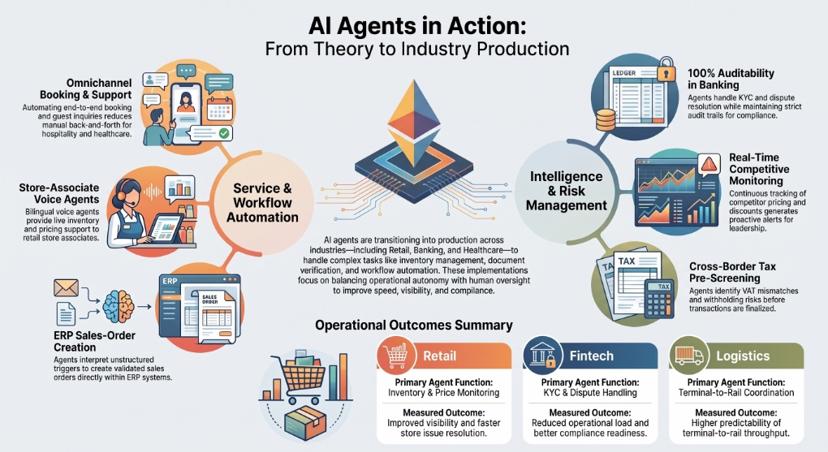
51. Store-associate voice support with live inventory — a voice agent answering store-specific pricing, stock and promotion questions in the local language. L3. 52. Competitive price and promotion monitoring — continuous tracking of pricing, MRP, discounts, offers, availability and ratings across channels, converted into leadership-ready answers and proactive alerts. L4. 53. Projected-stockout and transfer cases — detect the shortfall, investigate the cause, generate transfer or expedite options, execute within policy, verify shelf availability. L2 → L4 as evidence accumulates.
In production: an Indian value retailer with 700+ stores deployed a bilingual voice support agent, an inventory intelligence agent for per-store pricing, stock and promotions, and a knowledge agent over POS and SOP documentation. Outcome: reduced manual helpdesk burden, faster store issue resolution, improved store-level inventory visibility and faster onboarding. Separately, a major Indian HVAC manufacturer deployed continuous competitive monitoring with agentic Q&A mapped to leadership questions — replacing manual portal checks and shortening competitive response cycles.
Banking, fintech and insurance (3)
54. Dispute and chargeback handling — assemble evidence, classify, prepare the resolution, execute within authority. L3. 55. Onboarding and KYC document verification — identity and document validation, screening, risk scoring, with full evidence chains. L3. 56. Lending document assessment and underwriting preparation — validate documents, reconcile bureau and banking evidence, apply policy deterministically, prepare the credit memo and explain deviations. L2. Humans retain the credit decision.
In production: a global fintech serving banks and credit unions deployed omnichannel intake with workflow routing, agent-assist summarisation and next-best actions, with auditability and SLA monitoring. Outcome: faster case handling, reduced operational load, and better compliance readiness through audit trails.
Deeper: see our 25+ AI agent use cases in banking.
Logistics, ports and transport (2)
57. Terminal-to-inland coordination — digitise terminal workflows, provide rail scheduling and visibility, manage exceptions. L3. 58. Multi-entity operational consolidation — standardise KPIs across geographies and entities into one operational view with variance explanations. L1–L2.
In production: a global ports and logistics operator deployed a terminal and rail management solution with yard and rail operational dashboards and exception management. Outcome: improved operational visibility and higher predictability of terminal-to-rail throughput.
Manufacturing, energy and utilities (3)
59. Campus and plant energy optimisation — ingest utility and sensor data, detect anomalies, forecast, recommend and alert. L2. 60. Grid and asset anomaly detection — monitor transmission KPIs, detect losses and outages, route alerts to field operations. L3. 61. ERP sales-order creation from unstructured triggers — interpret the order trigger, validate it, create the sales order with governed exceptions and reconciliation reporting. L3 with maker-checker.
In production: a state power transmission utility deployed transmission KPI monitoring, loss and outage analytics and automated field alerts — improving reliability through proactive monitoring. An astronomy research institute deployed campus energy monitoring, forecasting and optimisation. A UAE premium appliance retailer replaced an end-of-life document-capture system with agentic SAP sales-order creation, reducing manual order processing and improving auditability.
Deeper: see our AI agents in manufacturing use cases and ROI guide.
Healthcare and life sciences (3)
62. Booking-to-reporting workflow automation — orchestrate booking, processing and reporting with status monitoring and customer notification. L3. 63. Revenue-cycle and utilisation analytics — surface leakage drivers, utilisation variance and billing workflow actions. L1. 64. Programme operations analytics — staffing, service delivery and revenue-cycle visibility with exception alerts. L1–L2.
In production: a UK private healthcare and testing provider automated booking-to-reporting workflows with operational analytics. A New England physician-led clinical enterprise deployed revenue and utilisation analytics with variance explanations and action lists. Outcome in both: more scalable operations, fewer missed handoffs, and improved visibility into revenue-leakage drivers.
Real estate and hospitality (2)
65. Omnichannel tenant and customer service — triage, FAQs, rental and payment support, escalation, over a governed knowledge base of policies and tenancy documents. L3. 66. End-to-end booking with human-in-the-loop quality control — email intake, intent classification, data extraction, a conversational loop to capture missing details, real-time availability checks, alternative-date negotiation, hybrid handoff for curated itineraries, automated document generation. L2.
In production: a luxury safari hospitality group operating 16 lodges and camps across East Africa deployed a digital booking agent with human-in-the-loop quality control. Outcome: faster booking turnaround with less back-and-forth, higher accuracy on complex guest requirements, and scalable operations without compromising service standards.
Professional services, legal and tax (2)
67. Cross-border tax risk pre-screening — screen transactions for withholding, VAT mismatch and permanent-establishment exposure, collect evidence, add explainability notes, escalate to specialists. L2. 68. Research automation with citations — automated source collection, summarisation and draft memo generation with traceable references. L1–L2.
In production: a UK cross-border tax technology product deployed transaction screening with risk classification, evidence collection and expert escalation. Outcome: earlier detection of withholding and VAT risk, and fewer late-stage deal disruptions.
Education and public sector (2)
69. Learner and educator competency insight — profiles, competency analysis, guided support and programme analytics at population scale. L1–L2. 70. Institutional infrastructure monitoring — campus-scale monitoring, forecasting and optimisation. L2.
In production: a global teacher community platform serving over a million educators across 131 countries deployed competency insights, a support agent for programme and learning queries, and analytics for programme operators. Outcome: scalable support for educator communities and better visibility into engagement and outcomes.
That is 68 use cases. Now the harder part.
What it takes to run these use cases in production
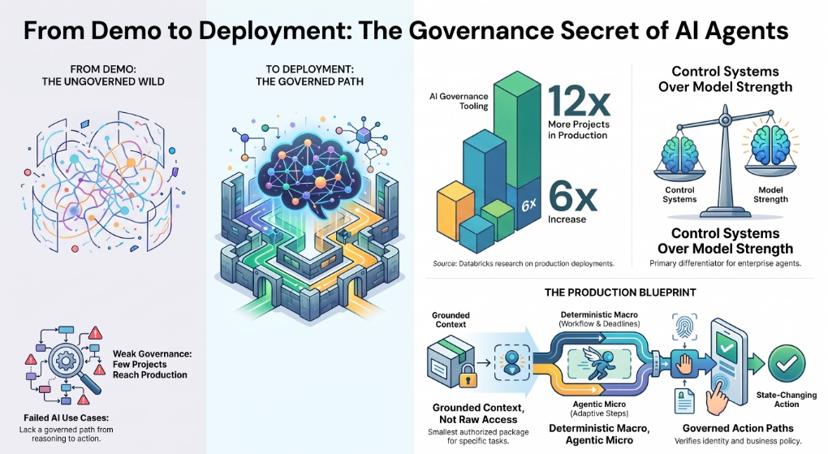
Most of these use cases fail not because the model is weak, but because there is no governed path from reasoning to action.
Databricks' 2026 State of AI Agents research found that organisations using AI governance tooling put over twelve times more AI projects into production, and those using evaluation tooling put nearly six times more into production. That is the entire story of enterprise agents in one statistic: the differentiator is the surrounding control system, not the model.
Five things separate a demo from a deployment:
Grounded context, not raw data access. An agent should receive the smallest authorised context package needed for the work — the relevant objects, certified metrics, documents and policies, with provenance — not broad warehouse access and permission to decide for itself what it should know. Broad access increases cost, leakage risk and reasoning error simultaneously.
Deterministic policy alongside agent reasoning. Eligibility, limits, approval authority and routing belong in an executable, versioned rule engine. Agents should choose when to invoke policy; they should never be the policy. The same applies to accounting calculations, official KPI computation and access control.
A governed action path. Every state-changing action should pass through one controlled path that checks identity, verifies the work purpose, evaluates business policy, enforces approvals and limits, executes idempotently, verifies the external state change and records a receipt. No agent should hold shared ERP credentials or a direct, ungoverned write path.
Human-in-the-loop as a design primitive. Approval, review, takeover, rework and escalation should be first-class actions in the workflow — not something bolted on after an incident.
Auditability by default. Every run, every context package, every tool call, every approval and every action receipt should be reconstructable after the fact. This is what makes autonomy expansion defensible to risk and compliance.
Underneath all five sits one architectural principle: deterministic macro, agentic micro. The workflow runtime owns process state, deadlines, approvals, retries and compensation. The agent chooses adaptive steps only inside a bounded zone — with a defined objective, allowed capabilities, prohibited actions, data scope, cost budget and escalation criteria. It cannot widen its own authority or change the surrounding process.
Where assistents.ai fits. The platform was built around exactly this shape. It provides natural-language analytics and text-to-SQL over governed data, a semantic metric layer with row-level security, agent building and multi-agent coordination, a workflow engine with human tasks and approvals, document ingestion, extraction, validation and review, hybrid retrieval with evidence-backed responses, deterministic rules and decision tables, voice agents connected to live business data, model routing across multiple providers, audit trails and human-in-the-loop controls, low-code application building for work surfaces, and 80+ workflow integrations alongside warehouse and BI connectivity plus generic REST. It deploys in private cloud, customer VPC or on-premise.
Which use case should you start with
Run every candidate through five questions:
- Volume. Does this happen often enough that a percentage improvement is material?
- Verifiability. Can you tell without debate whether the agent got it right?
- Blast radius. What is the worst thing a wrong action does, and can you reverse it?
- Data readiness. Is the source system queryable in real time, and is the document repository actually digitised?
- Ownership. Is there one named person who owns the outcome and the exceptions?
Anything scoring well on all five is a starting candidate. Anything failing question three or five should wait, regardless of how attractive the ROI looks.
Priority matrix
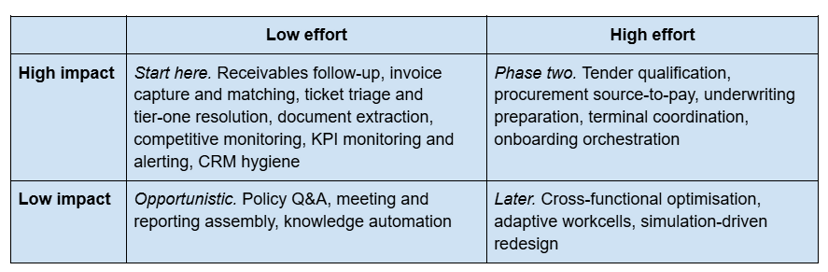
The fastest-payback clusters share three traits: high volume, a clean success signal, and a bounded action space. In practice that means customer service resolution, finance back-office processing, and document-heavy intake — which is why those three dominate credible published deployment evidence.
The 11 use cases you should not automate yet
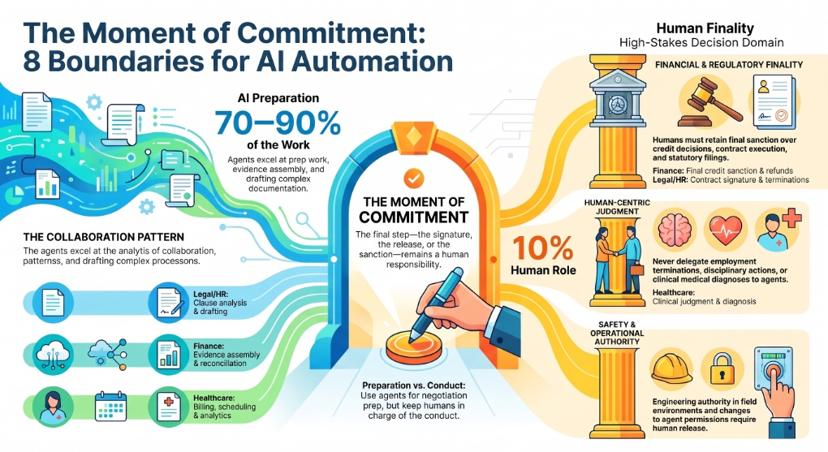
No vendor publishes this list. It is the most useful part of any honest agent roadmap.
- Final credit decisions. Agents can assemble evidence, reconcile documents, apply policy deterministically and draft the memo. A human owns the sanction.
- Credit notes, waivers and refunds above a threshold. Agents may recommend. Release stays human.
- Safety-critical operational calls. In industrial, energy and field environments, engineering authority stays with people. Restrict agents to administrative and logistical work.
- Terminations, disciplinary action and performance outcomes. Never delegate decisions about a person's employment.
- Regulated filings and statutory submissions. Prepare, evidence and reconcile — but a named human signs.
- Contract execution. Clause analysis and redline suggestion are strong agent work. Signature is not.
- Clinical judgement. Agents belong in scheduling, billing, documentation and analytics. Diagnosis and treatment stay clinical.
- Pricing changes above a defined band. Monitoring and recommendation are high-value; unilateral price movement is not.
- Anything with a near-zero error budget and no rollback path. If you cannot compensate a wrong action, do not automate the action.
- Novel, relationship-sensitive negotiation. Preparation yes, conduct no.
- Changes to policy, permissions or the agent's own authority. Agents may propose operating improvements. Production changes require evaluation and a governed release. Self-improvement must never mean self-modification.
The pattern: in every case, the agent still does 70–90% of the work. What stays human is the moment of commitment.
What AI agent deployments actually cost
Budget these as seven separate lines. Any vendor quoting a single blended number is hiding something.
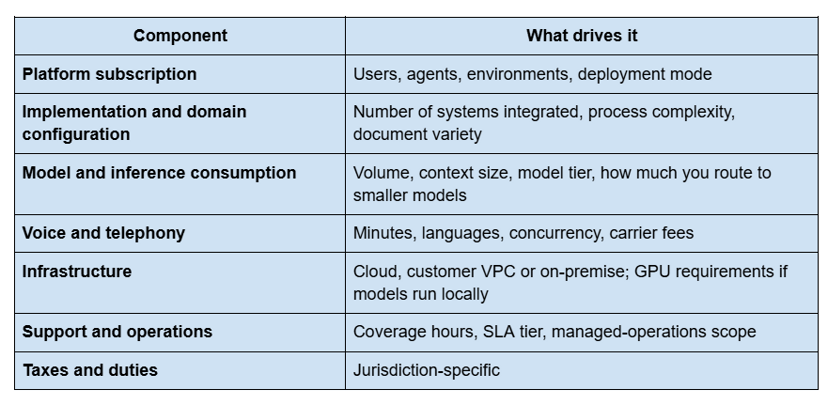
The five variables that move the total most: how many systems the agent must write to, how clean and queryable your data already is, how much regulatory review the use case attracts, how many languages you need, and whether the deployment must run inside your own environment.
One cost lever worth naming: model neutrality. Databricks' 2026 research found 78% of companies now use two or more LLM model families. Routing routine steps to smaller models and reserving frontier models for genuinely hard reasoning is the single largest controllable cost line in most deployments.
Why AI agent pilots fail — five failure modes
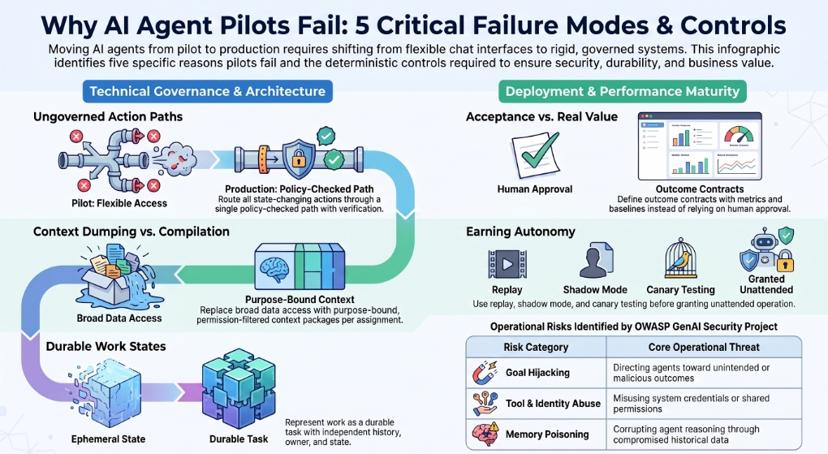
1. Ungoverned action paths. Agents given shared system credentials and a direct write path. One bad tool call becomes a production incident with no receipt trail. Control: route every state-changing action through a single policy-checked path with idempotency and verification.
2. Context dumped rather than compiled. Handing an agent broad data access and hoping it selects wisely. Control: compile a purpose-bound, permission-filtered context package per assignment, with provenance.
3. No durable work state. The process lives inside a chat session or an agent run. When the session ends, the work evaporates — and nothing survives a multi-day wait for a customer reply. Control: represent work as a durable case or task with its own state, owner, deadline and history, independent of any model session.
4. Acceptance mistaken for value. A human clicking "approve" on an agent recommendation is a behavioural signal, not proof of business impact. Control: define an outcome contract before go-live — intended metric, baseline, observation window, guardrail metrics, accountable owner.
5. Autonomy granted before evidence. Jumping to unattended operation without replay, shadow mode or canary. Control: earn each level — offline evaluation, historical replay, shadow operation, recommendation-only, human-approved execution, limited canary, then wider bounded operation.
The OWASP GenAI Security Project's agentic-security work names goal hijacking, tool misuse, identity and privilege abuse, memory poisoning and cascading failures as distinct operational risks. Each of them is a reason to put deterministic controls between reasoning and action.
A 90-day rollout: land, prove, expand
Days 1–30 — Land. Pick one bounded use case from the "start here" quadrant. Connect the minimum systems. Define the autonomy contract in writing before the first agent runs. Ship at Level 1 or 2 — assist or co-work. Instrument everything.
Days 31–60 — Prove. Measure four things, not one: output quality against a human baseline, human rework rate, action success and verification rate, and the business metric in the outcome contract. If rework is high, the problem is context or policy, not the model. Promote to Level 3 only on evidence.
Days 61–90 — Expand. Add the adjacent work around the same operation — more channels, more document types, more exception paths, a second human role. This is where the compounding starts: the context, policies, capabilities and outcome history you built for one use case are reusable for the next five in the same function.
Then repeat, don't restart. The enterprises getting real returns are not running twenty pilots. They are running one governed operation well and widening it.
Why enterprises choose assistents.ai
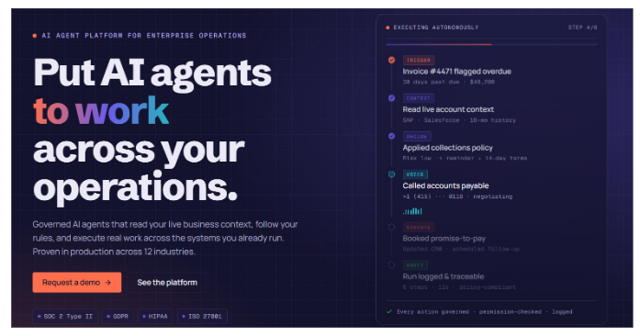
If you are evaluating platforms against this list, five criteria decide whether use cases reach production.
Governance depth. Approval gates, audit trails, role-based access control and row-level security, and human-in-the-loop designed in rather than retrofitted. Deterministic rules and decision tables carry eligibility, limits and authority, so policy is enforced by policy — not inferred by a model.
Grounded answers, not model recall. A semantic metric layer means an agent answers with your definition of margin, utilisation or DSO, with the evidence attached. This is the difference between an assistant that sounds right and one a CFO will sign off on.
Deployment control. Private cloud, customer VPC and on-premise deployment for regulated and data-sensitive environments — which is usually the first screening question for banking, utilities, healthcare and public-sector buyers in India, the Gulf and Europe.
Model independence. Routing across multiple providers, with the option to run models inside your own environment. The durable assets are your context, policies, capabilities and outcome history — not a dependency on one model vendor.
Production evidence across industries. The deployments referenced throughout this guide are drawn from 30+ enterprise implementations across India, the Gulf, the UK, Europe, North America, Africa and Australia — spanning retail, banking and fintech, logistics and ports, utilities and energy, healthcare, real estate and hospitality, professional services, and education.
The approach is deliberately incremental: land one bounded operation, prove it against a real business metric, then expand into the adjacent work with the same context, policies and controls already in place.
See the platform, or estimate your own payback with the AI agent ROI calculator.
Where to go next
If you are building the business case, start with the priority matrix in section 6 and the outcome-contract approach in section 10 — those two together are what survive a CFO review.
If you are ready to see the architecture behind these use cases, book a demo or explore the platform. If you want to size the return first, use the AI agent ROI calculator. And if governance is your gating concern, the AI agent governance playbook covers the controls referenced throughout this guide.
FAQs
What are AI agents used for in enterprises?
Enterprise AI agents are used for recurring, multi-step work that spans systems — receivables follow-up, invoice processing, ticket triage and resolution, document extraction and validation, procurement coordination, KPI monitoring, and onboarding orchestration. The common pattern is messy inputs, scattered context, and a decision that cannot be fully captured as a rigid rule.
What is the difference between an AI agent, a copilot, a chatbot and RPA?
A chatbot answers questions in one window. A copilot assists a human who stays in control of every step. RPA executes rigid, rule-based scripts and breaks on exceptions. An AI agent is assigned work, acts across multiple systems, adapts when conditions change, and owns the outcome within defined limits.
Which AI agent use case delivers ROI fastest?
Customer service resolution and finance back-office processing typically show returns fastest, often within weeks, because volume is high, the action space is bounded and success is easy to verify. Supply chain and manufacturing use cases usually take longer because they depend on mature data infrastructure.
How do you choose your first AI agent use case?
Score candidates on volume, verifiability, blast radius, data readiness and named ownership. Start with something high-volume and reversible, where you can prove quality against a human baseline within 30 days.
Which processes should not be automated with AI agents?
Final credit decisions, waivers and refunds above threshold, safety-critical operational calls, employment decisions, statutory filings without human sign-off, contract execution, clinical judgement, and anything with a near-zero error budget and no rollback path. Agents can still prepare, evidence and recommend in all of these.
How much does an enterprise AI agent deployment cost?
Budget seven separate components: platform subscription, implementation and domain configuration, model and inference consumption, voice and telephony, infrastructure, support, and applicable taxes. The largest cost drivers are the number of systems the agent must write to, data readiness, regulatory review, language coverage and deployment environment.
How long does it take to deploy an AI agent in production?
A single bounded use case on a platform with existing connectors is typically a matter of weeks rather than months. Multi-system, regulated use cases take longer — the constraint is usually data access and approvals, not build time.
Do AI agents need human-in-the-loop oversight?
Yes, calibrated to consequence. Low-consequence, high-volume work can run exception-managed. Anything involving money released, commitments made, regulated decisions or personal outcomes keeps a human checkpoint at the moment of commitment.
Why do most enterprise AI agent pilots fail?
The dominant causes are operational, not model-related: ungoverned action paths, context dumped rather than compiled, no durable work state outside the model session, acceptance mistaken for business value, and autonomy granted before evaluation.
Can AI agents be deployed on-premise or in a private VPC?
Yes. Private cloud, customer VPC and on-premise deployment are available and are usually necessary for regulated or data-sensitive environments with residency requirements.
How do you measure the ROI of an AI agent?
Define an outcome contract before go-live: the intended metric, a baseline or counterfactual, the observation window, guardrail metrics that must not degrade, and an accountable owner. Track output quality, human rework, action success and the business metric separately — human acceptance alone is not evidence of value.
What data do you need before deploying an AI agent?
At minimum: the source system queryable in near-real time, reasonably complete master data, a digitised and accessible document repository for document-driven use cases, and agreed definitions for any metric the agent will report.
Are AI agents replacing jobs in the enterprise?
Current deployments remove the highest-volume, lowest-judgement work from human queues. The observable effect so far is role change — people spend more time on exceptions, judgement and relationships — rather than headcount elimination at the enterprise level.
How many AI agent use cases should we run at once?
One, until it works. The enterprises seeing returns typically land a single governed operation, prove it, then expand into adjacent work reusing the same context, policies and controls.