Disclosure: assistents.ai is our product. We rank it first for governed, cross-system automation in mid-size and large enterprises, and we publish the criteria we used below — including the situations where another tool on this list is the better choice.
Quick answer: the best AI agent automation tools in 2026 The best AI agent automation tools in 2026 are assistents.ai for governed automation across enterprise systems, Zapier Agents for connecting SaaS apps, n8n for self-hosted technical teams, Make for visual workflows, Workato for enterprise integration teams, UiPath for organisations with existing RPA, Microsoft Copilot Studio for Microsoft 365 environments, and CrewAI or LangGraph for developers building custom agents. The right choice depends on how much control, data access and approval logic the work requires.
Key takeaways
- AI agent automation tools fall into six types. Choose the type before you choose the vendor.
- Workflow tools move data; agents make judgement calls. The automations that hold up in production combine both.
- For anything that touches money, customers or regulated data, deterministic rules and human approval matter more than which model you use.
- Start with one recurring, measurable process, run it in recommend-only mode, then expand autonomy decision by decision.
- The 32 automations in this guide show which tool type each kind of work actually needs.
Most organisations do not have an AI shortage. They have a finishing problem. A dashboard flags an overdue invoice, a projected stockout or a revised tender, and then a person still has to gather the context, check the policy, decide what to do, update three systems and confirm that it worked.
AI agent automation tools promise to close that gap. The difficulty is that almost everything now calls itself an "agent": inbox assistants, workflow builders, RPA platforms, CRM add-ons and Python frameworks. They solve different problems, and choosing the wrong type is the most common reason an automation stalls after the demo.
This guide sorts the market into six types, compares 15 tools against published criteria, and maps 32 real automations — drawn from work our team has delivered across India, the UAE, the UK, the US, Canada, Australia, Europe and Africa — to the type of tool that can run each one.
What are AI agent automation tools?
AI agent automation tools are software that let AI agents carry out multi-step work across business applications — reading data and documents, deciding what to do, taking actions such as updating records or sending messages, and escalating to people when needed. Unlike rule-based automation, agents can handle unstructured inputs and situations the workflow designer did not anticipate.
Traditional automation follows a path someone drew in advance: when a form is submitted, create a record and send an email. That works well until the input is a scanned PDF, an angry customer email or an invoice that does not match its purchase order. An AI agent can read that input, work out what it means, choose the next step and explain why.
The trade-off is predictability. A rule does the same thing every time; an agent reasons, and reasoning can be wrong. That is why the tools on this list differ so much in how they combine agents with deterministic workflows, business rules and human approval.
AI agent vs workflow automation vs RPA
| Trigger-action workflow automation | Robotic process automation (RPA) | AI agent | Governed agentic automation | |
|---|---|---|---|---|
| What it follows | A path you define in advance | Recorded screen and system steps | A goal, with the agent choosing steps | A durable process, with agents choosing steps inside defined limits |
| Inputs it handles | Structured fields | Structured screens and files | Text, documents, conversations, data | All of these, plus business context and policy |
| When something unexpected happens | Stops or errors | Breaks | Adapts, sometimes wrongly | Adapts within limits, or escalates |
| Who decides | The designer, in advance | The designer, in advance | The model | Rules decide policy; the model reasons; people approve what policy requires |
| Typical failure | Brittle on edge cases | Breaks when a screen changes | Confident wrong answers, unchecked actions | Slower to set up than a single zap |
| Best for | Moving data between SaaS apps | High-volume, stable, screen-based tasks | Research, drafting, triage | Cross-system processes involving money, customers or regulated data |
A useful rule of thumb, which Make also gives its own users: if a step just needs doing, automate it; if it needs judgement over unstructured input, give it to an agent. We would add a third clause — if the step involves money, customers or regulated data, put a rule and an approval around the agent. For a deeper comparison, see our guide to AI agents vs RPA.
How an AI agent automation actually runs
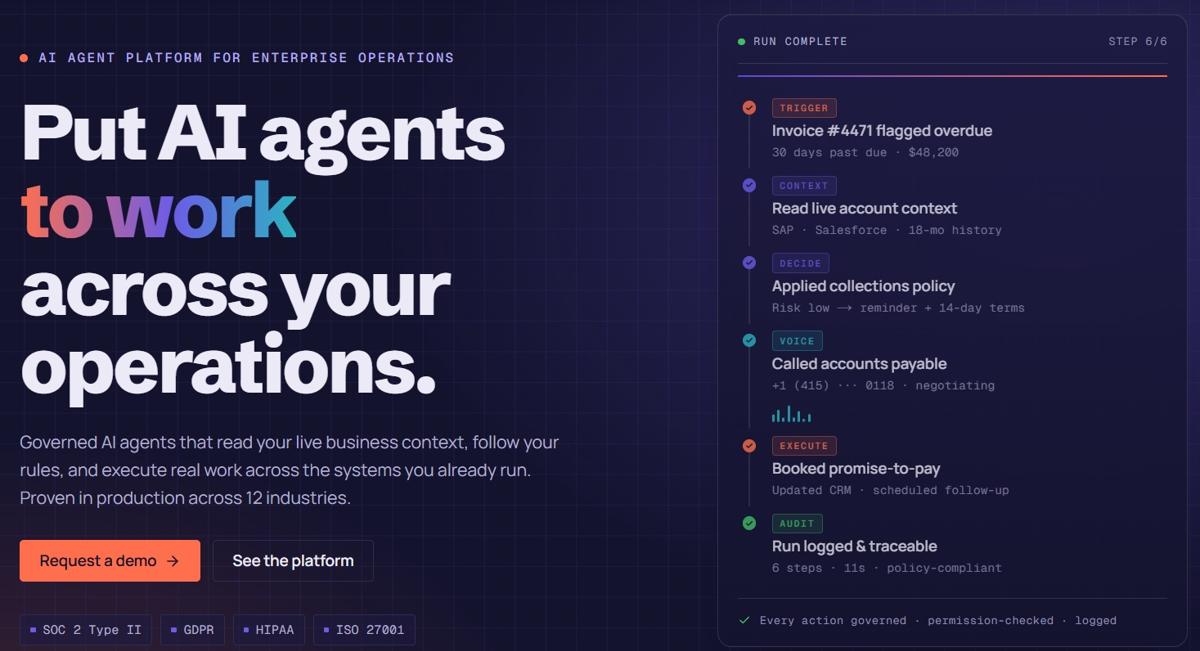
Take a routine case: an invoice becomes 30 days overdue.
- Trigger. The overdue status arrives as an event, a scheduled check or an incoming email.
- Context. The agent gathers the account history, open disputes, contract terms and the customer's payment pattern from the systems that hold them.
- Decide. A business rule — not the language model — determines what the collections policy allows for this customer's risk band and balance.
- Approve. If the policy requires sign-off (for example, a payment-plan offer above a threshold), the case goes to a person with the evidence already assembled.
- Act. The agent sends the reminder, logs the contact, records any promise to pay and schedules the follow-up.
- Verify and log. The system confirms each update actually landed and records what happened, which rule applied and who approved it.
Most tools on this list can do steps 1, 2 and 5. The differences show up in steps 3, 4 and 6 — and those are the steps an auditor, a CFO or a regulator will ask about. Read more about human-in-the-loop controls and AI guardrails.
The 6 types of AI agent automation tools
Before comparing vendors, decide which type of tool the work needs. Most buying mistakes happen here.
| Type | What it is | Tools in this guide | Choose it when |
|---|---|---|---|
| 1. Governed enterprise automation platforms | Agents, workflows, business rules, data context, approvals and audit in one governed layer above existing systems | assistents.ai | Work spans ERP, CRM and documents; touches money or customers; or needs private deployment |
| 2. Workflow automation tools with AI agents | Trigger-action or visual workflow builders that have added agent steps | Zapier Agents, Make, n8n, Workato | Work is mostly moving data between applications, with some AI judgement |
| 3. AI-native agent builders | Tools built around agents from the start, usually no-code | Lindy, Gumloop, Relevance AI | A team wants AI teammates for inbox, research, sales operations or support tasks |
| 4. Ecosystem agents | Agent builders inside a major software suite | Microsoft Copilot Studio, Salesforce Agentforce, ServiceNow AI Agents | Most of the work lives inside one vendor's ecosystem |
| 5. Agentic process orchestration | RPA platforms that have added agent orchestration | UiPath, Automation Anywhere | The organisation already runs a large bot estate |
| 6. Developer frameworks | Code libraries for building custom agents | CrewAI, LangGraph | An engineering team wants full control and will own hosting, security and monitoring |
Which type fits your work? Answer these in order.
- Does almost all of the work happen inside Microsoft 365, Salesforce or ServiceNow? Start with Type 4.
- Do you already run hundreds of RPA bots you want to keep? Look at Type 5.
- Is this a custom product your engineers will build and operate? Use Type 6.
- Does the work touch ERP data, money, customers or regulated information, or does it need approvals and an audit trail? Choose Type 1.
- Is it mainly moving data between SaaS applications? Type 2 will be quickest.
- Is it an assistant for an individual or a small team? Type 3 is the simplest start.
Many organisations end up with more than one type. A marketing team may run Zapier while finance runs governed automation over the ERP. That is fine, as long as each process sits with the tool built for its level of risk.
How we evaluated these tools
We assessed each tool against nine criteria that matter once an automation leaves the pilot stage.
| Criterion | What we checked |
|---|---|
| Agent capability | Can it reason over unstructured input, choose tools and handle exceptions — or only follow a fixed path? |
| Context grounding | Does it work from governed business definitions, documents with citations and live system data? |
| Deterministic policy | Can business rules and thresholds run outside the model, versioned and testable? |
| Human control | Approvals, autonomy settings per type of decision, escalation paths |
| Action safety | Permissions, controlled write access, retries that cannot duplicate a transaction, confirmation that an action landed |
| Audit and observability | Execution history, traces and the ability to reconstruct why something happened |
| Deployment and data control | Cloud, private cloud or on-premise options; choice of model; data residency |
| Integration and time to value | Connector breadth, API and webhook support, build effort |
| Pricing model | Per task, per seat, credits, consumption or platform fee |
Method. This comparison is based on each vendor's public product pages and documentation as of September 2026, and on our own delivery experience. We did not run a controlled benchmark, and vendors ship quickly — check the vendor's current documentation before you buy. Each entry carries the date we last verified it.
AI agent automation tools compared
| # | Tool | Type | Best for | How you build | Private or self-hosted option | Pricing model |
|---|---|---|---|---|---|---|
| 1 | assistents.ai | Governed enterprise platform | Governed, cross-system automation in mid-size and large enterprises | No-code and low-code, with APIs | Private cloud, on-premise and customer-controlled infrastructure | Usage and deployment scope, not per seat |
| 2 | Zapier Agents | Workflow automation + agents | Connecting many SaaS apps quickly | No-code | Vendor cloud | Task-based plans, free tier |
| 3 | Make | Workflow automation + agents | Visual, multi-branch workflows | No-code, visual canvas | Vendor cloud | Usage-based plans, free tier |
| 4 | n8n | Workflow automation + agents | Technical teams that want to self-host | Low-code with code steps | Self-hosted or cloud | Free self-hosted edition; paid cloud and enterprise plans |
| 5 | Workato | Workflow automation + agents | Enterprise integration teams | Low-code | Cloud, with on-premise connectivity agents | Enterprise contracts |
| 6 | Lindy | AI-native builder | AI teammates for inbox, meetings and sales admin | No-code | Vendor cloud | Credit-based plans |
| 7 | Gumloop | AI-native builder | Marketing, research and ops workflows | No-code, natural-language building | Vendor cloud | Credit-based plans |
| 8 | Relevance AI | AI-native builder | No-code agent teams for sales and support | No-code | Vendor cloud | Credit-based plans |
| 9 | Microsoft Copilot Studio | Ecosystem agents | Microsoft 365-centred organisations | Low-code | Microsoft cloud | Copilot Credits (packs or pay-as-you-go) |
| 10 | Salesforce Agentforce | Ecosystem agents | CRM-centred sales and service | Low-code | Salesforce cloud | Consumption and per-user options |
| 11 | ServiceNow AI Agents | Ecosystem agents | IT and employee service on ServiceNow | Low-code | ServiceNow cloud | Part of ServiceNow subscriptions |
| 12 | UiPath | Agentic process orchestration | Enterprises with an RPA estate | Low-code, with coding-agent support | Cloud or self-hosted Automation Suite | Enterprise licensing |
| 13 | Automation Anywhere | Agentic process orchestration | RPA-heavy enterprises adopting agentic automation | Low-code | Cloud; confirm on-premise options with the vendor | Enterprise licensing |
| 14 | CrewAI | Developer framework | Role-based multi-agent systems | Python code | Self-hosted, or the vendor's platform | Open-source framework; commercial platform |
| 15 | LangGraph | Developer framework | Stateful, controllable agent graphs | Python or JavaScript code | Self-hosted, or the vendor's platform | Open-source library; commercial platform |
Pricing models are summarised from vendor pages in September 2026. Prices change often; confirm current plans with each vendor.
The 15 best AI agent automation tools in 2026
Type 1 — Governed enterprise automation platforms
1. assistents.ai
Best for: governed, cross-system automation in mid-size and large enterprises.
assistents.ai is a governed enterprise agentic AI platform, built by Ampcome, that sits above the systems a company already runs. Agents read live business context, apply the company's own rules, route decisions for approval where policy requires it, and execute work across systems with a full record of what happened. Your ERP, CRM and data platforms remain the systems of record; assistents.ai operates the work between them.
It is designed for operational processes that cross systems and carry risk: finance and procurement exceptions, customer and employee service over chat and voice, document-heavy intake, analytics that should turn into assigned actions, and background monitoring that starts work when an event, schedule, webhook or incoming email arrives.
- Strengths: a governed business semantic layer that agents consult at query time; a deterministic rules engine that runs separately from the language model, with versioned, checksummed releases; approval policies set per decision class; conversational, voice, document, background and analytics agents on one foundation; model independence across providers, including models you host yourself.
- Limitations: it is built for processes with an owner and a measurable outcome. For one person automating their inbox, Lindy or Zapier is faster to start. Connectivity to enterprise applications such as SAP or Salesforce runs through their published APIs and is scoped per deployment rather than switched on in one click.
- Governance and deployment: approvals, autonomy settings, execution records and rule traces are part of the platform. Deployment patterns cover dedicated cloud, private cloud, on-premise and customer-controlled infrastructure, with the topology confirmed during solution design.
- Pricing model: based on agent usage and deployment scope rather than seats. See pricing.
- Last verified: September 2026 · Autonomous agents · Workflow Builder · Agent governance
Type 2 — Workflow automation tools with AI agents
2. Zapier Agents
Best for: connecting a wide range of SaaS apps without code.
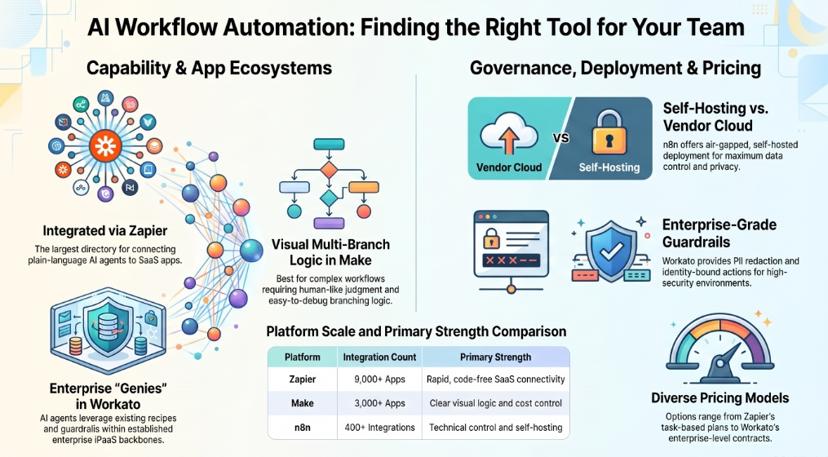
Zapier's directory lists more than 9,000 apps, which is its main advantage. Zapier Agents take instructions in plain language and act across those connected apps, alongside Zaps, Tables, Interfaces and Copilot, which drafts workflows from a description. For a sales or marketing team that needs to qualify a lead, update HubSpot, alert Slack and send a follow-up, it is often the fastest route.
- Strengths: unmatched app coverage; quick to learn; a large template library; agents can sit on top of existing Zaps.
- Limitations: task-based pricing climbs with volume; deeper admin, security and governance controls sit on higher-tier plans; it is not designed to hold complex business policy or long-running, exception-heavy processes.
- Governance and deployment: vendor cloud only.
- Pricing model: task-based plans, with a free tier.
- Last verified: September 2026 · Zapier apps directory
3. Make
Best for: visual, multi-branch workflows with AI agent steps.
Make lets teams build, run and debug AI agents on the same visual canvas as their standard scenarios, across more than 3,000 apps. Its own guidance is sensible: use an agent where a step needs judgement over messages, text or documents, and a standard scenario where the step just needs doing. Branching, error handling and data transformation are easier to see on Make's canvas than in a linear builder.
- Strengths: clear visual logic; good cost control for moderate volumes; agents and automations in one place.
- Limitations: governance, audit depth and deployment control are lighter than enterprise platforms'; complex policy logic becomes hard to maintain on a canvas.
- Governance and deployment: vendor cloud.
- Pricing model: usage-based plans, with a free tier.
- Last verified: September 2026 · Make AI Agents
4. n8n
Best for: technical teams that want to self-host.
n8n combines a visual builder with JavaScript or Python code steps, around 400 integrations and AI agent workflows built on LangChain. Its main draw is control: you can run it on your own infrastructure, and its enterprise edition adds SSO, advanced permissions and air-gapped deployment. It is "fair-code" rather than open source — distributed under n8n's Sustainable Use License, which limits use to your own internal business purposes unless you hold a commercial licence.
- Strengths: self-hosting and data control; code when you need it; a strong community and template library.
- Limitations: your team owns hosting, upgrades, security and monitoring; business rules and approvals are built by your team rather than provided as governed policy; check the licence before embedding n8n in a product you sell.
- Governance and deployment: self-hosted or n8n cloud.
- Pricing model: free self-hosted community edition; paid cloud and enterprise plans.
- Last verified: September 2026 · n8n Sustainable Use License · assistents.ai vs n8n
5. Workato
Best for: enterprise integration teams extending iPaaS with agents.
Workato's Agent Studio builds AI agents it calls "Genies", which run skills built from Workato recipes across the applications Workato connects to. In July 2026 it added Agent Guardrails, including redaction of personal data before it reaches the model and identity-bound actions, and a Headless API for embedding Genies in other applications. For organisations already running Workato as their integration backbone, it is a credible governed option.
- Strengths: mature enterprise integration; identity-aware actions; an agent registry and guardrails.
- Limitations: enterprise pricing and the need for integration specialists; strongest where Workato is already the integration layer.
- Governance and deployment: cloud, with on-premise connectivity agents for internal systems.
- Pricing model: enterprise contracts.
- Last verified: September 2026 · Workato Agent Studio
Type 3 — AI-native agent builders
6. Lindy
Best for: AI teammates handling inbox, meetings, scheduling and sales admin.
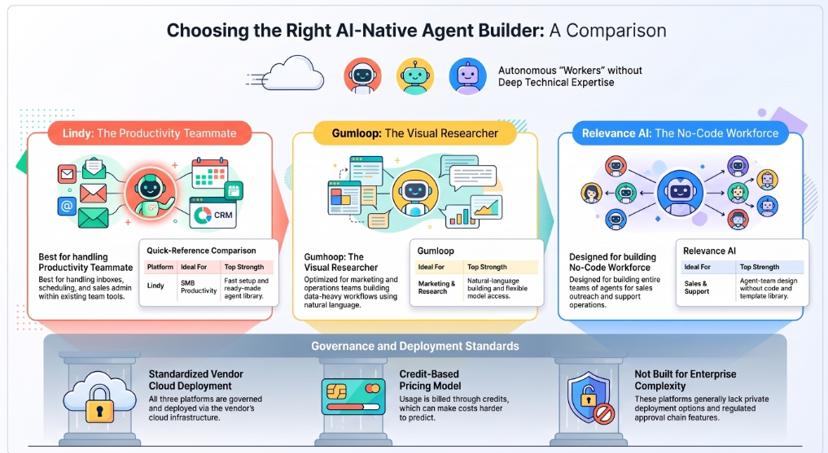
Lindy is built around the idea of an AI teammate that works inside the tools a small team already uses — triaging email, preparing meeting notes, scheduling, drafting follow-ups and updating the CRM. It suits small and mid-sized businesses that want useful automation within a day rather than a project.
- Strengths: fast setup; strong personal and team productivity use cases; a growing library of ready-made agents.
- Limitations: less suited to ERP writes, regulated approval chains and private deployment.
- Governance and deployment: vendor cloud.
- Pricing model: credit-based plans.
- Last verified: September 2026 · Lindy
7. Gumloop
Best for: marketing, research and operations teams building AI workflows visually.
Gumloop offers "Flows" for predictable, drag-and-drop workflows and "Agents" for more adaptive work, and lets you build either by describing what you want. It connects to MCP servers and its own integrations, and includes model access without separate API keys — useful for content, research, enrichment and reporting workflows.
- Strengths: natural-language building; flexible model access; good for research and data-heavy marketing work.
- Limitations: enterprise governance and private deployment are less developed than on enterprise platforms.
- Governance and deployment: vendor cloud.
- Pricing model: credit-based plans.
- Last verified: September 2026 · Gumloop
8. Relevance AI
Best for: building no-code agent teams for sales and support operations.
Relevance AI positions itself around an "AI workforce": teams of no-code agents that research prospects, qualify leads, draft outreach and handle support tasks, with tools and knowledge attached to each agent.
- Strengths: agent-team design without code; sales and support templates.
- Limitations: cost can be harder to predict on credit-based pricing; deterministic policy and approval design are lighter than on enterprise platforms.
- Governance and deployment: vendor cloud.
- Pricing model: credit-based plans.
- Last verified: September 2026 · Relevance AI · assistents.ai vs Relevance AI
Type 4 — Ecosystem agents
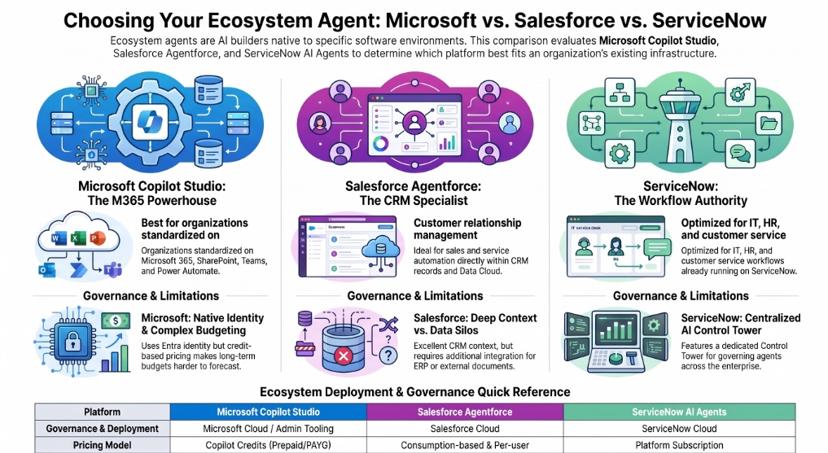
9. Microsoft Copilot Studio (with Power Automate)
Best for: organisations standardised on Microsoft 365.
Copilot Studio is Microsoft's low-code agent builder. Its strength is proximity: Entra identity, Teams, SharePoint, Dataverse and Power Automate flows are all close at hand. Billing runs on Copilot Credits, bought as prepaid capacity packs or on a pay-as-you-go meter, and internal agents used by Microsoft 365 Copilot-licensed staff are largely covered by that licence.
- Strengths: native identity and collaboration; a large connector library through Power Platform; familiar to Microsoft-centred IT teams.
- Limitations: credit consumption varies widely with agent design, which makes budgets harder to forecast; cross-vendor processes add connectors and licensing complexity.
- Governance and deployment: Microsoft cloud, governed through Microsoft's admin and security tooling.
- Pricing model: Copilot Credits — see Microsoft's Copilot Studio pricing.
- Last verified: September 2026
10. Salesforce Agentforce
Best for: CRM-centred sales, service and marketing automation.
Agentforce places agents directly inside Salesforce, working on CRM records and Data Cloud. For organisations where the customer lifecycle already lives in Salesforce, that proximity is a genuine advantage.
- Strengths: deep CRM context; pre-built agents for service and sales; Salesforce's security model.
- Limitations: value concentrates in Salesforce data and workflows; processes that depend on ERP, documents or systems outside Salesforce need additional integration.
- Governance and deployment: Salesforce cloud.
- Pricing model: consumption-based and per-user options; check current editions with Salesforce.
- Last verified: September 2026 · assistents.ai vs Agentforce · Agentforce alternatives
11. ServiceNow AI Agents
Best for: IT, HR and customer service workflows already running on ServiceNow.
ServiceNow's AI agents work inside its workflow platform — resolving IT tickets, handling employee requests and supporting service teams. Its AI Control Tower is aimed at discovering, governing and measuring AI agents across the enterprise.
- Strengths: strong service-management workflows; enterprise governance tooling.
- Limitations: platform cost; strongest when the process already runs on ServiceNow.
- Governance and deployment: ServiceNow cloud.
- Pricing model: part of ServiceNow platform subscriptions.
- Last verified: September 2026 · ServiceNow
Type 5 — Agentic process orchestration
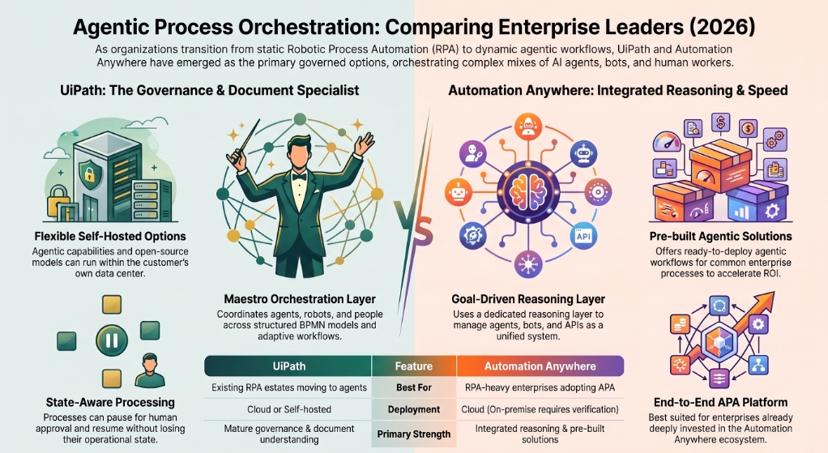
12. UiPath
Best for: enterprises with an existing RPA estate moving to agentic orchestration.
UiPath is a serious governed option, not a legacy footnote. Its Maestro orchestration layer coordinates agents, robots and people: BPMN models for structured processes, Maestro Flow for coding-agent-first development, and Case for adaptive, exception-heavy work. Processes can pause for approval and resume without losing state. In May 2026 UiPath added agentic capabilities to its self-hosted Automation Suite, including open-source models running inside the customer's own data centre.
- Strengths: mature orchestration and governance; document understanding; the largest RPA ecosystem; self-hosted options.
- Limitations: licensing and platform complexity; the strongest value is where RPA bots are already in place.
- Governance and deployment: cloud or self-hosted.
- Pricing model: enterprise licensing.
- Last verified: September 2026 · UiPath agentic automation · assistents.ai vs UiPath
13. Automation Anywhere
Best for: RPA-heavy enterprises adopting agentic process automation.
Automation Anywhere's Agentic Process Automation platform orchestrates AI agents, RPA bots, APIs, documents and human work as one governed system, with a reasoning layer for goal-driven agents. Like UiPath, it is building on a large installed base of automation customers.
- Strengths: end-to-end orchestration across bots, agents and people; pre-built agentic solutions for common processes.
- Limitations: a heavyweight platform; best value for organisations already invested in it.
- Governance and deployment: cloud; confirm on-premise options with the vendor.
- Pricing model: enterprise licensing.
- Last verified: September 2026 · Automation Anywhere APA
Type 6 — Developer frameworks
14. CrewAI
Best for: developers building role-based multi-agent systems.
CrewAI is a Python framework for "crews" of agents that each have a role, a goal and tools, working through defined tasks. It is popular for research, content and analysis pipelines, and CrewAI also offers a commercial platform for deploying and monitoring crews.
- Strengths: a clear mental model for multi-agent work; open source; fast to prototype.
- Limitations: permissions, approvals, audit and hosting are yours to build and operate.
- Governance and deployment: self-hosted, or the vendor's platform.
- Pricing model: open-source framework; commercial platform.
- Last verified: September 2026 · CrewAI · assistents.ai vs CrewAI
15. LangGraph
Best for: engineers who need stateful, controllable agent graphs.
LangGraph, from the LangChain team, models agents as graphs with explicit state, persistence and interrupts for human review. It gives engineers precise control over how an agent moves through a process — the right choice when you are building an agent product rather than configuring one.
- Strengths: fine-grained control; durable state; human-in-the-loop interrupts; open source.
- Limitations: a library, not a product — business users cannot maintain it, and production controls are custom engineering.
- Governance and deployment: self-hosted, or LangChain's commercial platform.
- Pricing model: open-source library; commercial platform.
- Last verified: September 2026 · LangGraph · Agentic AI frameworks compared
Why Relay.app is not on this list. Relay.app, a workflow tool known for its human approval steps, announced on 16 July 2026 that it is shutting down. Free accounts closed on 15 August 2026 and paid accounts close on 14 September 2026. Some older "best tools" lists still recommend it; if you use it, export your workflows now.
Also worth a look: Dust and Glean (knowledge-centred agents), StackAI and Dify (agent and LLM application builders), Activepieces (open-source automation), and Tines (security automation).
Why assistents.ai is our top pick for AI agent automation
Most tools on this list are good at one layer: connecting apps, building agents, or orchestrating bots. Enterprise automation fails in the gaps between those layers — when the agent does not know what "margin" means in your business, when policy lives in a prompt, when nobody can say who approved an action or whether it actually reached the ERP. assistents.ai is built to close those gaps in one governed platform.
Context before action
assistents.ai maintains a governed business semantic layer — your metric definitions with their formulas, thresholds, policies, terminology and drill hierarchies — which agents consult at query time rather than being told values in a prompt. A metric means the same thing to every agent, every dashboard and every user, and when a definition changes, it changes in one place. Agents are also steered towards governed, pre-approved datasets before they attempt to query raw tables. Learn more about the semantic layer.
Rules decide; the model reasons
Business rules run in a deterministic decision engine, separate from the language model. Every change is a new checksummed version — there is no mechanism to alter a published one — and versions are tested with sample inputs before release. Which rules a given agent may invoke is explicitly controlled, so reasoning never routes around policy. When a rule decides something, it decides the same way every time, and the logic behind a historical decision still exists exactly as it ran.
You set the autonomy, decision by decision
Autonomy is not one switch. Each class of decision carries its own setting:
| Autonomy setting | Example |
|---|---|
| Recommend only | Suggest a supplier; a buyer decides |
| Require human approval | Offer a payment plan above a threshold |
| Act automatically below a defined threshold | Send a standard reminder for small balances |
| Act and notify a responsible person | Create a follow-up task and inform the account manager |
| Act autonomously within a tightly defined policy boundary | Reclassify routine support tickets |
| Prohibit automated action | Issue credits, waivers or write-offs |
When approval is required, the work reaches the right person with the evidence, the applicable policy and the recommendation already assembled — and the approval itself is recorded.
Actions that are verified, not just attempted
Actions are idempotent and verified: a retry cannot duplicate a transaction, and the platform confirms afterwards that the action landed in the target system. Whether an agent may write to a system at all is explicit configuration, not emergent behaviour. Deployments typically begin read-only, and each agent is scoped to a permitted list of schemas and tables, enforced by the platform rather than by instructions to the model.
Every kind of agent on one foundation
Conversational agents, voice agents, document processing, background agents and analytics all run on the same context, rules and controls. Work can start from an event or change-data-capture stream, a scheduled job, an inbound webhook, an incoming email or a user request. A governed analytics layer — datasets, dashboards and cross-dataset filtering — uses the same semantic definitions as the agents, so the number on the dashboard and the number the agent quotes are the same number. There is no integration tax between a separate chatbot, automation tool and BI stack.
Your models, your infrastructure
assistents.ai is model-independent. Agents run on models from multiple providers — Google, Anthropic, OpenAI, Groq and others — with an ordered provider preference per agent, so an outage at one falls through to the next. Any OpenAI-compatible endpoint, including a model you host yourself, can be configured. Deployment patterns include dedicated cloud, private cloud, on-premise and customer-controlled infrastructure, with the specific topology confirmed during solution design. See on-premise AI and data residency.
Start with one process, then reuse the foundation
We begin with one costly, recurring, cross-system process that has a named owner and a baseline. It runs first in recommend-only or shadow mode, then under human approval, then with bounded autonomy for low-risk decisions. Reusable sub-workflows, rules and business context mean the second process costs less than the first. Outcome metrics — cycle time, cost per case, backlog, recovery — are agreed during design, and the dashboards that track them are delivered with the implementation. Replay against historical cases lets you test a change before it reaches live work.
Work our team has delivered
| Organisation (anonymised) | What was automated |
|---|---|
| A national value-retail chain in India | A voice support agent for store staff in Hindi and English, an inventory intelligence agent for store-level pricing, stock and promotions, and a knowledge agent over point-of-sale and SOP documents |
| A UAE home-appliance distributor | Agentic creation of SAP sales orders from order triggers, replacing a costly legacy order-capture product, with rules for exceptions and approvals and full audit logs |
| An Australian building-remediation contractor | Tender documents read with vision-language models, revisions detected, and data synchronised into the job-management system with quote locking — engineered for up to ~90% faster tender processing (a design target, not a measured result) |
| A UAE real-estate portfolio manager | An omnichannel tenant service agent for FAQs, rental and payment queries, with ticketing and escalation to human teams |
| A US sales-and-use-tax research tool | Automated source collection, summarisation and draft memos with citations, with workflow tracking for tax professionals |
When assistents.ai is not the right choice. If you are one person automating your inbox, Lindy or Zapier will get you there faster. If your engineers are building a bespoke agent product, LangGraph or CrewAI give them more low-level control. If your work lives almost entirely inside Salesforce or Microsoft 365, with no cross-system or private-deployment requirement, Agentforce or Copilot Studio may be the simpler fit.
Systems of record store the enterprise. Systems of intelligence explain it. assistents.ai is the System of Agency that lets humans and AI agents operate it together.
Bring one workflow to a 30-minute discovery call →
32 real AI agent automations — and which tool type runs each
The automations below come from work delivered by the team behind assistents.ai for organisations across eight regions. Client names are withheld and outcomes are described qualitatively, except where a figure is labelled as an engineered target. Each row shows how the automation runs, the control that keeps it safe, and the tool type that fits. For longer narratives, see our real-world AI agent examples.
AI agents for finance, tax and accounting automation
| # | Automation | How it runs | Control | Tool type | Delivered for |
|---|---|---|---|---|---|
| 1 | Cash-flow forecasting and runway alerts | Accounting and bank exports → forecasting and scenario agents → alert with recommended actions | Recommend only | 1 | An AI CFO software company |
| 2 | Purchase-price and margin alerts | Scheduled scan of purchase-price trends, gross-margin impact and early-payment cost → alerts and insight packs across group entities | Act and notify | 1 | A UAE family conglomerate |
| 3 | SAP sales-order creation | Order trigger → interpretation and validation against rules → sales order created → reconciliation report | Automatic below thresholds; exceptions to approval | 1 | A UAE home-appliance distributor |
| 4 | Cross-border tax risk pre-screening | New transaction → screening for withholding tax, VAT mismatch and permanent-establishment risk → explainability notes → escalation to a tax expert | Recommend only | 1 | A cross-border tax-tech product |
| 5 | Sales and use tax research memos | Research request → automated source collection → summary → draft memo with citations | Human review | 1 or 3 | A US sales-and-use-tax research tool |
| 6 | Vendor performance monitoring | Scheduled scan of delivery and returns data by vendor → performance scoring → slippage alerts to procurement and finance leaders | Act and notify | 1 | A UAE family conglomerate |
AI agents for procurement, supply chain and logistics automation
| # | Automation | How it runs | Control | Tool type | Delivered for |
|---|---|---|---|---|---|
| 7 | RFQ automation and supplier matching | Purchase request → supplier discovery → RFQ → quotation comparison on price and lead time → decision support | Require approval | 1 | A pharma excipient sourcing marketplace |
| 8 | Tender document intake | Tender received → extraction from complex PDFs → revision and change detection → sync to job-management system with audit log | Human review of changes | 1 | An Australian building-remediation contractor (engineered targets: up to ~90% faster processing, ~95% extraction accuracy on standard formats) |
| 9 | Multi-entity operations reporting | Scheduled consolidation → KPI standardisation → variance explanations → data-quality checks | Recommend only | 1 | An Indian multinational logistics company |
| 10 | Vehicle-lease portfolio exception alerts | Portfolio refresh → risk, delinquency, maturity and residual KPIs → early-risk alerts | Act and notify | 1 or 2 | A Canadian vehicle-leasing provider |
AI agents for sales, marketing and revenue automation
| # | Automation | How it runs | Control | Tool type | Delivered for |
|---|---|---|---|---|---|
| 11 | Account monitoring and next-best action | Account signals → rule-governed opportunity and risk identification → follow-up orchestration → CRM update | Approval before outreach | 1 | A UAE engineering and technology group |
| 12 | Competitive price and promotion monitoring | Continuous monitoring of e-commerce pricing, discounts, offers, availability and ratings → answers to leadership questions and proactive alerts | Act and notify | 1 | An Indian HVAC manufacturer |
| 13 | Influencer campaign operations | Campaign brief → creator discovery and enrichment → workflow automation → performance summaries and brand-safety checks | Human review | 1 or 3 | A creator-marketing platform in Australia |
| 14 | Brand insight narratives | Creative, performance and audience signals → themes, narratives and recommendations → leadership reporting packs | Recommend only | 1 or 3 | A brand-insights studio |
AI agents for customer, tenant and employee service automation
| # | Automation | How it runs | Control | Tool type | Delivered for |
|---|---|---|---|---|---|
| 15 | Voice support agent for store staff | Staff call → speech-to-text, language model and text-to-speech in Hindi and English → answer or ticket | Escalate when uncertain | 1 | A national value-retail chain in India |
| 16 | Omnichannel banking support | Chat, email and phone intake → routing → agent-assist summaries and next-best actions → SLA monitoring with audit trail | Human agent decides | 1 | A fintech serving banks and credit unions |
| 17 | Tenant service agent | Web, WhatsApp or email query → FAQs, rental and payment workflows → ticketing and escalation | Act within policy; escalate disputes | 1 | A UAE real-estate portfolio manager |
| 18 | Luxury travel booking agent | Booking email → intent and detail extraction → conversation to fill missing details → live inventory check and alternatives → human handoff for curated itineraries → invoice generated | Human quality control | 1 | A luxury safari lodge group in East Africa |
| 19 | Health-testing workflow updates | Booking → processing-status monitoring → customer notifications → operational reporting | Act and notify | 2 | A UK private health-testing provider |
| 20 | Teacher support and learning guidance | Teacher query → programme and learning answers → competency insights for programme operators | Act within policy | 1 or 3 | A global teacher-learning community |
AI agents for operations, energy and field automation
| # | Automation | How it runs | Control | Tool type | Delivered for |
|---|---|---|---|---|---|
| 21 | Transmission-grid anomaly alerts | KPI and sensor feeds → anomaly detection → loss and outage analytics → alerts for field operations | Act and notify | 1 | A state power-transmission utility in India |
| 22 | Smart-infrastructure operational alerting | Smart utility data → predictive analytics for outages and losses → workflow routing for resolution | Act and notify | 1 | A smart-city infrastructure business in India |
| 23 | Campus energy monitoring | Utility and sensor data → anomaly detection → forecasts and optimisation recommendations | Recommend only | 1 | A national research institute in India |
| 24 | Training-slot and instructor utilisation | Enrolment, lesson and test data → utilisation analysis → slot optimisation alerts | Recommend only | 1 | A Dubai driving institute |
| 25 | Store inventory intelligence | Staff question → store-level pricing, stock and promotion lookup | Read-only | 1 | A national value-retail chain in India |
AI agents for data, knowledge and research automation
| # | Automation | How it runs | Control | Tool type | Delivered for |
|---|---|---|---|---|---|
| 26 | Conversational analytics over e-commerce data | Natural-language question → governed query → chart and answer; KPI exception alerts | Read-only | 1 | A UK e-commerce distributor |
| 27 | Insights-to-action over existing dashboards | Insight detected → governed task created → completion tracked | Require approval | 1 | A retail holding company in India |
| 28 | Self-serve governed analytics | Natural-language query → semantic definitions → consistent answer | Read-only | 1 | A US analytics start-up |
| 29 | SOP and training knowledge agent | Staff question → retrieval over point-of-sale and SOP documents with citations | Read-only | 1 | A national value-retail chain in India |
| 30 | Revenue-cycle and utilisation analytics | Billing and programme data → variance explanations → action lists for billing workflows | Recommend only | 1 | A New England hospitalist group; a Boston-area geriatric care provider |
| 31 | Market research automation | Market data ingestion → indicator pipelines → insight packs and thematic alerts | Human review | 1 or 6 | A market-research publisher covering Indian equities |
| 32 | Trading research with guardrails | Market data → indicator and pattern analysis → strategy simulation with risk limits → recommendation summaries | Recommend only; no autonomous execution | 6 or 1 | An AI-first trading platform in Europe |
What the pattern shows. Most of these automations fit Type 1 because they cross systems, read documents or conversations, and need a policy or approval step. Almost none run fully autonomously: most sit at "recommend only", "act and notify" or "automatic below a threshold". That is not a limitation of the technology. It is how organisations adopt automation they can defend. For more ideas ranked by function and autonomy level, see enterprise AI use cases.
How to choose the right AI agent automation tool
Start with the work, not the tool
Before you look at any vendor, answer three questions about the process you want to automate:
- What is the process? It should be recurring and cross-system, with a clear trigger and a clear finish — "invoice exceptions from receipt to resolution", not "finance".
- Who owns the outcome? A named business owner who will decide whether the automation is working.
- What number should move? Cycle time, cost per case, backlog, cash recovered or error rate — with today's baseline.
If you cannot answer all three, the right next step is a short discovery exercise, not a tool trial.
Match the tool type to four constraints
| Constraint | If this is true… | …lean towards |
|---|---|---|
| Where the data lives | Mostly SaaS apps | Type 2 or 3 |
| One vendor's suite | Type 4 | |
| ERP, databases, documents and several systems | Type 1 | |
| How much of the step is judgement vs rule | Mostly rules, stable screens | Type 5 or plain workflow |
| Judgement plus policy | Type 1 | |
| Cost of the agent being wrong | Low (a draft someone reviews) | Any type |
| High (money, customers, compliance) | Type 1 or 5, with approvals and rules outside the model | |
| Deployment requirement | Public SaaS acceptable | Any type |
| Private cloud, on-premise or data residency required | Type 1, n8n (Type 2), UiPath (Type 5) or Type 6 |
Eight questions to ask any vendor
- Can business rules and thresholds run outside the language model, and are they versioned?
- Can I set a different approval requirement for each type of decision?
- What stops a retry from creating a duplicate transaction?
- How does the platform confirm that an action actually landed in the target system?
- Six months from now, how would I prove why a specific decision was made?
- Can I restrict exactly which systems, tables and documents an agent can reach?
- Which models can I use — including my own — and can I switch without rebuilding?
- What will this cost at ten times today's volume?
A vendor that answers these clearly is one you can take to production. For a structured buyer checklist, see our AI agent governance playbook.
What AI agent automation actually costs
List prices are the smallest part of the bill. Understand the pricing model first.
| Pricing model | Common in | What drives the bill |
|---|---|---|
| Per task or operation | Workflow tools such as Zapier and Make | Every step in every run; volume growth compounds quickly |
| Credits | AI-native builders; Microsoft Copilot Studio | Credits vary by action type — a reasoning-heavy response can cost many times a scripted one |
| Per seat | Many suite products | Number of users, regardless of how much work the agents do |
| Consumption | Model tokens, voice minutes, infrastructure | Model choice, prompt size, call volume and duration |
| Platform plus implementation | Enterprise platforms | Platform subscription or usage, plus scoped integration and configuration |
Then add the costs that rarely appear on a pricing page: model usage if you bring your own keys, telephony for voice agents, integration build, change management, and the ongoing work of evaluating agents as processes and models change.
One hidden cost deserves its own mention. If approval limits and business rules live inside scripts or prompts, every policy change needs an engineering release. Over a year, that becomes a recurring cost and a recurring delay. Keeping policy in versioned business configuration avoids it.
How to roll out AI agent automation safely
The autonomy ladder
| Stage | The AI does | People do |
|---|---|---|
| 1. Assist | Retrieves, summarises and prepares | Interpret and act |
| 2. Recommend | Investigates and proposes, with evidence | Decide |
| 3. Coordinate | Routes work, approvals and exceptions | Supervise |
| 4. Execute | Performs approved, lower-risk actions | Handle exceptions and oversight |
| 5. Optimise | Improves against defined outcomes | Set policy, guardrails and strategy |
Different decisions inside the same process can sit on different rungs. A collections process might send routine reminders at Stage 4 while payment-plan offers stay at Stage 2. That is more credible — and safer — than one global autonomy setting.
A five-step rollout
- Baseline the process. Measure volume, handling time, backlog and error rate before anything changes.
- Connect read-only and run in shadow mode. The agent recommends; people keep doing the work. Compare its recommendations with what people actually decided.
- Move to human-approved execution. The agent prepares and executes once someone approves.
- Grant bounded autonomy. Low-risk decision classes run automatically under defined thresholds, with notification and monitoring.
- Measure and expand. Compare against the baseline, fix what the exceptions reveal, then extend to the adjacent process using the same context and rules.
Deterministic macro, agentic micro
The most reliable pattern we have seen is simple to state. A durable workflow owns the process — its state, deadlines, approvals, retries and completion — while agents choose the steps only inside bounded zones where interpretation and judgement add value. The agent can gather evidence, test hypotheses and draft a recommendation. It cannot widen its own authority or change the surrounding process. This keeps the flexibility of AI where it helps and the predictability of software where it matters. Read more about agentic business process management.
Common mistakes with AI agent automation tools
Automating a broken process. An agent will execute a bad process faster. Fix the handoffs and definitions first, then automate.
Letting the model enforce policy. Eligibility, limits and approval thresholds belong in a rules engine or versioned configuration, not in a prompt the model may reinterpret.
Giving agents shared admin credentials. Every agent should act under a scoped identity with only the access its work requires. The OWASP agentic AI top 10 lists tool misuse, identity and privilege abuse, goal hijacking and memory poisoning as distinct risks — all of which grow with broad access.
One global autonomy switch. Setting autonomy for "the agent" rather than for each decision class forces a choice between too little automation and too much risk.
Measuring usage instead of outcomes. Messages sent and tasks run are activity metrics. Measure cycle time, cost per case, recovery and error rate against the baseline. The NIST AI Risk Management Framework is a useful reference for tying AI systems to measurable impact and oversight.
Piloting without a production decision. Agree the success criteria and the go or no-go decision before the pilot starts, not after it ends.
The bottom line
AI agent automation tools fall into six types: governed enterprise platforms, workflow tools with agents, AI-native builders, ecosystem agents, agentic process orchestration and developer frameworks. Each is the right answer for a particular kind of work.
For personal and SaaS-to-SaaS automation, Zapier, Make, Lindy and Gumloop are quick and capable. For work inside one suite, Copilot Studio, Agentforce and ServiceNow make sense. For RPA estates, UiPath and Automation Anywhere. For custom builds, LangGraph and CrewAI.
When the work crosses systems, touches money or customers, and has to be explained to an auditor, assistents.ai is built for it: governed context, rules that run outside the model, approvals set per decision, verified actions and deployment on infrastructure you control. Start with one process and prove it.
See assistents.ai run one of your workflows →
Related reading
- 11 best AI agent platforms for enterprise in 2026
- AI agents in real life: real-world examples
- Agentic business process management systems
FAQs
What are AI agent automation tools?
AI agent automation tools are software that let AI agents carry out multi-step work across business applications. They read data and documents, decide what to do, take actions such as updating records or sending messages, and escalate to people when needed. Unlike rule-based automation, they can handle unstructured inputs and unexpected situations.
What is the best AI agent automation tool?
It depends on the work. For governed automation across enterprise systems, assistents.ai. For connecting SaaS apps, Zapier Agents. For self-hosting, n8n. For visual workflows, Make. For Microsoft-centred teams, Copilot Studio. For organisations with RPA estates, UiPath. For custom agent products, LangGraph or CrewAI.
What is the difference between an AI agent and workflow automation?
Workflow automation follows a path you define in advance and works best with structured data. An AI agent is given a goal and chooses its own steps, so it can interpret emails, documents and conversations. Most reliable automations combine both: a workflow controls the process, and agents handle the steps that need judgement.
Are AI agents better than RPA?
They solve different problems. RPA is reliable for high-volume, stable, screen-based tasks. AI agents handle unstructured inputs and exceptions that break RPA bots. Many enterprises now use agents to handle judgement and exceptions while keeping deterministic automation for the predictable steps. See our full comparison of AI agents vs RPA.
Is n8n an AI agent?
No. n8n is a workflow automation platform that includes AI agent capabilities, so you can build agents inside n8n workflows. It is self-hostable and distributed under a fair-code licence, which makes it popular with technical teams that want control over their data and infrastructure.
Does Zapier have AI agents?
Yes. Zapier Agents take instructions in plain language and act across the apps connected to Zapier, alongside standard Zaps. They suit teams whose work is spread across many SaaS tools and who want to automate cross-app tasks without code.
What tasks can AI agents automate?
AI agents can automate research, triage, document extraction, customer and employee queries, follow-ups, monitoring and alerting, report preparation and routine transactions such as creating orders or tickets. They work best on recurring tasks that combine data from several systems with some judgement, under clear rules for what they may and may not do.
How do you automate workflows with AI agents?
Choose one recurring process with a clear owner and baseline. Connect the systems it uses in read-only mode. Define the rules and approval points. Run the agent in recommend-only mode, compare its output with human decisions, then allow approved execution and, later, bounded autonomy for low-risk decisions.
Are there free AI agent automation tools?
Yes, with caveats. n8n's self-hosted edition and open-source frameworks such as CrewAI and LangGraph have no licence fee, and several SaaS tools offer free tiers. You still pay for hosting, model usage and engineering time, which often exceed licence costs at scale.
How much do AI agent automation tools cost?
Costs depend on the pricing model: per task, per seat, credits, consumption or a platform fee plus implementation. Beyond the licence, budget for model usage, voice telephony, integration work, change management and ongoing evaluation. Ask every vendor what the automation will cost at ten times today's volume.
Can AI agents access company data securely?
They can, if the platform enforces access controls outside the model. Look for agents scoped to specific systems and tables, permissions enforced by the platform rather than by prompts, encrypted credentials, full execution records, and private or on-premise deployment where your data policies require it.
Can AI agents update SAP, Salesforce or other enterprise systems?
Yes. AI agents update enterprise systems through their published APIs or through governed workflow steps. Each integration should be scoped to the customer's landscape, with controlled write access, approvals where policy requires them, and verification that each update actually landed.
Which business processes should you automate with AI agents first?
Start with a process that is recurring, crosses several systems, has a measurable baseline and carries moderate risk — such as invoice or payment exceptions, procurement requests, service queries or document intake. Avoid starting with processes where one wrong decision is costly and irreversible.