YouTube creators uploaded more than 500 hours of video every minute in 2025, and the bar for what gets watched, ranked, and monetized keeps climbing. The creators and brands winning in 2026 aren't the ones working longer hours — they're the ones who built AI agent pipelines that handle research, scripting, voiceover, video assembly, SEO, and publishing without breaking a sweat.
This guide breaks down the 15 best AI agents for YouTube automation in 2026, the production stacks that actually scale, and how to pick the right setup for your channel — whether you're a solo faceless-channel operator, a marketing team running a brand channel, or an agency managing a roster of clients.
The best AI agents for YouTube automation in 2026
For solo creators (under $50/month): ChatGPT or Claude for scripts → ElevenLabs for voice → Pictory or InVideo AI for video → Canva AI for thumbnails → VidIQ for SEO → manual upload.
For faceless Shorts on autopilot: AutoShorts.ai or FlowShorts handle the entire pipeline from idea to publish without you touching a video editor.
For brands, agencies, and enterprise content operations: Build a governed multi-agent pipeline on a platform like assistents.ai — combining custom scripting agents, brand-safety checks, voice agents, performance analytics loops, and audit trails that off-the-shelf tools can't deliver.
For DIY orchestration: n8n, Make.com, or Zapier glue the individual tools together into one pipeline.
The rest of this guide explains why these picks beat the alternatives, how the 7-stage YouTube automation pipeline actually works, and what production-grade AI agent deployments look like inside teams that have shipped this at scale.
What is an AI agent for YouTube automation?
An AI agent for YouTube automation is an autonomous system that plans, acts, chains tasks together, and adapts across the multi-step workflow of producing a YouTube video — from topic research to publish — with minimal human prompting between steps.
That's a meaningful distinction, because most lists you'll find online use "AI tool" and "AI agent" interchangeably. They're not the same thing.
AI agent vs AI tool — why the distinction matters
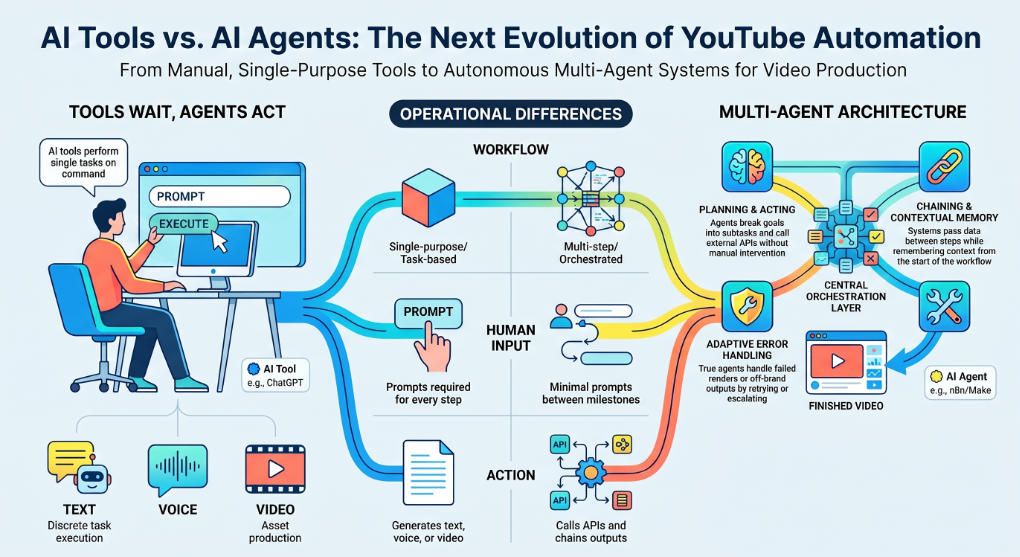
An AI tool does one job when you ask it to. ChatGPT writes a script. ElevenLabs generates a voiceover. Pictory turns text into video. Each is single-purpose and waits for your next prompt.
An AI agent plans the work, uses multiple tools to execute it, makes decisions across steps, and only escalates to a human when it needs judgment. A true YouTube automation agent doesn't just write a script — it picks the topic based on trends, drafts the script for your niche and brand voice, routes the script to a voice agent, sends the voice file to a video assembly agent, generates a matching thumbnail, optimizes the metadata, and schedules the upload. You step in only at the checkpoints you've defined.
In 2026, the strongest YouTube automation setups use a modular multi-agent architecture: specialized agents for each stage, coordinated by an orchestration layer. That's the shift this guide is built around.
The 5 traits of a true YouTube automation agent
A genuine AI agent (versus a glorified prompt wrapper) does five things:
- Plans — breaks a goal ("publish a 10-minute explainer on compound interest") into a sequence of subtasks
- Acts — calls external tools and APIs (YouTube Data API, ElevenLabs, Pictory, etc.) without you doing it manually
- Chains — passes output from one step into the next, with type-checking and error handling
- Remembers — keeps context across the workflow so step 7 knows what happened in step 2
- Adapts — handles unexpected outputs (a failed render, an off-brand visual) by retrying or escalating
Tools like ChatGPT or ElevenLabs are inputs to an agent. Platforms like n8n, Make.com, and assistents.ai are where you build the agent itself.
The 7-stage YouTube automation pipeline
Every YouTube video — whether it takes 30 minutes or 30 hours to make — moves through the same seven stages. Mapping the stages first makes it obvious which agents you actually need and where the leverage is.
- Research & ideation — niche trends, keyword demand, competitor gaps, audience questions
- Scripting — hook, body, CTA, formatted for voice or on-camera delivery
- Voice generation — narration, ideally with a consistent brand voice across all videos
- Video assembly — stock footage, AI-generated B-roll, avatars, transitions, captions
- Thumbnail design — the single biggest CTR lever on the entire platform
- SEO & metadata — title, description, tags, chapters, end screens
- Publishing & analytics — scheduling, posting, watching retention curves, feeding insights back into stage 1
The best AI agent stack covers all seven stages. Most creators get stuck because they over-invest in stage 4 (video assembly) and ignore stage 1 (research) and stage 7 (analytics loop) — which is where the real growth lives.
The 15 best AI agents for YouTube automation in 2026
Here's the working list by stage. Each pick is the strongest option to recommend for a creator or team starting fresh in 2026, with honest notes on where it falls short.
1. assistents.ai — best for governed brand and enterprise YouTube pipelines
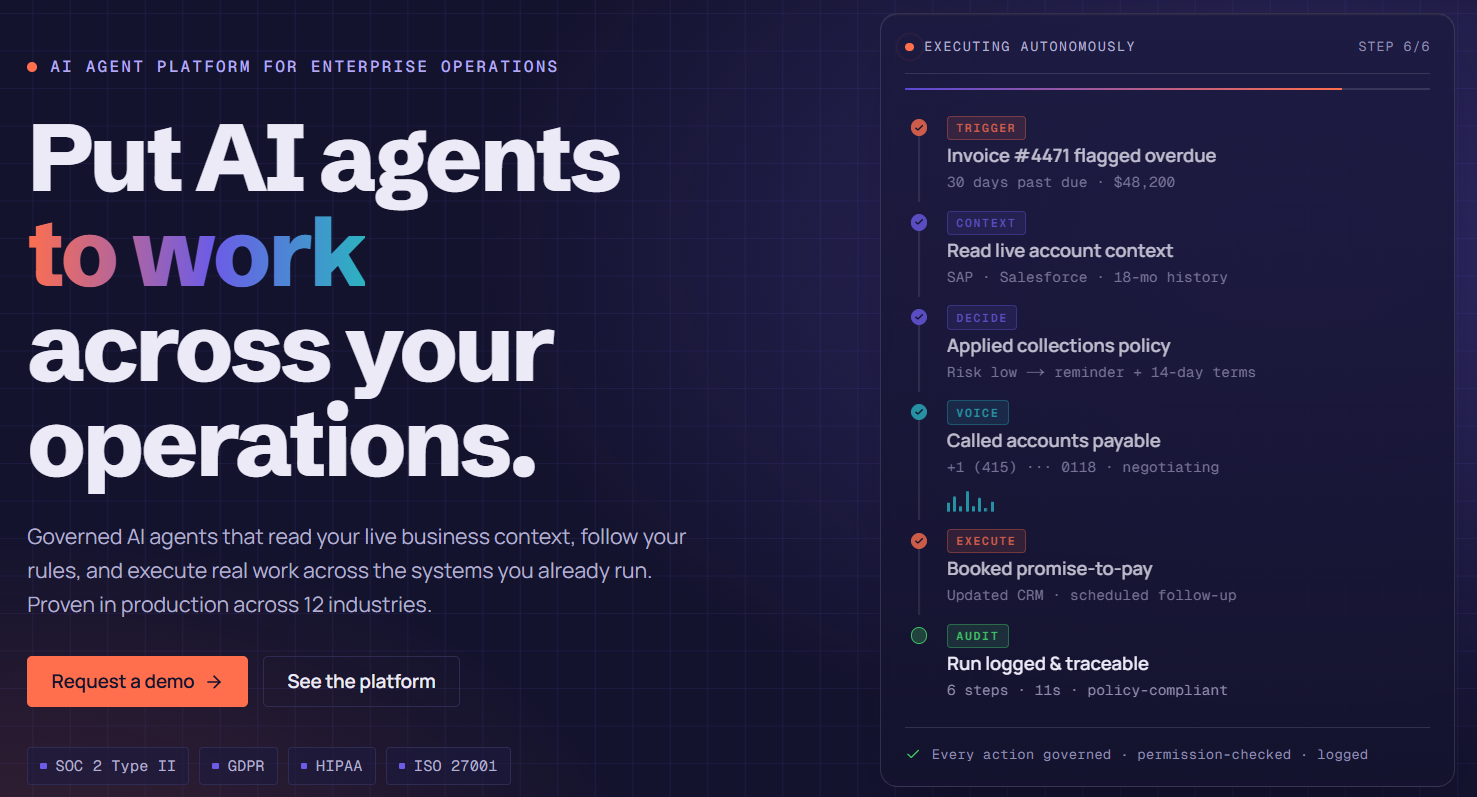
assistents.ai (built by Ampcome) is the strongest option for any team that needs to build a custom multi-agent YouTube pipeline with enterprise governance — brand-safety checks, audit logs, human-in-the-loop approvals, no hallucinated outputs, and full control over which models, voices, and tools each agent uses.
Unlike pre-built tools that lock you into one workflow, assistents.ai is a platform you build YOUR multi-agent pipeline on. It includes a workflow engine for orchestration, a voice agent runtime for sub-second TTS narration, RAG and document grounding for research agents, governed action layers for brand safety, and a model-agnostic backbone (OpenAI, Anthropic, Google, Bedrock, Groq) with BYOK support.
For solo creators, it's overkill. For agencies, brands, and enterprise content operations producing 50+ videos a month across multiple channels with brand stakes, it's the platform that replaces five disconnected SaaS subscriptions with one governed pipeline. (Full breakdown later in this guide.)
Best for: brand channels, agencies, enterprise content ops, governed multi-agent pipelines.
2. Claude — best for long-form and brand-voice scripts
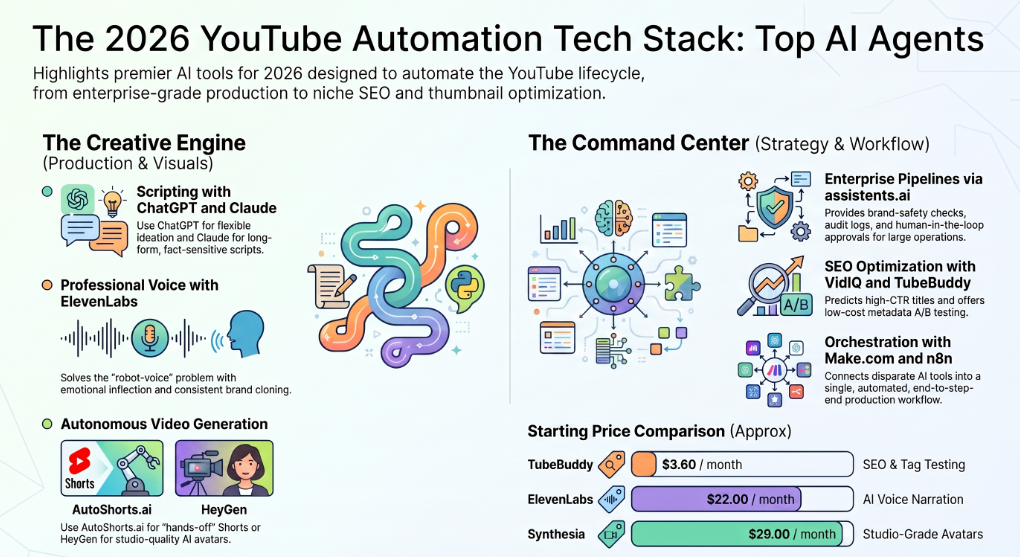
Anthropic's Claude (Opus and Sonnet 4.x in 2026) handles long, nuanced scripts with more factual care than ChatGPT, which matters for finance, education, science, and history channels where accuracy is the whole point. Pricing matches ChatGPT.
Best for: long-form explainers, nuanced brand voice, fact-sensitive niches.
3. ElevenLabs — best AI voice agent
ElevenLabs has effectively solved the robot-voice problem. Its 2026 voice models capture breath, intonation, and emotional inflection well enough that most viewers can't tell the difference from a professional voice actor. Voice cloning lets you keep a consistent brand voice across every video. The Creator plan runs around $22/month; the API is the backbone of most automated voiceover pipelines.
Best for: narration on faceless channels, multilingual content, branded voice consistency.
4. ChatGPT — best AI agent for scripting and ideation
OpenAI's ChatGPT (running on GPT-5 in 2026) is still the most flexible scripting engine for YouTube creators. It writes hooks, outlines, full scripts, and structured outputs (JSON, CSV) that downstream automation tools can consume directly. The free tier handles most solo creators; the $20/month Plus tier unlocks longer outputs and faster responses.
Best for: scripts, video outlines, structured metadata, hook A/B testing.
5. HeyGen — best AI avatar and faceless video agent
HeyGen's Video Agent in 2026 generates a finished video — script, B-roll selection from Sora and Veo models, voiceover, captions, 1080p export — in under five minutes from a single prompt. For talking-head faceless channels using AI avatars, it's neck-and-neck with Synthesia, with a faster prompt-to-publish loop.
Best for: avatar-based explainer channels, news-style faceless content, multilingual dubbing.
6. InVideo AI — best for long-form prompt-to-video
InVideo AI takes a text prompt and returns a complete 1–15 minute video with stock footage, AI narration, transitions, and text overlays. The output quality is solid enough for explainers, listicles, and documentary-style faceless content where most Shorts-focused tools fall short.
Best for: long-form faceless videos, prompt-to-video workflows under tight time budgets.
7. Pictory — best for blog-to-video automation
Pictory converts blog posts, articles, and scripts into fully edited videos by matching text with stock footage from a large library and layering AI voiceover on top. Plans start around $19/month. For creators repurposing written content (blogs, newsletters, podcasts) into YouTube, it's the most efficient automation in the category.
Best for: faceless channels built on repurposed long-form content.
8. AutoShorts.ai — best fully-autonomous Shorts agent
AutoShorts.ai is the closest thing to a "set it and forget it" Shorts channel agent. You pick a topic, set a schedule, connect your YouTube and TikTok accounts, and the platform handles script, visuals, voiceover, captions, and publish without you touching anything. Pure autopilot.
Best for: Shorts-only faceless channels, hands-off operators.
9. Synthesia — best for studio-grade AI avatars
Synthesia produces photorealistic lip-synced AI avatars at broadcast quality, with growing support for studio-express custom avatars trained on a single video upload. Pricing starts at $29/month for the Starter plan. For corporate explainers, training content, or branded talking-head videos, it's the most polished avatar engine on the market.
Best for: corporate channels, training content, branded avatar videos.
10. Midjourney — best for thumbnail concepts
In the thumbnail wars, Midjourney v7 generates stylized, hyper-creative imagery that stock photography can't touch. Used in combination with Canva for text overlay and final assembly, it's the most cost-efficient way to consistently produce high-CTR thumbnails at scale.
Best for: stylized thumbnails, consistent channel branding.
11. Canva AI — best for thumbnail assembly and channel art
Canva's Magic Design and template system handle the production layer of thumbnail work — text, layouts, brand assets, exports — that pure image generators don't. The free tier is enough for most solo creators; Pro runs around $15/month.
Best for: final thumbnail assembly, channel art, branding consistency.
12. VidIQ — best AI agent for YouTube SEO
VidIQ analyzes the YouTube algorithm in real time and predicts which titles will drive the highest click-through rate based on historical performance data. Its Daily Ideas feature uses AI to scan your niche and surface rising topics before they trend. The Boost plan (~$16.58/month) unlocks the AI title and description generators.
Best for: keyword research, title optimization, trend detection.
13. TubeBuddy — best for tag optimization and A/B testing
TubeBuddy is YouTube-certified and lives inside YouTube Studio. It handles tag research, thumbnail A/B testing, bulk metadata edits, and SEO insights. Plans start around $3.60/month — the lowest cost-per-value pick on the list.
Best for: A/B thumbnail testing, bulk metadata work, beginner SEO.
14. n8n — best open-source orchestrator for custom YouTube pipelines
n8n is the open-source workflow automation platform of choice for technical creators. It's self-hostable (zero ongoing platform fees), has native YouTube, OpenAI, and ElevenLabs nodes, and supports custom JavaScript and Python inside workflow nodes. If you're comfortable in a developer environment, n8n lets you build a full YouTube agent pipeline for the cost of a $5/month VPS.
Best for: technical creators, full self-hosted control, unlimited workflow volume.
15. Make.com — best no-code orchestrator
Make (formerly Integromat) is the visual drag-and-drop alternative to n8n. It has a native YouTube module that requires zero API coding and a massive directory of pre-built integrations. Free tier supports 1,000 ops/month; paid plans scale from there.
Best for: non-technical creators, visual workflow builders, small agencies.
Best AI agent stack by user tier
The "best" stack depends almost entirely on who you are and what you're trying to build. Here are four tiers that actually ship.
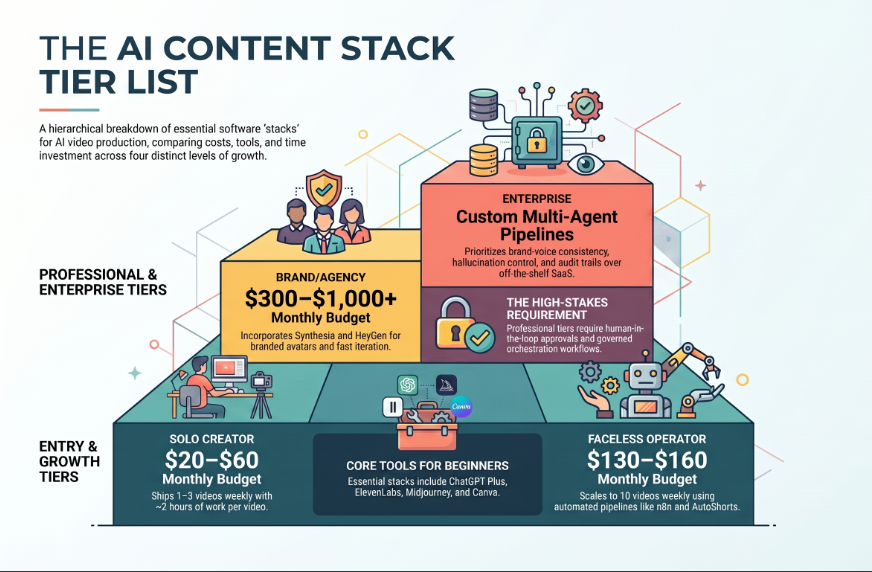
Solo creator stack — $20–$50/month
ChatGPT Plus ($20) + ElevenLabs Creator ($22) + Canva Free + VidIQ Free or Boost ($17) + manual upload. Total: $20–60/month, 1–3 videos per week, 2 hours of work per video.
Faceless channel operator stack — $50–$150/month
Claude Pro ($20) + ElevenLabs Creator ($22) + InVideo AI or Pictory ($30) + Midjourney ($10) + Canva Pro ($15) + VidIQ Boost ($17) + n8n self-hosted ($5 VPS) + AutoShorts.ai for Shorts ($29). Total: $130–$160/month, 5–10 videos per week, 30–60 minutes per video once the pipeline is dialled in.
Brand / agency stack — $300–$1,000/month
Add: Synthesia for branded avatars ($89), HeyGen for fast iteration ($89), Make.com Pro for orchestration ($16), team seats across the above stack. Plus a custom layer for brand-safety review and approval workflows. Total: $300–$1,000/month depending on volume.
Enterprise content operations stack — custom
This is where off-the-shelf SaaS hits its ceiling. Brands running multiple YouTube channels across regions, agencies managing rosters of client channels, and content teams with brand stakes (regulated industries, sponsored content, multilingual production) need governed multi-agent pipelines that off-the-shelf tools can't deliver: brand-voice consistency at scale, hallucination control, audit trails, human-in-the-loop approvals on high-stakes content, and the ability to swap models without re-architecting.
This is the tier where building on a platform like assistents.ai outperforms stacking SaaS subscriptions.
What production-grade AI agent pipelines actually look like
Most ranking blogs on this topic talk about AI agents in the abstract — "set it and forget it," "channels are doing this." Here are five anonymized patterns from real AI agent deployments shipped in adjacent domains. Each one maps cleanly onto a YouTube use case.
Pattern 1 — Creator-economy operations at scale
A creator-economy platform built an AI agent layer to automate influencer discovery enrichment, campaign workflow orchestration, brand-safety checks on creator content, and end-to-end engagement and ROI analytics — replacing manual operations across hundreds of brand programs.
Translation to YouTube: the highest-leverage agent stack for any brand-adjacent channel isn't script generation. It's discovery + safety + analytics. Get the research agent and the analytics-loop agent right, and the rest of the pipeline becomes much easier to scale.
Pattern 2 — Production-grade voice agents
A consumer voice-agent product for actors deployed a real-time AI voice agent with character-controlled voices, pacing logic, and cue handling — convincing enough to be used as a rehearsal partner for self-tape auditions.
Translation to YouTube: AI voice in 2026 has crossed the "good enough" threshold for narration-led content. The remaining work is brand consistency (one cloned voice across hundreds of videos) and pacing control, not raw audio quality.
Pattern 3 — Brand insights and creative loop
A brand insights studio founded by ex-Google leaders unified creative, performance, and audience signals into actionable themes and insight narratives — closing the loop from "what did our audience respond to" back into "what should we make next."
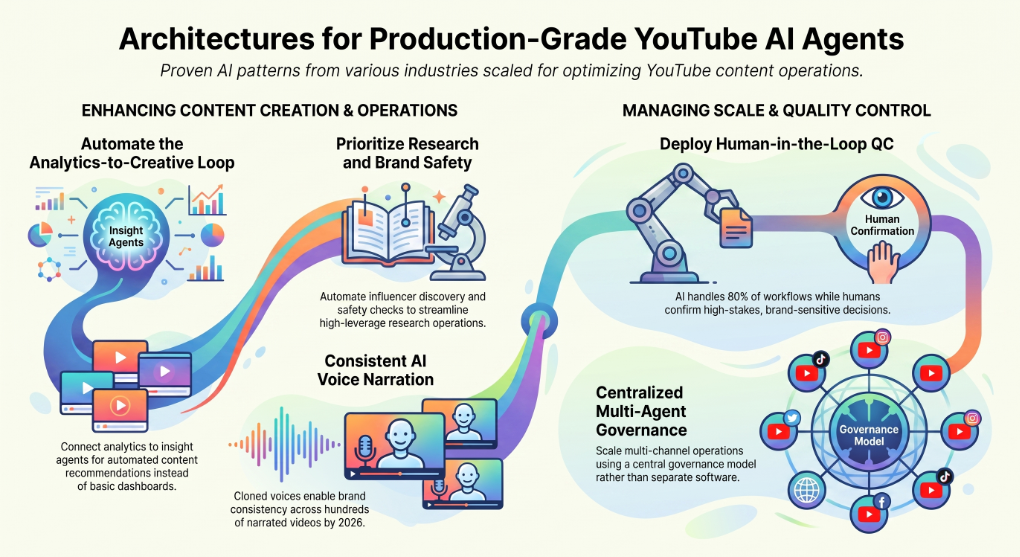
Translation to YouTube: the analytics-to-next-video loop is where most automated channels plateau. Plug your YouTube Analytics into an insight agent that produces themes and recommendations, not just dashboards.
Pattern 4 — Human-in-the-loop quality control
A luxury hospitality brand deployed an end-to-end digital booking agent with a hybrid human-in-the-loop handoff on high-stakes itinerary decisions — the AI handles 80% of the workflow, humans confirm the decisions where brand experience matters.
Translation to YouTube: don't fully automate the final publish step on brand-sensitive content. Build a maker-checker model where the AI proposes the title, thumbnail, and description, and a human approves before it goes live. This is the difference between a channel that scales and one that gets demonetized.
Pattern 5 — Content workflows at million-user scale
A global learning platform with over 1M users across 131 countries runs competency insights, learning guidance, and automated support workflows via AI — proof that content/learning workflows can run at YouTube-channel-network scale without breaking.
Translation to YouTube: if you're managing 5+ channels or a content operation that touches multiple regions and languages, the right architecture is multi-agent with central governance, not 5 separate SaaS subscriptions.
How to choose the right AI agent for your channel
A four-question framework that cuts through the noise:
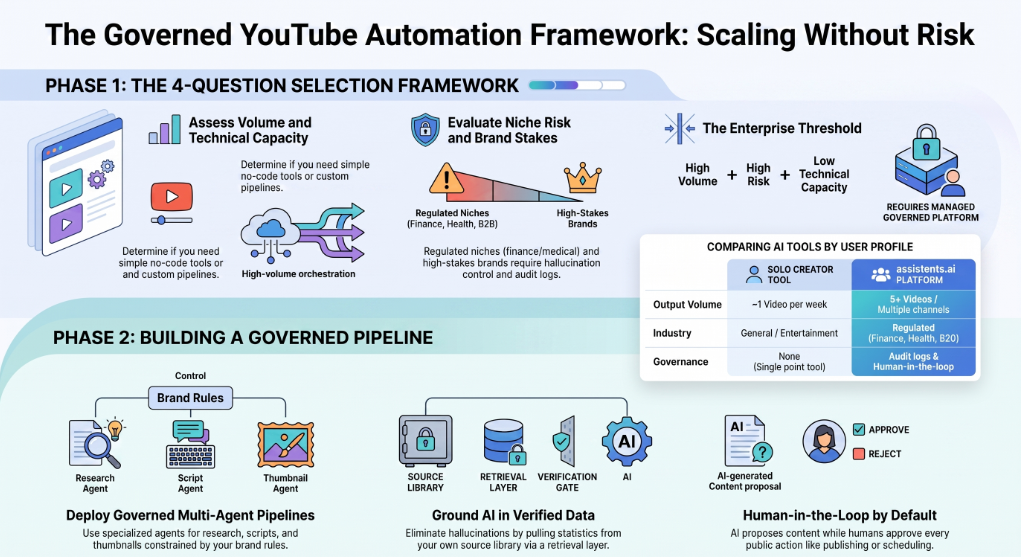
- Volume. Publishing 1 video a week? A pre-built tool stack is fine. Publishing 5+ a week or running multiple channels? You need orchestration.
- Niche risk. Educational, news, finance, medical, legal? You need a hallucination-control layer (RAG over verified sources, human approval on factual claims) — not just a script generator.
- Brand stakes. Personal channel? Pre-built tools work. Brand or agency channel where one bad video damages the brand? You need governance, brand-safety checks, and audit logs.
- Technical capacity. Comfortable in n8n or with a developer on the team? Build custom on n8n or assistents.ai. No technical capacity? Stick to no-code tools like Make and AutoShorts.ai.
If you scored "high volume + high niche risk + high brand stakes + low technical capacity," you need a managed governed AI platform with implementation support. That's the assistents.ai use case.
Why assistents.ai for branded and enterprise YouTube automation
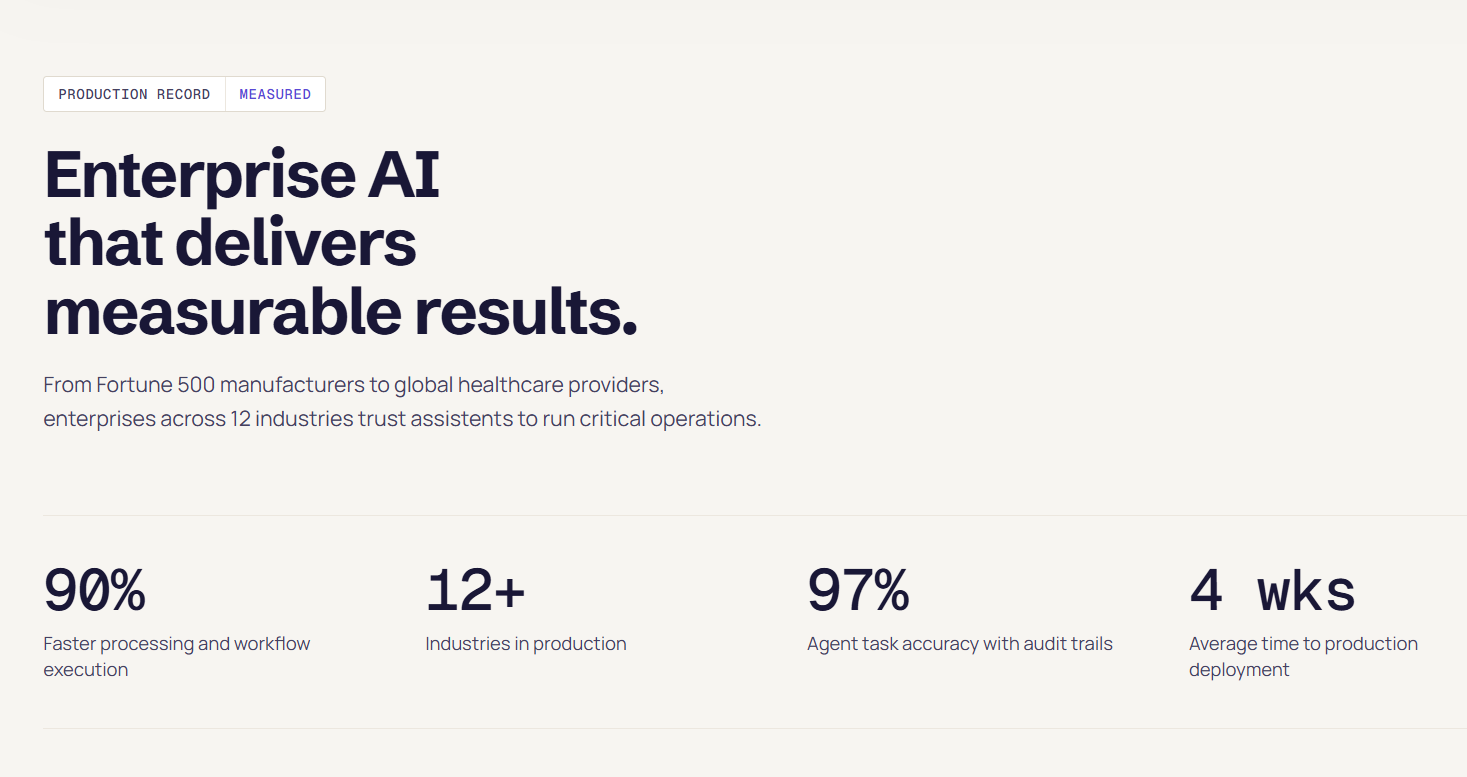
Most AI YouTube tools are point solutions. They do one thing — generate a video, write a script, schedule an upload — and they assume you're a solo creator with low brand stakes and no governance requirements.
That assumption breaks fast when you cross any of these thresholds: producing branded content under a sponsor's brand guidelines, running multiple channels across regions or languages, working in a regulated industry (finance, health, education, B2B), or operating at a volume where one off-brand or hallucinated video is a real reputational risk.
assistents.ai is built for the work that starts where point tools stop. Here's what that actually means in practice for YouTube automation.
Governed multi-agent pipelines. You can build a YouTube content pipeline as a workflow of specialized agents — a research agent that grounds itself in verified sources, a script agent constrained by your brand voice, a voice agent generating narration through a cloned brand voice, a thumbnail agent enforcing visual guidelines, a metadata agent optimizing for your SEO targets, and a publishing agent that respects your approval policy. Each agent runs under governance rules you define.
No hallucinated numbers, no off-brand outputs. assistents.ai grounds AI in your own data, metrics, and business rules. For YouTube channels with factual claims (finance, education, B2B), this matters. Your script agent doesn't make up statistics — it pulls them from your verified source library through a retrieval layer with audit logging.
Model-agnostic, BYOK. The platform routes through OpenAI, Anthropic, Google Vertex, Bedrock, Groq, and xAI through an AI Gateway, with per-organization bring-your-own-key support. You pick the right model for each agent (Claude for long scripts, GPT-5 for ideation, Gemini for vision) without re-architecting when the leaderboard changes.
Voice agent runtime built in. The platform includes a real-time voice agent pipeline (STT → streaming LLM with tools → TTS) with sub-second latency and barge-in handling. For most YouTube use cases you won't need streaming voice, but the same engine produces high-quality TTS narration with consistent brand voice cloning.
Workflow engine for orchestration. Instead of duct-taping n8n + Make + custom scripts, the platform's workflow engine lets you visually compose multi-agent pipelines with built-in error handling, retries, human approval steps, and audit logs. Each workflow run is fully traceable — useful when a sponsor asks "show me the approval chain for this video."
Human-in-the-loop by default. Every action that touches the public-facing channel (publish, schedule, respond to comments) can be configured to require a human approval before it executes. The AI proposes; a human confirms; the server re-checks. This is the maker-checker pattern that lets brand and enterprise teams sleep at night.
Honest positioning. assistents.ai is not a turnkey "generate YouTube videos with one click" tool. It's the platform you build your custom AI agent pipeline on when off-the-shelf tools have run out of road. For solo creators, the pre-built tools in this guide are the right answer. For brands, agencies, and enterprise content operations that need governed YouTube pipelines, assistents.ai is the platform.
If your team is at that threshold, book a 15-minute scoping call and we'll map your current YouTube workflow against a governed multi-agent pipeline.
How to build your own AI agent for YouTube automation
If you'd rather build than buy, here are three paths in 2026.
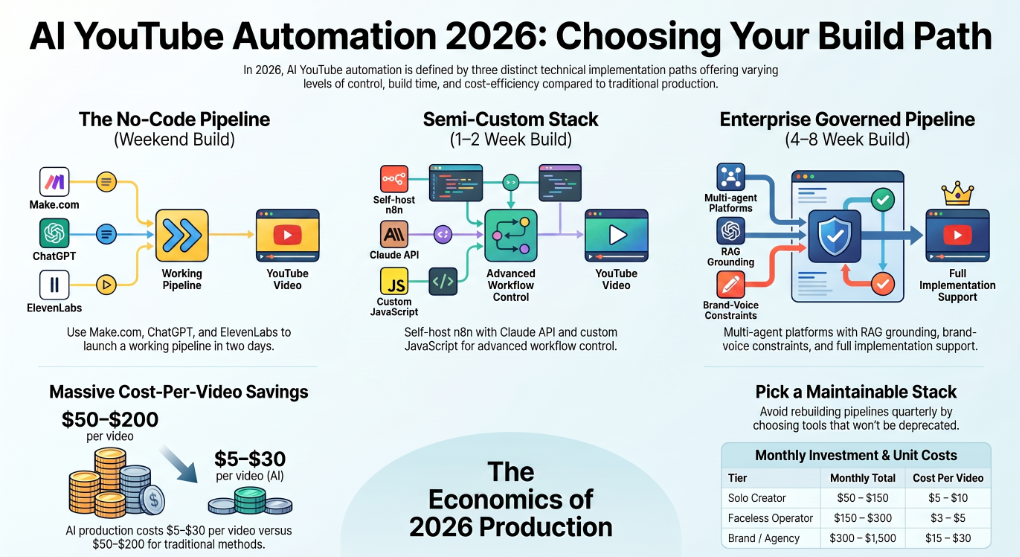
The no-code path
Stack: Make.com + ChatGPT + ElevenLabs + Pictory + Canva + YouTube Data API.
Build a Make scenario triggered by a Google Sheet entry (your topic queue). Steps: ChatGPT generates the script → ElevenLabs renders the voiceover → Pictory assembles the video from the script → Canva generates the thumbnail via API → ChatGPT writes the title, description, and tags → the YouTube node uploads and schedules.
Time to working pipeline: a weekend. Ongoing cost: ~$50–$150/month.
The semi-custom path
Stack: n8n self-hosted + Claude API + ElevenLabs API + Sora/Veo for B-roll + custom prompts.
Build the pipeline in n8n with custom JavaScript nodes for the parts pre-built integrations don't cover. Add a Slack approval step before publish. Add a YouTube Analytics pull at 24h, 7d, and 30d post-publish that feeds back into the topic queue.
Time to working pipeline: 1–2 weeks. Ongoing cost: ~$5 VPS + API usage.
The enterprise path
Stack: assistents.ai (or equivalent governed multi-agent platform).
Build your pipeline as a workflow with named agents for each stage. Configure RAG grounding for the research agent. Set brand-voice constraints on the script agent. Configure the voice agent with a cloned brand voice. Set approval policies on the publish action. Connect YouTube Analytics through the platform's connector layer. Wire the analytics output back into the research agent's context.
Time to working pipeline: 4–8 weeks with implementation support. Ongoing cost: platform license + API usage.
How much does AI YouTube automation cost in 2026?
Honest cost breakdown by tier:
- Ultra-budget faceless stack: $1–$3 per video, $20–$50/month all in. Free-tier ChatGPT, ElevenLabs free tier, Canva free, manual upload.
- Solo creator stack: $50–$150/month, ~$5–$10 per video at 10 videos/month.
- Faceless operator stack: $150–$300/month, ~$3–$5 per video at 30+ videos/month (economies of scale on API usage).
- Brand/agency stack: $300–$1,500/month, $15–$30 per video at brand-quality output.
- Enterprise governed pipeline: custom pricing, typically $2,000–$10,000+/month including platform license and implementation, $5–$20 per video at full governance and brand-safety overhead.
Traditional production for the same output volume runs $50–$200 per video minimum. The economics are what make AI YouTube automation compelling — but the economics break if you're rebuilding the same pipeline every quarter because tools are deprecated. Pick a stack you can maintain.
What YouTube's 2026 policy says about AI content
YouTube's July 2025 inauthentic content update did not ban AI. It banned mass-produced, template-based content with no creative input. The platform's Gemini-powered content review now cross-checks for originality at upload time.
Safe in 2026: AI-generated unique scripts, custom voiceovers, original AI-assembled scenes, AI thumbnails, AI metadata. Suppressed or demonetized: direct copies of other channels, templated low-effort uploads, content depicting realistic people or events without disclosure.
Disclosure is required for synthetic media depicting real people or real events. AI narration on a faceless channel discussing facts does not require disclosure under current policy. Always check the latest YouTube Creator policy before assuming.
The channels thriving in 2026 use AI as a production accelerator with strong creative direction — not as a replacement for editorial judgment.
6 mistakes most creators make with AI YouTube agents
- Over-investing in stage 4 (video assembly) and ignoring stage 1 (research) and stage 7 (analytics loop). The leverage is in topic selection and the feedback loop, not in video rendering.
- Fully automating publish on brand-sensitive content. One off-brand thumbnail can cost more than the time saved across 100 videos. Keep human approval on the publish step until you've shipped 50+ videos cleanly.
- Treating AI tools as AI agents. Subscribing to ChatGPT, ElevenLabs, and Pictory separately is not "an AI agent for YouTube automation." Until you've orchestrated them with n8n, Make, or a platform like assistents.ai, you have three tools and a lot of copy-paste.
- Skipping the voice cloning step. A consistent brand voice across all your videos is a major retention and recognition lever. Most creators use ElevenLabs' default voices and lose the brand consistency benefit.
- Generating generic AI thumbnails. Stock-looking AI thumbnails get scrolled past. Stylized, on-brand thumbnails (Midjourney + Canva template) outperform by 30–50% on CTR in most niches.
- No hallucination control on factual content. If your niche is finance, health, education, science, or B2B, you need a retrieval layer that grounds the script in verified sources. A bare ChatGPT prompt will hallucinate stats, and YouTube will eventually catch up to that.
The bottom line
The best AI agent for YouTube automation in 2026 isn't a single tool — it's the right stack for your tier, orchestrated as a true multi-agent pipeline. Solo creators win with pre-built tools. Brands and enterprise content operations win with governed custom pipelines built on platforms like assistents.ai.
Start with the stage where you have the biggest leverage gap, automate it well, then expand. The creators and teams shipping at scale in 2026 aren't the ones with the most tools — they're the ones whose pipelines are clean, governed, and feedback-looped.
If you're at the threshold where off-the-shelf tools have stopped scaling and you need a governed AI agent pipeline for your YouTube operation, book a 15-minute scoping call with the assistents.ai team.
FAQs
What is the best AI agent for YouTube automation in 2026?
The best AI agent depends on use case. For solo creators, ChatGPT (scripting) + ElevenLabs (voice) + InVideo AI or Pictory (video) + Canva (thumbnails) + VidIQ (SEO) is the strongest pre-built stack. For brands, agencies, and enterprise content teams needing governed multi-agent pipelines, assistents.ai is the platform to build on. For Shorts-only autopilot, AutoShorts.ai is the strongest single tool.
What's the difference between an AI agent and an AI tool for YouTube?
An AI tool does one task when you prompt it (ChatGPT writes a script). An AI agent plans, chains multiple tools, makes decisions across steps, and only escalates to a human at defined checkpoints. n8n, Make, and assistents.ai are platforms where you build AI agents — ChatGPT and ElevenLabs are tools the agents call.
Can AI agents fully automate a YouTube channel?
Technically yes, but it's a mistake to do it. The strongest channels in 2026 keep humans on creative direction (niche selection, brand voice, editorial judgment) and let AI agents handle execution (research, scripting, voice, video, thumbnails, metadata, publishing). Full automation without creative direction produces generic content that gets suppressed by YouTube's inauthentic content rules.
Are AI YouTube automation channels allowed by YouTube?
Yes, with conditions. YouTube's 2025 inauthentic content policy banned mass-produced template content, not AI itself. Unique scripts, custom voiceovers, original scenes, and disclosure for synthetic media depicting real people are all required. Channels following these rules monetize normally.
How much does AI YouTube automation cost in 2026?
A solo creator stack runs $20–$50/month and produces videos for $1–$3 each. A faceless operator stack runs $150–$300/month at $3–$5 per video. A brand/agency stack runs $300–$1,500/month at $15–$30 per video. An enterprise governed pipeline starts around $2,000/month including platform license and implementation.
What's the best AI agent for faceless YouTube channels?
For full autopilot on Shorts: AutoShorts.ai or FlowShorts. For long-form faceless explainers: HeyGen Video Agent or InVideo AI. For blog-to-video repurposing: Pictory. Combine any of these with ElevenLabs for voice and Canva or Midjourney for thumbnails.
Can ChatGPT or Claude be turned into a YouTube automation agent?
Not on their own — they're tools, not agents. To turn ChatGPT or Claude into a YouTube agent, you orchestrate them inside a workflow platform (n8n, Make, assistents.ai) that handles the multi-step logic, tool calls, error handling, and YouTube API integration. The LLM becomes the brain; the platform becomes the agent.
What's the best free AI agent for YouTube automation?
n8n self-hosted plus free tiers of ChatGPT, ElevenLabs, and Canva is the strongest free stack. You'll pay for a $5/month VPS to host n8n. There are also open-source GitHub projects (search "youtube automation agent") that bundle the orchestration layer for free if you can follow a README.
How do I build my own AI agent for YouTube using n8n or Make?
Start with the two lowest-risk modules: an upload/scheduling workflow that pulls metadata from a Google Sheet and posts to YouTube via the Data API, and an ideation workflow that pulls trending topics via VidIQ or Google Trends. Add the scripting agent next (ChatGPT or Claude). Add voice (ElevenLabs API), then video assembly (Pictory or HeyGen API), then thumbnails (Canva API). Connect them with conditional logic in n8n or Make. Build the analytics feedback loop last.
Which AI agent is best for YouTube Shorts automation?
AutoShorts.ai and FlowShorts are purpose-built for Shorts. Both handle the entire pipeline — niche selection, script, visuals, voice, captions, upload — without you touching anything. For semi-automated Shorts with more creative control, combine HeyGen with ElevenLabs.
Can AI agents write YouTube scripts that rank?
Yes, with the right setup. The scripts that rank in 2026 have strong hooks (10–15 seconds), tight pacing, retention loops, and audience-specific framing. ChatGPT and Claude can both produce this with the right prompt structure — but generic prompts produce generic scripts. Use a structured prompt (AIDA framework, specific niche, defined audience) and edit for your voice before publishing.
What's the best AI voice agent for YouTube voiceovers?
ElevenLabs is the gold standard in 2026 for English content. For multilingual channels, ElevenLabs also leads with 30+ language support and voice cloning that preserves your tone across languages. Play.ht is the budget alternative; Murf.ai is strong for corporate explainers.
How do brands and agencies use AI agents for YouTube?
Brands and agencies use AI agents for high-volume content production under brand guidelines. The typical setup combines a custom multi-agent pipeline (assistents.ai or similar) with brand-voice constrained scripting, cloned voice narration, brand-safety checks before publish, and human approval workflows on every public-facing action. This replaces 3–5 SaaS subscriptions and a freelance editor with one governed pipeline.
Will YouTube demonetize AI-generated content in 2026?
Not by default. YouTube demonetizes inauthentic content — mass-produced templated uploads with no creative input — regardless of whether AI was involved. Original AI-assisted content with unique scripts and creative direction monetizes normally. Synthetic media depicting real people or real events requires disclosure.
What's the production-grade alternative to off-the-shelf YouTube AI agents?
For teams that have outgrown off-the-shelf tools, the alternative is a governed multi-agent platform like assistents.ai. Instead of stacking ChatGPT, ElevenLabs, Pictory, Canva, n8n, and a publishing tool with separate subscriptions and no governance layer, you build one pipeline with named agents per stage, brand-voice constraints, RAG grounding, audit logs, and human-in-the-loop approvals. This is the tier where the economics flip from "save money on tools" to "save reputational risk on brand-sensitive content."