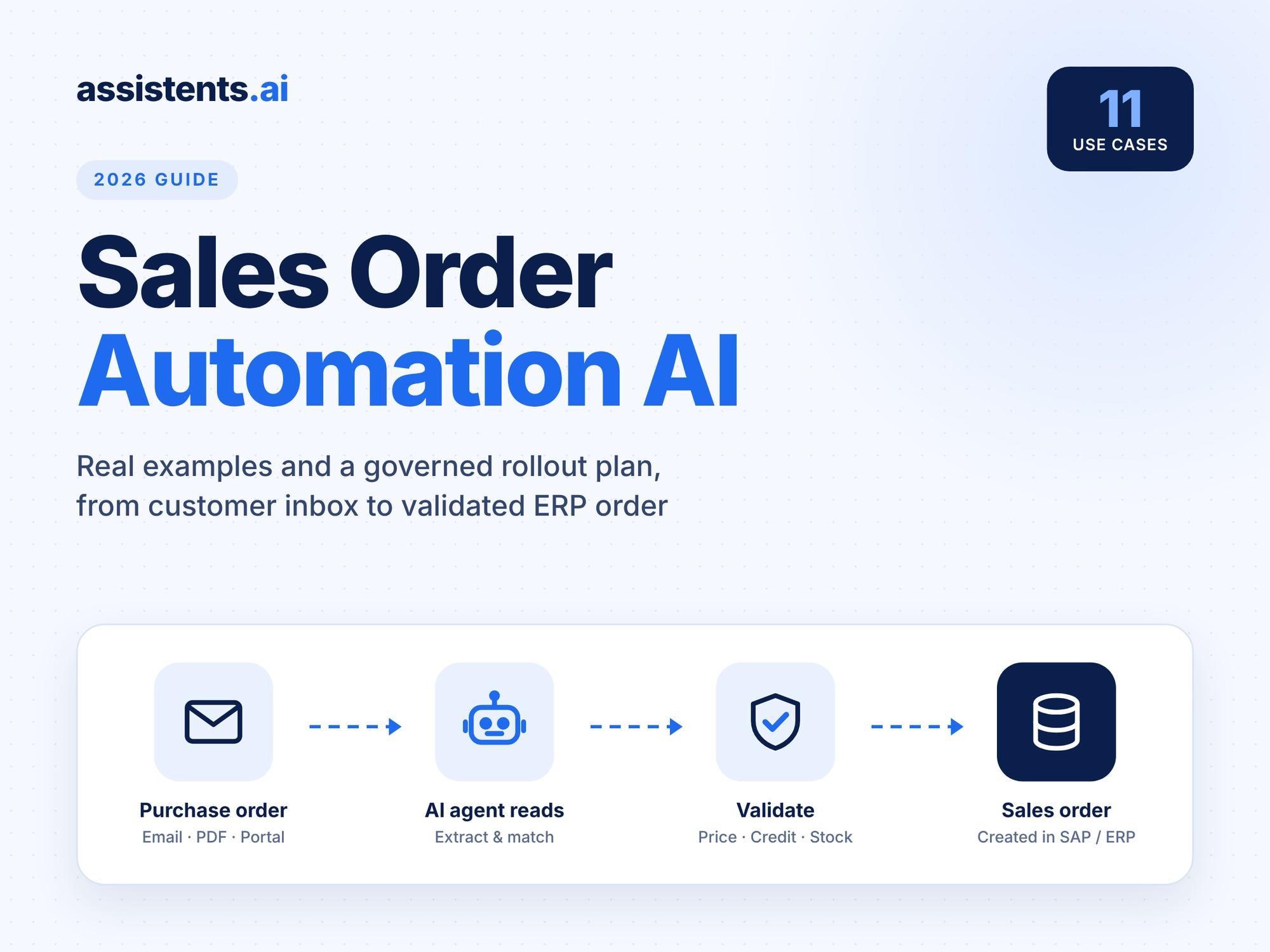
Sales order automation AI reads customer purchase orders from email, PDF, Excel and portals, checks them against your prices, stock and credit rules, and creates validated sales orders in SAP or any ERP. People only step in for exceptions. For most manufacturers, distributors and retailers, it is the fastest way to cut order entry cost, shorten order-to-cash and free customer service teams for real customer work.
This guide covers 11 sales order automation AI use cases, each with a real (anonymised) example, plus a comparison of tools, an ROI formula and a 90-day governed rollout plan.
Key takeaways
- Sales order automation AI handles the full order, not just data capture: intake, extraction, validation, ERP creation, exceptions and customer confirmation.
- Benchmark research from APQC estimates savings of $5 to $15 per sales order when a manual process is automated, and a 46% shorter order cycle time.
- The biggest wins come from combining Document AI, business context (prices, contracts, credit) and governed workflows with human review for exceptions.
- Start with one order inbox, run in shadow mode for 30 days, then switch on auto-creation within policy.
What is sales order automation AI?
Sales order automation AI is software that uses AI agents to turn incoming customer orders into validated sales orders in your ERP without manual re-keying. It reads unstructured documents such as emails, PDFs and spreadsheets, matches every line to your customers and products, applies pricing, credit and stock rules, and either creates the order or routes it to a person for review.
It differs from traditional order management software. Order management systems store and track orders once they exist. Sales order automation AI creates those orders in the first place, from messy, real-world inputs that ERPs cannot read on their own.
Platforms such as assistents.ai combine Document AI, a Context Engine that understands your business data, and autonomous agents that act in your ERP under clear governance.
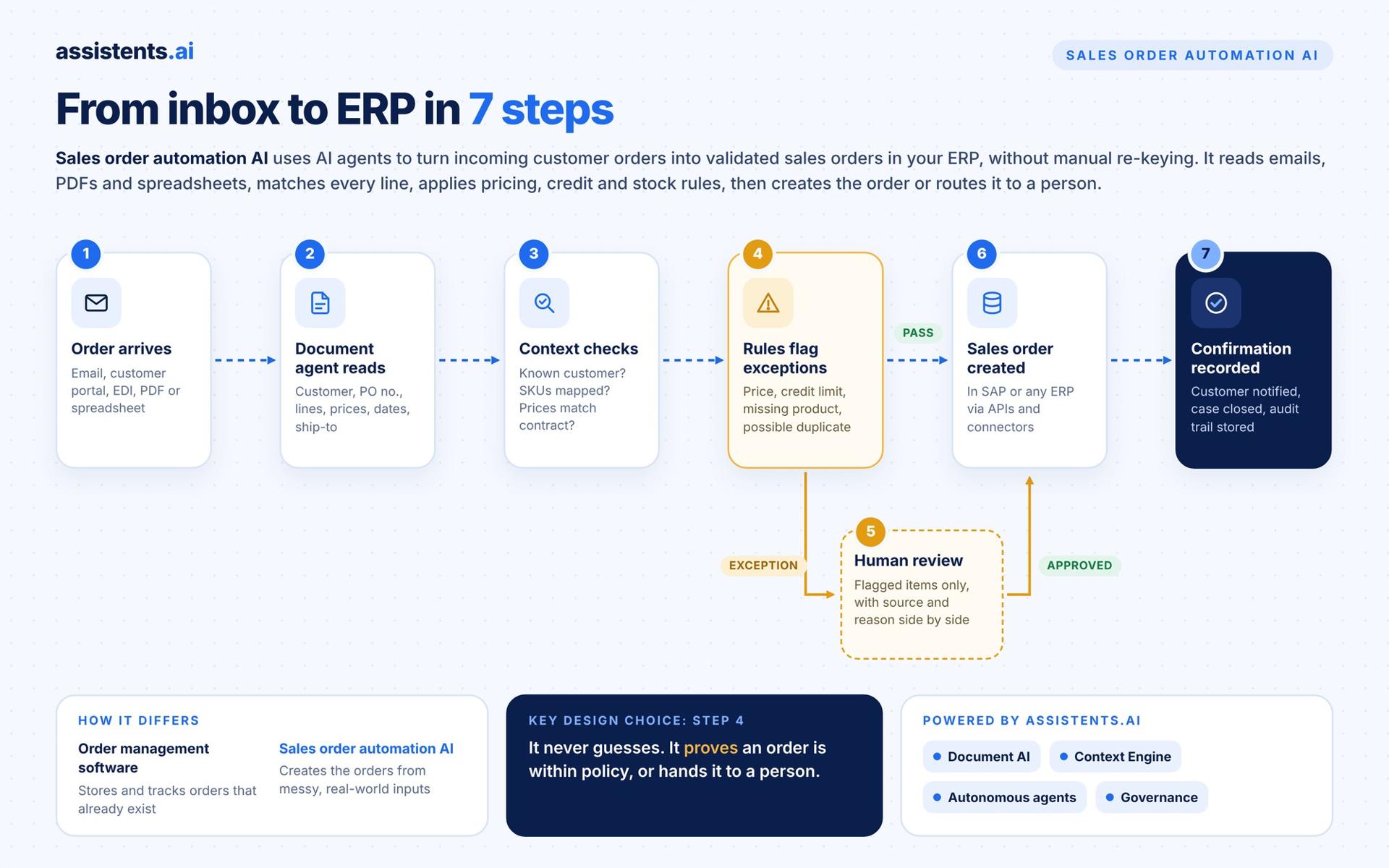
How does AI sales order processing work? From inbox to ERP in 7 steps
AI sales order processing follows the same seven steps for every order, whether it arrives as an email body, a scanned PDF or a portal download:
- A purchase order arrives by email, customer portal, EDI, PDF or spreadsheet.
- A document agent reads the fields: customer, PO number, line items, quantities, prices, delivery dates and ship-to address.
- Context checks run against your business data: is this a known customer, do the product codes map to your SKUs, do prices match the contract?
- Rules flag exceptions: a price outside tolerance, a credit limit breach, a missing product reference or a possible duplicate.
- An authorised person reviews only the flagged items, with the source document and the reason shown side by side.
- The sales order is created in SAP or your ERP through APIs or connectors.
- Confirmation is recorded: the customer is notified, the case is closed and the full audit trail is stored.
The key design choice is step 4. Good sales order automation never guesses. It either proves an order is within policy or hands it to a person, which is how teams move safely towards touchless order processing.
Sales order automation AI vs OCR vs RPA vs EDI
AI agents are the only approach that handles unstructured orders, validates them against business rules and resolves exceptions in one flow. Here is how the four approaches compare:
| AI agents | OCR / templates | RPA bots | EDI | |
|---|---|---|---|---|
| Unstructured input (email body, varied PDFs) | Yes, any layout | Only known templates | No, needs structured data | No, needs a standard format |
| New customer formats | Works without new templates | New template per layout | New script | Onboarding per partner |
| Validation (price, credit, stock) | Built in, uses business context | None | Scripted, brittle | Limited |
| Exception handling | Routes with reasons, asks for missing details | Manual | Fails or stops | Manual |
| Setup effort | Weeks | Weeks per template | Weeks per process | Months per trading partner |
| Best for | Mixed, high-variety order inboxes | Few, fixed layouts | Stable screen workflows | Large, standardised trading partners |
EDI still works well for your biggest, most stable trading partners. AI agents cover everyone else, which for most B2B companies is the majority of customers. For a deeper look, see AI agents vs RPA.
Why are order desks adopting AI in 2026?
Order desks are adopting AI because manual order entry is expensive, slow and increasingly hard to staff, while AI can now read unstructured documents reliably.
- Cost per order. An APQC survey on automating sales order entry found bottom performers using paper-based methods spend $21.00 per sales order, against $2.00 for top performers on digital channels, and estimated automation savings of $5 to $15 per order.
- Cycle time. The same APQC research reports automation cuts order cycle time by over 46%, from 8.6 hours to 4.6 hours between order receipt and logistics notification.
- Customer experience. In that survey, 96% of respondents agreed that order automation improves customer satisfaction.
- Speed to cash. A later APQC report on order automation found a median customer order cycle time of 2.0 days for organisations focused on first-time data accuracy, against 9.5 days for those without that focus.
- ERP change. Many companies are moving from SAP ECC to SAP S/4HANA or retiring legacy capture tools. That is the right moment to replace manual entry rather than migrate it.
- People. Only 1.9% of APQC respondents laid off staff after automating. Teams redeploy order-entry time to customer service, account growth and exception handling.
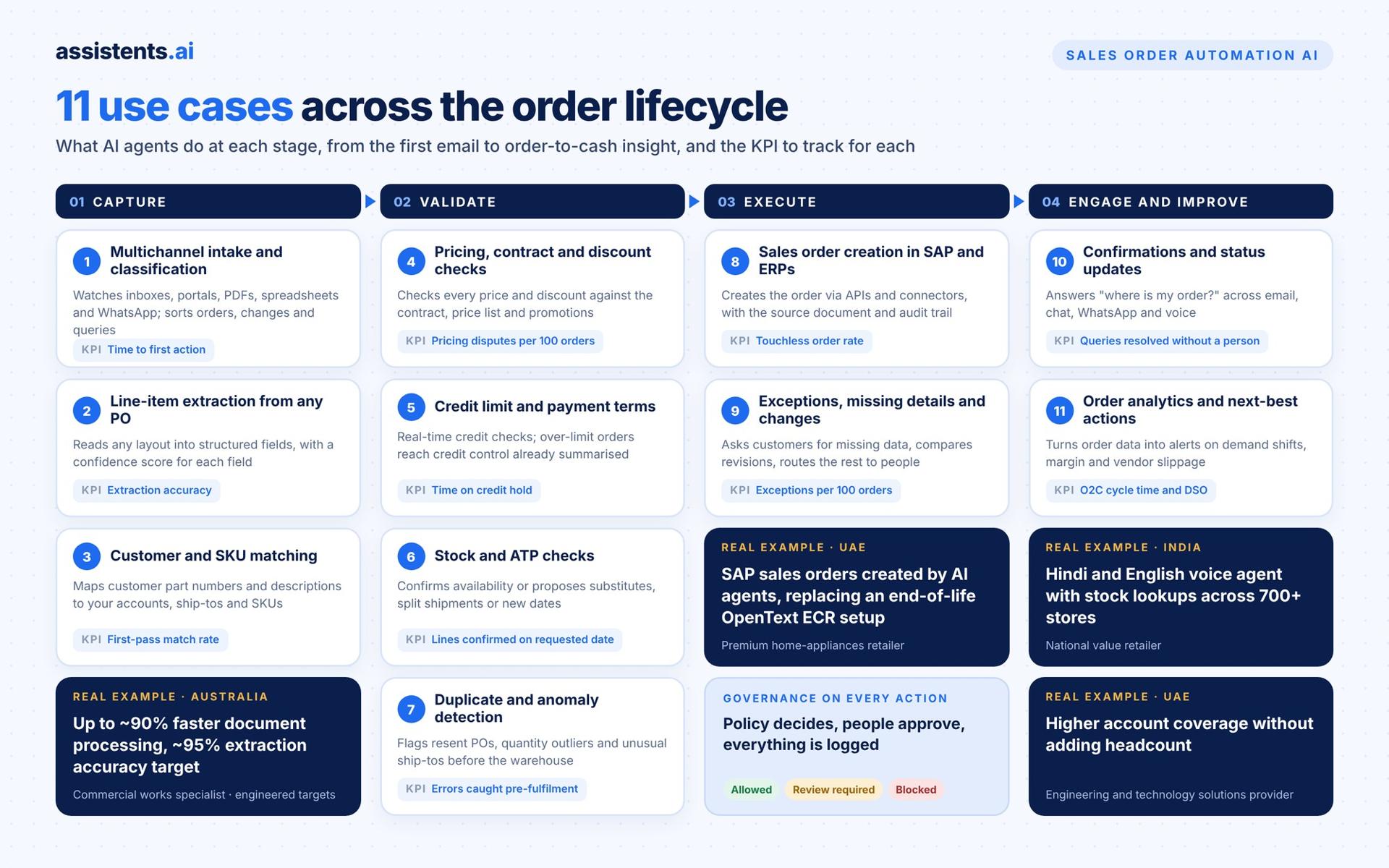
11 sales order automation AI use cases
Each use case below explains what the agent does, how it works, a real example from an assistents.ai deployment (client names withheld), and the KPI to track.
1. Multichannel order intake and classification
AI agents watch every order channel, including shared inboxes, portals, PDFs, spreadsheets and WhatsApp, and classify each message: new order, change, cancellation, quote request or status query. Only real orders go into the order flow; everything else is routed to the right team.
Using autonomous workflows, assistents.ai triggers work from inbox emails, recurring schedules, system events, APIs and files, so nothing waits for someone to open a mailbox.
Real example: A luxury hospitality group running 16 lodges and camps across East Africa receives complex booking requests by email. assistents.ai deployed a digital booking agent for email intake, intent classification and data extraction, with human-in-the-loop quality control. Result: faster turnaround with less back-and-forth, and higher accuracy on complex requests.
KPI to track: time from order receipt to first action.
2. Line-item extraction from unstructured purchase orders
This is the core of AI order entry. The agent reads the purchase order, whatever its layout, and extracts customer, PO number, line items, quantities, units, prices, delivery dates and addresses into structured data, with a confidence score for each field.
assistents.ai Document AI reads layouts and tables, extracts fields, applies business rules and routes low-confidence fields for review. The same engine powers invoice processing on the buying side.
Real example: An Australian remediation and commercial works specialist with 20+ years in the market handled long, complex tender documents by hand. assistents.ai built an intelligent document workbench with multi-agent orchestration and vision-LLM extraction from complex PDFs, fully integrated with its field-service management system, including quote locking and audit logs. Result: engineered for up to ~90% faster document processing, with a ~95% extraction accuracy target for standard formats.
KPI to track: field-level extraction accuracy and percentage of orders needing no correction.
3. Customer, material and SKU matching against master data
Customers rarely use your product codes. They send their own part numbers, old catalogue references or just a description. The agent matches each line to the right customer account, ship-to and SKU using your master data, past orders and customer-specific cross-references.
The Context Engine connects customers, products, contracts and order history so the match is based on evidence, not guesswork, and every suggested mapping shows its source.
Real example: A pharma sourcing platform listing 1,800+ rare excipients and 7,500+ SKUs needed faster supplier discovery and quoting. assistents.ai automated RFQs, supplier matching and quality and regulatory document handling. Result: faster procurement cycles and fewer manual vendor follow-ups.
KPI to track: first-pass SKU match rate.
4. Pricing, contract and discount validation
Before an order is created, the agent checks every price and discount against the customer's contract, price list and promotions. Small differences within tolerance are accepted automatically; anything else is flagged with the expected price and the contract clause.
How it works on assistents.ai (illustrative): for an order of air conditioners from a retail customer, the agent links the order to master agreement MSA-204, applies the contract discount, and sends the order for review only if it exceeds the allowed limit. Permitted actions are defined up front: create the order within policy, apply the discount per contract, send for review if over limit, or request more information.
KPI to track: pricing disputes and credit notes per 100 orders.
5. Credit limit and payment-term checks with approval routing
The agent checks open receivables and credit limits in real time. Orders within limits continue; orders over limit go to credit control with the exposure, ageing and order value already summarised, so approval takes minutes, not days.
Agent governance on assistents.ai evaluates every action against user permissions and business rules, with three outcomes: allowed (proceed and create the record), review required (human approval, then update) or blocked (no action, logged for review). Agentic BI can also alert credit control when overdue receivables rise in a customer segment.
KPI to track: average time orders spend on credit hold.
6. Real-time stock and available-to-promise (ATP) checks with alternatives
The agent checks stock and available-to-promise dates before confirming. If an item is short, it proposes alternatives such as a substitute product, a split shipment or a later date, and can ask the customer directly.
Real example 1: A value retailer with 700+ stores across India deployed an inventory intelligence agent that answers pricing, stock and promotion questions per store, alongside a knowledge agent over POS and SOP documents. Result: improved store-level inventory visibility and faster store issue resolution.
Real example 2: The East African hospitality group above uses real-time inventory checks with alternative date and property suggestions, so guests get workable options in the first reply.
KPI to track: order lines confirmed on the requested date.
7. Duplicate order and anomaly detection
Customers resend orders, forward the same PO twice or send a revised version without saying so. The agent compares each new order with recent ones and flags duplicates, quantity outliers, unusual ship-to addresses and items outside policy before anything reaches the warehouse.
Real example: In the home-appliances deployment described in use case 8, missing information, duplicate orders and items outside policy are all treated as exceptions and sent for review before a sales order is created in SAP. Result: clearer exceptions and fewer wrong shipments.
KPI to track: duplicate or erroneous orders caught before fulfilment.
8. Automated sales order creation in SAP S/4HANA and other ERPs
Once an order passes validation, the agent creates the sales order in SAP or your ERP through APIs, SDKs or connectors, attaches the source document and records every decision. This is where sales order automation delivers its biggest saving: no more re-keying.
assistents.ai connects to SAP, CRM, files and databases with event ingestion and bidirectional sync, and deploys as cloud SaaS, private cloud or on-premise. It works with SAP ECC and SAP S/4HANA, so the automation survives an ERP migration.
Real example: A premium kitchen and home-appliances retailer in the UAE created SAP sales orders manually and relied on an end-of-life OpenText ECR environment with high licensing costs. assistents.ai delivered agentic automation that interprets order triggers, validates each order and creates SAP sales orders, with rules for exceptions and approvals, audit logs and reconciliation reporting, as an integration-ready replacement for the OpenText ECR workflows. Result: reduced manual order processing and legacy dependency, a faster order-to-confirm cycle with fewer data-entry errors, and improved auditability of sales order creation and exceptions.
KPI to track: touchless order rate (orders created with no manual edits).
9. Exception handling, missing details and order changes
Real orders are messy: missing PO numbers, unclear delivery addresses, revised quantities. Instead of parking these in an inbox, the agent asks the customer for the missing details, compares revised orders with the original, and routes the rest to the right person with the reason and the evidence.
Agent orchestration on assistents.ai coordinates a document agent (extract and interpret), a data agent (look up and validate) and a communication agent (contact the customer or team). When review is needed, the workflow waits, then resumes after approval.
Real example 1: The hospitality group uses a conversational loop to capture missing details from guests before a booking is created, with a hybrid handoff to specialists for curated itineraries.
Real example 2: The Australian remediation specialist uses revision and change detection to compare document versions, highlight what changed and update operational systems only with approved details. Result: reduced risk from missed changes, with a full audit trail.
KPI to track: exceptions per 100 orders and average time to resolve.
10. Order confirmations and status updates by email, chat and voice
After the order is created, the agent sends confirmations and answers "where is my order?" questions across email, web chat, WhatsApp and phone. It pulls status from the ERP, CRM and dispatch records, and can create a follow-up task when a delivery is at risk.
assistents.ai conversational agents give source-backed answers and take permitted actions, and Voice AI handles inbound and outbound calls in multiple languages. See also voice-based order tracking.
Real example 1: The 700+ store value retailer runs a voice support agent in Hindi and English, integrated with ticketing. Result: reduced manual helpdesk burden and faster issue resolution.
Real example 2: A major UAE real estate portfolio owner deployed an omnichannel service agent across web, WhatsApp and email, with ticketing and escalation to human teams. Result: faster responses, lower call-centre load, consistent 24×7 service and better SLA adherence.
KPI to track: order status queries resolved without a person.
11. Order analytics, order-to-cash KPIs and next-best actions for sales
Every processed order becomes data. Agents track cycle time, exceptions, margin and customer buying patterns, and turn them into alerts and actions: a customer ordering more than usual, a margin dropping on a product line, a vendor slipping on delivery.
Real example 1: A UAE engineering and technology solutions provider deployed an agentic AI sales agent for always-on account monitoring, rule-governed opportunity identification and CRM follow-up workflows. Result: higher account coverage without increasing headcount and faster response on opportunities and renewals.
Real example 2: A UAE family business group of 30+ companies automated procurement and finance KPI alerts across group entities, covering purchase price trends, gross margin impact and vendor delivery and returns. Result: earlier detection of margin erosion and vendor slippage.
KPI to track: order-to-cash cycle time and days sales outstanding (DSO).
Sales order automation AI use cases at a glance
| # | Use case | Input | Agent | ERP action | KPI |
|---|---|---|---|---|---|
| 1 | Multichannel intake | Email, portal, PDF, Excel, WhatsApp | Intake + classification | Start order case | Time to first action |
| 2 | Line-item extraction | Unstructured PO | Document agent | Structured order draft | Extraction accuracy |
| 3 | Customer and SKU matching | Customer part numbers, descriptions | Data agent | Map to master data | First-pass match rate |
| 4 | Price and contract validation | Order + contract + price list | Policy agent | Accept or flag | Pricing disputes |
| 5 | Credit and payment terms | Order + receivables | Governance + approval | Release or hold | Time on credit hold |
| 6 | Stock and ATP checks | Order + inventory | Data agent | Confirm or propose alternatives | On-time confirmation |
| 7 | Duplicate detection | New + recent orders | Anomaly check | Block or flag | Errors caught pre-fulfilment |
| 8 | ERP order creation | Validated order | Workflow agent | Create SAP/ERP sales order | Touchless rate |
| 9 | Exceptions and changes | Missing data, revisions | Orchestrator + human | Resume after approval | Exceptions per 100 orders |
| 10 | Confirmations and status | Customer queries | Chat and voice agents | Read status, create tasks | Self-served queries |
| 11 | Analytics and next actions | Order history | Agentic BI | Alerts and tasks | O2C cycle time, DSO |
Real-world results: how organisations deploy these agents
These are selected assistents.ai deployments. Client names are withheld; targets are labelled as targets.
| Organisation | Situation | What the agents do | Result |
|---|---|---|---|
| Premium home-appliances retailer, UAE | Manual SAP order entry on an end-of-life OpenText ECR setup | Interpret order triggers, validate, create SAP sales orders, route exceptions, keep audit logs | Less manual processing, faster order-to-confirm, fewer entry errors, better auditability |
| Remediation and commercial works specialist, Australia | Long, complex tender documents re-keyed by hand | Vision-LLM extraction, revision analysis, deep system integration | Engineered for up to ~90% faster processing; ~95% extraction accuracy target |
| Luxury safari hospitality group, East Africa | Complex requests by email with lots of back-and-forth | Intake, classification, missing-detail loop, live inventory checks, document generation | Faster turnaround, higher accuracy on complex requests |
| Value retailer, 700+ stores, India | Store teams waiting on stock and process answers | Hindi and English voice agent, inventory and knowledge agents | Better inventory visibility, faster store issue resolution |
| Family business group, 30+ companies, UAE | No group-wide view of purchase price and vendor performance | Automated KPI alerts and leadership insight packs | Earlier detection of margin erosion and vendor slippage |
The order desk autonomy ladder: what to automate and what to keep human
Touchless order processing is a destination, not a starting point. Move up the ladder one customer segment at a time.
| Level | What the AI does | What people do | When to move up |
|---|---|---|---|
| 1. Assist | Extracts and suggests | Review every order | Extraction accuracy is consistently high |
| 2. Draft | Creates draft orders in the ERP | Approve each draft | Few corrections on drafts |
| 3. Auto-create within policy | Creates orders that pass all checks | Handle flagged exceptions only | Exception reasons are stable and understood |
| 4. Touchless | Creates, confirms and closes | Monitor KPIs and audit samples | Sustained low error rate per customer segment |
The controls that make it safe
- Policy checks on every action: allowed, review required or blocked.
- Confidence thresholds per field, with low-confidence fields always reviewed.
- Role-based permissions so agents only act within what a person in that role could do.
- Full audit trail linking the source document, every check and every decision.
- Shadow mode before go-live, comparing agent output with what your team did.
Common failure modes and the fix
- Wrong SKU mapping → maintain customer cross-references and review new mappings for the first weeks.
- Silent duplicates → compare against recent orders by customer, PO number, lines and value.
- Exceptions piling up in a mailbox → route each exception to a named owner with an SLA.
- Changes missed on revised POs → always diff revisions against the original order.
Best sales order automation AI tools in 2026: compared
The right tool depends on whether you need only data capture or the whole order process. Here is how the main options compare.
| Tool | Best for | Input handling | ERP write-back | Beyond extraction |
|---|---|---|---|---|
| assistents.ai | Enterprises that want the full order (intake to SAP to customer reply) plus other processes on one governed platform | Email, PDF, Excel, portals, chat, voice | SAP ECC, SAP S/4HANA and other ERPs via APIs, SDKs and connectors | Credit, ATP, duplicates, customer conversations, analytics, governance; cloud, private cloud or on-premise |
| SAP-native tools (SAP BTP document extraction, Joule) | SAP-centric teams with in-house SAP build capacity | Documents into SAP | Native to SAP | Depends on what you build |
| Conexiom | Manufacturers and distributors focused on order capture | Email and document orders | Major ERPs | Focused on order entry |
| Esker | Companies wanting a broad order-to-cash suite | Multichannel orders | Major ERPs | Order management, AR and related O2C modules |
| Rossum | Teams needing an intelligent document processing layer | Transactional documents | Through integrations | Extraction-centred workflows |
| IntelliChief | Document workflow inside SAP, Oracle or JD Edwards | Scanned and email documents | ERP-integrated | Approvals and document management |
| Order-entry AI specialists | Smaller order desks wanting fast setup | Email orders | Common mid-market ERPs | Narrower scope |
How to choose
- Test with your real orders, including your messiest customers, not vendor samples.
- Check validation depth: price, contract, credit, stock and duplicates, not just extraction.
- Confirm ERP write-back for your exact system and version, including SAP ECC to S/4HANA migration.
- Look at exception handling: who sees what, with which evidence, and how fast.
- Ask about governance: permissions, policy checks, approvals and audit trails.
- Think beyond one process: the same platform should extend to AP, customer service and analytics. See AI agents for accounts payable for the buying-side equivalent.
Why assistents.ai for sales order automation
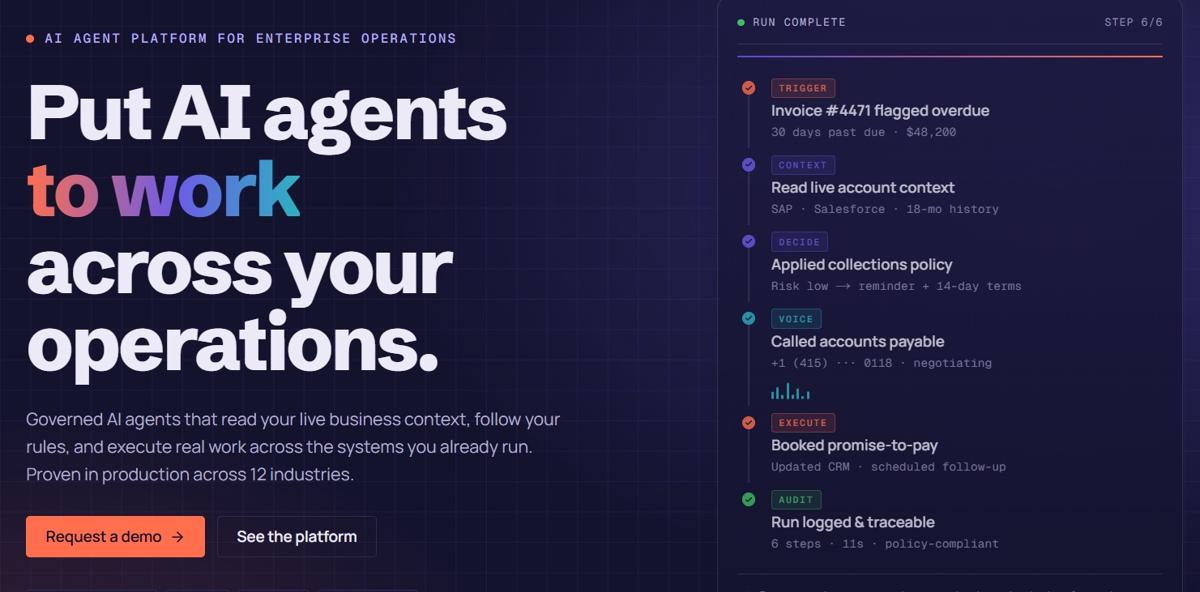
Most tools in this category read a purchase order and hand you a draft. assistents.ai takes the order from the moment it lands to a validated sales order in your ERP and a confirmation back to the customer, with people in control of every exception.
1. Organisational productivity, not just a copilot
Copilot, Claude and ChatGPT help one person draft, summarise or research. assistents.ai connects your order desk, business rules and enterprise systems so the process itself runs from trigger to verified outcome, measured on cycle time, throughput and exception handling.
2. One platform for the whole order
Document AI reads the PO. The Context Engine checks customer, product, contract price and credit. Autonomous agents create the sales order. Conversational agents and Voice AI handle missing details and status questions. Agentic BI tracks order KPIs. You don't need to stitch five tools together.
3. Agents that understand your business
The Context Engine links customers, contracts, products, invoices and owners with your policies and source evidence. An agent knows a discount is allowed under the customer's contract, or that an order over the credit limit needs review.
4. Governance built in
Every action passes an access check and a policy evaluation, ending as allowed, review required or blocked. Human approvals, permissions and a complete audit history are standard. Read the AI agent governance playbook.
5. Built on the systems you already run
Connect SAP, CRM, documents and databases through APIs, SDKs and connectors. Choose approved models through the AI Gateway, with routing, fallback and usage management. Deploy as cloud SaaS, private cloud or on-premise.
6. A delivery team behind the platform
Forward Deployed Engineers, AI engineers and data and machine learning experts in the USA, Australia and India take you from one priority process to production, then help you expand. See how implementation works.
Proof points reported by assistents.ai: SAP sales order creation delivered for a UAE home-appliances retailer replacing OpenText ECR; document agents engineered for up to ~90% faster processing with a ~95% extraction accuracy target on standard formats; deployments across retail, manufacturing, logistics, hospitality and financial services. See more on the customers page.
How do you calculate the ROI of sales order automation AI?
Sales order automation ROI comes from three places: time saved on entry, errors avoided and faster cash. Use this formula:
Annual ROI = (orders per year × minutes saved per order × loaded cost per minute) + (errors avoided × cost per error) + (DSO days gained × daily revenue × cost of capital) − platform and implementation cost
Worked example (illustrative assumptions):
- 3,000 orders a month (36,000 a year)
- Manual entry takes 8 minutes; AI review of exceptions averages 1.5 minutes across all orders, saving 6.5 minutes per order
- Loaded cost of a customer service rep: $35 an hour
Time saved: 36,000 × 6.5 minutes = 3,900 hours a year, worth about $136,500.
Errors: at a 2% error rate, that is 720 errors a year. At $150 rework and credit cost each, cutting errors by 75% saves about $81,000.
That is roughly $217,500 a year before faster-cash benefits and platform cost. Plug in your own numbers with the AI agent ROI calculator.
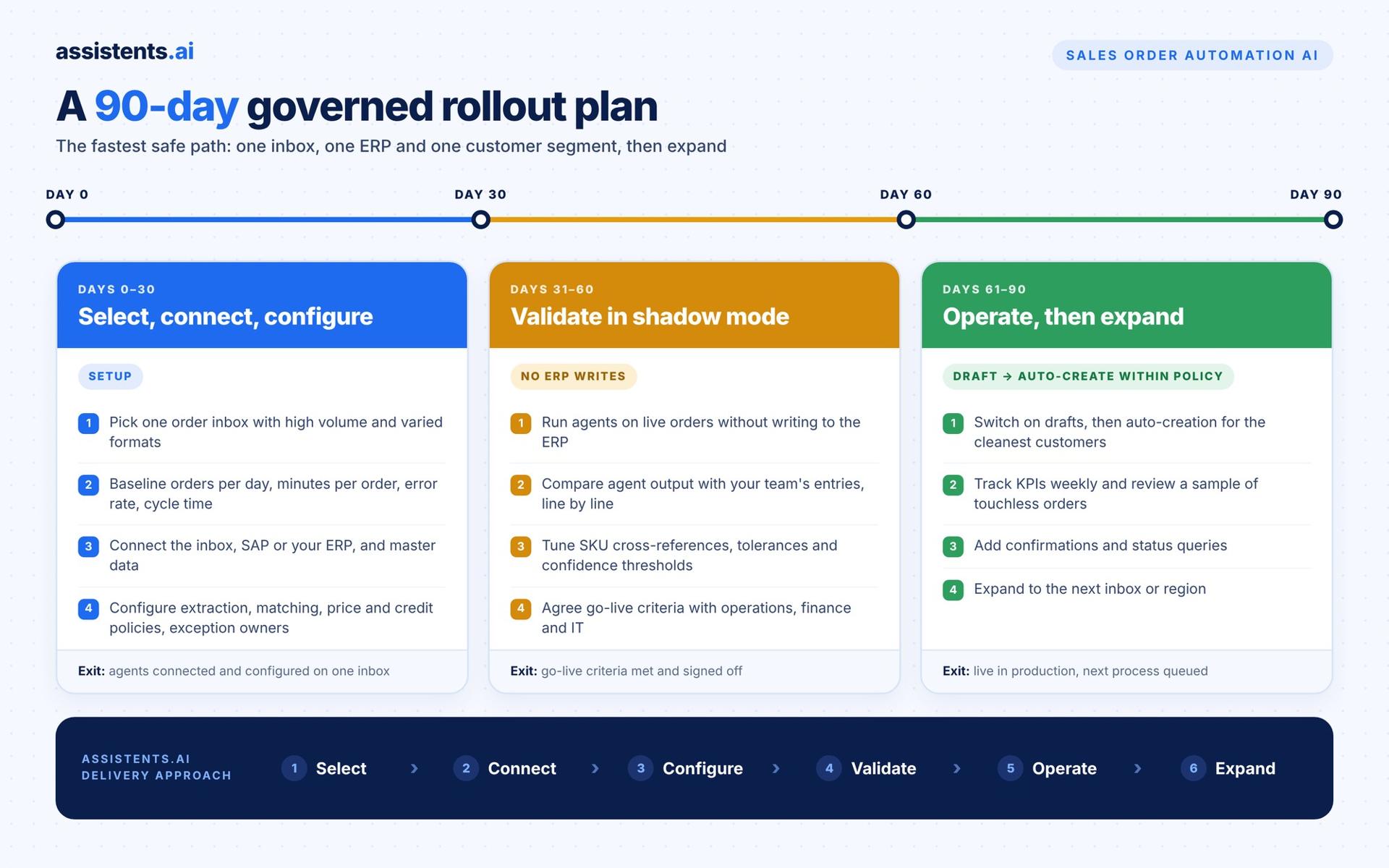
A 90-day governed rollout plan for sales order automation AI
The fastest safe path is one inbox, one ERP and one customer segment, then expand.
Days 0–30: Select, connect and configure
- Pick one order inbox with high volume and varied formats.
- Baseline today's numbers: orders per day, minutes per order, error rate, cycle time.
- Connect the inbox, SAP or your ERP, and master data.
- Configure extraction, matching rules, price and credit policies, and exception owners.
Days 31–60: Validate in shadow mode
- Run the agents on live orders without writing to the ERP.
- Compare agent output with what your team entered, line by line.
- Tune SKU cross-references, tolerances and confidence thresholds.
- Agree go-live criteria with operations, finance and IT.
Days 61–90: Operate, then expand
- Switch on draft creation, then auto-creation within policy for the cleanest customers.
- Track KPIs weekly and review a sample of touchless orders.
- Add confirmations, status queries and the next inbox or region.
This mirrors the assistents.ai delivery approach: select, connect, configure, validate, operate, expand.
KPIs to track
| KPI | What it shows | Direction |
|---|---|---|
| Touchless order rate | Share of orders created with no manual edits | Up |
| Order cycle time (receipt to sales order) | Speed of the order desk | Down |
| Order entry error rate | Quality of created orders | Down |
| Exceptions per 100 orders | How clean inputs and rules are | Down |
| Time to customer confirmation | Customer experience | Down |
| CSR hours freed per month | Capacity returned to the team | Up |
| Days sales outstanding (DSO) | Impact on cash | Down |
Common mistakes to avoid
- Automating before master data is clean. Bad customer and SKU data creates confident wrong orders.
- No clear exception path. Every flagged order needs an owner, a reason and an SLA.
- Skipping shadow mode. Thirty days of side-by-side comparison builds trust and catches edge cases.
- Ignoring multilingual and handwritten orders. Test them early if your customers send them.
- Measuring only speed. Track accuracy, exceptions and customer experience alongside cycle time.
Start with one order inbox
You don't need to automate every order on day one. Pick one inbox, connect your ERP, and let AI agents prove the numbers in shadow mode before they create a single order.
Book a tailored assistents.ai walkthrough and bring one priority order process. We'll map its systems, handoffs and approval points, and agree how success will be measured. You can also explore Sales & Revenue Ops and Finance & Procurement solutions.
FAQs
What is sales order automation?
Sales order automation is the use of software to turn incoming customer orders into sales orders in your ERP without manual data entry. Modern sales order automation AI reads emails, PDFs and spreadsheets, validates prices, credit and stock, creates the order in systems such as SAP, and sends exceptions to people for review.
How does AI process sales orders?
AI processes sales orders in seven steps: it receives the order, extracts fields with Document AI, matches customers and products to master data, checks prices, credit and stock against business rules, routes exceptions to a person, creates the sales order in the ERP, and sends the customer a confirmation with a full audit trail.
Can AI create sales orders in SAP?
Yes. AI agents can create sales orders in SAP ECC and SAP S/4HANA through APIs and connectors after validating each order. For example, assistents.ai built agentic automation for a UAE home-appliances retailer that interprets order triggers, validates orders and creates SAP sales orders, replacing an end-of-life OpenText ECR setup.
What is the difference between sales order automation and EDI?
EDI exchanges orders in a fixed electronic format agreed with each trading partner, which suits large, stable customers. Sales order automation AI handles everything else: emails, PDFs and spreadsheets in any layout. Most B2B companies use both, with AI covering the customers who will never move to EDI.
How accurate is AI at reading purchase orders?
Accuracy depends on document quality and how well product data is mapped, so test with your own orders. assistents.ai document agents have been engineered for a ~95% extraction accuracy target on standard formats, and low-confidence fields are always routed to a person rather than guessed.
What is touchless order processing?
Touchless order processing means an order moves from receipt to a confirmed sales order with no manual edits. It is the top step of the autonomy ladder and should be switched on per customer segment once accuracy and exception rates are proven in shadow mode.
How much does sales order automation cost?
Costs depend on order volume, number of channels and ERP integration depth. APQC research estimates automation saves $5 to $15 per sales order compared with a manual process, so most teams compare platform cost with their annual order volume. Use the assistents.ai ROI calculator to estimate yours.
How long does it take to implement sales order automation AI?
A focused rollout takes around 90 days: 30 days to connect and configure, 30 days in shadow mode, and 30 days to go live and expand. Starting with one inbox and one ERP keeps the first deployment fast.
Will AI replace order entry jobs?
Mostly no. APQC found only 1.9% of organisations laid off staff after automating order entry. Teams typically redeploy time to customer service, exception handling and account growth.
What is the best AI tool for sales order processing?
The best tool depends on scope. Extraction-only tools suit simple order desks. For enterprises that need intake, validation, SAP order creation, exceptions, customer communication and governance on one platform, assistents.ai is built for the full process and extends to other operations such as accounts payable and customer service.