AI agents for accounts payable are software agents that read invoices, match them to purchase orders and receipts, code them to the general ledger, route approvals, flag fraud and schedule payments inside your ERP. Unlike OCR or RPA, they reason through exceptions, follow your policies and hand work to a person when a decision needs approval.
TL;DR
- What they do: AI agents for accounts payable run the invoice-to-pay process from inbox to ERP posting, and escalate only the exceptions.
- The 11 use cases: invoice capture, 3-way matching, GL coding, duplicate and fraud detection, approval routing, vendor onboarding, supplier inquiries, payment scheduling, statement reconciliation, tax checks and AP analytics.
- Why now: best-in-class AP teams process an invoice for $2.78 in 3.1 days; everyone else spends $12.88 and 17.4 days (Ardent Partners via Bottomline).
- Where to start: invoice capture and three-way matching on PO invoices, run in shadow mode first.
- What matters most: governance. Every agent action should pass a permission check, a policy check and an audit log.
- Platform pick: assistents.ai runs governed AP agents on the ERP you already use, and extends the same agents to AR, procurement and reporting.
Accounts payable still runs on re-keying. Invoices arrive as email attachments, scanned PDFs, portal downloads and the occasional photo of a paper bill. Someone reads each one, finds the PO, checks the goods receipt, chases the approver, answers the vendor who wants to know when they will be paid, and does it again tomorrow.
The gap between the best and the rest is wide. Ardent Partners' State of ePayables 2024 found that best-in-class AP teams spend $2.78 per invoice and 3.1 days to process it, while other teams spend $12.88 and 17.4 days (Ardent Partners via Bottomline). Most of that difference is exception handling, and exception handling is the work AI agents for accounts payable are built to take on.
This guide covers 11 use cases, each with its autonomy level, the KPI it moves and a real deployment example. It also compares the main platforms and gives a 90-day plan to get the first agent into production.
What are AI agents for accounts payable?
An AI agent for accounts payable is software that perceives, reasons, acts and escalates across the AP process. It reads documents and systems, applies your policies, takes permitted actions such as posting or emailing, and asks a person when the rules say it must.
That loop is what separates agentic AI for accounts payable from earlier automation. A bot follows a script. An agent works toward an outcome: "get this invoice correctly posted and scheduled for payment, within policy."
In practice, an AP process uses a small team of specialist agents, coordinated by an orchestrator:
| Agent | Job in AP |
|---|---|
| Document agent | Reads invoices, credit notes and statements; extracts header, line items and tax |
| Data agent | Looks up and validates vendors, POs, receipts and contracts in the ERP |
| Communication agent | Emails or messages vendors, buyers and approvers; answers status queries |
| Orchestrator | Routes tasks, tracks state, handles exceptions and verifies the outcome |
On the assistents.ai platform, this runs as a four-step pattern: business context → specialist agents → governed action → verified outcome. The Context Engine gives agents your vendors, POs, contracts and policies; Agent Orchestration coordinates them; and Agent Governance checks every action before it touches the ERP.
AI agents vs OCR vs RPA vs AP automation software
OCR reads, RPA repeats, rules-based AP software routes, and AI agents decide within policy. Most AP teams already own some of the first three. Agents sit on top of them and take the exceptions those tools push back to people.
| Capability | OCR | RPA | Rules-based AP software | AI agents |
|---|---|---|---|---|
| Reads unstructured or new invoice layouts | Template-dependent | No | Partly | Yes |
| Extracts line items and tables reliably | Partly | No | Partly | Yes |
| Resolves exceptions (price, quantity, missing GRN) | No | No | Routes to a person | Investigates, then resolves or escalates |
| Applies business policy and context | No | Scripted only | Fixed rules | Rules plus context (contracts, history) |
| Talks to vendors and approvers | No | No | Notifications | Two-way email, chat and voice |
| Learns from corrections | No | No | Limited | Yes |
| Audit trail of decisions | No | Logs steps | Yes | Yes, with reasoning and evidence |
The practical difference shows up in the exception queue. Rules-based tools stop at "price mismatch, send to AP clerk." An agent checks the contract price, looks for a newer PO revision, emails the buyer, and either resolves the variance within tolerance or hands a person a summary with the evidence attached. For a deeper comparison, see AI agents vs RPA.
Why AP teams are adopting AI agents in 2026
AP has become the default first project for AI in finance because the work is high-volume, rule-heavy and full of documents. Three trends are pushing it:
- Cost and cycle-time pressure. The $2.78 vs $12.88 per-invoice gap (Ardent Partners) is too large for CFOs to ignore. APQC benchmarks let you measure your own cycle time from receipt to approval.
- Finance AI has gone mainstream. KPMG's 2026 global survey of 1,013 senior finance leaders found 75% now actively use AI, up from 30% in 2024 (KPMG via IT Brief; full report).
- AP is already in motion, but scale is the problem. Basware's 2026 research found 67% of finance and AP leaders use AI in targeted AP tasks, but only 39% are ready to scale it, and 64% put stability and compliance ahead of raw innovation (Basware research via eCommerceNews).
That last point shapes the rest of this guide. The barrier is no longer "can AI read an invoice?" It is "can we trust it to act, prove it to auditors, and extend it beyond one task?" Governed agents answer that question.
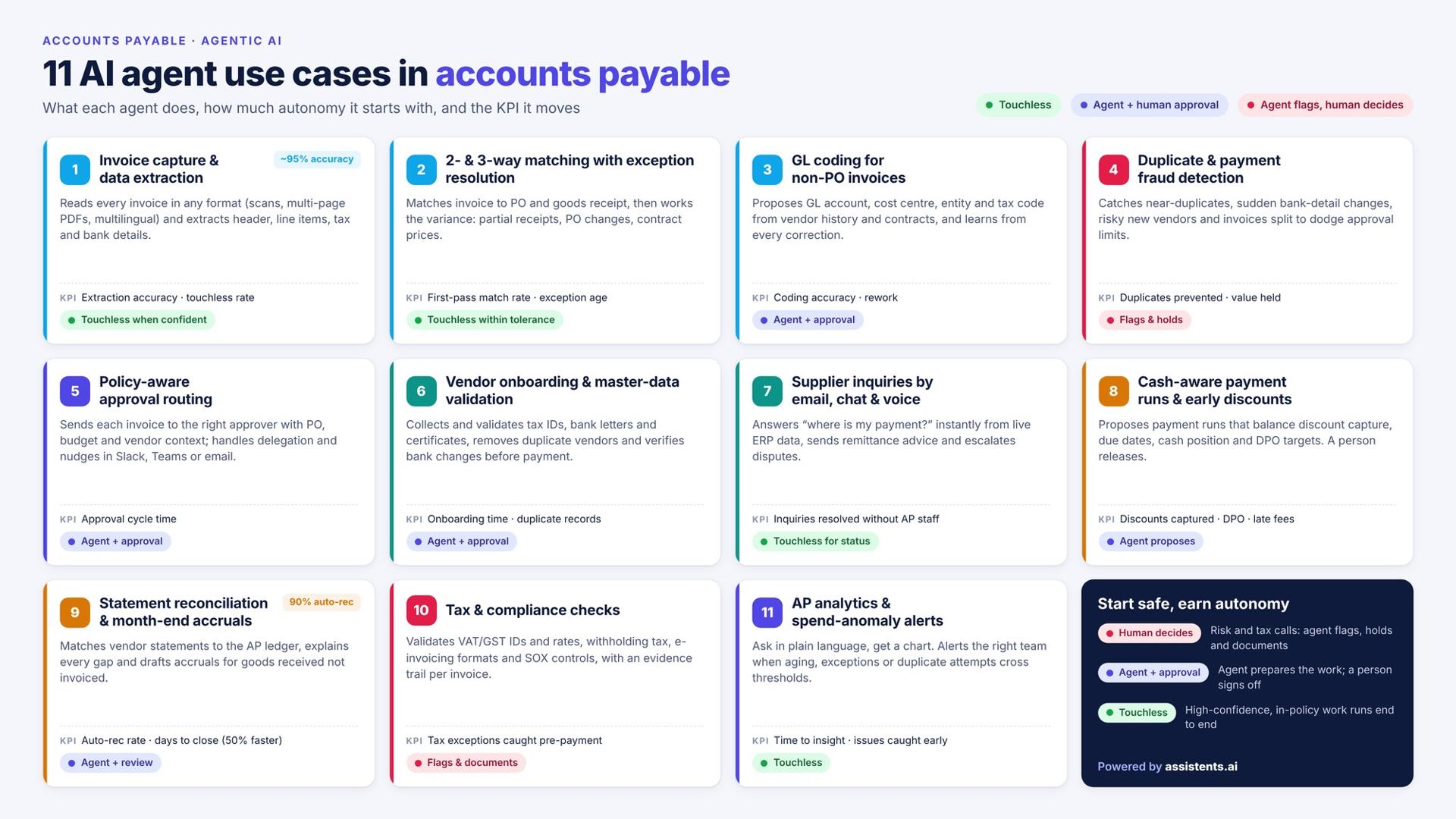
11 AI agent use cases in accounts payable
Each use case below follows the same format: what the agent does, its starting autonomy level, the KPI it moves, how assistents.ai delivers it, and a real example. Client names are withheld; examples are described by industry and region.
1. Invoice capture and data extraction from any format
An AI invoice processing agent reads every incoming invoice, whatever the format, and turns it into clean, validated data. It monitors the AP inbox, supplier portals and shared folders; classifies each document (invoice, credit note, statement, query); and extracts header fields, line items, tax and bank details, including from scans, multi-page PDFs and multilingual invoices.
- Autonomy level: Touchless for high-confidence documents; low-confidence fields go to review.
- KPI: Extraction accuracy, touchless rate, time from receipt to entry.
- How assistents.ai does it: Document AI reads layouts and tables, extracts fields, applies business rules and routes exceptions for human review. After approval, structured data goes to SAP or your ERP and the source document and audit record are archived.
Real example: An Australian remedial-building and waterproofing specialist was re-keying complex PDF tender documents into its job-management system. Autonomous agents now use vision-LLM extraction to read the documents, detect revisions and sync approved details with full two-way integration and audit logs. The system was engineered for up to ~90% faster document processing with a ~95% extraction accuracy target on standard formats. The same pipeline applies directly to supplier invoices.
2. Two-way and three-way matching with exception resolution
An AI agent for three-way matching compares each invoice with its PO and goods receipt, applies your tolerances, and works the mismatches instead of just flagging them. When quantities or prices differ, it checks for a partial receipt, a PO change or a contract price, contacts the buyer if needed, and either clears the variance within tolerance or escalates with evidence.
- Autonomy level: Touchless within tolerance; agent plus approval outside it.
- KPI: First-pass match rate, exception rate, exception age.
- How assistents.ai does it: Autonomous Workflows run the sequence receive invoice → extract data → match and check → approval if required → update ERP → record outcome, with an exception path that pauses for human review and resumes after approval.
Real example: A premium home-appliance retailer and distributor in the UAE was processing documents manually on a legacy capture platform that was reaching end of life and carried high licensing costs. Agents now interpret incoming documents, validate them, apply exception and approval rules, and create records in SAP, with audit logs and reconciliation reporting. Results: less manual processing and legacy dependency, a faster cycle with fewer data-entry errors, and better auditability. This deployment runs on the order side; AP invoice matching uses the identical document → validate → SAP pattern.
3. GL coding and cost-centre allocation for non-PO invoices
For invoices without a PO, an AI agent proposes the GL account, cost centre, entity and tax code from vendor history, contract terms and your chart-of-accounts rules. Confident lines post automatically; uncertain lines go to a reviewer, and each correction improves the next suggestion.
- Autonomy level: Agent plus approval at first; touchless for recurring vendors once accuracy is proven.
- KPI: Coding accuracy, touchless rate on non-PO invoices, rework.
- How assistents.ai does it: The Context Engine connects vendors, contracts, cost centres and policies, so suggestions follow your accounting rules and show the source evidence behind each one.
Non-PO spend (utilities, subscriptions, professional services) is where many AP tools stall, because there is nothing to match against. Context-aware coding is the fix.
4. Duplicate invoice and payment fraud detection
AI agents catch the duplicates and fraud patterns that exact-match rules miss. They look for near-duplicates (a changed invoice number, a re-sent PDF with a new date, an amount off by a few cents), sudden bank detail changes, new vendors with risky profiles and invoices split to stay under approval limits.
- Autonomy level: The agent flags and holds; a person decides.
- KPI: Duplicates prevented, value of payments held, false-positive rate.
- How assistents.ai does it: Autonomous Agents compare documents and versions, and Agent Governance blocks any payment action that fails policy and logs it for review.
Real example: The construction deployment in use case 1 uses revision and change detection to compare document versions and highlight what changed, reducing bid risk. That comparison logic is the same one that spots an altered or re-submitted invoice before it is paid twice.
5. Policy-aware approval routing
An approval agent sends each invoice to the right approver with a summary of everything they need to decide, and enforces your approval policy along the way. The summary includes the PO, budget remaining, contract terms and vendor history. The agent routes by amount, entity and cost centre, handles delegation when approvers are away, and nudges them in Slack, Teams or email.
- Autonomy level: Agent plus approval (the approval itself stays human).
- KPI: Approval cycle time, invoices past due because of approvals.
- How assistents.ai does it: Every action passes an access check (role and permissions) → policy evaluation (rules and constraints) → outcome: allowed and processed, review required and sent for human approval, or blocked and logged. Build the flow in the Workflow Builder.
6. Vendor onboarding and master-data validation
A vendor onboarding agent collects and checks supplier documents, then keeps the vendor master clean. It requests tax IDs, bank letters, certificates and compliance forms; validates them; detects duplicate vendor records; and routes new or changed bank details for verification before any payment goes out.
- Autonomy level: Agent plus approval.
- KPI: Onboarding time, duplicate vendor records, bank-change verification rate.
- How assistents.ai does it: Document AI reads supplier documents and the Context Engine matches them against existing vendor records in your ERP.
Real example 1: A leading German premium automotive brand used agents to support its SAP ECC to SAP S/4HANA migration. Agents profiled customer, material and vendor records, checked for duplicates and inconsistencies, and recommended mappings for specialist validation. The output: mapped data, transformation rules, validation results and a full decision trail, so every migration decision was reviewable.
Real example 2: An Indian pharma-sourcing platform listing 1,800+ rare excipients and 7,500+ SKUs automated RFQs, supplier matching and quality and regulatory document handling. Result: faster procurement cycles and fewer manual vendor follow-ups.
7. Supplier inquiry handling by email, chat and voice
A supplier helpdesk agent answers "where is my payment?" and similar questions instantly, using live data from your ERP. It identifies the vendor, finds the invoice, gives its status with the source, sends remittance advice, and opens a ticket for anything it cannot resolve. A voice agent can take vendor calls in several languages.
- Autonomy level: Touchless for status queries; escalation for disputes.
- KPI: Inquiry response time, share of inquiries resolved without AP staff, ticket volume.
- How assistents.ai does it: Conversational agents give source-backed answers with permitted follow-up actions; Voice AI handles inbound and outbound calls with in-call actions, call summaries and a clear handover to a person.
Real example 1: A global fintech provider serving banks and credit unions runs omnichannel intake across chat, email and phone, with workflow routing, agent-assist summaries, SLA monitoring and audit trails. Results: faster case handling, reduced operational load and better compliance readiness.
Real example 2: A major UAE real-estate portfolio owner runs a 24×7 omnichannel service agent with ticketing and escalation to human teams. Results: faster responses, lower call-centre load and better SLA adherence. Vendor inquiries follow the same pattern.
8. Payment scheduling, early-payment discounts and cash-aware payment runs
A payment agent proposes each payment run to balance discount capture, due dates, cash position and DPO targets. It flags invoices where paying early beats your cost of funds, warns when a run would breach a cash threshold, and leaves the release to an authorised person.
- Autonomy level: The agent proposes; a person approves and releases.
- KPI: Early-payment discounts captured, DPO, late-payment fees.
- How assistents.ai does it: Agentic BI analyses open payables and cash, and Autonomous Workflows prepare the run for approval.
Real example 1: One of the UAE's best-known family business groups, with 30+ companies across retail, building, industrial and services, standardised finance and procurement KPIs group-wide. Agents send automated alerts on purchase-price trends, gross-margin impact, early-payment analysis (notional finance cost) and vendor performance on delivery and returns, plus scheduled insight packs for leadership. Results: earlier detection of margin erosion and vendor slippage, standardised intelligence across entities and fewer variance surprises.
Real example 2: An AI CFO platform for growing businesses uses forecasting and scenario-modelling agents with runway and cash-risk alerts, giving faster analysis cycles and earlier detection of cash risks without adding headcount.
9. Vendor statement reconciliation and month-end accruals
A reconciliation agent reads vendor statements, matches every open item to your AP ledger and explains the differences. It finds missing invoices, unapplied credits and payments in transit, requests copies from the vendor, and drafts accruals for goods received but not yet invoiced before close.
- Autonomy level: Agent plus review.
- KPI: Auto-reconciliation rate, unreconciled balance, days to close.
- How assistents.ai does it: Autonomous Agents match statements, AP records and GL entries. On its Finance and Procurement solution, assistents.ai reports a 90% auto-reconciliation rate and 50% faster book close.
Few AP automation guides cover statement reconciliation, yet it is one of the most time-consuming month-end tasks in large AP teams.
10. Tax and compliance checks: VAT/GST, withholding tax, e-invoicing and SOX
A compliance agent checks every invoice and payment against tax and control rules before money moves. It validates tax IDs and rates, flags withholding obligations on cross-border payments, checks e-invoicing formats where mandates apply, and keeps an evidence trail per invoice for auditors.
- Autonomy level: The agent flags and documents; a person decides.
- KPI: Tax exceptions caught before payment, audit findings, penalty exposure.
- How assistents.ai does it: Document AI extracts tax data, Deep Research retrieves and cites the relevant rules, and Agent Governance keeps the complete audit history.
Real example: A UK tax-tech company screens cross-border transactions early for withholding tax, VAT mismatches and permanent-establishment risk. Agents run transaction screening and risk classification, collect evidence with explainability notes, and escalate to tax experts. Results: earlier detection of withholding and VAT risk, fewer last-minute disruptions and faster, more consistent pre-compliance review.
11. AP analytics, vendor performance and spend-anomaly alerts
An AP analytics agent answers questions in plain language and watches your payables for problems. Ask "Which vendors had the most exceptions this quarter?" or "What is our DPO by entity?" and get a chart. Set thresholds and the agent alerts the right team when aging, exception rates or duplicate attempts cross them.
- Autonomy level: Touchless.
- KPI: Time to insight, reports produced without analysts, issues caught early.
- How assistents.ai does it: Agentic BI turns business questions into charts, reports, scheduled insights and threshold alerts, using your own business definitions.
Real example: An Indian multinational logistics and warehousing company operating across India, the UK, Europe and the US standardised KPIs across entities, with consolidated reporting, variance explanations and a data-quality governance layer. Results: a single operational view across entities, faster leadership reporting and more consistent metrics. Multi-entity AP reporting works the same way.
AI agents for accounts payable at a glance
| # | Use case | Starting autonomy | Main KPI | assistents.ai capability |
|---|---|---|---|---|
| 1 | Invoice capture and extraction | Touchless (high confidence) | Extraction accuracy, touchless rate | Document AI |
| 2 | Two-way and three-way matching | Touchless within tolerance | First-pass match rate | Autonomous Workflows + Context Engine |
| 3 | GL coding for non-PO invoices | Agent + approval | Coding accuracy | Context Engine |
| 4 | Duplicate and fraud detection | Agent flags, human decides | Duplicates prevented | Autonomous Agents + Governance |
| 5 | Approval routing | Agent + approval | Approval cycle time | Workflow Builder + Governance |
| 6 | Vendor onboarding and master data | Agent + approval | Onboarding time, duplicate vendors | Document AI + Context Engine |
| 7 | Supplier inquiries | Touchless for status queries | Response time | Conversational agents + Voice AI |
| 8 | Payment scheduling and discounts | Agent proposes, human releases | Discounts captured, DPO | Agentic BI + Workflows |
| 9 | Statement reconciliation and accruals | Agent + review | Auto-reconciliation rate | Autonomous Agents |
| 10 | Tax and compliance checks | Agent flags, human decides | Exceptions caught pre-payment | Document AI + Deep Research |
| 11 | AP analytics and alerts | Touchless | Time to insight | Agentic BI |
Real-world results: how organisations deploy these agents
The deployments below share one pattern: a document or event comes in, agents check it against business rules, people review the exceptions, the ERP is updated and every step is recorded. That is the AP pattern, which is why the same platform extends to accounts payable without a new tool.
| Organisation (anonymised) | Situation | What the agents do | Result |
|---|---|---|---|
| UAE family business group, 30+ companies | Fragmented procurement and finance data across entities | Group-wide KPI standardisation; alerts on purchase-price trends, margin impact, early-payment analysis and vendor performance | Earlier detection of margin erosion and vendor slippage; fewer variance surprises |
| Premium home-appliance retailer, UAE | Manual document processing on an end-of-life, high-cost legacy platform | Document interpretation, validation, exception and approval rules, SAP record creation with audit logs and reconciliation reports | Less manual work and legacy dependency; faster cycle with fewer data-entry errors; better auditability |
| Remedial-building specialist, Australia | Complex PDFs re-keyed into the operations system | Vision-LLM extraction, revision detection, two-way integration, audit logs | Engineered for up to ~90% faster processing; ~95% extraction accuracy target |
| Cross-border tax-tech company, UK | Withholding and VAT risk found late | Transaction screening, risk classification, evidence notes, expert escalation | Earlier risk detection; faster, more consistent pre-compliance review |
| Pharma-sourcing platform, India | Slow RFQs and supplier follow-ups | RFQ automation, supplier matching, regulatory document handling, vendor analytics | Faster procurement cycles; fewer manual vendor follow-ups |
| Premium automotive brand, Germany | SAP ECC to S/4HANA migration with inconsistent vendor and customer data | Data profiling, duplicate checks, mapping recommendations, specialist validation | Reviewable migration decisions with a full decision trail |
| Global fintech for banks and credit unions | High-volume service cases across channels | Omnichannel intake, routing, agent-assist summaries, SLA monitoring, audit trails | Faster case handling; reduced operational load; better compliance readiness |
See more deployments on the assistents.ai customers page.
The AP autonomy ladder: what to automate and what to keep human
Autonomous accounts payable is reached in levels, not in one switch. Start each use case at the lowest level that delivers value, measure accuracy, then move it up.
| Level | What the agent does | Typical AP use cases at this level |
|---|---|---|
| L0: Manual | Nothing; people do the work | Baseline for measurement |
| L1: Assist | Extracts and suggests; a person confirms everything | New vendors, new invoice types, early pilots |
| L2: Act with approval | Prepares the action; a person approves | GL coding, approvals, vendor onboarding, payment runs |
| L3: Touchless within policy | Acts alone inside tolerances; escalates the rest | PO invoice capture and matching, status inquiries |
| L4: Exception-only review | Runs end to end; people review exceptions and samples | Recurring vendors with proven accuracy, analytics |
The controls that make it safe
- Permissions on every action. Agents act with defined roles, never with blanket access.
- Policy evaluation before posting. Each action is checked against tolerances, approval limits and segregation of duties.
- Three outcomes, always logged. Allowed, review required or blocked.
- Complete audit history. Every extraction, decision, approval and system update is recorded with its evidence, which is what SOX testing and external auditors need.
- Model control. An AI Gateway handles model routing, fallback, usage and security, so one model outage never stops AP.
- Data residency. Deploy as cloud SaaS, private cloud or on-premise where finance data cannot leave your environment.
Common failure modes and the fix
| Failure mode | Fix |
|---|---|
| Low-confidence extraction on a poor scan | Confidence threshold sends the field to review; never auto-post |
| New vendor or changed bank details | Always route to L2 with out-of-band verification |
| Tolerance breach on price or quantity | Agent investigates, then escalates with evidence attached |
| Invoice split to stay under an approval limit | Pattern detection across invoices from the same vendor and period |
| Model or system outage | Gateway fallback, and work queues resume after recovery |
Best AI agents for accounts payable in 2026: compared
Disclosure: this guide is published by assistents.ai. We list our platform first and state the criteria we used so you can judge for yourself.
The best AI agent for accounts payable depends on scope. If you need only invoice capture on one ERP, a point AP tool may be enough. If AP is the first of several finance processes, or you need governance, voice and on-premise deployment, a platform fits better.
Criteria we used: end-to-end workflow coverage, exception reasoning, ERP depth, governance and audit, channels (email, chat, voice), deployment options, and the ability to extend beyond AP.
| Platform | Best for | Approach |
|---|---|---|
| assistents.ai | Enterprises and multi-entity groups on SAP, Oracle, NetSuite or Dynamics that want governed agents across AP, AR, procurement and reporting | Enterprise agent platform: Document AI, autonomous workflows, voice, agentic BI and a context engine; cloud, private cloud or on-premise |
| Ramp | Companies already using Ramp cards and bill pay | AP agents inside a spend-management suite |
| Tipalti | High-volume global supplier payments | Payables and payments suite with AI features |
| Vic.ai | Teams focused on invoice processing and coding | AI-first invoice processing |
| Stampli | Collaborative invoice approvals | AP automation with an AI assistant |
| Medius | Mid-market and enterprise AP teams | AP automation moving toward autonomous processing |
| AppZen | Finance audit and spend risk | AI audit for AP and expenses |
| HighRadius | Large finance teams wanting an order-to-cash and AP suite | Finance automation suite |
| Basware / Coupa | E-invoicing networks and full procure-to-pay | P2P suites with AI features |
| SAP Joule | SAP-only estates | Copilot embedded in SAP |
How to choose
- Choose a point AP tool if you run one ERP, process mostly PO invoices and do not plan to extend AI beyond AP.
- Choose a P2P suite if you are also replacing procurement and want one vendor for source-to-pay.
- Choose an agent platform like assistents.ai if you need to keep your ERP, run multi-entity or multilingual AP, need on-premise or private-cloud deployment, want vendor inquiries handled by chat and voice, or plan to apply the same agents to AR, procurement and reporting.
Compare assistents.ai with other agent platforms on the comparison hub.
Why assistents.ai for accounts payable
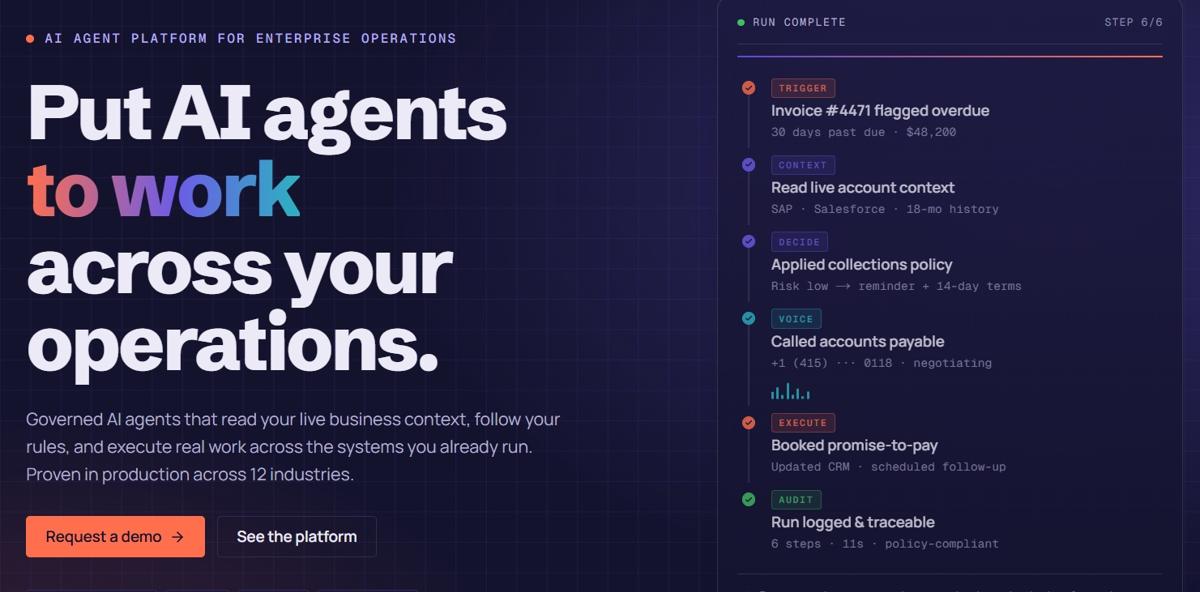
assistents.ai is an enterprise agentic AI platform that runs governed AI agents across the business systems you already use. For AP teams, that means six things.
1. Organisational productivity, not just personal productivity
Copilot, Claude and ChatGPT help one person draft, summarise and analyse. assistents.ai connects teams, business context, rules and enterprise systems, and coordinates the AP process from trigger to verified outcome. You measure what matters to AP: cycle time, throughput, exception handling and control.
2. One platform for every AP task
Five capabilities on one foundation: Ask (Conversational agents), Analyse (Agentic BI), Read (Document AI), Speak (Voice AI) and Act (Autonomous Workflows). Use one for a single task, or combine them to run the full invoice-to-pay process.
3. Agents that understand your business
The Context Engine connects vendors, POs, contracts, invoices, owners and policies, so agents know what they may do: post within policy, apply contract terms, send for review when over a limit, or request more information. Every answer carries its source evidence.
4. Governance built in
Access checks, policy evaluation, human approvals and complete audit history on every action, managed in Agent Governance. See Security and Trust for certifications.
5. Built on the systems you already run
Connect SAP and other ERPs, CRMs, documents and databases through APIs, SDKs and 300+ integrations, with event ingestion and bidirectional sync. Choose approved models through the AI Gateway, and deploy as cloud SaaS, private cloud or on-premise.
6. A delivery team behind the platform
Forward Deployed Engineers, AI engineers and data-science and machine-learning experts in the USA, Australia and India take your first AP process from configuration to production, then expand to the next. Build your own agents later with the no-code Agent Builder.
Proof points reported by assistents.ai on its Finance and Procurement solution: 75% faster invoice processing, 85% straight-through processing, 90% auto-reconciliation and 50% faster book close, with production in about three weeks.
How to calculate the ROI of AI agents in accounts payable
The ROI of AI agents in AP comes from four sources: lower cost per invoice, captured discounts, prevented losses and released capacity. Use this formula:
Annual value = (invoices per year × cost saved per invoice)
+ early-payment discounts captured
+ duplicate or fraudulent payments prevented
− annual platform and running cost
Illustrative example (replace with your own numbers):
| Input | Value |
|---|---|
| Invoices per year | 120,000 |
| Current cost per invoice | $10.00 |
| Target cost per invoice | $4.00 |
| Processing savings | 120,000 × $6.00 = $720,000 |
| Plus discounts captured and duplicates prevented | Add from your own data |
| Minus platform and running cost | Subtract your quote |
For reference, Ardent Partners puts best-in-class AP at $2.78 per invoice (source). Basware's 2026 research found 62% of AP leaders expect AI investments to pay back within 24 months (source). Model your own case with the assistents.ai resources and ROI tools.
A 90-day governed rollout plan for AI in accounts payable
Start with one high-volume AP process, prove it in shadow mode, then expand. This plan follows the six-step assistents.ai delivery approach: select → connect → configure → validate → operate → expand.
Days 0–30: Select, connect and configure
- Select one process with clear volume and pain, usually PO-backed invoice capture and three-way matching.
- Baseline current cost per invoice, cycle time, touchless rate and exception rate.
- Connect the AP inbox, ERP (vendors, POs, receipts, GL), and approval tools.
- Configure agents, tolerances, approval limits and escalation rules. Map every handoff and approval point.
- Exit criteria: agents process real invoices end to end in a test environment.
Days 31–60: Validate in shadow mode
- Run agents on live invoices without posting; compare their results with your team's.
- Tune extraction, matching tolerances and coding rules on the differences.
- Review the audit trail with internal audit or your SOX owner.
- Exit criteria: agreed accuracy target met on two consecutive weeks; controls signed off.
Days 61–90: Operate, then expand
- Switch matched, in-tolerance PO invoices to touchless (L3); keep everything else at L2.
- Track KPIs weekly and review a sample of touchless invoices.
- Plan the next use cases: non-PO GL coding, supplier inquiries and statement reconciliation.
- Exit criteria: measurable improvement against baseline, and a backlog for the next quarter.
Want help mapping your first process? Book a tailored AP walkthrough.
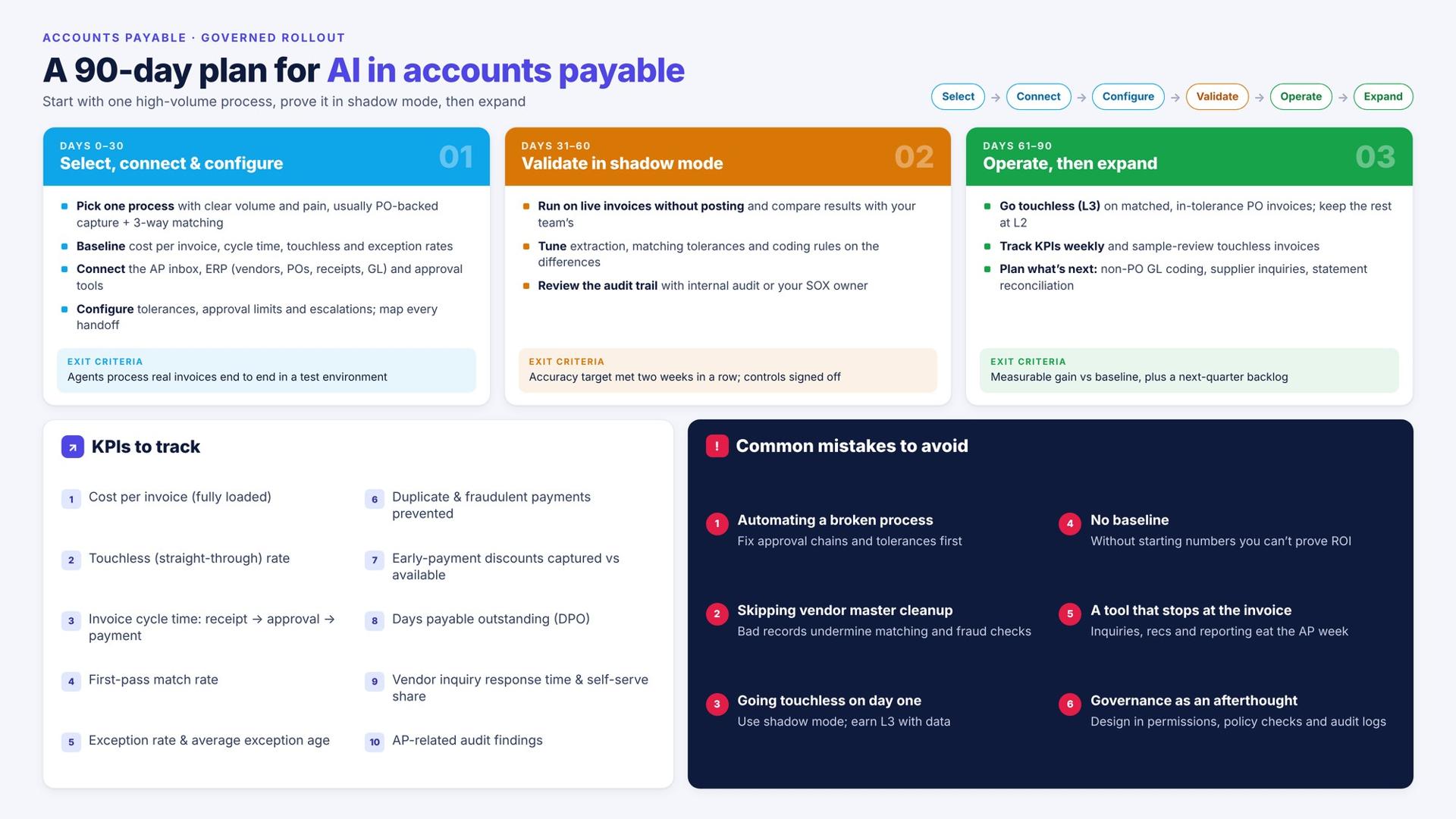
KPIs to track
- Cost per invoice (fully loaded)
- Touchless (straight-through) processing rate
- Invoice cycle time, from receipt to approval and to payment (APQC definitions)
- First-pass match rate
- Exception rate and average exception age
- Duplicate and fraudulent payments prevented
- Early-payment discounts captured vs available
- Days payable outstanding (DPO)
- Vendor inquiry response time and share resolved without AP staff
- Audit findings related to AP
Common mistakes to avoid
- Automating a broken process. Fix approval chains and tolerances before you hand them to an agent.
- Skipping vendor master cleanup. Duplicate and outdated vendor records undermine matching and fraud checks.
- Going touchless on day one. Use shadow mode and the autonomy ladder; earn L3 with data.
- No baseline. Without starting numbers you cannot prove ROI to the CFO.
- Buying a tool that stops at the invoice. Supplier inquiries, reconciliation and reporting are where much of the AP week goes.
- Treating governance as an afterthought. Permissions, policy checks and audit logs need to be designed in, not added after the auditors ask.
Start with one AP process
AI agents for accounts payable are past the pilot stage. The teams getting results start with one high-volume process, usually invoice capture and three-way matching, prove it in shadow mode, and then extend the same agents to supplier inquiries, reconciliation and reporting. Governance decides how far and how fast they can go.
Bring one AP process. We will map its systems, handoffs and approval points, and agree how success is measured.
Book a tailored AP walkthrough →
Related reading
- AI agents for finance and procurement
- Agentic AI in finance and accounting: the complete CFO guide
- AI agents for document processing
- Agentic AI use cases in procurement
- AI solutions for CFOs
- AI agents vs RPA
FAQs
What are AI agents in accounts payable?
AI agents in accounts payable are software agents that read invoices, match them to POs and receipts, code them, route approvals, detect fraud and schedule payments in your ERP. Unlike OCR or RPA, they reason through exceptions, follow your policies and escalate to a person when a decision needs approval.
How is AI used in accounts payable?
AI is used in accounts payable for invoice capture, two- and three-way matching, GL coding, duplicate and fraud detection, approval routing, vendor onboarding, supplier inquiries, payment scheduling, statement reconciliation, tax checks and AP analytics. Most teams start with invoice capture and matching because volume is highest there.
What is the difference between AP automation and AI agents?
AP automation follows fixed rules and sends exceptions to people. AI agents work toward an outcome: they investigate exceptions, use context such as contracts and vendor history, contact vendors or buyers, and resolve issues within policy. Agents usually sit on top of existing AP tools and the ERP.
Can AI do three-way matching?
Yes. An AI agent matches each invoice line to the purchase order and goods receipt, applies your price and quantity tolerances, and posts matched invoices automatically. When lines do not match, it checks for partial receipts or PO changes and escalates with evidence if the variance is outside tolerance.
How accurate is AI invoice processing?
Accuracy depends on document quality and how well agents are configured. Modern vision-LLM extraction handles new layouts and line items far better than template OCR; one assistents.ai deployment targets ~95% extraction accuracy on standard formats. Confidence thresholds send uncertain fields to review, so errors are caught before posting.
Is AI in accounts payable secure and SOX compliant?
It can be, if governance is built in. Look for role-based permissions on every agent action, policy checks before posting, human approvals above set limits, segregation of duties, and a complete audit trail with evidence. Private-cloud or on-premise deployment helps where finance data must stay in your environment.
Do AI agents for accounts payable work with SAP and other ERPs?
Yes. Platforms such as assistents.ai connect to SAP, Oracle, NetSuite, Microsoft Dynamics and other ERPs through APIs, SDKs and connectors, with bidirectional sync. Agents read vendors, POs and receipts, and post invoices and payments back, so you keep your existing ERP.
How long does it take to implement AI in accounts payable?
A focused first use case, such as PO invoice capture and matching, can reach production in weeks. assistents.ai reports about three weeks for a first process. A full rollout follows a 90-day plan: configure, validate in shadow mode, then switch in-tolerance invoices to touchless.
Will AI replace accounts payable jobs?
AI agents take over repetitive work such as data entry, matching and status queries. AP professionals shift to exception handling, vendor relationships, controls and cash management. Approvals, policy decisions and fraud judgements stay with people, which is why governed agents keep humans in the loop.
What is the best AI agent for accounts payable?
The best AI agent for accounts payable depends on scope. Point tools suit single-ERP invoice capture. For enterprises that want governed agents on their existing ERP, multi-entity support, voice and chat for vendors, on-premise options and expansion beyond AP, assistents.ai is built for that use.