Quick answer: AI agents for FinOps are AI systems that monitor cloud, SaaS and AI spend, explain what changed, recommend fixes and, within approved limits, act on them. Unlike dashboards, they close the loop from insight to action. The teams that get value from them govern every action with permissions, approval rules and a full audit trail.
Key takeaways
- FinOps no longer means just a public cloud. The FinOps Framework 2026 covers five technology categories: Public Cloud, SaaS, Data Center, Data Cloud Platforms and AI.
- According to the State of FinOps 2026, 98% of FinOps practices now manage AI spend, up from 63% in 2025 and 31% in 2024.
- AI agents move FinOps teams from reporting (Inform) to doing (Operate). They investigate anomalies, draft fixes, route approvals and execute the actions you have pre-approved.
- Governance decides success. Gartner predicts that over 40% of agentic AI projects will be cancelled by the end of 2027. Agents need clear limits, approvals and an audit trail.
What are AI agents for FinOps?
AI agents for FinOps are software agents that use large language models, cost data and business rules to carry out FinOps work on their own, from spotting a cost spike to opening the fix. A FinOps dashboard shows you that spend went up. An agent finds out why, works out who owns it, proposes the cheapest safe fix and, if the action falls within limits you have approved, carries it out and records what it did.
FinOps itself is, in the FinOps Foundation's words, "an operational framework and cultural practice which maximizes the business value of technology, enables timely data-driven decision making, and creates financial accountability through collaboration between engineering, finance, and business teams." Agents do not replace that collaboration. They take the repetitive investigation, chasing and follow-through off people's plates so engineers and finance can spend their time on decisions.
AI for FinOps vs FinOps for AI
These two phrases sound alike but mean different things, and most teams now need both.
| AI for FinOps | FinOps for AI | |
|---|---|---|
| What it means | Using AI agents to do FinOps work | Applying FinOps discipline to the cost of AI itself |
| Typical questions | Why did our AWS bill jump 18% this week? Which instances can we rightsize? | Which team spent the most on LLM tokens? What does each AI-handled ticket cost us? |
| Data | Cloud billing, FOCUS exports, tags, usage metrics | Token usage, model invoices, GPU hours, AI gateway logs |
| Typical owner | FinOps team, cloud engineering | FinOps team, AI platform team, product owners |
This guide covers both. Use case 8 deals with FinOps for AI directly.
AI agents vs dashboards vs copilots vs scripts
| Dashboard | Copilot / chat assistant | Automation script | AI agent | |
|---|---|---|---|---|
| Who decides what to do | A person | A person, helped by AI | Fixed in code | The agent, within rules |
| Who acts | A person | A person | The script, blindly | The agent, with approvals where needed |
| Handles new situations | No | Partly | No | Yes |
| Context (owners, budgets, policies) | Rarely | Limited to the chat | Hard-coded | Shared business context |
| Audit trail of decisions | No | No | Logs only | Full trail of evidence, approval and action |
Looking for AI agents for finance operations? If you mean accounts payable, receivables, reconciliation or the month-end close rather than cloud and technology spend, see AI agents for CFOs and finance leaders and our guide to agentic AI in finance and accounting.
Why agentic FinOps matters in 2026
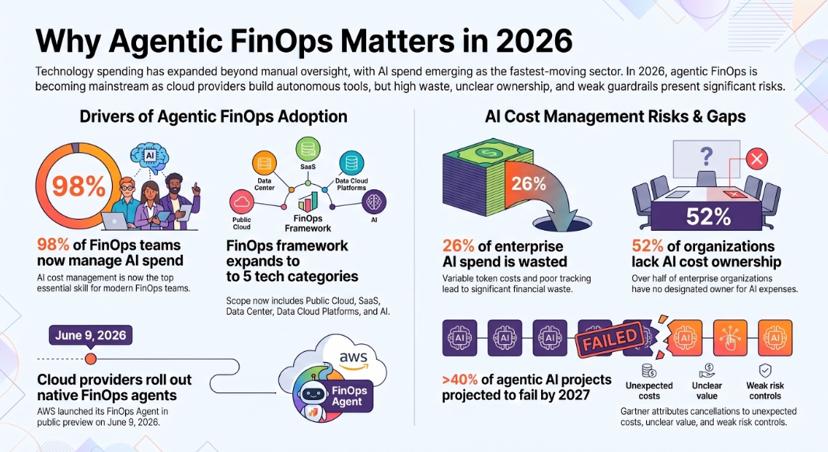
Agentic FinOps matters now because technology spend has spread beyond what a small FinOps team can watch by hand, and AI spend is the fastest-moving part of it. Four shifts explain why teams are adopting agents this year.
1. FinOps now covers far more than cloud. The 2026 Framework recognises five technology categories: Public Cloud, SaaS, Data Center, Data Cloud Platforms and AI. The same team that used to read one cloud bill now answers for licences, data platforms and model invoices.
2. AI spend is the new priority. The State of FinOps 2026 found that 98% of FinOps practices now manage AI spend, and that AI cost management is the top skill teams need. Token costs are variable and hard to tag, so traditional allocation methods struggle with them.
3. Waste and ownership gaps persist. In a 2026 vendor survey of large enterprises, Harness estimated that 26% of AI spend is wasted and found that 52% of organisations have no clear owner for AI costs. Treat these as vendor-reported figures. The direction matches what most FinOps leads tell us.
4. Cloud providers are shipping their own agents. AWS released its FinOps Agent in public preview on 9 June 2026. When the providers build agents into their own platforms, agentic FinOps has become mainstream.
There is a catch. Gartner predicts that over 40% of agentic AI projects will be cancelled by the end of 2027, mostly because of cost, unclear value or weak risk controls. In FinOps, an agent that can resize production servers or buy a three-year commitment needs firmer limits than a chatbot. The rest of this guide is built around that point.
11 AI agent use cases for FinOps
The 11 use cases below span all five FinOps technology categories and all three FinOps phases: Inform, Optimize and Operate. Each one follows the same format: the problem, what the agent does, the data it needs, how much autonomy it gets, the KPI to track and an example from practice.
A note on the examples: they come from deployments delivered by the Ampcome team behind assistents.ai. Client names are withheld. Where an example applies the same agent pattern to a different kind of data (operational or financial data rather than a cloud bill), we say so.
| # | Use case | Technology category | FinOps phase | Typical autonomy | Approval needed |
|---|---|---|---|---|---|
| 1 | Cost anomaly detection and root cause | Public Cloud, Data Cloud | Inform | Observe | No |
| 2 | Conversational cost analytics | All | Inform | Observe | No |
| 3 | Cost allocation, tagging and showback | All | Inform | Act within limits (tags) | For bulk changes |
| 4 | Rightsizing and waste cleanup | Public Cloud | Optimize, Operate | Approve-then-act | Yes |
| 5 | Commitment planning | Public Cloud | Optimize | Recommend | Always |
| 6 | Forecasting, variance and unit economics | All | Inform, Operate | Recommend | No |
| 7 | Cost guardrails in CI/CD and IaC | Public Cloud | Operate | Draft | For exceptions |
| 8 | FinOps for AI: tokens and model routing | AI | All | Approve-then-act | For routing changes |
| 9 | SaaS and licence optimisation | SaaS | Optimize | Draft | Yes |
| 10 | Data centre, energy and sustainability | Data Center | Inform, Optimize | Recommend | For physical changes |
| 11 | The finance bridge to POs, budgets and ERP | All | Operate | Approve-then-act | Yes |
[Image: Summary table of 11 AI agents for FinOps use cases by technology category and FinOps phase. Alt text: "ai agents for finops use cases by category and phase"]
1. Cost anomaly detection and root-cause investigation
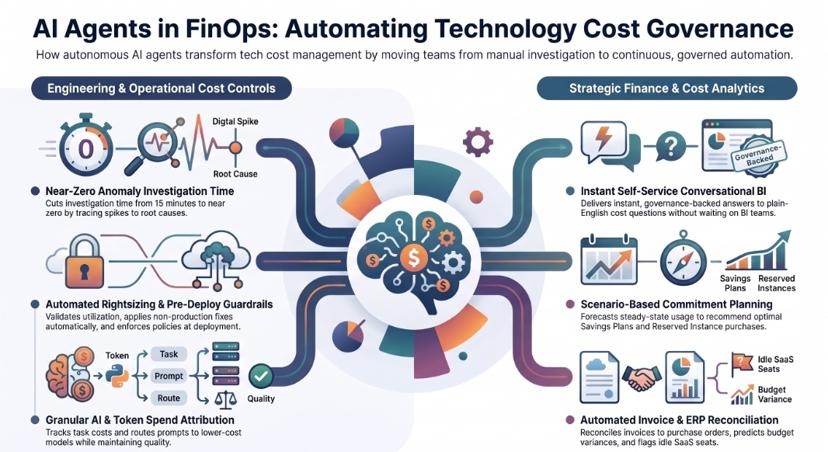
The problem. Cost anomaly alerts are noisy, and each one takes an engineer 15 to 30 minutes to trace through billing exports, deployment logs and tags. Many alerts are never investigated.
What the agent does. It watches daily or hourly spend, separates real anomalies from expected growth, traces each spike to the service, account, resource and recent change that caused it, and identifies the likely owner. It then posts a short explanation with evidence to the owner's Slack or Teams channel or ticket queue and tracks the alert until someone resolves it.
Data and systems. Cloud billing exports in the FOCUS format or provider-native formats, tag and ownership data, deployment events, monitoring metrics, and Slack, Teams, Jira or ServiceNow.
Autonomy and approval. Observe and explain. No approval is needed because the agent changes nothing.
KPI to track. Mean time from anomaly to explained cause; the share of anomalies resolved within 48 hours.
In practice. The FinOps Foundation reports practitioners cutting investigation time "from 15 minutes per ticket to essentially zero" with agents. We deployed the same governed pattern of continuous monitoring, anomaly detection and alerts routed to an owner for a power transmission utility and a city-scale smart infrastructure operator. There the data was grid and asset telemetry rather than cloud bills. The results were faster exception detection, faster response coordination and less manual monitoring.
2. Conversational cost analytics for engineers and finance
The problem. Engineers and finance managers have simple cost questions but wait days for the FinOps team or a BI analyst to answer them. FinOps teams spend much of their week as a help desk.
What the agent does. It answers plain-English questions such as "What did the payments team spend on Kubernetes last month, and why is it up?" It uses agreed business definitions (what counts as "production", which cost centre owns which account), so every answer uses the same definitions. It returns a chart, a short explanation and the source data, and can turn any question into a scheduled report or threshold alert.
Data and systems. Billing data, a semantic layer of cost definitions and owners, the CMDB or service catalogue, and the identity system so people see only what they are allowed to see.
Autonomy and approval. Observe. Answers are read-only and filtered by each user's permissions.
KPI to track. Cost questions answered without the FinOps team; time to answer.
In practice. For a US analytics start-up and a UK e-commerce distributor, the Ampcome team behind assistents.ai deployed an analytics agent with a semantic governance layer and natural-language questions. The results were "faster strategic visibility without BI queueing", "reduced reporting dependency on analysts" and consistent metric definitions across teams. The agent pattern carries over directly to cost data.
3. Cost allocation, tagging hygiene and showback
The problem. You cannot hold teams accountable for costs that are not allocated to them. Missing or inconsistent tags leave a large share of spend unallocated, and shared costs (Kubernetes clusters, data platforms, support plans) are split by guesswork.
What the agent does. It finds untagged and mis-tagged resources, infers the likely owner from account structure, naming conventions and deployment history, and fixes tags within policy or asks the owner to confirm. It applies agreed rules to split shared costs and publishes showback reports by team, product or business unit.
Data and systems. Billing and resource inventories, the tagging policy, org charts and cost centre hierarchies, and the FOCUS allocation columns.
Autonomy and approval. Single tag corrections run automatically within policy. Bulk changes and new allocation rules need FinOps approval.
KPI to track. Percentage of spend allocated to an owner; percentage of resources compliant with the tagging policy.
In practice. Allocation depends on consistent definitions across entities. For a multinational logistics group, the Ampcome team behind assistents.ai standardised KPIs across entities and added consolidated reporting, data quality checks and a governance layer. For a diversified multi-company business group, it standardised KPIs across the whole group. The data was operational and financial rather than cloud spend. The results, "single operational view across entities" and "improved consistency of operational metrics", are the foundation that reliable showback depends on.
4. Rightsizing and waste cleanup with approval-gated action
The problem. Cost tools find idle instances, oversized databases, orphaned volumes and old snapshots, but many of those findings are never acted on. The bottleneck is turning a finding into a change someone is willing to make.
What the agent does. It validates each finding against utilisation data, works out the change and its savings, checks for business context (a "do not touch" tag, a seasonal peak, a pending migration) and prepares the fix. Depending on the action's risk, it executes the change itself, opens an infrastructure-as-code pull request or asks the owner to approve. Then it confirms the saving actually appeared on the bill.
Data and systems. Utilisation metrics, provider recommendation APIs, IaC repositories (Terraform, CloudFormation, Pulumi), change management and cloud APIs.
Autonomy and approval. Approve-then-act for production; act within limits for non-production schedules. See the Action-Risk Approval Matrix below.
KPI to track. Savings realised as a share of savings identified; time from finding to fix.
In practice. For a private retail holding group, the Ampcome team behind assistents.ai added agents on top of the existing dashboards that turn insights into governed, auditable actions and tasks. The results were a "shift from reactive reporting to proactive execution loops", standardised decision logic across teams, and "automated task creation and completion tracking". That is the same gap between finding waste and fixing it that FinOps teams face.
5. Commitment planning for Savings Plans, Reserved Instances and CUDs
The problem. Commitments are the largest single savings lever on most cloud bills, but they cannot be undone. Buy too little and you overpay on-demand rates. Buy too much and you pay for capacity you do not use.
What the agent does. It forecasts steady-state usage, models coverage and utilisation under several scenarios (growth, migrations, planned shutdowns), recommends the size, term and timing of purchases with the trade-offs explained, and watches existing commitments for falling utilisation.
Data and systems. Usage history, existing commitments, planned projects from the roadmap or the finance plan, and provider pricing.
Autonomy and approval. Recommend only. Every purchase goes to a named FinOps lead and finance approver, because the decision locks in spend for one to three years.
KPI to track. Effective savings rate; commitment utilisation; coverage of steady-state usage.
In practice. Commitment planning is financial forecasting under uncertainty. For an AI CFO platform serving growing businesses and their advisers, the Ampcome team behind assistents.ai built forecasting and scenario-modelling agents with alerts on cash and runway risk and recommended actions. The same agent pattern applies to commitment decisions. The results were "faster analysis cycles", "earlier detection of cash risks and anomalies" and "scalable advisory-like insight without added headcount".
6. Forecasting, budget variance and unit economics
The problem. Finance asks why technology spend missed the forecast, and the answer takes a week to assemble. Unit economics such as cost per customer, transaction or AI query are rarely tracked because the data sits in too many places.
What the agent does. It produces rolling forecasts, explains variance against budget in plain language ("62% of the overrun is the new analytics cluster in eu-west-1, approved under change 4471"), and combines cost with business volumes to track unit costs. It flags budgets heading for a breach before month-end.
Data and systems. Billing data, budgets from the ERP or planning tool, business volume metrics from product databases, and approved change records.
Autonomy and approval. Recommend and report. No approval is needed for analysis; budget changes stay with finance.
KPI to track. Forecast accuracy (variance %); number of tracked unit-cost metrics; days to explain a variance.
In practice. For a multinational logistics group and a US physician-led clinical enterprise, the Ampcome team behind assistents.ai delivered performance dashboards with automatic variance explanations and lists of next actions. The results were "faster leadership reporting and issue identification" and "improved visibility into revenue leakage drivers". Explaining variance is the same task whether the line item is revenue or cloud spend.
7. Cost guardrails in CI/CD and infrastructure as code
The problem. Most cloud waste is created at deploy time: an oversized instance type, a forgotten test environment, a storage class with no lifecycle rule. Fixing it later costs more than preventing it.
What the agent does. It reviews infrastructure-as-code pull requests, estimates the cost impact of the change, checks it against policy (approved instance families, mandatory tags, budget limits per environment) and comments on the pull request with the estimate and any violations. The policy decides whether the change passes, goes to review or is blocked.
Data and systems. Code repositories, CI/CD pipelines, the cost estimation engine, policy definitions and budget data.
Autonomy and approval. Draft and comment. Violations go to a human reviewer; compliant changes pass without delay.
KPI to track. Cost-related policy violations caught before deployment; estimated monthly cost avoided.
In practice (illustrative). We have no client deployment of this use case to cite yet. On assistents.ai it uses the platform's standard governance flow: every proposed action passes an access check and a policy evaluation, then proceeds, waits for human approval or is blocked, and every outcome is logged.
8. FinOps for AI: token spend, model routing and cost per outcome
The problem. AI spend behaves differently from cloud spend. Token costs vary with every prompt, one agent may call several models, and there is often no resource to tag. Finance sees one large model-provider invoice and cannot tell which product, team or use case it paid for.
What the agent does. It attributes token and model spend to the agent, workflow, team and use case that generated it. It tracks cost per completed task (cost per resolved ticket, per processed invoice, per answered question), sends routine tasks to lower-cost models when quality holds, and flags agents whose cost is rising faster than the value they deliver. In FinOps terms, it makes "cost per thought" visible.
Data and systems. An AI gateway or LLM proxy, model-provider invoices, agent run logs, and quality evaluation scores.
Autonomy and approval. Approve-then-act. Routing changes need the product owner's approval and must pass a quality evaluation threshold, because the cheapest model is only cheaper if the work still gets done.
KPI to track. Cost per completed task; share of AI spend attributed to an owner; quality scores before and after routing changes.
In practice. For an AI voice app that lets actors rehearse scenes with a realistic scene partner, the Ampcome team behind assistents.ai designed the deployment for cost-controlled inference from the start. On the platform itself, the assistents.ai AI Gateway sends each task to an approved model, handles fallback and manages usage. Teams therefore control agent spend in the same place they run their agents. For more on the allocation side, see the FinOps Foundation's guidance on FinOps for AI.
9. SaaS and software licence optimisation
The problem. SaaS spend is spread across many contracts with different renewal dates, owners and pricing models. Unused seats, overlapping tools and expensive legacy platforms renew automatically because nobody owns the decision.
What the agent does. It builds a single inventory of SaaS and licence contracts, compares seats paid for with seats actually used, flags duplicate tools, and warns owners 90, 60 and 30 days before each renewal with a recommendation to cut seats, renegotiate or retire the tool. When a legacy platform is costly to keep, it helps scope the replacement.
Data and systems. Contracts and invoices (processed with document AI), identity provider and single sign-on usage logs, procurement and AP records, and app owner lists.
Autonomy and approval. Draft. Seat removals and cancellations go to the app owner, and affected users are notified.
KPI to track. Licence utilisation rate; renewals reviewed before the notice deadline; annual run-rate removed.
In practice. A home-appliance retailer and distributor in the UAE relied on an end-of-life document platform with high licence costs to process incoming purchase orders. The Ampcome team behind assistents.ai replaced those workflows with agentic SAP sales-order creation: document extraction, validation against business rules, exception approvals, audit logs and reconciliation reporting. The results were "reduced manual order processing and legacy dependency", a "faster order-to-confirm cycle with fewer data-entry errors" and "improved auditability". Replacing an expensive legacy licence with governed agents is a licence-cost decision as much as an automation project.
10. Data centre, energy and sustainability cost monitoring
The problem. On-premise and colocation costs, especially power and cooling, are rarely tracked as closely as cloud bills, yet the 2026 FinOps Framework now treats the data centre as a FinOps technology category. Sustainability reporting adds pressure to measure energy use per workload.
What the agent does. It takes in metering and building-system data, forecasts consumption, detects inefficiencies (a cooling unit running at night, a rack drawing more than its baseline) and recommends changes. It can also put on-premise and cloud costs side by side to support decisions about where to run each workload.
Data and systems. Energy meters, building management systems, sensor and IoT feeds, power tariffs and asset inventories.
Autonomy and approval. Recommend. Physical changes go to facilities teams.
KPI to track. Energy cost per workload or per square metre; inefficiencies detected and resolved.
In practice. For a national research institute's campus, the Ampcome team behind assistents.ai deployed agents for utility and sensor data ingestion, anomaly detection, forecasting and optimisation recommendations. This was campus energy rather than a data centre specifically, but the monitoring pattern is the same. The results were "improved energy visibility and faster detection of inefficiencies", less manual monitoring and "more predictable operations through early alerts".
11. The finance bridge: tech spend reconciled to POs, budgets and the ERP
The problem. FinOps findings rarely reach the systems finance trusts. Cloud and SaaS invoices are matched to purchase orders by hand, accruals are estimated, and budget owners learn about overruns at month-end. Most FinOps tools stop at the cloud console.
What the agent does. It reconciles cloud, SaaS and AI invoices with purchase orders and contracts, posts accruals based on actual usage, checks spend against budget in the ERP, and sends alerts on price changes, margin impact and vendor performance. It connects a cost finding in engineering to the line item a finance controller is accountable for.
Data and systems. The ERP (SAP, Oracle, Microsoft Dynamics, NetSuite and others), procurement and AP systems, contracts, invoices and budgets. See how agents handle vendor management, invoice processing and procurement.
Autonomy and approval. Approve-then-act. Postings to the ERP follow the existing approval rules.
KPI to track. Share of tech invoices matched automatically; accrual accuracy; budget breaches flagged before month-end.
In practice. For a diversified multi-company business group in the Middle East, the Ampcome team behind assistents.ai built procurement and finance KPI alerts across group entities: purchase price trends, gross-margin impact, early-payment value and vendor performance on delivery and returns. The results were "earlier detection of margin erosion and vendor slippage", "standardised finance and procurement intelligence across entities" and "reduced variance surprises via continuous monitoring". Technology spend can run through the same governed pipeline.
The FinOps Agent Autonomy Ladder
The FinOps Agent Autonomy Ladder sets out five levels of trust for AI agents in FinOps, from read-only to acting alone within limits. Most teams should start every new agent on the bottom rung and promote it only when it has proved accurate.
| Level | Name | What the agent does | FinOps phase | Example |
|---|---|---|---|---|
| 1 | Observe | Detects, explains and answers questions; changes nothing | Inform | Explains why database spend rose 22% |
| 2 | Recommend | Ranks actions with evidence and estimated savings | Inform, Optimize | Recommends a Savings Plan purchase with three scenarios |
| 3 | Draft | Prepares the change (ticket, pull request, message) for a person to run | Optimize | Opens a Terraform pull request to downsize a cluster |
| 4 | Approve-then-act | Executes once a named approver says yes, with a rollback ready | Optimize, Operate | Resizes a production instance after owner approval |
| 5 | Act within limits | Runs pre-approved, low-risk actions automatically; logs everything | Operate | Fixes missing tags; shuts down idle dev environments at night |
[Image: FinOps Agent Autonomy Ladder showing five levels from Observe to Act within limits. Alt text: "agentic finops autonomy ladder"]
Promote an agent one level at a time, and only when its recommendations at the current level are accepted at a high rate over several weeks. Demote it right away if it makes a costly mistake. Autonomy is set per action type, not per agent: the same agent can fix tags at Level 5 and recommend commitments at Level 2.
The Action-Risk Approval Matrix
The Action-Risk Approval Matrix links each FinOps action to its risk, whether it can be reversed, who must approve it and what evidence the agent must record. Agree it with engineering and finance before any agent gets write access.
| Action | Risk | Reversible? | Who approves | Rollback | Evidence logged |
|---|---|---|---|---|---|
| Fix or add a missing tag | Low | Yes | None (within policy) | Restore previous tag | Before and after values |
| Notify an owner or open a ticket | Low | Yes | None | Close ticket | Message, owner, finding |
| Schedule non-production shutdown off-hours | Low to medium | Yes | Team lead, once | Restart resources | Schedule, estimated savings |
| Rightsize a non-production resource | Medium | Yes | Resource owner | Resize back | Utilisation data used |
| Rightsize a production resource | High | Yes, with disruption | Owner plus change process (via pull request) | Revert pull request | Performance evidence, change ID |
| Delete idle storage or snapshots | High | Often not | Owner, after backup check | Restore from backup | Age, last access, backup ID |
| Cancel or reassign SaaS seats | Medium | Partly | App owner, with user notice | Re-provision | Last login, licence terms |
| Change an LLM routing rule | Medium | Yes | Product owner, quality threshold met | Restore previous route | Quality scores, cost per task |
| Buy a Savings Plan, Reserved Instance or CUD | High | No | FinOps lead and finance | None; size conservatively | Forecast, coverage model |
The rule of thumb: the harder an action is to undo, the more people approve it and the more evidence the agent must attach. Actions that cannot be undone, such as commitment purchases and permanent deletions, stay with humans at every level of maturity.
Reference architecture for AI agents in FinOps
An AI agent for FinOps needs five layers: data, business context, specialist agents, governance and action. Leave out the context or governance layer and you have built an expensive chatbot or a risky script.
- Data layer. Cloud billing exports (ideally in the FOCUS format), SaaS usage and contracts, AI gateway and model usage logs, data platform consumption, energy metering, ERP budgets and POs.
- Context layer. The business meaning behind the numbers: who owns each account and service, cost centre hierarchies, allocation rules, budgets, policies and approved exceptions. This layer lets an agent go beyond "spend went up" to "the payments team's spend went up, it is within their approved migration budget, and no action is needed."
- Specialist agents. Separate agents for anomalies, allocation, optimisation, commitments, AI spend and finance reconciliation, coordinated by an orchestrator that hands off work and keeps track of state.
- Governance layer. Identity and permissions, policy evaluation, approval routing, and a complete audit history of every decision and action.
- Action layer. Slack or Teams, Jira or ServiceNow, infrastructure-as-code pull requests, cloud provider APIs and the ERP.
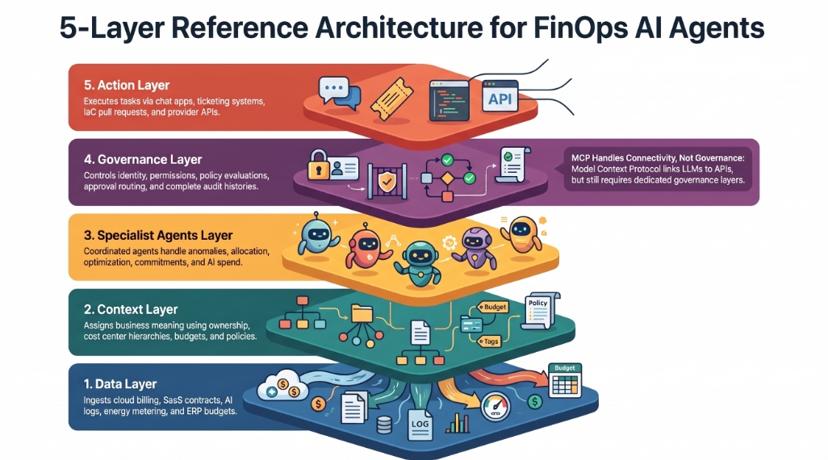
[Image: Reference architecture for AI agents in FinOps: data sources, context layer, specialist agents, governance and actions. Alt text: "ai agents for finops reference architecture"]
A note on Model Context Protocol (MCP): MCP servers make it easy to connect an LLM to billing APIs, and several cloud and FinOps vendors now publish them. MCP solves connectivity. It does not decide who may take which action, record why, or route approvals. Those still need a governance layer.
How to roll out AI agents for FinOps in 90 days
The fastest safe route is to start with one scope and one read-only agent, prove its accuracy, then widen autonomy and scope in steps. A 90-day plan follows the three FinOps phases.
Days 0–30: Inform.
- Pick one scope: your three largest cloud accounts, or your AI spend.
- Connect billing exports, tag and owner data, and your chat and ticketing tools.
- Turn on the anomaly agent (use case 1) and conversational analytics (use case 2) in read-only mode.
- Record baseline KPIs.
Days 31–60: Optimize.
- Turn on recommendations and drafted actions for rightsizing, waste cleanup and SaaS seats.
- Agree the Action-Risk Approval Matrix with engineering and finance.
- Track how often owners accept the agent's recommendations.
Days 61–90: Operate.
- Move low-risk actions (tag fixes, non-production schedules) to Level 5.
- Move medium-risk actions to approve-then-act.
- Review results monthly with finance, then expand to the next technology category.
| KPI | What it shows | Measure from |
|---|---|---|
| Time from anomaly to explained cause | Speed of investigation | Day 1 |
| Percentage of spend allocated to an owner | Accountability | Day 1 |
| Recommendation acceptance rate | Trust in the agent | Day 31 |
| Savings realised vs identified | Whether findings get fixed | Day 31 |
| Forecast variance | Finance confidence | Day 31 |
| Agent cost per action | Whether the agent pays for itself | Day 1 |
Track the last KPI from day one. An agent that spends more on tokens than it saves is a FinOps problem in its own right.
Build, buy or use your cloud's native agent?
There are four ways to get AI agents into FinOps. The right one depends on how many clouds you run, how far beyond cloud your FinOps scope reaches, and whether agents need to act in systems outside the cloud console.
| Approach | Best for | Scope of action | Governance | Watch-outs |
|---|---|---|---|---|
| Native cloud agent (for example the AWS FinOps Agent) | Teams on one cloud wanting fast answers about that cloud | Inside that provider's account | Provider identity and access controls | Covers one cloud; the AWS agent was in preview as of September 2026 |
| Cost platform with an agent (for example Vantage, Finout, Amnic, Usage.ai) | Cloud cost visibility, allocation and savings automation | Mostly cloud billing and commitments | Varies by vendor; some add approval steps | Usually stops at the cloud bill; rarely reaches ERP, procurement or SaaS owners |
| DIY: an LLM plus MCP servers and scripts | Engineering-led teams testing ideas | Whatever you build | Whatever you build | Audit, permissions, maintenance and token costs fall on you |
| Governed agent platform: assistents.ai | Enterprises where FinOps must act across cloud, SaaS, AI usage and ERP under approval rules | Across systems: chat, ticketing, code repositories, cloud and ERP (including SAP) | Access check, policy evaluation, proceed / review / block, human approval, full audit | Works alongside your existing cost data source rather than replacing it |
For most enterprises the answer is not either-or. Keep the cost data source you trust, whether that is your cloud's native tooling or a cost platform. Then add a governed agent layer that turns its findings into approved actions across every system where technology spend is owned, approved and paid.
Why assistents.ai for AI agents in FinOps
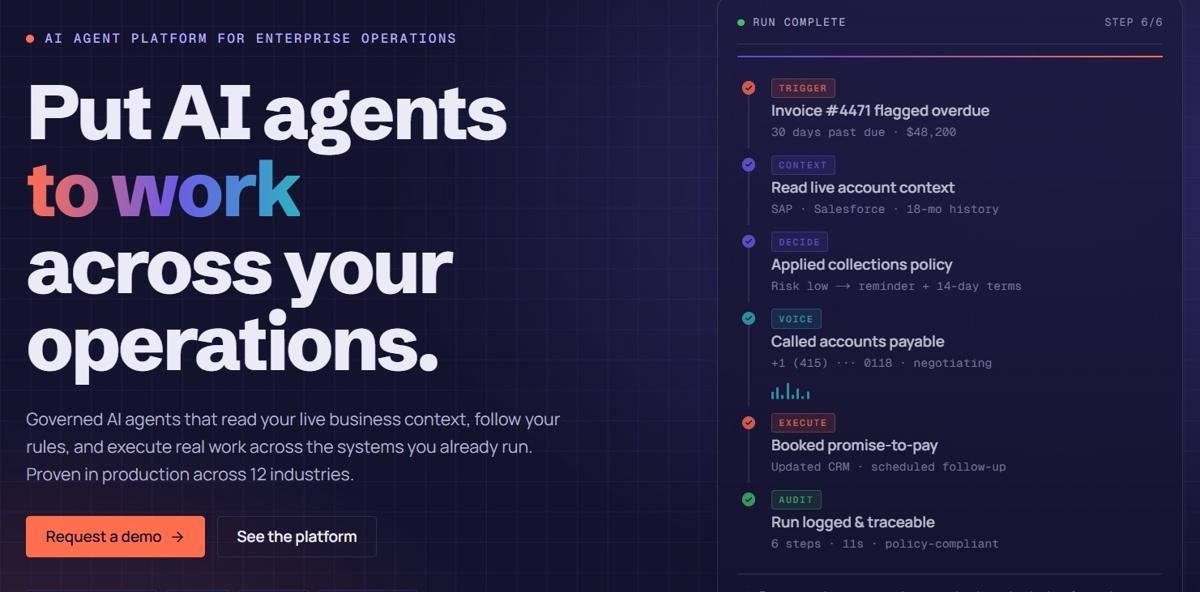
Cost tools tell you where the money went. assistents.ai agents decide what to do about it, within your rules, and do it in the systems where the spend is owned, approved and paid. assistents.ai is a governed enterprise platform for AI agents: a context, governance, decision and action layer that sits above your existing cloud, ERP, CRM, data and workflow systems. Here is why it suits FinOps teams that need more than another dashboard.
1. Shared business context, not just billing rows. The assistents.ai Context Engine holds entities, relationships, owners, definitions, policies and source evidence. Agents know who owns a cost, which budget it affects and what they are allowed to do about it.
2. Every action is governed. Each action passes an access check and a policy evaluation, then proceeds, waits for human approval or is blocked and logged. Every step is recorded in a complete audit history. That answers the first question every FinOps lead asks: what can this agent actually change? Learn more about agent governance.
3. Five ways to work, on one platform. Conversational Agents answer and act. Agentic BI turns questions into charts, scheduled insights and threshold alerts. Document AI turns invoices, contracts and order forms into structured data. Voice AI handles spoken requests. Autonomous Workflows run work triggered by events, schedules and inboxes. FinOps use cases need all five, from a Slack question about spend to an invoice reconciled in the ERP.
4. FinOps for AI, built in. The assistents.ai AI Gateway sends each task to an approved model, handles fallback and high availability, and manages usage. You can govern the cost of your agents on the same platform that runs them, without tying yourself to one model provider.
5. It reaches the systems of record. assistents.ai connects to ERPs including SAP, as well as CRM, databases and files, through secure APIs, SDKs and connectors, with event ingestion and two-way sync. This is how the finance link in use case 11 works, and most FinOps tools do not have it.
6. It deploys where your data must stay. Run assistents.ai as cloud SaaS, in your private cloud or on-premise. That matters when billing data, contracts and ERP records cannot leave your environment.
7. Delivered, not just licensed. Ampcome's Forward Deployed Engineers, AI engineers and data specialists in the USA, Australia and India work through a six-step path: select one valuable process, connect systems, configure agents and workflows, validate on real cases, operate, then expand.
8. Proven agent patterns. The patterns behind these 11 use cases are continuous monitoring, anomaly alerts, multi-entity reporting, turning insights into governed actions, legacy licence replacement and controlling inference cost. The Ampcome team behind assistents.ai has delivered all of them in logistics, retail, utilities, healthcare, financial services and more.
When assistents.ai is not the right fit. If you run a single cloud and only want automated commitment purchasing, your cloud's native agent or a specialist commitment tool may be all you need. assistents.ai is most useful when FinOps decisions cross teams and systems and need to be governed, recorded and auditable.
Common pitfalls with AI agents for FinOps
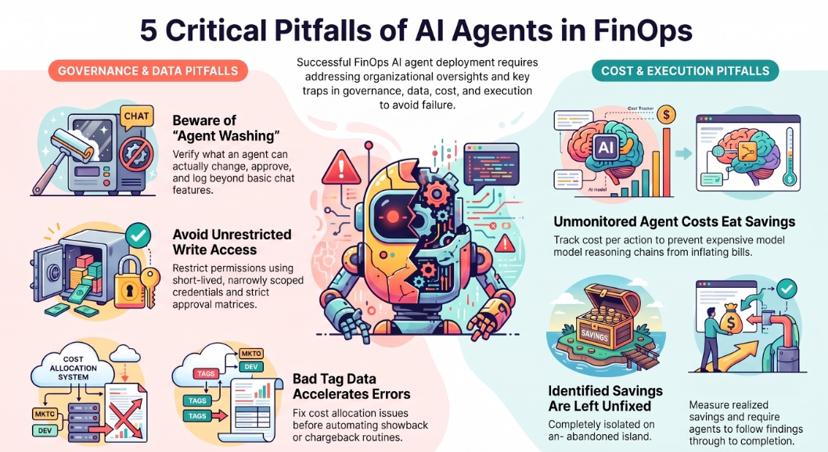
Most failed FinOps agent projects fail for organisational reasons, not technical ones. Watch for these five.
- Agent washing. Many "AI agents" are dashboards with a chat box. Ask any vendor what the agent can change, under what approval, and where the record of it is kept.
- Write access without limits. Never give an agent broad write permissions on day one. Use short-lived, narrowly scoped credentials and the approval matrix above.
- Agents running on bad tag data. An agent that allocates costs from poor tags spreads the errors faster. Fix allocation (use case 3) before you automate showback or chargeback.
- Agents that cost more than they save. Long reasoning chains on expensive models can make a FinOps agent a cost line of its own. Measure agent cost per action from day one.
- Findings that are never fixed. Identified savings are not realised savings. Track realised savings against identified savings and make the agent responsible for following each finding through to the change.
For the wider IT operations picture, including incident, capacity and change management, see our guide to AI use cases in IT operations.
Start with one FinOps process
You don't need to automate all 11 use cases at once. Pick the process that costs your team the most time each week, such as anomaly triage, SaaS renewals or AI spend allocation, and run one governed agent on it with clear success measures. Raise its autonomy as it proves itself.
assistents.ai helps FinOps, engineering and finance teams put AI agents to work across cloud, SaaS, AI and ERP systems, with every action permission-checked, governed and logged. Book a tailored walkthrough of assistents.ai built around your priority FinOps process.
Related reading
- AI use cases in IT operations: agentic workflows
- AI agents for CFOs and finance leaders
- AI agents for finance and procurement
- Agentic AI in finance and accounting
- AI agents for document processing
FAQs
What is an AI agent for FinOps?
An AI agent for FinOps is software that uses AI, cost data and business rules to carry out FinOps tasks on its own: detecting anomalies, explaining spend, recommending and drafting optimisations, and executing approved actions. Unlike a dashboard, it follows each finding through to resolution and records what it did.
What is agentic FinOps?
Agentic FinOps is the practice of using AI agents to run parts of the FinOps lifecycle across Inform, Optimize and Operate. People set goals, policies and approval limits. Agents do the investigation, follow-up and execution within those limits.
What is the difference between AI for FinOps and FinOps for AI?
AI for FinOps means using AI to manage technology costs. FinOps for AI means managing the cost of AI itself: tokens, model invoices and GPU hours. According to the State of FinOps 2026, 98% of FinOps practices now manage AI spend, so most teams need both.
How do AI agents reduce cloud costs?
They find and explain waste faster, follow each finding through to an owner and a fix, apply low-risk changes automatically within policy, and catch expensive changes before deployment. Most of the gain comes from acting on findings that would otherwise sit in a report.
How is a FinOps AI agent different from a FinOps dashboard or copilot?
A dashboard shows data and a copilot answers questions, but people still do all the work. An agent investigates, decides within rules, drafts or executes the change, asks for approval when needed and keeps an audit trail.
Do AI agents for FinOps need write access to my cloud accounts?
Not to start with. Begin read-only. Give write access only for specific low-risk actions, using narrowly scoped, short-lived credentials, and route higher-risk actions through approvals or infrastructure-as-code pull requests.
Can AI agents fix cloud costs without human approval?
Yes, for low-risk, reversible actions you have pre-approved, such as fixing tags or scheduling non-production shutdowns. Actions that are hard or impossible to undo, such as commitment purchases and permanent deletions, should always need human approval.
How do you track and control the cost of AI agents and LLM tokens?
Send all model traffic through an AI gateway that records usage by agent, team and use case. Measure cost per completed task, not just total spend. Use cheaper models for routine work when quality scores hold.
How do I use AI in FinOps if my tagging is poor?
Start with allocation. An agent can find untagged resources, infer likely owners from account structure and deployment history, and ask owners to confirm. Better allocation makes every other use case more accurate.
Should I build a FinOps agent with MCP or buy a platform?
Building with MCP and an LLM is fine for experiments. In production you still need permissions, policy checks, approvals, audit trails, monitoring and cost control. Most enterprises buy that governance layer rather than build and maintain it.
Which approach works best for multi-cloud FinOps?
A native cloud agent covers one provider. For multi-cloud, use a cost data source that normalises billing across providers, ideally in the FOCUS format, with a governed agent layer that can act across all of them and in your ERP.
How long does it take to deploy AI agents for FinOps?
A read-only anomaly and analytics agent on one scope can go live within the first month. A sensible plan reaches approved actions on low-risk items within about 90 days, depending on how ready your data and integrations are.