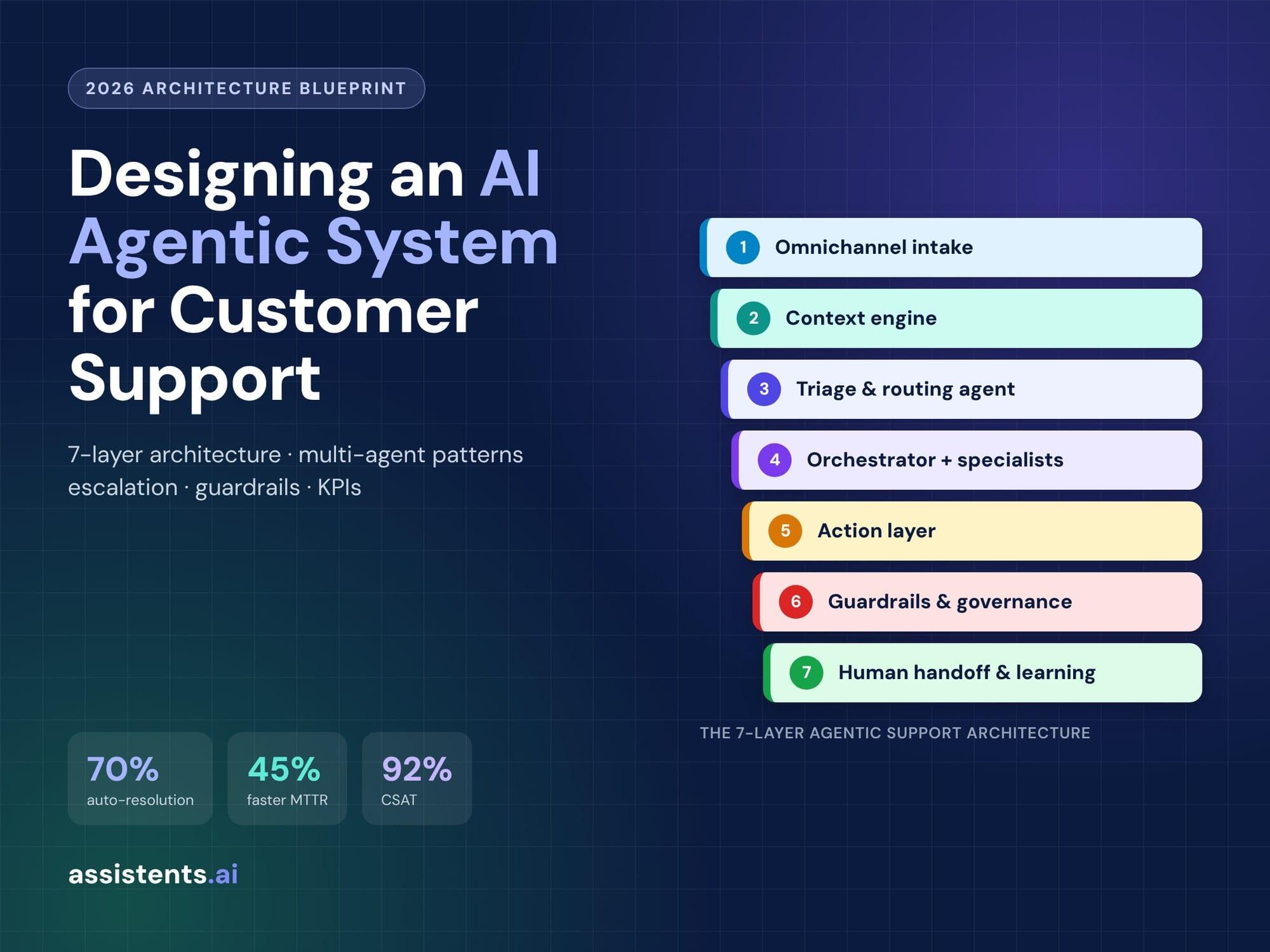
Designing an AI agentic system for customer support means building a set of AI agents that understand a customer's request, pull the right context, take approved actions in your systems, and hand off to a human with full context when they should. Get the design right and the system resolves tickets instead of just answering questions. Get it wrong and you have an expensive chatbot that frustrates customers and your team.
This guide gives you the blueprint we use in production: a 7-layer agentic support architecture, a framework for choosing between single-agent and multi-agent designs, concrete escalation rules, and the KPIs that matter. Every design choice is backed by a real assistents.ai deployment in retail, real estate, banking, hospitality, education or field services.
Key takeaways
- An AI agentic system for customer support combines intake, context, reasoning, permissioned actions, guardrails and human handoff, so issues get resolved, not just deflected.
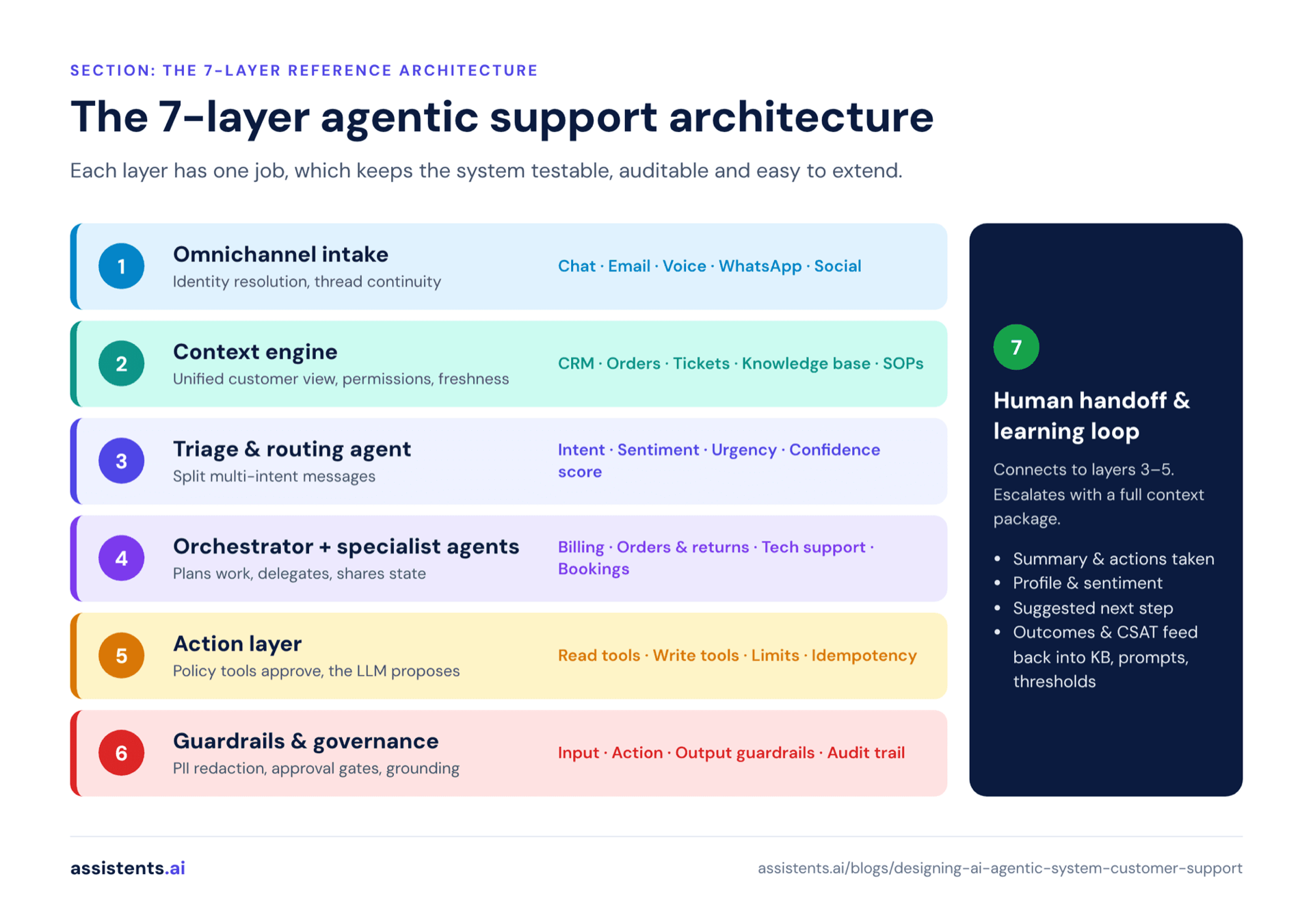
- Use the 7-layer architecture: omnichannel intake → context engine → triage agent → orchestrator and specialist agents → action layer → guardrails and governance → human handoff and learning loop.
- Start with one agent and intent routing. Move to an orchestrator with specialist agents once you have 5+ support domains, several languages, voice, or regulated workflows.
- Design escalation early. Low confidence, negative sentiment, sensitive intents and SLA risk should route to a human early, with a full context package.
- What good looks like: assistents.ai customer support deployments average 70% auto-resolution, 45% faster MTTR and 92% CSAT, and go live in under 3 weeks (source).
What is an AI agentic system for customer support?
An AI agentic system for customer support is a coordinated set of AI agents that perceive a customer request, reason over live business context, take permissioned actions in systems like your CRM, order platform or helpdesk, and escalate to humans with full context when needed. Unlike a chatbot, it is designed to resolve the issue end to end, not just reply.
The shift is already happening. Gartner predicts that by 2029, agentic AI will autonomously resolve 80% of common customer service issues without human intervention, leading to a 30% reduction in operational costs. The teams that reach that number will be the ones that designed for it: clear agent roles, clean context, safe actions and smart handoffs.
If you want the business view first, see our overview of customer service automation.
Agentic AI vs chatbots vs copilots
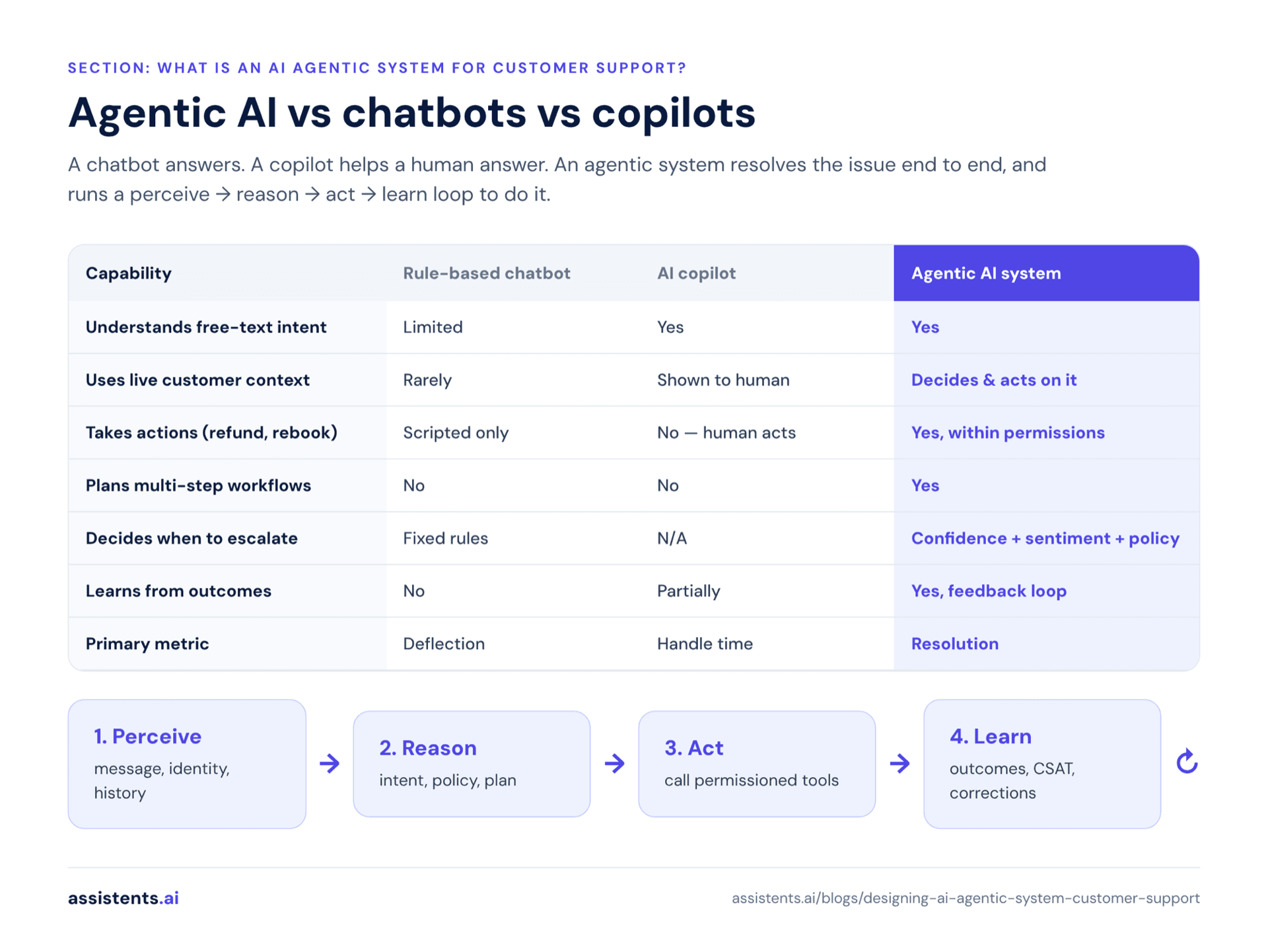
What "agentic" means in practice: perceive → reason → act → learn
Every agentic support system runs the same loop:
- Perceive: take in the message, channel, customer identity and history.
- Reason: classify intent, check policy, plan the steps.
- Act: call tools (look up an order, issue a credit, book a slot, open a ticket).
- Learn: log the outcome, collect CSAT, and feed corrections back into knowledge and prompts.
The architecture below is how you make that loop reliable at enterprise scale.
Do you need an agentic system? A 6-question readiness check
You need an agentic system, rather than a FAQ bot, when your tickets require looking up live data or changing something in a system of record. If three or more of the questions below are a "yes", design for agents.
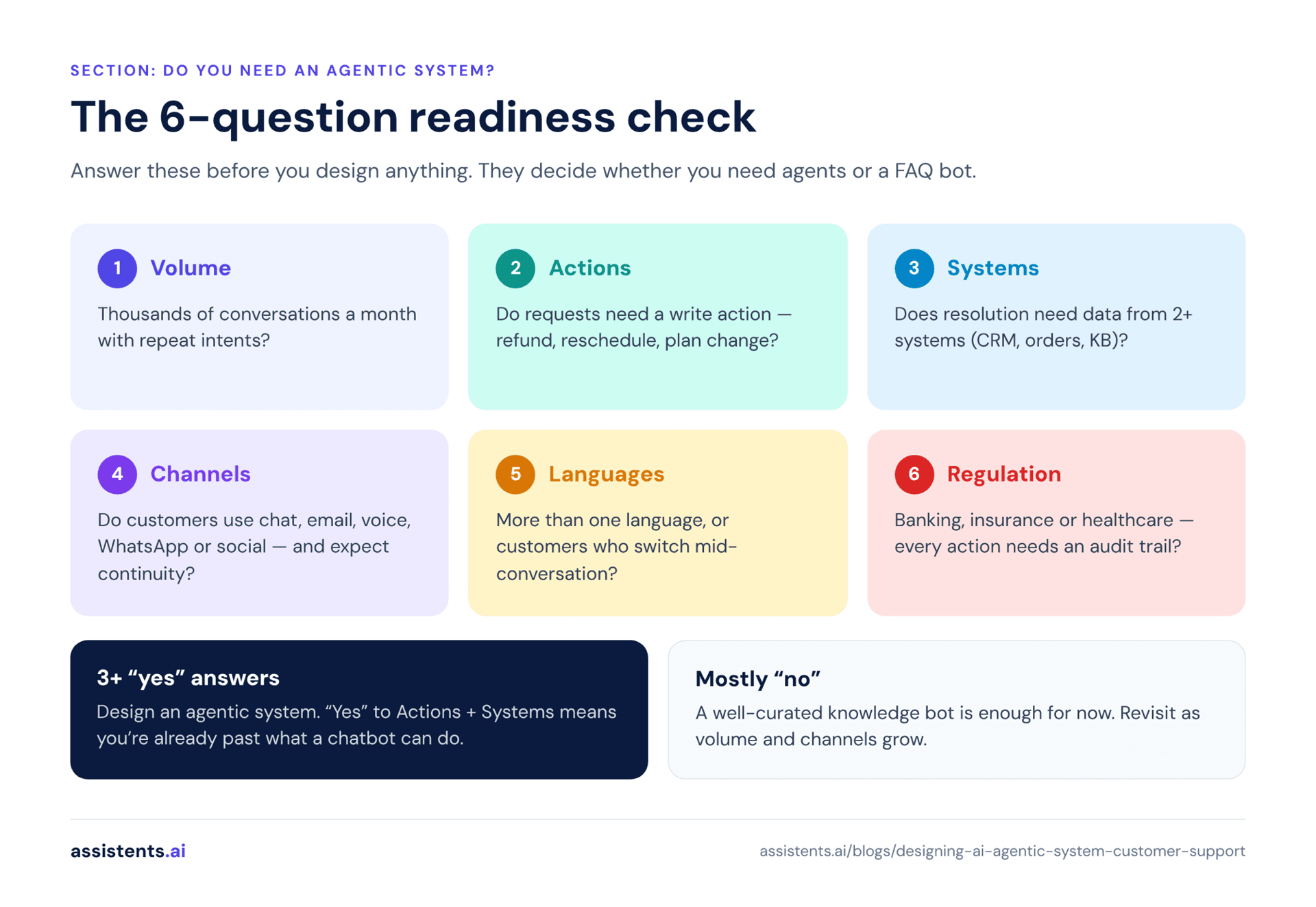
- Volume: do you handle more than a few thousand support conversations a month, with a large share of repeat intents?
- Actions: do common requests need a write action (refund, reschedule, change of plan, payment arrangement), not just an answer?
- Systems: does resolution require data from two or more systems (for example, CRM + order management + knowledge base)?
- Channels: do customers contact you on more than one channel (chat, email, voice, WhatsApp, social) and expect continuity?
- Languages: do you support more than one language, or customers who switch languages mid-conversation?
- Regulation: are you in a regulated industry (banking, insurance, healthcare) where every action needs an audit trail?
If you answered "no" to almost everything, a well-curated knowledge bot is enough for now. If you answered "yes" to Actions and Systems, you are already past what a chatbot can do.
The 7-layer reference architecture for agentic customer support
A production-grade AI agentic system for customer support has seven layers: omnichannel intake, a context engine, a triage and routing agent, an orchestrator with specialist agents, a permissioned action layer, guardrails and governance, and a human handoff and learning loop. Each layer has one job, which makes the system testable, auditable and easy to extend.
Layer 1: Omnichannel intake (chat, email, voice, WhatsApp, social)
The intake layer normalises every message into one conversation object, whatever the channel. The key design decision is identity and thread continuity. If a customer emails on Monday and calls on Tuesday, the agent should know it's the same issue. assistents.ai keeps context across email, chat, phone, social and self-service, so customers never repeat themselves.
Design tips:
- Resolve identity early (email, phone, account ID, verified login).
- Store a channel-agnostic transcript. Email and voice need different response formatting, not different logic.
- For email, extract structured fields (order number, dates, property, booking reference) at intake.
Layer 2: Context engine (CRM, orders, ticket history, knowledge base, SOPs)
Agents are only as good as the context they see. The context engine joins structured data (CRM records, orders, entitlements, inventory) with unstructured knowledge (help articles, SOPs, policies, past resolutions) into a unified customer view.
Design tips:
- Curate the knowledge base; don't crawl everything. A smaller set of accurate, current articles beats a full-site crawl.
- Retrieve 3–5 high-quality chunks rather than many weak ones, and attach source citations to every answer.
- Respect permissions: the agent should only see what the customer is entitled to see.
Layer 3: Triage and routing agent (intent, sentiment, urgency, confidence)
The triage agent classifies each request by intent, sentiment, urgency and complexity, and outputs a confidence score, not just a label. That score drives everything downstream: auto-resolve, route to a specialist agent, or escalate.
Design tips:
- Detect multi-intent messages ("cancel my order and update my address") and split them into sub-tasks.
- Sentiment should change tone and escalation priority, never policy outcomes. An angry customer doesn't get a refund they aren't eligible for, but they should get a human sooner.
Layer 4: Orchestrator and specialist agents
For anything beyond simple FAQs, an orchestrator plans the work and delegates to specialist agents, each with its own tools and knowledge scope. Typical specialists: Billing, Orders and Returns, Technical Support, Bookings, Account Management. This keeps prompts small, reduces "context pollution" and lets you test each specialist independently.
See single agent vs multi-agent for when to introduce this layer.
Layer 5: Action layer (permissioned tools)
This is where agentic systems earn their name and where most risk lives. Separate read tools (look up order, check inventory, fetch policy) from write tools (issue refund, change booking, update record).
Design tips:
- Let a policy tool decide eligibility, not the LLM. The model proposes; deterministic rules approve.
- Set limits per action, per session and per customer per day (for example, refunds under a set value are autonomous; above it, they need approval).
- Confirm write actions with the customer, and use idempotency keys so a retry never double-refunds.
Layer 6: Guardrails and governance
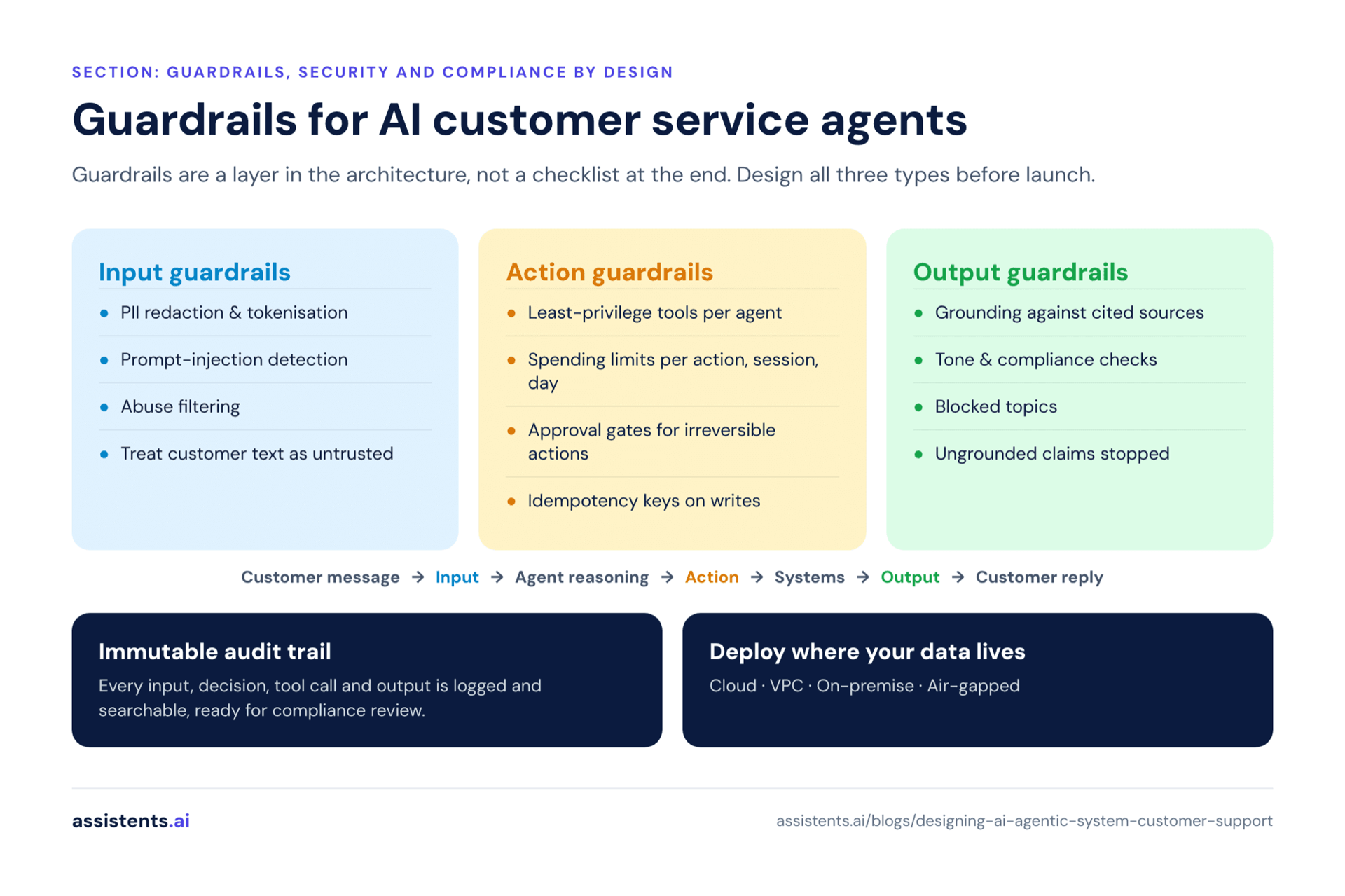
Guardrails aren't a final checklist. They're a layer in the architecture. Use three types:
- Input guardrails: PII redaction, prompt-injection detection, abuse filtering.
- Action guardrails: role-based tool access, spending limits, approval gates.
- Output guardrails: grounding checks against cited sources, tone and compliance checks, blocked topics.
Every decision and tool call should land in an immutable audit log. More on this in guardrails, security and compliance.
Layer 7: Human handoff and learning loop
When the system escalates, the human should receive a context package: a summary, what the AI already tried, customer profile and sentiment, and a suggested next step. After resolution, outcomes, CSAT and human corrections feed back into the knowledge base, prompts and routing thresholds. That loop is how auto-resolution climbs from launch to steady state.
Single agent vs multi-agent: how to choose
Start with a single agent and intent-based routing if you have fewer than three support domains, one language and low regulatory exposure. Move to a multi-agent design, with an orchestrator and specialist agents, when you have five or more domains, voice or multilingual support, document-heavy workflows, or regulated actions that need separate permissions.
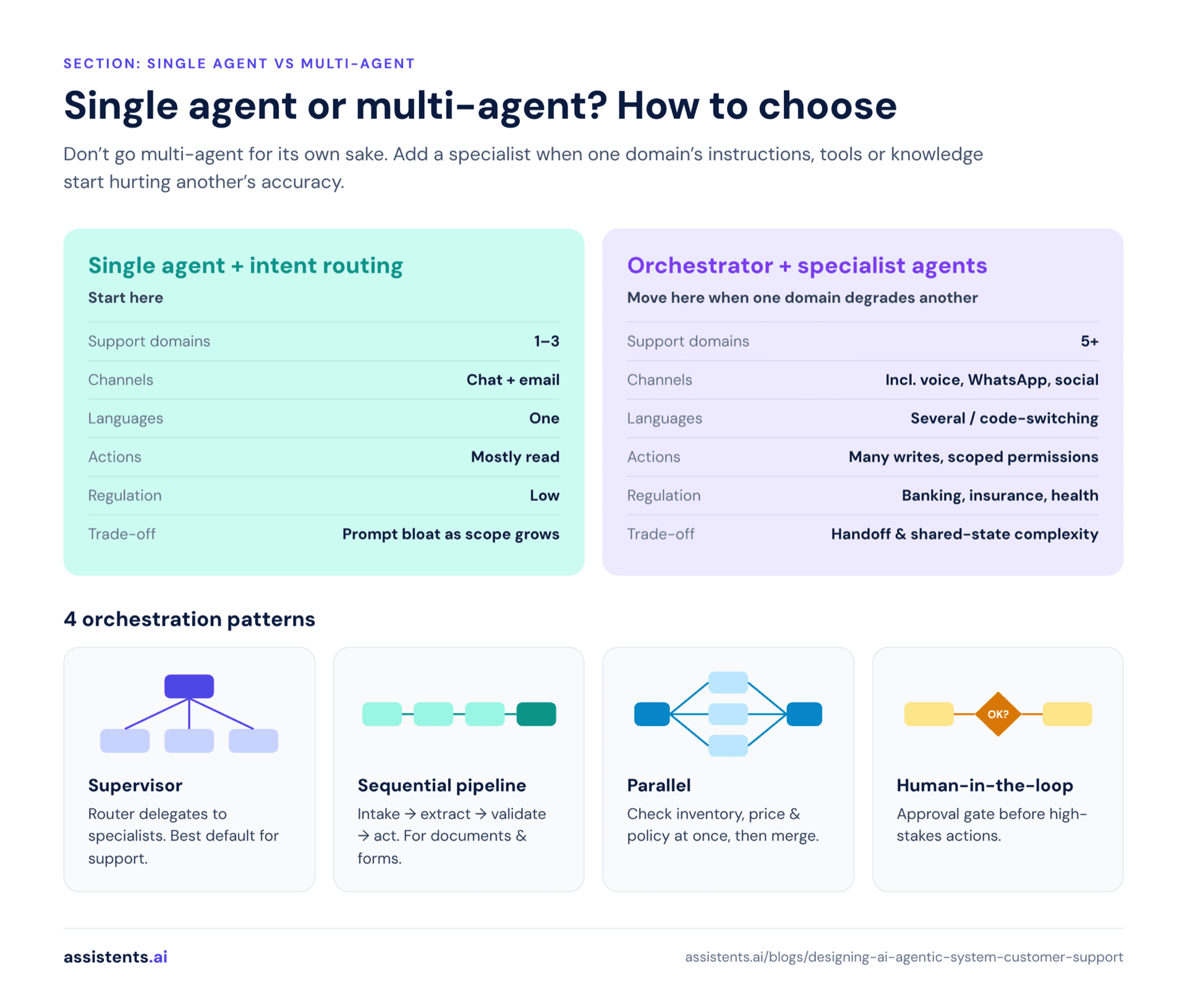
| Factor | Single agent + intent routing | Orchestrator + specialist agents |
|---|---|---|
| Support domains | 1–3 | 5+ |
| Channels | Chat and email | Chat, email, voice, WhatsApp, social |
| Languages | One | Several, or code-switching |
| Actions | Mostly read, a few simple writes | Many writes with different permission levels |
| Documents | Short articles | Long PDFs, contracts, forms, tenders |
| Regulation | Low | Banking, insurance, healthcare, utilities |
| Pros | Simpler, cheaper, lower latency | Modular, testable, scoped permissions, scales |
| Cons | Prompt bloat as scope grows | Handoff and shared-state complexity |
A practical rule: don't start multi-agent for its own sake. Add a specialist when one domain's instructions, tools or knowledge start degrading another's accuracy.
4 orchestration patterns
- Supervisor (orchestrator–specialist): a router agent delegates to specialists. Best default for customer support.
- Sequential pipeline: intake → extract → validate → act. Best for document-heavy or form-based requests.
- Parallel: several agents work at once (for example, check inventory, pricing and policy simultaneously), then merge results.
- Human-in-the-loop hybrid: an approval gate sits before high-stakes actions.
In production: an Australian remedial building services specialist needed to process complex, revision-heavy documents. A single agent couldn't reliably extract, compare revisions and update the operations system in one pass. The design used a multi-agent document workbench: one agent retrieves and classifies, a vision-LLM agent extracts data from complex PDFs, another detects revisions, and an integration agent writes to the core system with full audit logs. The system was engineered for up to ~90% faster document processing with a ~95% extraction accuracy target on standard formats.
How to design an AI agentic system for customer support in 8 steps
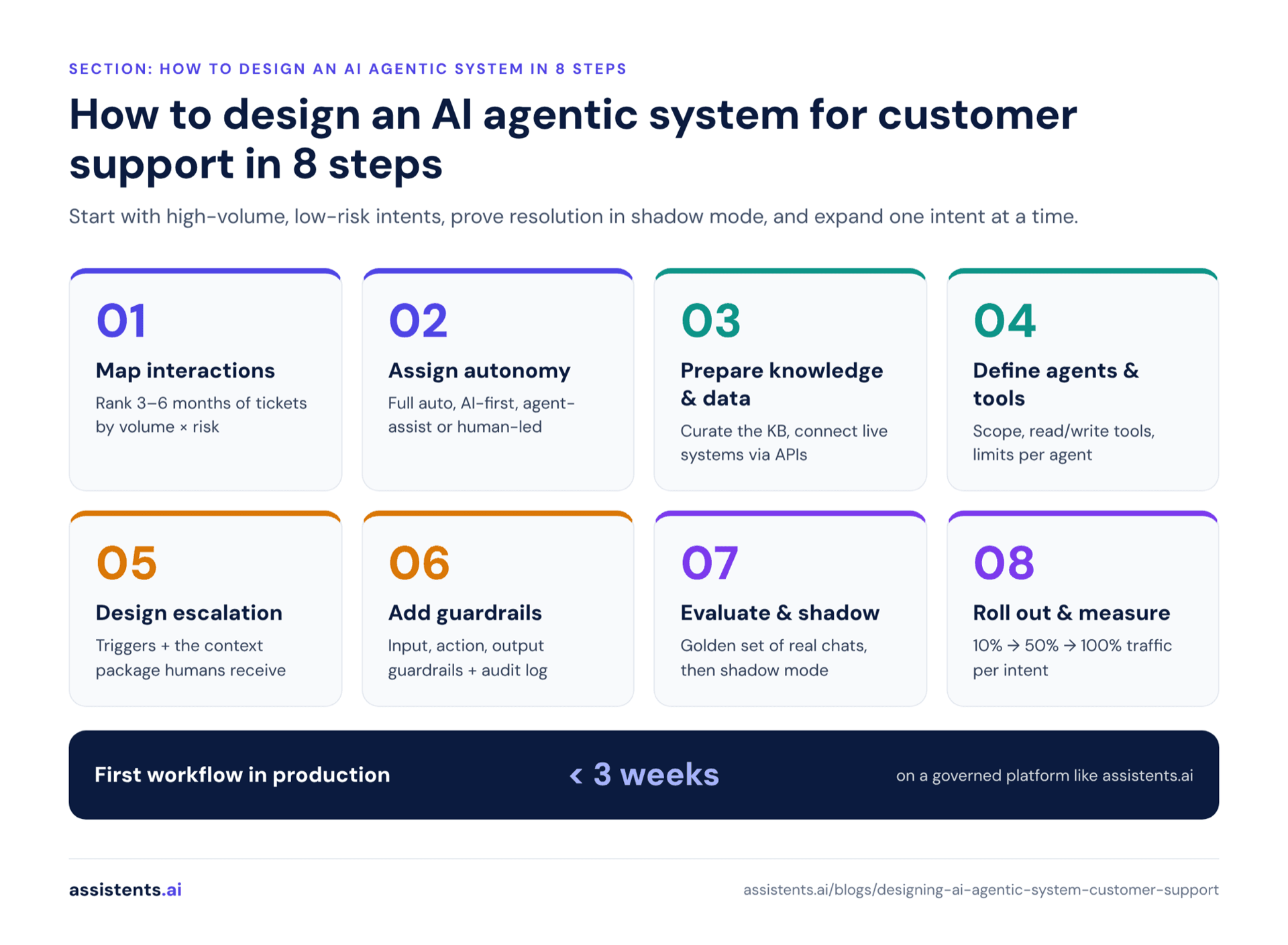
To design an AI agentic system for customer support: (1) map your interactions, (2) assign autonomy levels, (3) prepare knowledge and data, (4) define agents, tools and permissions, (5) design escalation, (6) put guardrails in place, (7) evaluate offline and in shadow mode, and (8) roll out in phases while you measure.
Step 1: Map your interactions by volume × risk
Export 3–6 months of tickets. Group them by intent and rank each intent by volume and risk (financial, legal, reputational). High-volume, low-risk intents (order status, booking changes, FAQs, password resets) are your first wave.
Step 2: Assign an autonomy level to each intent
| Autonomy level | When to use | Example intents |
|---|---|---|
| Full automation | High volume, low risk, clear policy | Order status, FAQs, appointment rescheduling |
| AI-first with monitoring | Medium risk, clear policy | Refunds under a limit, plan changes |
| Agent-assist (copilot) | High risk or judgement-heavy | Disputes, complaints, complex billing |
| Human-led | Sensitive or regulated | Fraud, bereavement, legal, medical triage decisions |
Step 3: Prepare knowledge and data
Clean and de-duplicate help articles, policies and SOPs. Tag each with an owner and a review date. Connect live systems through APIs, not exports, so the agent sees current orders, inventory and entitlements.
Step 4: Define agents, tools and permissions
For each agent, write down: its scope (intents it owns), its tools (read and write), its knowledge sources, its limits, and its escalation triggers. If you can't describe an agent's job in two sentences, split it.
Step 5: Design escalation and the handoff payload
Decide when the AI hands off and what the human receives. This step is so important it has its own section below.
In production: a luxury safari hospitality group received complex booking requests by email. The system used email intake, intent classification and data extraction, then a conversational loop to ask for missing details (dates, guests, preferences). It ran real-time inventory checks, proposed alternative dates or properties when needed, and handed curated itinerary building to a human travel designer. It then generated invoices and documents automatically. The result: faster booking turnaround with less back-and-forth, higher accuracy on complex guest requirements, and the ability to scale without compromising luxury service.
Step 6: Put guardrails in place before launch
Configure input, action and output guardrails, spending limits and the audit log before any customer sees the agent.
Step 7: Evaluate offline, then run in shadow mode
Build a golden set of real conversations (including your 30 hardest). Score accuracy, policy compliance, tone and escalation correctness. Then run the system in shadow mode: it drafts responses that humans review but customers don't see.
Step 8: Roll out in phases and measure
Go from 10% of traffic to 50% to 100% for each intent, with go/no-go criteria at each stage (for example, auto-resolution and CSAT for AI-handled tickets within a few points of your human baseline). On a governed platform, the first workflow can be in production in under 3 weeks.
Designing escalation and human-in-the-loop
An AI support agent should escalate to a human when its confidence is low, the customer's sentiment is deteriorating, the intent is sensitive, the customer is high-value, it has failed twice, or an SLA is at risk. The handoff must include a summary, actions already taken and a suggested next step, so the customer never repeats themselves.
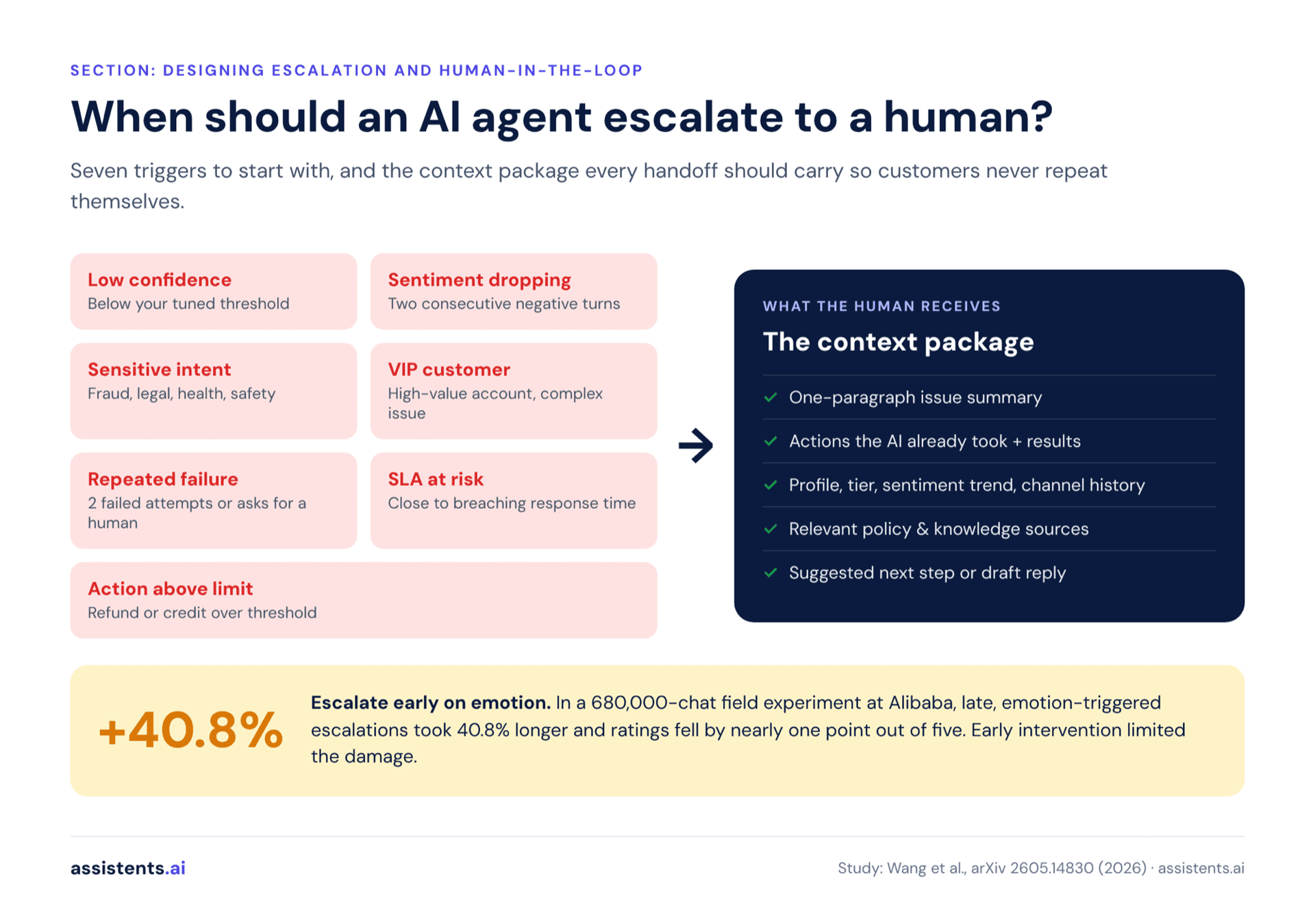
Timing matters as much as the trigger. A May 2026 randomised field experiment on Alibaba's customer service operations, covering more than 680,000 chats, found that late escalations triggered by negative emotion hurt outcomes the most. Those chats took 40.8% longer and ratings fell by nearly one point on a five-point scale. Early intervention limited the damage. The lesson for design: escalate early on emotion, don't wait for the customer to get angry.
Escalation triggers (starting configuration)
| Trigger | Suggested starting rule | Why |
|---|---|---|
| Low confidence | Triage or answer confidence below your threshold (tune in shadow mode) | Avoids confident wrong answers |
| Negative sentiment trend | Sentiment drops across two consecutive turns | Early handoff protects CSAT |
| Sensitive intent | Fraud, legal threat, health, bereavement, safety | Human judgement required |
| Customer tier | VIP or high-value accounts on complex issues | Relationship risk |
| Repeated failure | Two failed attempts or the customer asks for a human | Prevents loops |
| SLA risk | Ticket is close to breaching its response or resolution SLA | Protects commitments |
| Action above limit | Refund or credit above the autonomous threshold | Financial control |
What the human receives
- One-paragraph summary of the issue
- Actions the AI already took (and their results)
- Customer profile, tier, sentiment trend and channel history
- Relevant policy and knowledge sources
- A suggested next step or draft reply
In production: a diversified real estate portfolio in the UAE deployed an omnichannel service agent on web, WhatsApp and email to triage tenant queries, answer FAQs, and handle rent and payment workflows using a knowledge base built on tenancy documents, policies and SOPs. Anything outside policy went to the human team through ticketing and escalation with full context. The results: faster response times, lower call-centre load, a consistent 24×7 tenant experience and better SLA adherence through automated routing and tracking. See how this works in tenant and property inquiry management.
A tax-tech deployment shows the same principle in a high-stakes domain: the agent screens transactions, collects evidence and explainability notes, and escalates to tax experts with the case already documented. That's the standard every handoff payload should meet.
Designing for voice and multilingual support
Voice agents need a separate design pass: a strict per-turn latency budget across speech-to-text, LLM reasoning and text-to-speech, support for interruptions, and native handling of multiple languages and code-switching. Without it, even accurate agents feel robotic and callers hang up.
Design tips:
- Budget latency per turn. Stream STT and TTS, use smaller models for routine intents, and save frontier models for complex reasoning. assistents.ai voice agents run at sub-200ms latency with real-time sentiment detection.
- Support barge-in. Callers interrupt; the agent should stop, listen and re-plan.
- Design for code-switching. In many markets, customers mix languages in a single sentence.
- Keep the same brain across channels. The voice agent should share the context engine, tools and guardrails with chat and email.
- Measure voice separately. Track containment, average handle time and sentiment by call, using voice AI analytics.
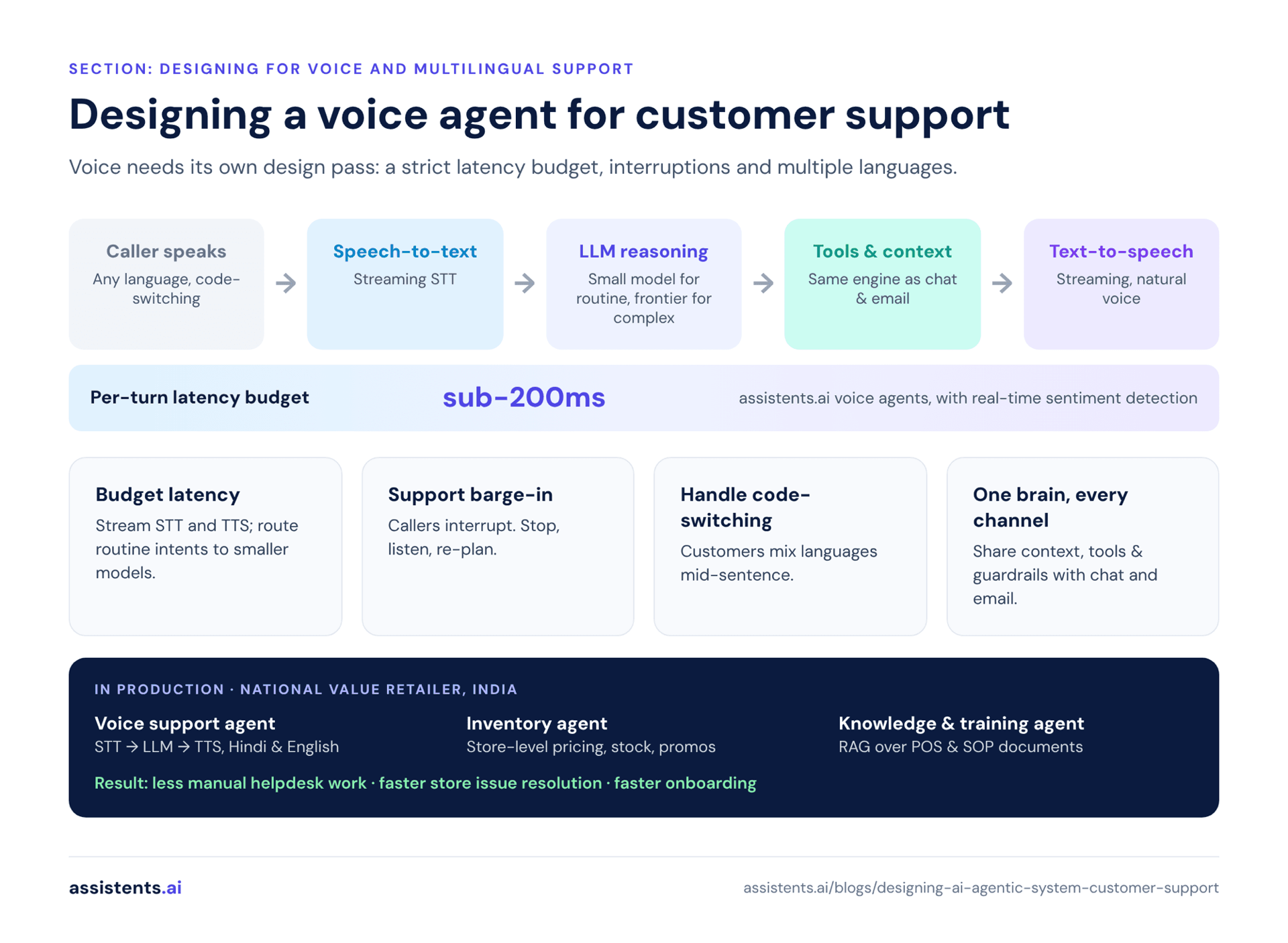
In production: a national value retailer with hundreds of stores in India needed to support store staff at scale. The design used three agents:
- A voice support agent (STT → LLM → TTS) in Hindi and English.
- An inventory intelligence agent for store-level pricing, stock and promotions.
- A knowledge and training agent using RAG over POS and SOP documents.
An admin console, analytics and ticketing integration tied it together. Results: less manual helpdesk work, faster store issue resolution, better store-level inventory visibility, and faster onboarding through on-demand training guidance.
Guardrails, security and compliance by design
A secure agentic support system redacts personal data at intake, limits each agent to the tools and data its role needs, gates high-risk actions behind approvals, logs every decision and tool call, and can be deployed in your own cloud or on-premise when data residency demands it.
| Control | What to implement |
|---|---|
| PII protection | Redact or tokenise card numbers, IDs and health data before they reach the model |
| Least-privilege tools | Each agent gets only the tools and data scopes its role needs |
| Approval gates | High-value or irreversible actions need human approval |
| Prompt-injection defence | Tools enforce limits independently of the model; treat customer text as untrusted |
| Grounding | Answers cite approved sources; ungrounded claims are blocked |
| Audit trail | Every input, decision, tool call and output is logged and searchable |
| Deployment options | Cloud, VPC, on-premise or air-gapped for regulated data |
In production: a global fintech provider serving banks and credit unions needed AI support that could pass compliance review. The design combined omnichannel intake (chat, email and phone) with workflow routing, agent-assist summaries and next-best actions for human staff, and auditability, reporting and SLA monitoring built in. Results: faster case handling and more consistent answers, lower operational load through automation, and audit trails ready for compliance.
Read more about how assistents.ai approaches agent governance for regulated support teams.
KPIs to measure your agentic support system
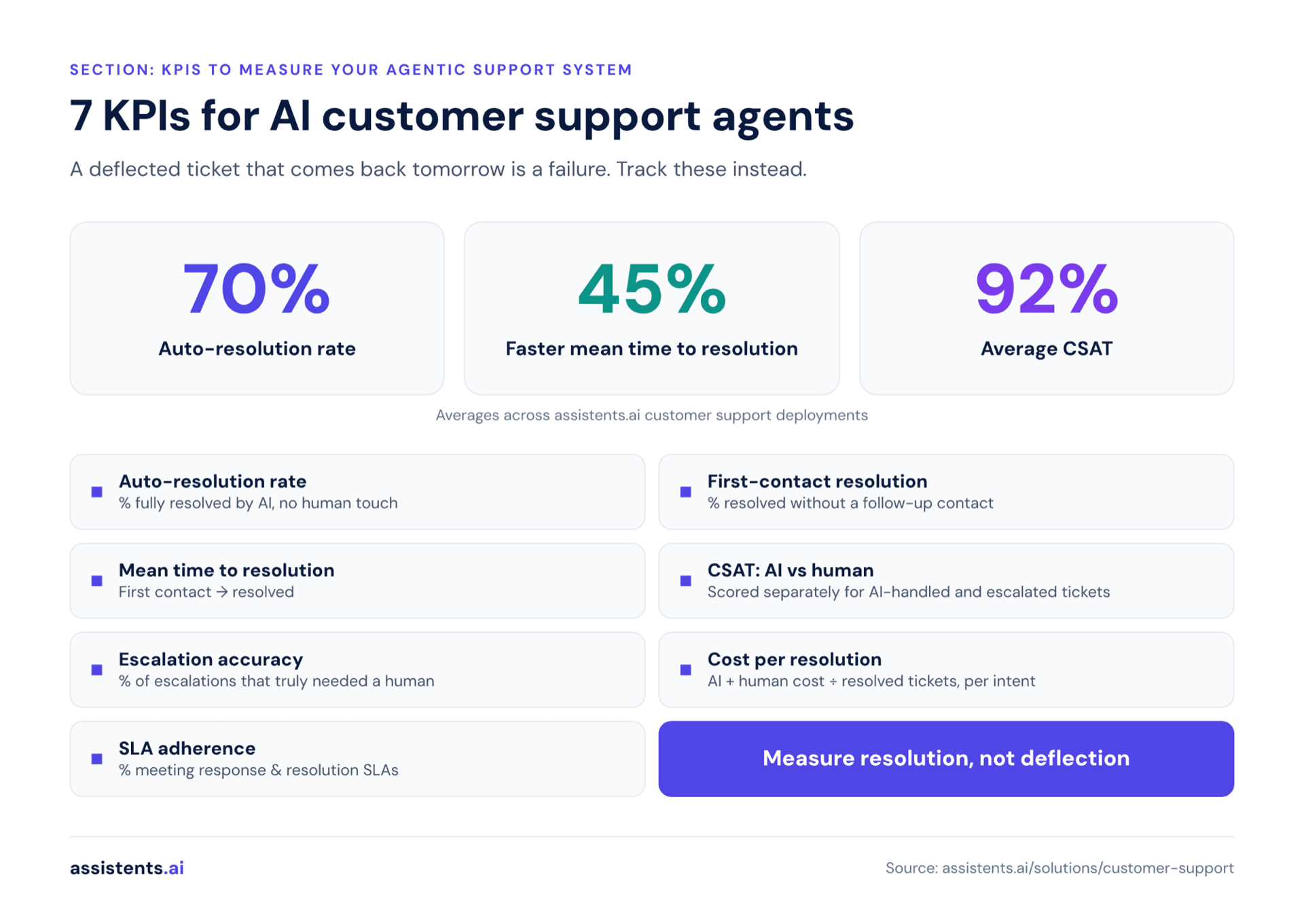
Measure an agentic support system on resolution, not deflection: auto-resolution rate, first-contact resolution, mean time to resolution, CSAT split by AI and human, escalation accuracy, cost per resolution and SLA adherence.
| KPI | Definition | Benchmark to aim for |
|---|---|---|
| Auto-resolution rate | % of conversations fully resolved by AI with no human touch | ~70% average across assistents.ai support deployments |
| First-contact resolution (FCR) | % resolved without a follow-up contact | Should rise as context improves |
| Mean time to resolution (MTTR) | Average time from first contact to resolution | 45% faster on average with assistents.ai |
| CSAT (AI vs human) | Satisfaction scored separately for AI-handled and escalated tickets | 92% average CSAT with assistents.ai |
| Escalation accuracy | % of escalations that truly needed a human | High and stable; review false escalations weekly |
| Cost per resolution | Total AI + human cost ÷ resolved tickets | Track per intent, not just overall |
| SLA adherence | % of tickets meeting response and resolution SLAs | Should rise with automated routing |
Benchmarks are from the assistents.ai customer support solution page. Your baseline will depend on intent mix and channel.
6 agentic customer support systems in production: what the design looked like
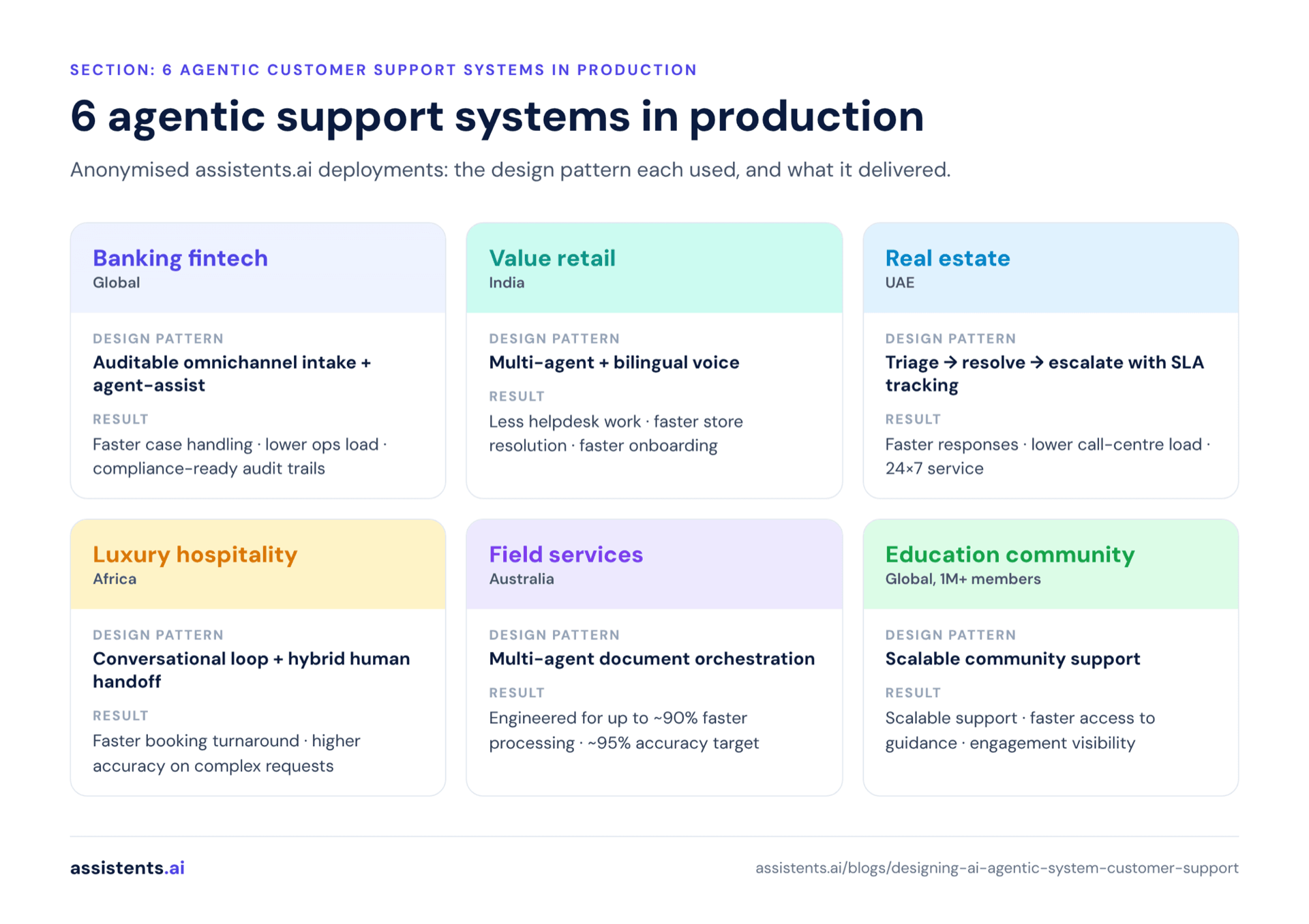
The fastest way to design your own system is to copy proven patterns. Here are six anonymised assistents.ai deployments, each showing the design pattern, the agents and channels used, and the result.
| Industry and region | Design pattern | Agents and channels | Results |
|---|---|---|---|
| Banking fintech (global) | Auditable omnichannel intake + agent-assist | Chat, email, phone intake; routing; summaries; next-best actions; SLA monitoring | Faster case handling, lower operational load, audit trails ready for compliance |
| Value retail (India) | Multi-agent + bilingual voice | Voice agent (Hindi/English), inventory agent, knowledge and training agent, ticketing | Less helpdesk work, faster store issue resolution, faster onboarding |
| Real estate (UAE) | Triage → resolve → escalate with SLA tracking | Web, WhatsApp, email; tenant triage; payments; knowledge base over policies | Faster responses, lower call-centre load, 24×7 service, better SLA adherence |
| Luxury hospitality (Africa) | Conversational loop for missing details + hybrid handoff | Email intake, extraction, inventory checks, alternative offers, invoices | Faster booking turnaround, higher accuracy, scale without losing service quality |
| Field services (Australia) | Multi-agent document orchestration | Retrieval, vision-LLM extraction, revision analysis, system integration | Engineered for up to ~90% faster processing, ~95% extraction accuracy target |
| Education community (global, 1M+ members) | Scalable community support | Support agent for programme and learning queries, plus analytics | Scalable support for educators, faster access to guidance, better engagement visibility |
Two more patterns worth borrowing:
- Healthcare testing (UK): booking orchestration with status monitoring and automatic customer notifications led to faster customer communication and fewer missed handoffs. Proactive updates prevent "where is my result?" tickets before they arrive.
- Voice rehearsal app (global): a voice agent with cost-controlled inference shows how to keep voice economics sustainable at scale.
Want more examples by industry? Read 15 agentic AI use cases in customer service.
7 design mistakes that stall agentic support projects
- Crawling the whole website into the knowledge base. Broad, outdated content lowers answer quality. Curate instead.
- Letting the LLM decide policy. Refund eligibility, credits and exceptions belong in deterministic policy tools.
- Optimising for deflection instead of resolution. A deflected ticket that comes back tomorrow is a failure.
- Handing off without context. If the human has to re-ask everything, CSAT drops and handle time rises.
- Skipping shadow mode. Real conversations surface edge cases your test set never will.
- Testing in one language only. Accuracy and tone vary by language; test every language you serve.
- Adding governance at the end. Audit trails and permissions are much harder to retrofit than to design in.
Build vs buy: frameworks or an agentic platform?
Build on open-source frameworks if you have a dedicated AI engineering team and unusual requirements. Buy a governed agentic platform if you need production results in weeks, deep integrations with your helpdesk and CRM, and built-in governance.
| Factor | Build (LangGraph, CrewAI, OpenAI Agents SDK) | Buy (governed agentic platform like assistents.ai) |
|---|---|---|
| Time to first production workflow | Typically months | Under 3 weeks |
| Integrations | Build and maintain each one | 70+ pre-built (Zendesk, ServiceNow, Salesforce, Twilio and more) |
| Governance and audit | Build it yourself | Built in |
| Voice | Assemble STT, LLM and TTS yourself | Native |
| Flexibility | Maximum | High, via no-code builder plus APIs and SDKs |
| Ongoing maintenance | Your team | Shared with the vendor |
| Best for | AI-native product companies | Support and CX teams that need outcomes fast |
Comparing vendors? See our ranking of the best AI agents for customer service, and learn how a no-code AI agent builder speeds up delivery. For architecture patterns beyond support, read agentic AI applications from concept to code.
Why assistents.ai for agentic customer support
assistents.ai is an enterprise agentic AI platform that deploys governed AI agents for customer support across chat, email, voice, WhatsApp and social. It connects to your existing helpdesk and CRM, goes live in under three weeks, and averages 70% auto-resolution, 45% faster MTTR and 92% CSAT.
Production in under 3 weeks
Connect your ticketing system and launch your first agent in weeks, not quarters. No six-month build, no rip-and-replace.
A context engine across 70+ systems
Out-of-the-box integrations with Zendesk, ServiceNow, Freshdesk, Jira Service Management, Intercom, Salesforce, HubSpot, Dynamics, Confluence, Notion, Slack, Teams, Twilio, Talkdesk, Five9 and more, mostly with bidirectional sync. Agents build a unified view of each customer and issue, so every answer is grounded in live data.
Governed by design
Intelligent classification, threshold-based escalation, SLA monitoring and full audit trails are built into the platform. Deploy in the cloud, your VPC, on-premise or air-gapped.
Omnichannel and voice-native
One context, every channel. Customers never repeat themselves, whether they start in chat and finish on a call. Voice agents replace legacy IVR trees with natural conversations and human handoff.
Proven in production
Deployments across retail, real estate, banking, hospitality, healthcare, education and field services, with platform averages of 70% auto-resolution, 45% faster MTTR and 92% CSAT.
Built for CX teams and engineers
A no-code agent builder lets support leaders own workflows, while APIs and SDKs give engineering full control.
Conclusion: design for resolution, not deflection
Designing an AI agentic system for customer support comes down to a few decisions made well: a clean context engine, clear agent boundaries, safe permissioned actions, early and context-rich escalation, and governance from day one. Start with your highest-volume, lowest-risk intents, prove resolution and CSAT in shadow mode, and expand one intent at a time.
If you'd rather go live in weeks with a governed platform that already connects to your helpdesk, CRM and telephony, see the assistents.ai customer support demo.
FAQs
What is agentic AI in customer service?
Agentic AI in customer service is a system of AI agents that understands a customer's request, plans the steps to resolve it, takes actions in business systems such as the CRM, order platform or helpdesk, and escalates to a human with full context when needed. It aims to resolve issues end to end, not just answer questions.
How is agentic AI different from a chatbot?
A chatbot follows scripts or retrieves answers from a knowledge base. An agentic AI system reasons over live customer data, calls tools to take actions such as refunds, bookings or account updates, plans multi-step workflows, and decides when to hand off to a human based on confidence, sentiment and policy.
What are the components of an agentic AI system for customer support?
A production system has seven layers: omnichannel intake, a context engine, a triage and routing agent, an orchestrator with specialist agents, a permissioned action layer, guardrails and governance, and a human handoff and learning loop.
How do you build an AI agent for customer support?
Map your ticket intents by volume and risk, assign autonomy levels, prepare clean knowledge and live data connections, define each agent's tools and permissions, design escalation, add guardrails, test offline and in shadow mode, then roll out in phases while measuring resolution and CSAT.
Should customer support use a single agent or multiple agents?
Start with a single agent and intent routing if you have fewer than three support domains and one language. Move to an orchestrator with specialist agents once you have five or more domains, voice or multilingual support, document-heavy workflows, or regulated actions that need separate permissions.
When should an AI agent escalate to a human?
Escalate when confidence is low, sentiment is getting worse, the intent is sensitive (fraud, legal, health), the customer is high-value, the AI has failed twice, the customer asks for a person, an SLA is at risk, or an action exceeds its approved limit. Escalate early on emotion. Late handoffs hurt satisfaction most.
Can AI agents replace customer service agents?
No. AI agents take over routine, high-volume work so human agents can focus on complex, sensitive and relationship-critical cases. The best systems redesign human roles around judgement, empathy, exception handling and improving the AI.
Is agentic AI safe for customer data?
It can be, if it's designed for it. Look for PII redaction, least-privilege tool access, approval gates for high-risk actions, full audit trails, and deployment options such as VPC, on-premise or air-gapped hosting for regulated data.
How long does it take to implement agentic AI in customer service?
On a governed platform like assistents.ai, the first support workflow can be in production in under three weeks. A custom build on open-source frameworks typically takes several months to reach production quality for one workflow.
What KPIs should you track for AI customer support agents?
Track auto-resolution rate, first-contact resolution, mean time to resolution, CSAT split between AI-handled and escalated tickets, escalation accuracy, cost per resolution and SLA adherence. Measure resolution, not deflection.