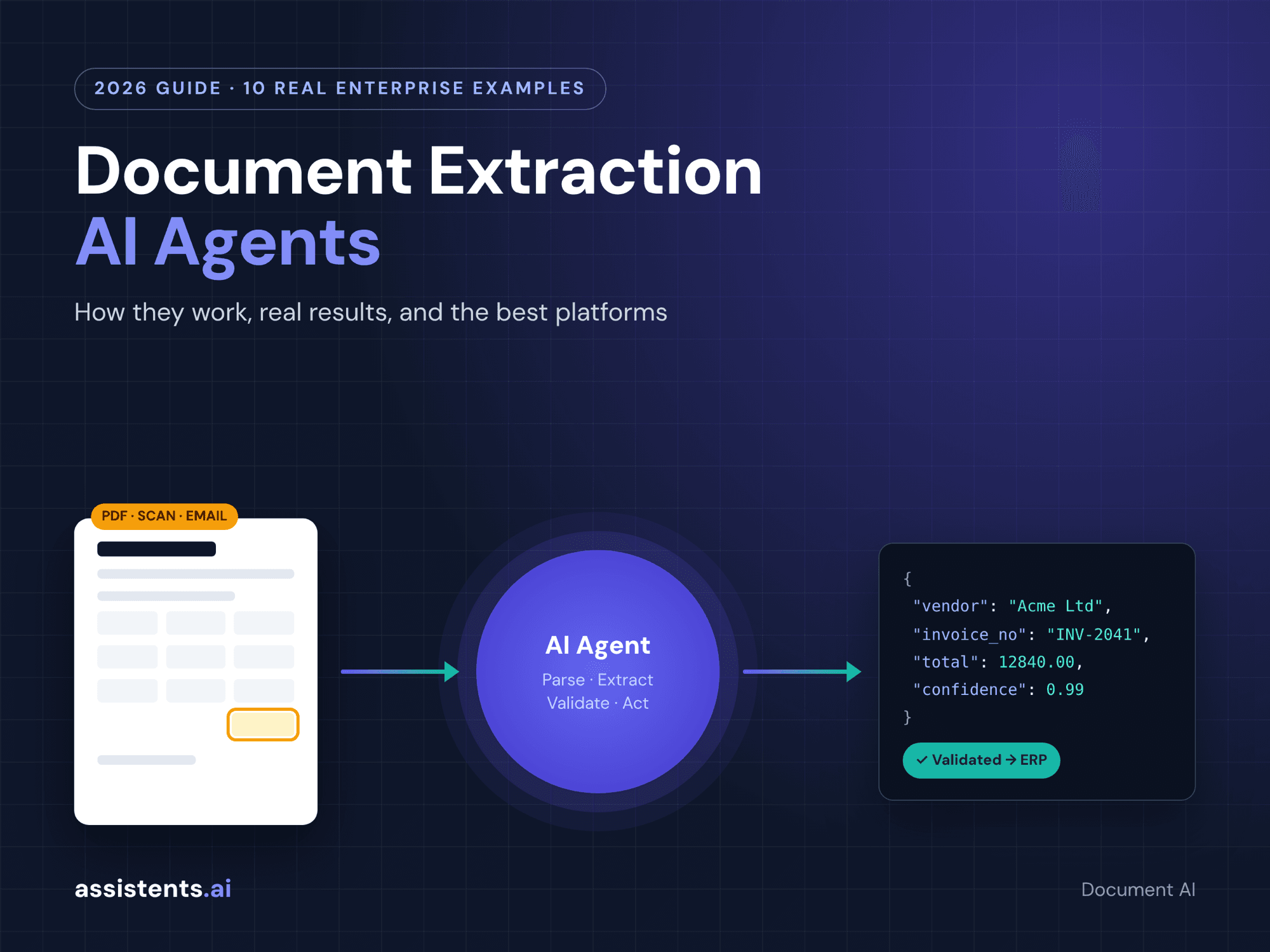
A document extraction AI agent is the fastest way to get data out of PDFs, scans, emails and spreadsheets and into the systems that run your business. Without manual keying, and without templates that break every time a supplier changes their invoice layout.
Most enterprises still lose days to this work. Finance teams re-type invoices. Bid teams copy line items out of 200-page tender packs. Operations teams chase missing fields over email. Classic OCR reads the text but doesn't understand it, and template-based tools fail the moment a document looks different.
This guide explains what a document extraction AI agent is, how it works step by step, and where it delivers measurable results. It covers 10 real enterprise deployments, the best platforms in 2026, and how to choose one.
TL;DR
- What it is: an AI agent that reads any document, extracts the fields you need, checks them against your business rules and pushes clean data into your ERP, CRM or workflow. It decides on its own when to retry, cross-check or ask a human.
- How it differs from OCR: OCR turns images into text. A document extraction AI agent turns documents into validated, structured data and actions.
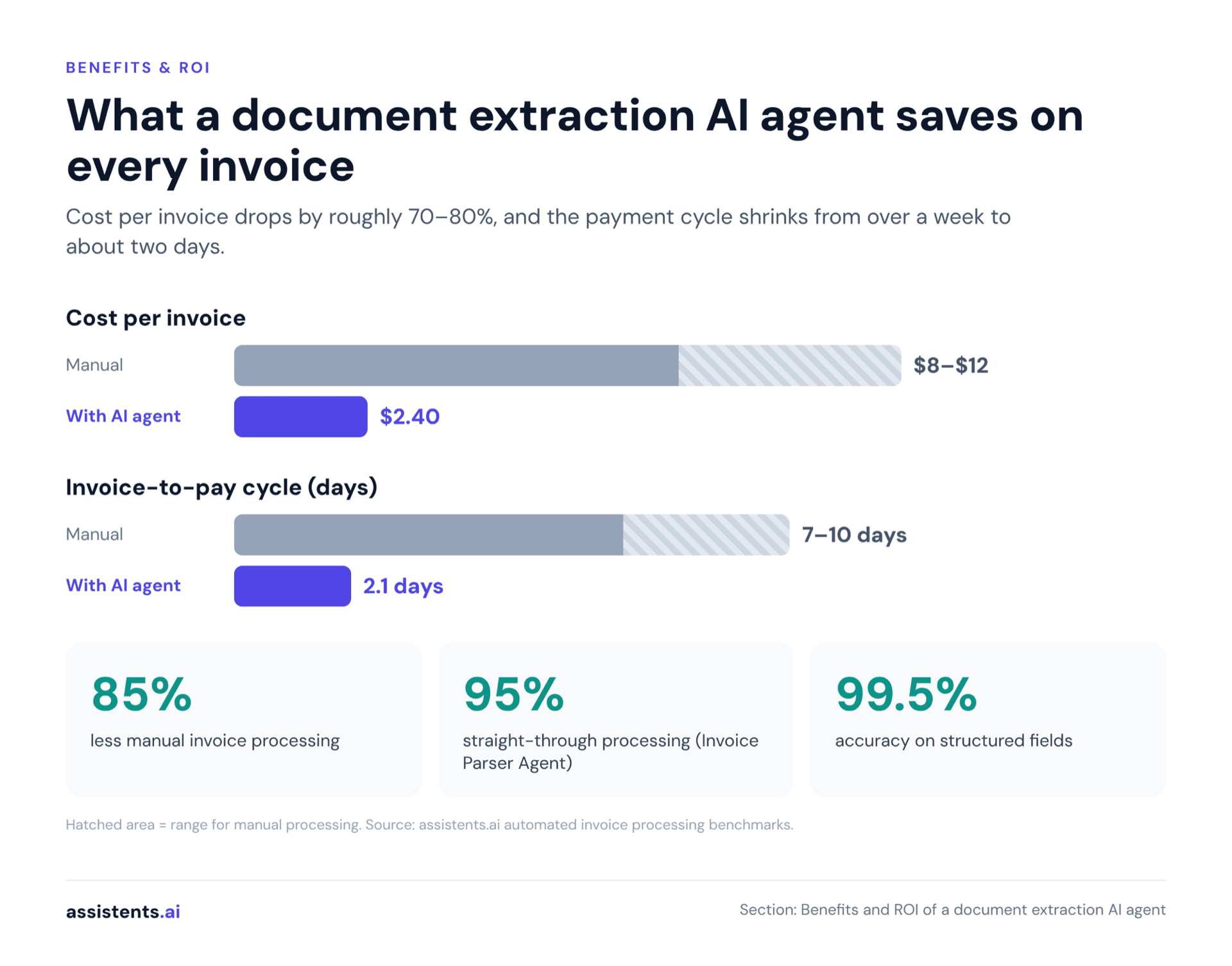
- Typical results: invoice cost dropping from $8–12 to about $2.40 per document, an 85% reduction in manual processing, and up to 95% straight-through processing on standard formats (source).
- Who needs one: any team handling high volumes of variable documents (invoices, contracts, claims, KYC files, tenders, shipping docs) where errors are costly.
What is a document extraction AI agent?
A document extraction AI agent is software that reads any document (PDF, scanned image, email or spreadsheet), identifies the fields you need, validates them against business rules, and sends clean, structured data to your systems. It decides on its own when to retry, cross-check a value or escalate to a human.
The key word is agent. A traditional extraction tool runs once and returns whatever it found. An agent works toward a goal ("get a correct, complete invoice record into SAP"). It checks its own output and takes extra steps until it gets there or hands off to a person.
Agentic document extraction, explained
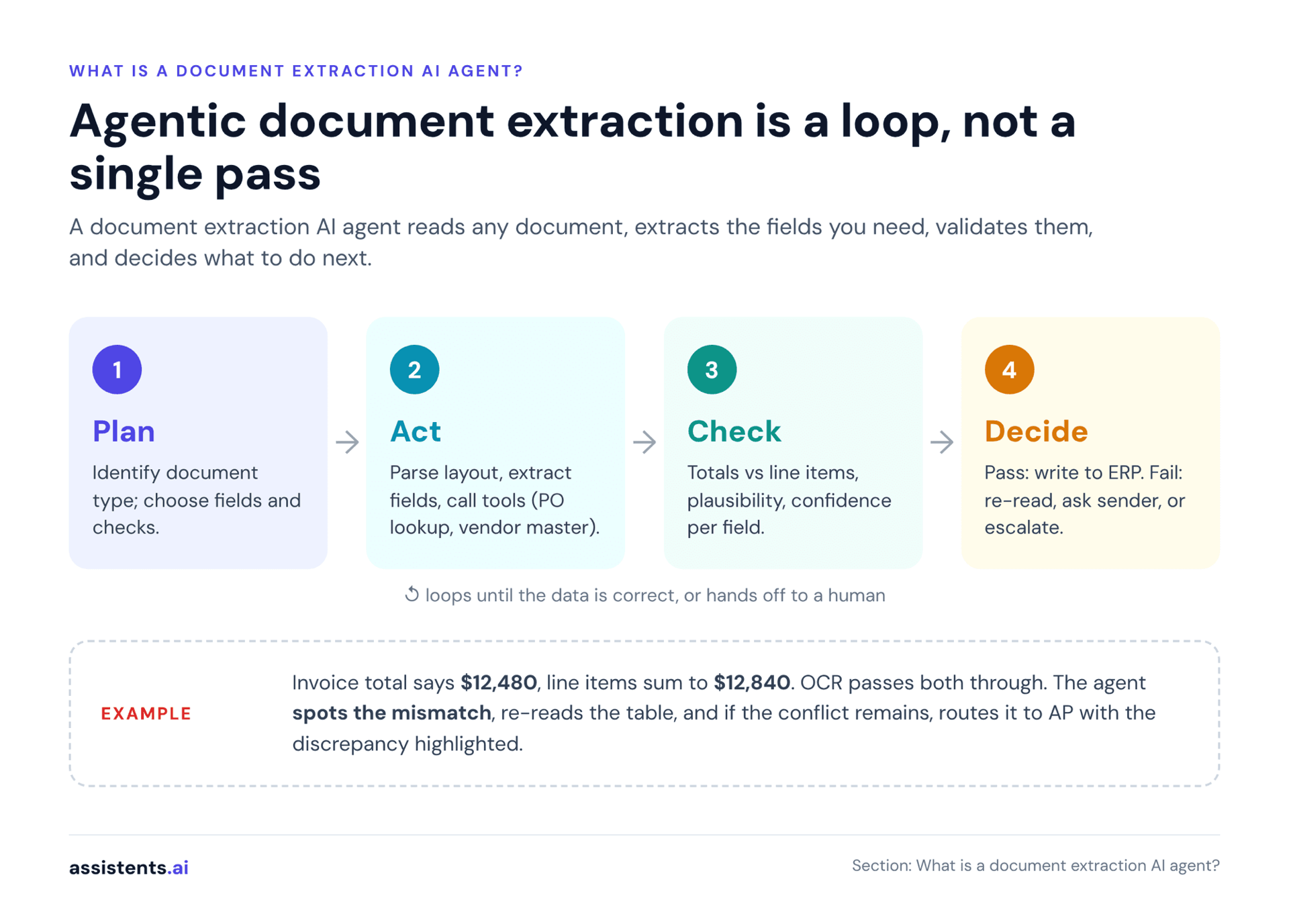
Agentic document extraction is a loop, not a single pass:
- Plan: identify the document type and decide which fields and checks apply.
- Act: parse the layout, extract fields, and call tools such as a PO lookup, a vendor master or a currency converter.
- Check: compare totals with line items, flag improbable values, and score confidence per field.
- Decide: if everything passes, write the data downstream. If not, re-read the relevant region, ask the sender for missing details, or route to a reviewer.
Here's a simple example. An invoice says the total is $12,480, but the line items add up to $12,840. An OCR tool passes both numbers through. A document extraction AI agent spots the mismatch and re-reads the line-item table. If the conflict remains, it sends the invoice to accounts payable with the mismatch highlighted.
Extraction vs understanding vs action
- Extraction pulls values out: invoice number, date, total. (New to the concept? Start with what document extraction is.)
- Understanding knows what those values mean in context: this is a credit note, so the total should be negative.
- Action does something with them: matches a PO, creates a sales order, triggers an approval.
A document extraction AI agent does all three. That's why it can replace end-to-end manual work rather than just one step of it.
Document extraction AI agent vs OCR vs IDP
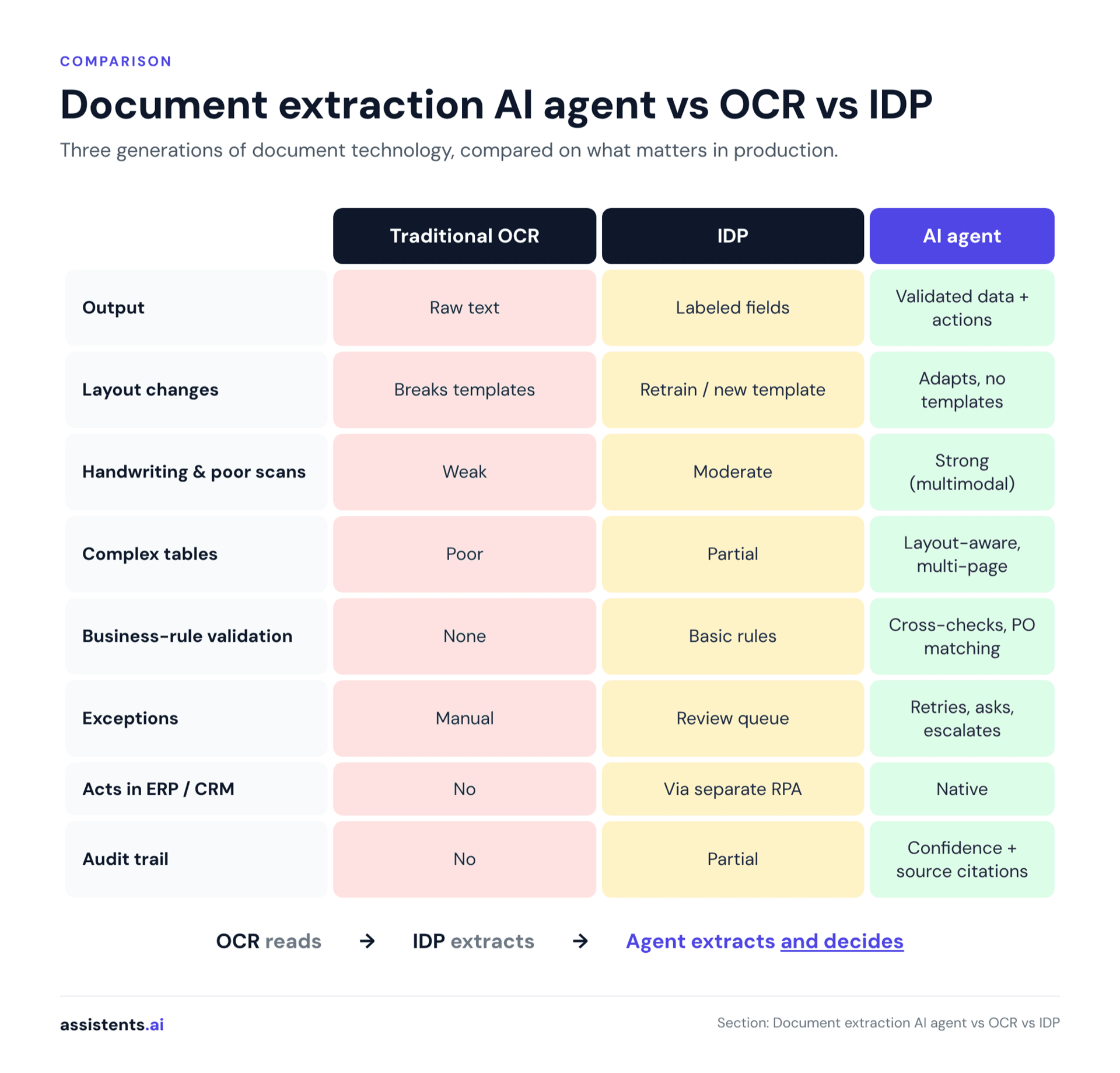
OCR reads, IDP extracts, and a document extraction AI agent extracts and decides. Here's how the three generations compare:For a deeper breakdown, see OCR vs AI extraction and our primer on intelligent document processing.
The market is moving the same way. Vendors from LandingAI to LlamaIndex now describe agentic extraction as the successor to template-based IDP. DeepLearning.AI even runs a course titled Document AI: From OCR to Agentic Doc Extraction.
How a document extraction AI agent works: the 7-stage pipeline
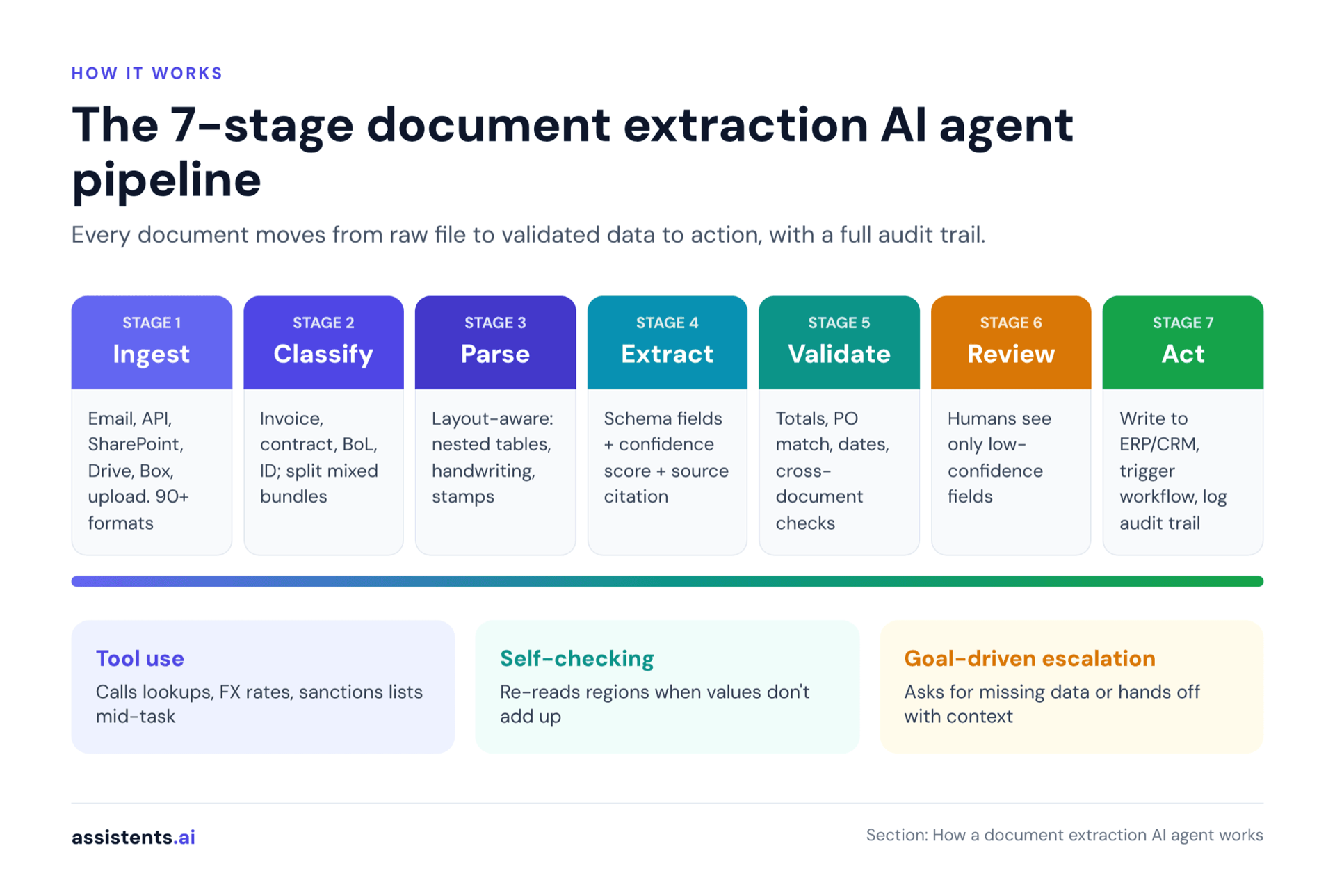
A production-grade document extraction AI agent runs every document through seven stages. On assistents.ai Document AI, the core pipeline is Ingest → Parse → Extract → Validate → Output, with classification, human review and action layered on top.
1. Ingest
Documents arrive from email inboxes, APIs, cloud storage (SharePoint, Google Drive, Box, Dropbox) or direct upload. A strong agent accepts 90+ file formats in one pipeline, including native PDFs, scanned images, Word files, spreadsheets and email bodies.
2. Classify
The agent identifies what each document is (invoice, credit note, contract, bill of lading, ID card) and routes it to the right schema and rules. Mixed bundles, like a tender pack with drawings, schedules and forms, are split and classified page by page.
3. Parse
This is where a document parsing agent earns its keep. Agentic parsing is layout-aware and multimodal. It preserves nested headers, tables that span pages, handwriting, stamps and embedded images instead of flattening everything into a block of text.
4. Extract
The agent pulls fields defined in a schema: vendor name, invoice number, line items, GL codes, clause types, policy numbers. With schema-based structured extraction, every value comes with:
- a confidence score (0–100), and
- a source citation pointing to the exact location in the document.
Source citations are what make extraction auditable. A reviewer can click a value and see exactly where it came from.
5. Validate
Extracted data is checked against business rules and reference data. Typical checks include line items summing to the total, a PO number existing in the ERP, a contract end date falling after the start date, and a name on an ID matching the application. Validation is also where you clean extracted data before it reaches downstream systems.
6. Human-in-the-loop review
Only low-confidence fields or failed checks go to a person, not the whole document. The reviewer sees the value, the source region and the reason it was flagged. Their corrections feed back into the agent's rules and schema.
7. Act
Clean data is written to the system of record (ERP, CRM, claims platform, data warehouse), and the next step in the workflow is triggered: approval, payment, onboarding, filing. With document workflows, every action is logged in an immutable audit trail.
What makes it "agentic"?
Three behaviors separate a document extraction AI agent from a pipeline that only runs once:
- Tool use: it calls lookups, calculators and APIs mid-task (vendor master, FX rates, sanctions lists).
- Self-checking: it verifies its own output and re-reads regions when something doesn't add up.
- Goal-driven escalation: when it can't reach the goal, it asks for missing information, by email or chat, or hands off with context.
This reasoning runs on the Context Engine, which lets the agent reason across documents, structured data and business rules together. It also runs under AI agent governance controls, so every decision is permissioned and traceable.
What documents can a document extraction AI agent handle?
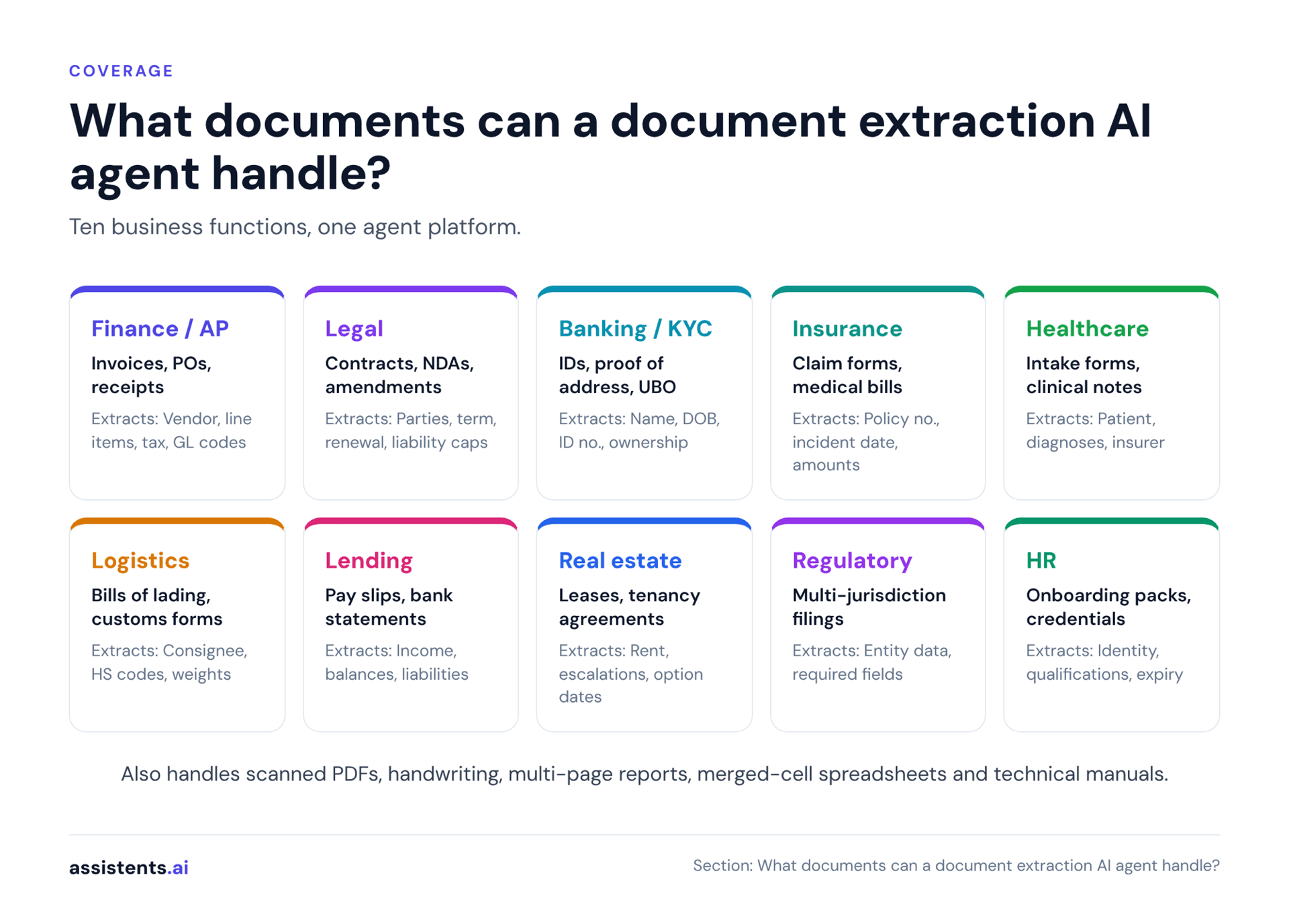
Almost any business document, structured or unstructured. Here are the most common, by function:It also handles hard cases that break older tools: scanned PDFs, handwritten notes, multi-page reports, spreadsheets with merged cells, and technical manuals.
10 real document extraction AI agent examples (with results)
These are production deployments built on the assistents.ai platform. Clients are described by industry and region only.
1. Engineering and technology group (UAE): order documents to SAP sales orders
- Documents: incoming customer order documents and order triggers.
- What the agent does: interprets each order, validates it against rules and approval thresholds, and creates the SAP sales order automatically. It replaced a legacy document-capture system that was reaching end-of-life and carried high licensing costs.
- Results: less manual order processing and less reliance on the legacy system, a faster order-to-confirm cycle with fewer data-entry errors, and better auditability through audit logs and reconciliation reports.
- Related: Document workflows
2. Remedial building services specialist (Australia): tender packs
- Documents: complex, multi-format tender packs, including drawings, schedules, specifications and revisions.
- What the agent does: an Intelligent Document Workbench coordinates several specialized agents. They retrieve tenders, decide which workflow applies, analyze revisions and use vision-LLM extraction on complex PDFs. The data syncs into the company's field-service management platform with full create/update/delete support, quote locking and audit logs.
- Results: engineered for up to ~90% faster tender document processing, with a ~95% extraction accuracy target on standard formats. Change detection and auditability also reduce bid risk.
- Related: Agentic parsing
3. Healthcare staffing platform (US): nurse credential capture
- Documents: nursing licenses, certifications and onboarding paperwork, plus facility staffing requests.
- What the agent does: captures credentials during talent onboarding, takes in facility requests, matches staff to shifts and runs compliance workflows, including reporting on fill rate and utilization.
- Results: faster fill cycles, less scheduling friction, better workforce utilization and quicker response to facilities.
- Related: Automated employee onboarding
4. Pharma sourcing platform (India): RFQs and regulatory documents
- Documents: requests for quotation, supplier documents, and quality and regulatory files for rare excipients.
- What the agent does: automates RFQs and supplier matching, supports quality and regulatory document handling, and analyzes price, lead time and vendor performance.
- Results: faster procurement cycles, fewer manual vendor follow-ups, and more competitive pricing and lead times through better insight.
- Related: Intelligent vendor management
5. Cross-border tax-tech product (UK): transaction screening
- Documents: cross-border transaction records and supporting evidence.
- What the agent does: extracts transaction details, classifies withholding tax, VAT-mismatch and permanent-establishment risks, collects evidence with explainability notes, and escalates to tax experts.
- Results: earlier detection of withholding and VAT risk, fewer last-minute deal disruptions, and faster, more consistent pre-compliance review.
- Related: Compliance risk scoring
6. Sales and use tax research tool (US): source documents to cited memos
- Documents: statutes, rulings and guidance from many sources.
- What the agent does: collects sources automatically, summarizes them and drafts memos or position papers with citations, while tracking the workflow and building a knowledge base.
- Results: less manual source-hunting, faster research cycles, more consistent outputs and better documentation.
- Related: Deep research agents
7. Luxury safari hospitality group (East Africa): booking emails to confirmed itineraries
- Documents: unstructured guest booking emails and generated invoices and PDFs.
- What the agent does: handles email intake, classifies intent and extracts booking data. It asks guests for missing details in a back-and-forth conversation, checks live inventory, suggests alternative dates or properties, and generates invoices and PDFs. It hands off to human specialists for curated itineraries.
- Results: faster booking turnaround with less back-and-forth, higher accuracy on complex guest requirements, and operations that scale without lowering the luxury service standard.
- Related: Autonomous agents
8. Real estate portfolio owner (UAE): tenancy documents and tenant service
- Documents: tenancy agreements, policies and SOPs.
- What the agent does: answers tenants from a knowledge base built on tenancy documents and policies, triages queries (FAQs, rent and payment support), and escalates to human teams through ticketing.
- Results: a consistent 24×7 tenant experience, faster responses, lower call-center load and better SLA adherence through automated routing.
- Related: Tenant and property inquiry management
9. Pan-India value retail chain: POS and SOP documents for store teams
- Documents: POS manuals, SOPs and training material, plus store-level inventory, pricing and promotion data.
- What the agent does: a knowledge and training agent uses retrieval (RAG) over POS and SOP documents. It's paired with an inventory intelligence agent and a Hindi–English voice support agent for store staff.
- Results: less manual helpdesk work and faster resolution of store issues, better store-level inventory visibility, and faster onboarding through on-demand training guidance.
- Related: Employee IT and HR helpdesk
10. Banking-automation fintech (global): dispute and case intake
- Documents: customer dispute submissions and case files arriving by chat, email and phone.
- What the agent does: takes in cases from every channel, summarizes and routes them, suggests next-best actions to human agents, and keeps the workflow auditable with SLA monitoring.
- Results: faster, more consistent case handling, less operational load and better compliance readiness through audit trails.
- Related: AI agents for financial services
Summary: 10 examples at a glance
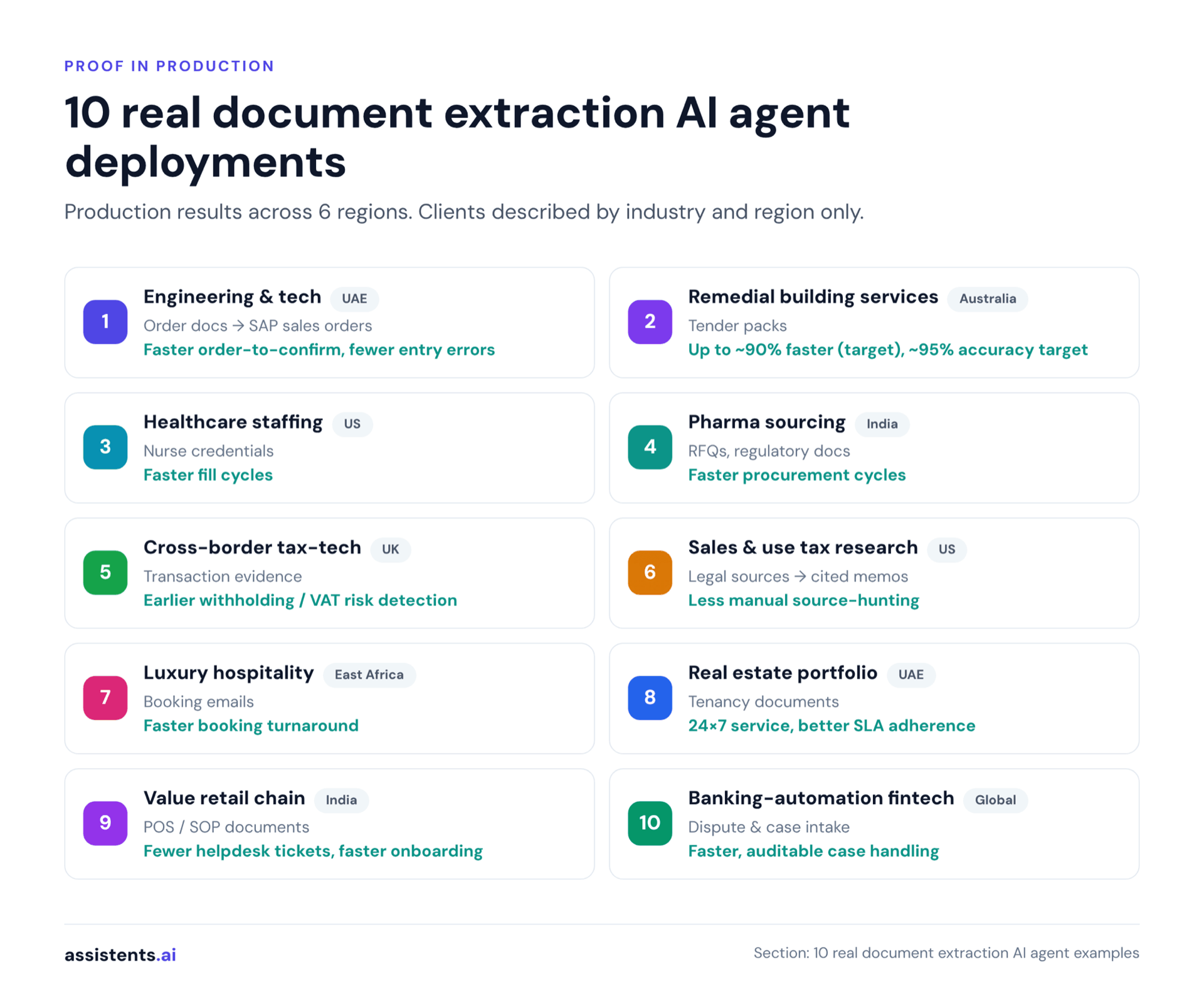
Benefits and ROI of a document extraction AI agent
The clearest ROI shows up in high-volume, repetitive document flows like invoices. Benchmarks from the assistents.ai automated invoice processing use case:
| Metric | Manual / legacy | With a document extraction AI agent |
|---|---|---|
| Cost per invoice | $8–12 | $2.40 |
| Invoice-to-pay cycle | 7–10 days | 2.1 days |
| Manual processing effort | Baseline | 85% reduction |
| Straight-through processing | Low | Up to 95% (Invoice Parser Agent) |
| Field accuracy on structured fields | Varies with keying errors | 99.5% |
Results reported across industries on the Document AI platform:
- Financial services: 70% faster due diligence
- Insurance: 85% of claims auto-processed
- Healthcare: 60% less form-processing effort
- Legal: 80% faster contract review
- Manufacturing: 3× faster compliance audits
- Government: 50% shorter processing time
Benefits beyond cost:
- Scale without headcount: month-end and seasonal peaks no longer need temporary staff.
- Fewer downstream errors: validation catches mistakes before they reach the ERP.
- Faster cash and decisions: quicker invoice cycles capture early-payment discounts, and faster contract review shortens deal cycles.
- Audit readiness: every value traces back to its source.
Estimate your own numbers with the AI agent ROI calculator.
Limits: when you don't need a document extraction AI agent
A document extraction AI agent isn't always the right tool. Be honest about the trade-offs:
- Latency: reasoning loops take longer than a single OCR pass. Independent analyses put agentic extraction at roughly 8–40+ seconds per complex page, compared with 1–2 seconds for standard parsing (Parseur). That's fine for back-office work but matters in real-time flows.
- Cost per page: multi-step reasoning uses more compute. Good platforms reduce this by using cheaper models for simple pages and saving heavier reasoning for hard ones (a model gateway helps; see AI Gateway).
- Hallucination risk: a general LLM can invent a value that looks plausible. The fix is architectural: field-level confidence scores, source citations for every value, and validation rules. If a value can't be traced to the document, it isn't accepted.
- Overkill for simple cases: if you process a few hundred documents a month from one fixed template, OCR plus simple rules may be enough.
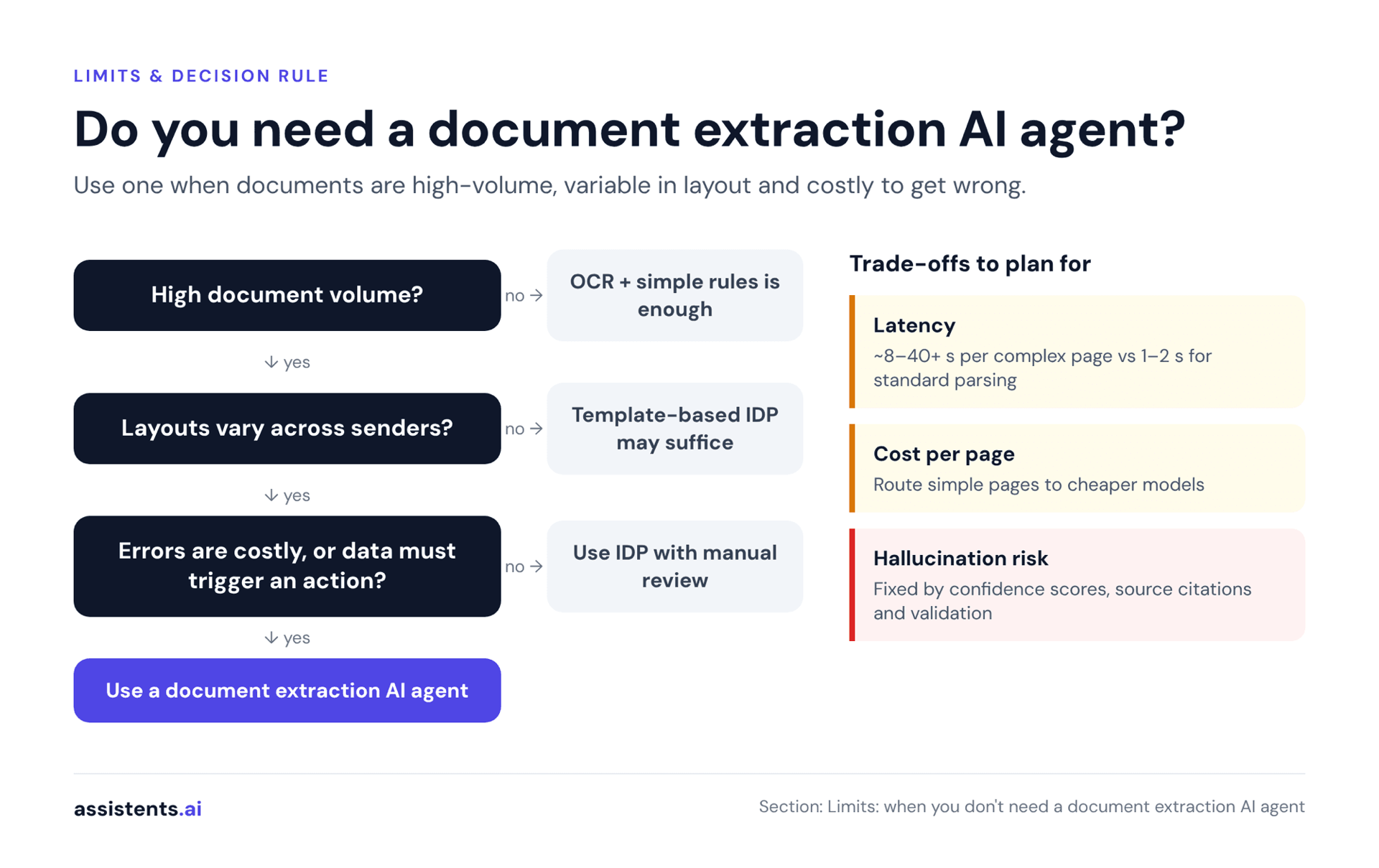
Decision rule: use a document extraction AI agent when documents are high-volume, variable in layout, and costly to get wrong, or when extraction must be followed by an action in another system.
Best document extraction AI agent platforms in 2026
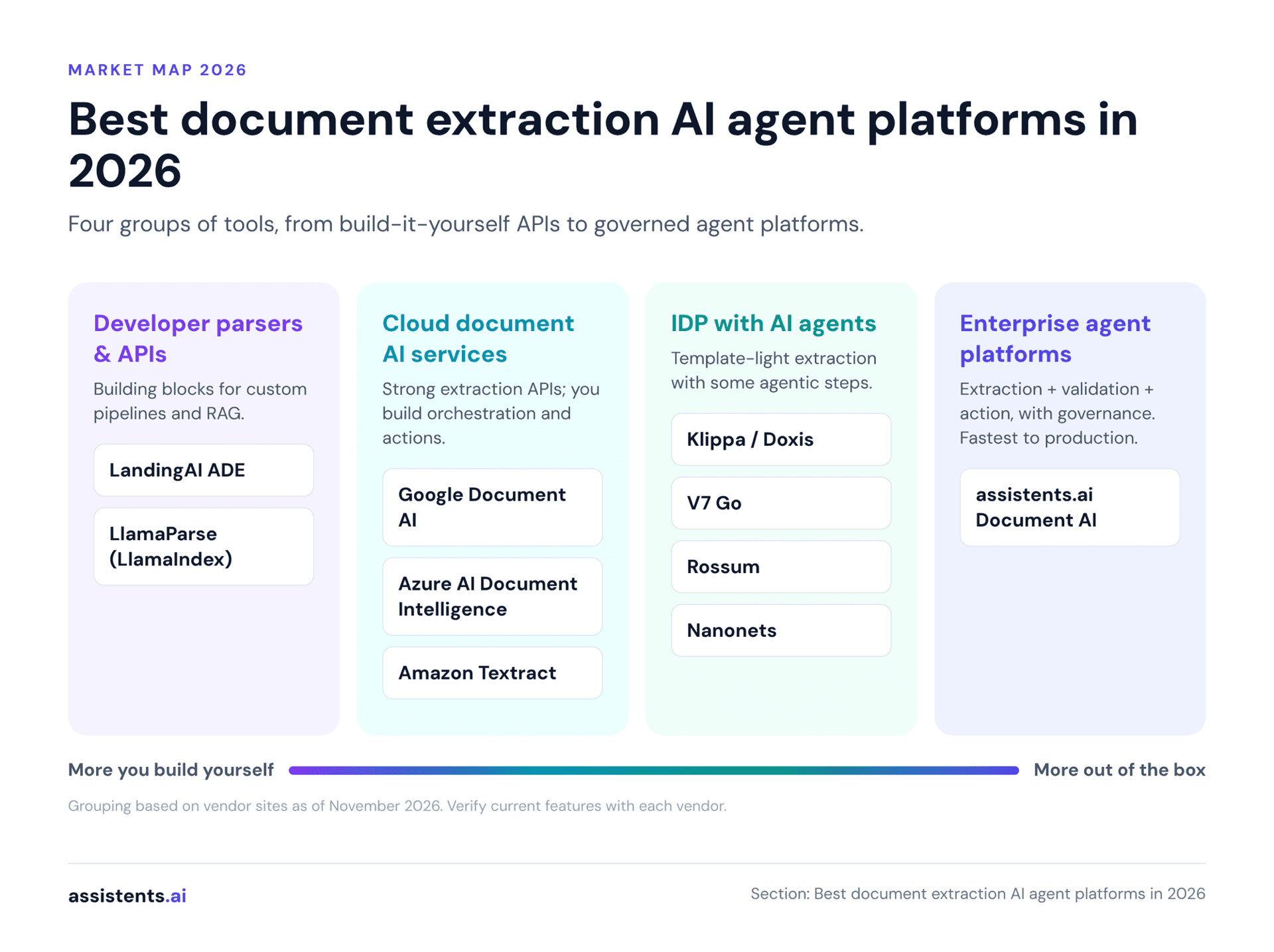
The market splits into three groups: agent platforms (extraction plus reasoning plus action), cloud document AI services (strong extraction APIs you build around), and developer parsers (building blocks for custom pipelines).Capabilities summarized from vendor sites as of November 2026. Check current features and pricing with each vendor.
How to read this table: if you have engineers and want to build your own orchestration, validation and integrations, a cloud API or parser gives you strong building blocks. If you need governed agents that extract, validate and act in SAP, Salesforce or your claims system, without stitching five tools together, an enterprise agent platform is the faster path. See how assistents.ai compares with UiPath and other automation platforms.
How to choose (and build vs buy) a document extraction AI agent
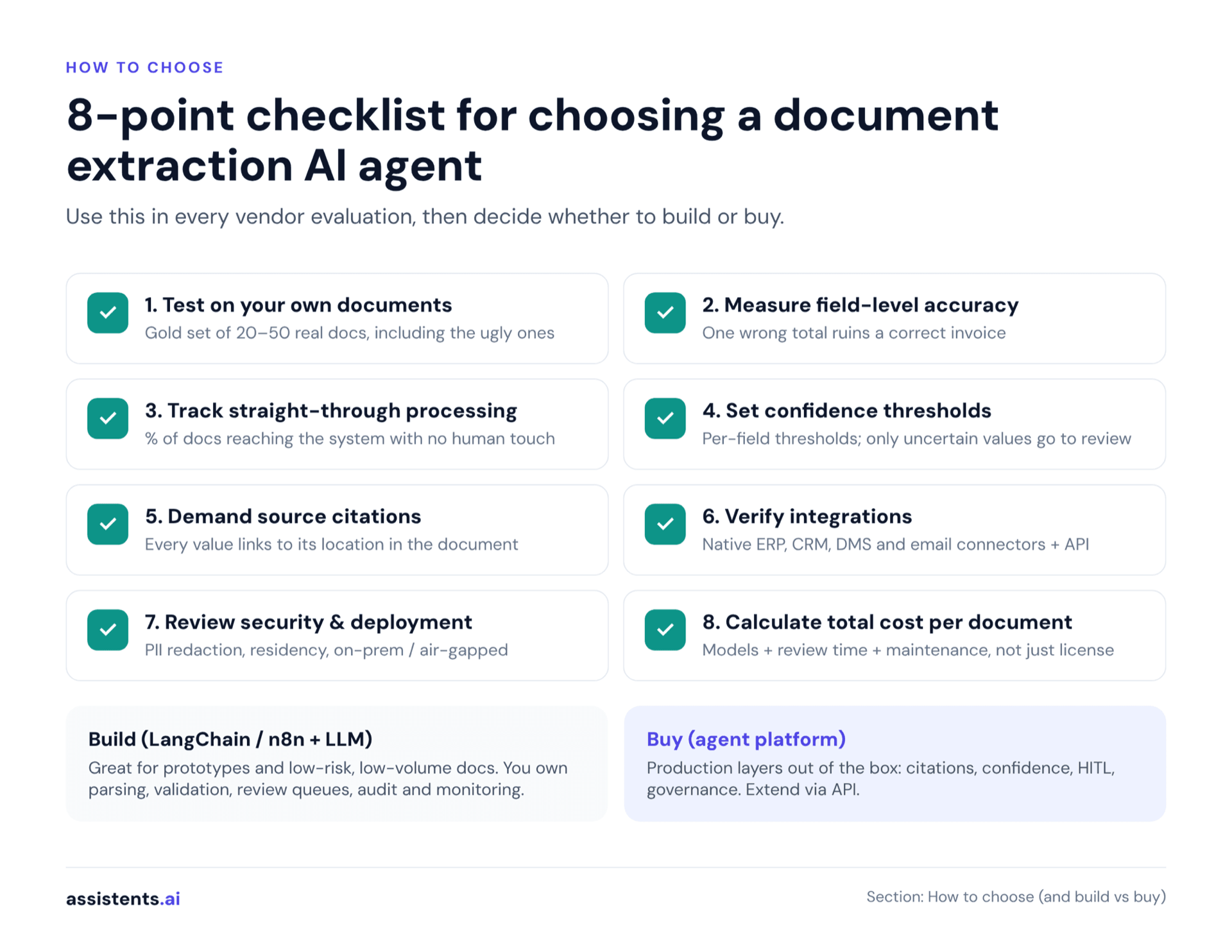
Use this 8-point checklist when evaluating any document extraction AI agent:
- Test on your own documents. Build a "gold set" of 20–50 real documents, including the ugly ones: poor scans, handwriting, multi-page tables.
- Measure field-level accuracy, not document-level. One wrong total ruins an otherwise correct invoice.
- Track straight-through processing (STP). What share of documents reach the target system with no human touch?
- Check confidence scores and thresholds. Can you set per-field thresholds that send only uncertain values to review?
- Demand source citations. Every value should link back to its location in the document.
- Verify integrations. Look for native connectors to your ERP, CRM, DMS and email, plus APIs for everything else (integrations).
- Review security and deployment. Check PII redaction, data residency, on-prem or air-gapped options, and certifications.
- Calculate total cost per document, including model costs, review time and maintenance, not just the license.
Build with LangChain or n8n vs buy a platform
Many teams start with a prototype: an n8n or LangChain workflow that sends a PDF to GPT-4o or Gemini and asks for JSON. It's a great way to learn, and it works for low-volume, low-risk documents.
Production is harder. You'll need layout-aware parsing for tables and scans, confidence scoring, citations, validation rules, human-review queues, retries, audit logs, access control and monitoring. Building and maintaining all of that usually takes longer than the prototype suggests. A platform with a no-code agent builder and workflow builder gives you those layers out of the box. Your engineers can still extend it through an API.
Security and compliance for document extraction
Documents contain the most sensitive data in a business: bank details, health records, identity documents and contract terms. A document extraction AI agent needs enterprise controls by default:
- Role-based access control: users and agents see only the documents and fields they're allowed to.
- Encryption at rest and in transit.
- Automatic PII redaction of sensitive fields before data leaves the secure boundary.
- Immutable audit trails of every extraction, edit and action.
- Compliance: HIPAA and SOC 2 alignment for healthcare and financial data.
- Deployment choice: cloud, private cloud, on-premise or air-gapped for regulated industries.
Learn more on the Security and Trust page and in our guide to HIPAA-compliant AI agents.
Why assistents.ai for document extraction AI agents
assistents.ai is an enterprise AI agent platform whose Document AI extracts, validates and acts on data from 90+ document formats, with field-level confidence scores, source citations and full audit trails. Here's why enterprises choose it:
1. Accuracy you can audit
99.5% extraction accuracy on structured fields. Every value comes with a confidence score and a source citation, so reviewers verify rather than re-type.
2. Agents that act, not just extract
The Context Engine reasons across documents, structured data and business rules together. Agents then create the SAP sales order, match the PO or trigger the approval, with permission checks and logging on every step.
3. Pre-built document agents, ready to deploy
Start from agents pre-configured with schemas, validation rules and workflow logic:
- Invoice Parser Agent: 95% straight-through processing
- Contract Analyzer Agent: 85% clause-detection accuracy
- Claims Processing Agent, Compliance Review Agent, Technical Docs Agent and Support Knowledge Agent
4. Built for enterprise scale
500M+ documents processed, 90+ file formats, multi-language support, and 300+ integrations, including SharePoint, Google Drive, Box, Dropbox, ERPs and CRMs.
5. Governance by default
Immutable audit trails, human-in-the-loop approvals, automatic redaction, HIPAA and SOC 2 compliance, and deployment on cloud, private cloud, on-premise or air-gapped infrastructure. See AI agent governance.
6. One platform, not five tools
Document, voice, conversational, autonomous and analytics agents share one orchestration layer and one context. Your document agent can hand off to a voice agent or a data analysis agent without new integrations. Agent orchestration coordinates multi-agent workflows like the tender-pack example above.
7. Production in weeks, proven across industries
Go from pilot to production in about 4 weeks, with a custom proof-of-concept plan within 48 hours. Deployments run across 12+ industries, including financial services, healthcare, logistics, manufacturing and real estate. Read more on why assistents.
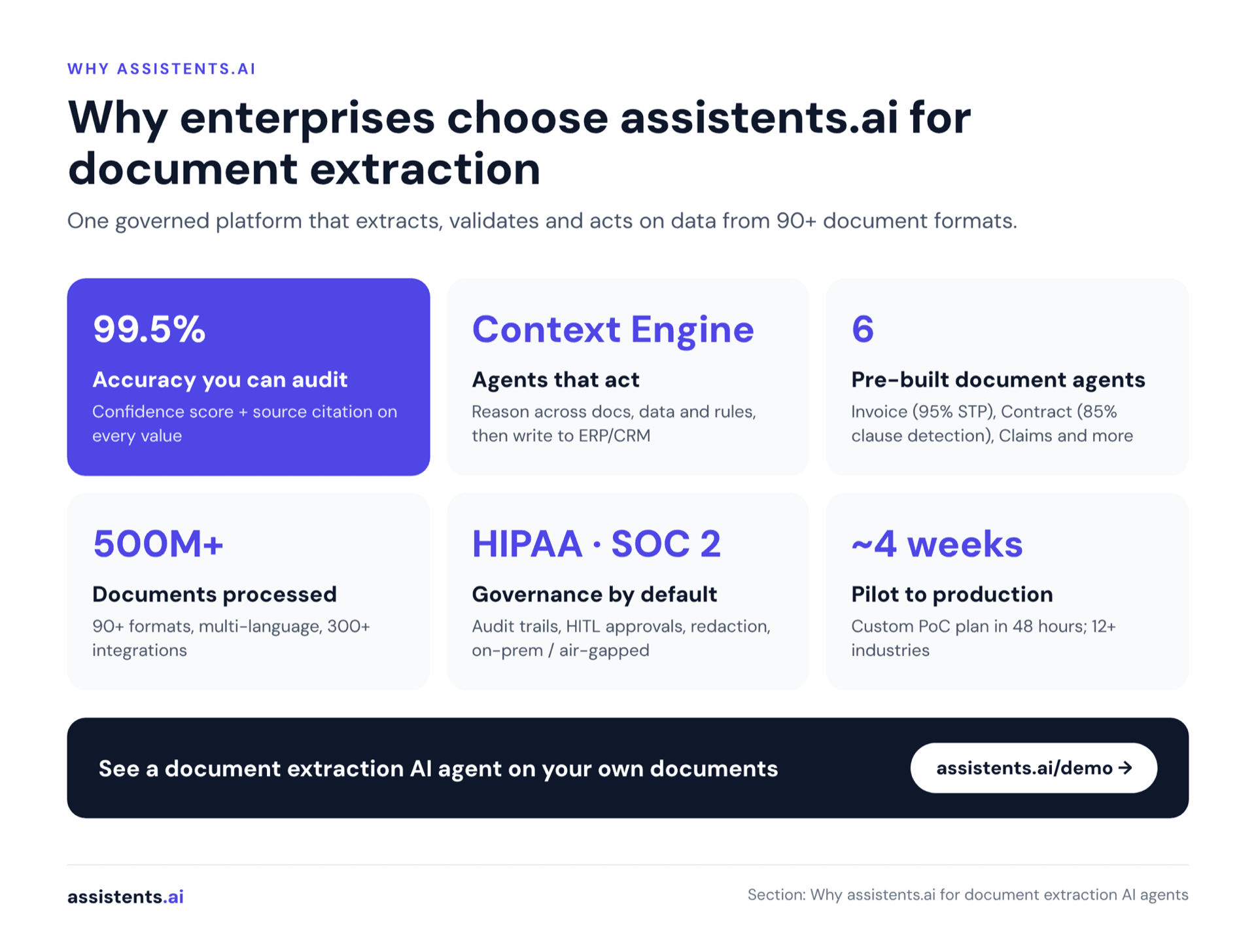
See a document extraction AI agent on your own documents. Send us 20 sample documents and we'll show you field-level accuracy, STP rate and cost per document in one session. Book a demo → · Explore Document AI
Deploy your first document extraction AI agent in 4 weeks
A focused rollout gets one document type into production in about a month.
Week 1: Pick one document type and build a gold set. Choose a high-volume, high-pain flow, usually supplier invoices, claims or onboarding documents. Collect 20–50 real samples and record the correct values.
Week 2: Define the schema and thresholds. List the fields, formats and validation rules (for example, "total = sum of line items", "PO must exist"). Set confidence thresholds per field.
Week 3: Connect intake and target systems, then run in shadow mode. Connect the inbox or storage source and the ERP or CRM. Run the agent alongside your team and compare its output with theirs.
Week 4: Go live with human-in-the-loop. Switch to production, with only low-confidence fields sent for review. Track STP rate, field accuracy and cost per document weekly, then expand to the next document type.
Need help planning? See our implementation approach and the Enterprise AI buyer's guide.
Conclusion
A document extraction AI agent goes beyond OCR and template-based IDP. It reads any document, extracts the data you need, checks it, and completes the next step in the workflow, with an audit trail behind every value. The 10 deployments above show the pattern: faster cycles, fewer errors and operations that scale without adding headcount.
If your teams still key in data from invoices, contracts, claims or tender packs, start with one high-volume document type and measure the results in four weeks.
Book a demo of assistents.ai Document AI →
Related reading
- Document AI platform
- What is document extraction?
- OCR vs AI extraction
- AI Agents for Data Cleaning
- Agentic AI for Financial Crime Compliance
- Document Processing AI Agents (Ampcome)
FAQs
What is agentic document extraction?
Agentic document extraction is a way of processing documents where an AI agent plans, extracts, checks and corrects its own work in a loop, rather than running a single OCR or template pass. It can call tools, cross-check values, ask for missing information and escalate to humans. The result is validated data instead of raw text.
What does a document extraction AI agent do?
A document extraction AI agent reads documents such as PDFs, scans, emails and images. It extracts the fields you define, validates them against business rules, and writes clean data into systems like SAP, Salesforce or a claims platform. It sends only uncertain fields to human reviewers, which keeps straight-through processing high.
Can AI extract data from a PDF?
Yes. Modern AI reads both native and scanned PDFs, including tables, handwriting and multi-page layouts. For one-off tasks, a chatbot can pull values from a PDF. For business-critical, high-volume work, a document extraction AI agent adds the confidence scores, source citations and validation needed for reliable results.
Is ChatGPT good at extracting data from documents?
ChatGPT works well for quick, one-off extraction from clean documents. At scale it has limits: output can vary between runs, there are no field-level confidence scores, and there's no validation or audit trail. Enterprises use a document extraction AI agent to get consistent, traceable results that connect directly to their systems.
What is the difference between OCR and AI document extraction?
OCR converts images of text into machine-readable characters, but it doesn't know what those characters mean. AI document extraction understands context: it identifies fields like "invoice total" or "termination date", handles different layouts, and outputs structured, labeled data. A document extraction AI agent goes further by validating that data and acting on it.
What is the difference between IDP and an AI agent?
Intelligent document processing (IDP) combines OCR, machine learning and rules to classify documents and extract fields, but it usually needs templates or training per document type. An AI agent adds reasoning and action. It adapts to new layouts, resolves exceptions, and completes the downstream task, such as creating a sales order.
How accurate is AI document extraction?
Accuracy depends on document quality and the platform. Leading platforms reach about 99% on structured fields. assistents.ai reports 99.5% on structured fields, with confidence scores and source citations on every value. Always test on a gold set of your own documents and measure field-level accuracy.
Can a document extraction AI agent read handwritten documents?
Yes, within limits. Multimodal models read clear handwriting on forms, notes and annotations well. Very messy handwriting may get lower confidence scores, which the agent routes to a human reviewer instead of guessing. That keeps errors out of downstream systems.
What is the best AI tool for document extraction?
It depends on your needs. Cloud APIs like Google Document AI, Azure AI Document Intelligence and Amazon Textract are strong building blocks for engineering teams. If you need extraction plus validation, governance and actions in your business systems without custom development, an enterprise agent platform such as assistents.ai is the faster route to production.
How much does AI document extraction cost?
Pricing is usually per page, per document or by platform license. The more useful measure is total cost per document. In invoice processing, teams using a document extraction AI agent report around $2.40 per invoice, compared with $8–12 for manual processing, once review time and errors are included.
Does a document extraction AI agent work with SAP and other ERPs?
Yes. Enterprise platforms connect to SAP, Oracle, Microsoft Dynamics, NetSuite and other ERPs and CRMs through native connectors and APIs. In one deployment above, an agent creates SAP sales orders directly from incoming order documents, replacing a legacy capture system.
Can it process documents in multiple languages?
Yes. Modern document extraction AI agents handle many languages, including documents that mix languages on one page. They can also output extracted data in a single standard language and format for downstream systems.
Is AI document extraction secure for regulated data?
It can be, if the platform is built for it. Look for encryption, role-based access, automatic PII redaction, immutable audit trails, HIPAA and SOC 2 compliance, and on-premise or air-gapped deployment options. These controls let banks, insurers and healthcare providers use AI extraction safely.
How long does it take to deploy a document extraction AI agent?
A focused deployment for one document type typically takes about four weeks: gold set and schema, integration and shadow mode, then go-live with human review. Pre-built agents for invoices, contracts and claims shorten this further.