AI agents in construction are software systems that read project data, decide the next step and act across tools such as the project management platform, the scheduler and the ERP, while people approve decisions that carry financial, contractual or safety risk. The strongest AI agent use cases in construction today are tender and document processing, procurement and margin control, order-to-ERP automation, compliance tracking, cost control and post-handover asset operations. This guide covers 36 use cases from bid to handover. Each one comes with an autonomy level, a human checkpoint, a KPI and, where one exists, a real anonymised example.
Key takeaways
- Assistants answer, agents act. An AI agent carries work across systems: it drafts, checks, routes, updates and escalates. An AI assistant only answers questions.
- Money leaks between systems. Construction loses margin at the handoffs: tender to estimate, purchase order to invoice, variation to cost report. That is where agents pay for themselves.
- Autonomy is set per decision, not per tool. Every use case below is tagged with one of four autonomy levels. Decisions about money, contracts and safety stay at "act with approval" unless a signed-off rule set says otherwise.
- Every example has an evidence label. Each use case is marked Delivered example, Proven pattern or Emerging. Figures described as targets are labelled as targets.
- Start where volume is high and rules are clear. Good first agents are tender and document intake, procurement margin alerts and compliance expiry tracking.
What are AI agents in construction?
An AI agent in construction is goal-driven software. It watches project and business data, reasons about what needs to happen and takes the next step inside the systems your teams already use. It escalates to a person whenever judgment or authority is needed. For a broader primer, see our guide to types of AI agents and how AI agents compare with RPA.
A concrete example: a supplier emails a revised quotation. An assistant can summarise that email if someone asks. An agent notices the email arrived and extracts the new prices. It compares them with the approved purchase order and the budget line. If the margin impact is above the set threshold, it routes a variation for approval. Once approved, it updates the ERP and logs every step.
AI assistant vs AI agent vs RPA vs construction software
| What it does | What it can't do | Typical construction example | |
|---|---|---|---|
| Construction software (PM, ERP, scheduling) | Stores records and runs defined workflows | Won't chase, check or connect work across systems on its own | RFI log in the PM platform, POs in the ERP |
| RPA / scripted automation | Repeats fixed clicks and field mappings | Breaks when formats change; can't read messy documents or judge exceptions | Copying invoice fields into accounts payable |
| AI assistant / copilot | Answers questions and drafts content when asked | Doesn't monitor, decide or act; a person drives every step | "Summarise this specification section" |
| AI agent | Monitors, reasons, acts across systems, escalates and logs | Shouldn't make unapproved contract, payment or safety decisions | Detects an addendum, updates the bid register, flags changed scope to the estimator |
Why construction suits AI agents
Four features of construction make agents unusually valuable.
- Documents. Tenders, addenda, drawings, specifications, contracts, submittals, certificates and supplier quotations arrive constantly, and every revision can change scope or price.
- Parties. An owner, a main contractor, consultants and dozens of subcontractors and suppliers all create information that someone has to reconcile.
- Systems. Most firms run a PM platform, a scheduler, an ERP or accounting system, document stores, email and spreadsheets, and none of them talk to each other well.
- Contracts. Notice periods, payment terms, retention and variation rules turn a missed follow-up into lost money.
Most construction software handles storage. The follow-through between systems is still manual, and that is the gap AI agents fill.
The Construction Agent Autonomy Ladder
The first question isn't "can AI do this?" It is "what should the agent be allowed to do without asking?" We use four levels, and every use case in this guide carries one.
| Level | Name | What the agent may do | Who is accountable | Example |
|---|---|---|---|---|
| L1 | Ask | Answer questions from governed project and business data | The person asking | "Which packages are over budget this month?" |
| L2 | Recommend | Draft, flag, score and prioritise; a person takes the action | The reviewer | Drafts an RFI response with citations |
| L3 | Act with approval | Prepare and execute the action after a named person approves (maker-checker) | The approver | Creates a purchase order once the buyer approves it |
| L4 | Act within rules | Execute routine steps inside deterministic, versioned rules; people handle exceptions | The rule owner | Sends certificate-expiry reminders and suspends site access per policy |
The rule we recommend: any decision with a financial, contractual or safety consequence stays at L3 or below. It moves to L4 only when a written, versioned rule set has been signed off by the accountable owner. The AI agent governance playbook explains how to set these levels in practice.
Evidence labels used in this guide
| Label | Meaning |
|---|---|
| Delivered example | An anonymised engagement delivered by Ampcome, the team that builds assistents.ai |
| Proven pattern | Delivered by Ampcome in an adjacent industry, and the same pattern transfers directly to construction |
| Emerging | Credible and already in the market, but not yet backed by an Ampcome construction delivery |
36 AI agent use cases in construction at a glance
The table below is the whole guide in summary. The detail for each use case follows, grouped by project lifecycle stage.
| # | Use case | Stage | Autonomy | Human checkpoint | KPI | Evidence |
|---|---|---|---|---|---|---|
| 1 | Tender document intake and extraction | Bidding | L3 | Estimator confirms extracted scope | Hours per tender pack | Delivered example |
| 2 | Addendum and revision change detection | Bidding | L2 | Estimator accepts scope changes | Missed-addendum incidents | Delivered example |
| 3 | Bid/no-bid qualification | Bidding | L2 | Bid committee decides | Win rate on pursued bids | Emerging |
| 4 | Specification review and compliance matrix | Preconstruction | L2 | Engineer signs off matrix | Non-compliance found post-award | Proven pattern |
| 5 | Quantity takeoff and first-pass estimate | Preconstruction | L2 | Estimator owns final price | Estimate cycle time | Emerging |
| 6 | Subcontractor RFQ and bid levelling | Preconstruction | L3 | Buyer approves shortlist | Quotes per package, levelling time | Proven pattern |
| 7 | RFI drafting, routing and chasing | Design coordination | L2 | Discipline lead approves response | RFI response time | Emerging |
| 8 | Submittal review against specifications | Design coordination | L2 | Reviewer approves or rejects | Resubmission rate | Emerging |
| 9 | BIM clash triage | Design coordination | L2 | Coordinator assigns resolution | Open clashes ageing | Emerging |
| 10 | Drawing version comparison and distribution | Document control | L4 | Document controller handles exceptions | Work done to superseded drawings | Proven pattern |
| 11 | Permit and code-compliance pack preparation | Preconstruction | L2 | Professional of record signs | Permit resubmissions | Emerging |
| 12 | Embodied carbon and material ESG reporting | Preconstruction | L2 | Sustainability lead approves | Report preparation time | Emerging |
| 13 | Purchase price and margin erosion alerts | Procurement | L4 | Commercial lead acts on alerts | Days to detect margin erosion | Delivered example |
| 14 | Vendor performance monitoring | Procurement | L4 | Procurement head reviews scorecards | On-time, in-full delivery | Delivered example |
| 15 | Delivery exceptions and resequencing | Supply chain | L2 | Site manager approves resequence | Crew idle hours | Proven pattern |
| 16 | Order and PO creation into the ERP | Procurement | L3 | Buyer approves exceptions | Order-to-confirm time, entry errors | Delivered example |
| 17 | Payment application and invoice checks | Commercial | L3 | Quantity surveyor certifies | Overpayment and duplicate rate | Emerging |
| 18 | Early-payment and working-capital analysis | Finance | L2 | Finance lead decides | Discounts captured | Delivered example |
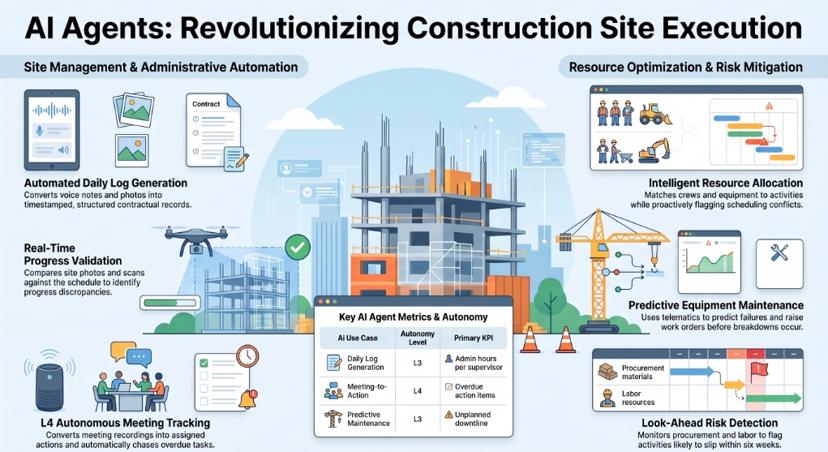
| 19 | Daily log and site diary generation | Site | L3 | Site manager confirms | Admin hours per supervisor | Emerging |
| 20 | Look-ahead schedule risk detection | Site | L2 | Planner updates schedule | Activities slipping without warning | Emerging |
| 21 | Progress capture versus plan | Site | L2 | Project manager validates | Reporting lag | Emerging |
| 22 | Crew and equipment allocation | Site | L2 | Superintendent approves | Utilisation | Emerging |
| 23 | Equipment predictive maintenance | Site | L3 | Plant manager schedules work | Unplanned downtime | Proven pattern |
| 24 | Meeting-to-action tracking | Site / PMO | L4 | Owners close actions | Overdue actions | Emerging |
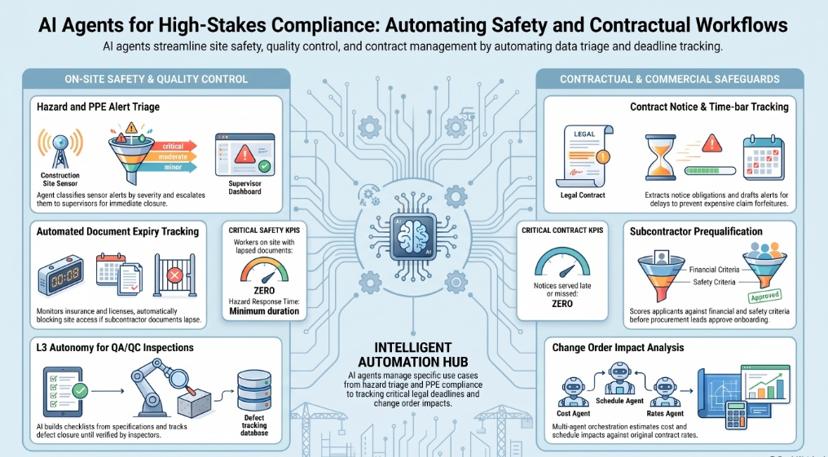
| 25 | Hazard and PPE alert triage | Safety | L3 | Safety officer responds | Time to close hazards | Emerging |
| 26 | Insurance, certificate and training expiry | Compliance | L4 | HSE lead handles exceptions | Workers on site with lapsed certificates | Emerging |
| 27 | QA/QC inspection and punch-list closure | Quality | L3 | Inspector verifies closure | Defects open at handover | Emerging |
| 28 | Subcontractor prequalification and compliance | Compliance | L3 | Procurement approves onboarding | Onboarding time | Emerging |
| 29 | Contract notice and time-bar tracker | Contracts | L3 | Commercial manager sends notice | Notices missed | Emerging |
| 30 | Change order and variation impact analysis | Commercial | L2 | Commercial manager approves | Variation turnaround | Emerging |
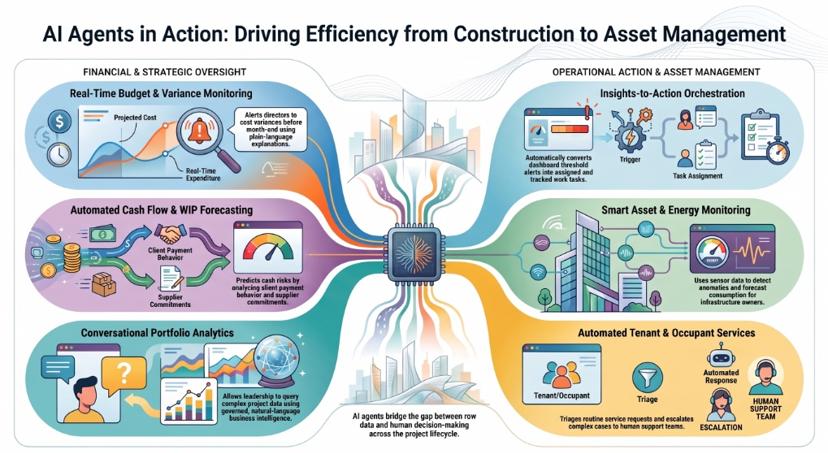
| 31 | Cost-to-complete and variance monitoring | Commercial | L4 | Project director reviews | Surprise variance at month end | Proven pattern |
| 32 | Cash flow and WIP forecasting | Finance | L2 | CFO approves forecast | Forecast accuracy | Proven pattern |
| 33 | Conversational portfolio analytics | Leadership | L1 | None; read-only | Time to answer | Proven pattern |
| 34 | Insights-to-action task orchestration | Leadership | L3 | Task owner accepts | Insight-to-action time | Proven pattern |
| 35 | Post-handover energy and infrastructure monitoring | Operations | L4 | Operations lead dispatches | Time to detect anomalies | Delivered example |
| 36 | Occupant and tenant service agent | Operations | L4 | Service team handles escalations | First-response time, SLA adherence | Delivered example |
Bidding and preconstruction: use cases 1–6
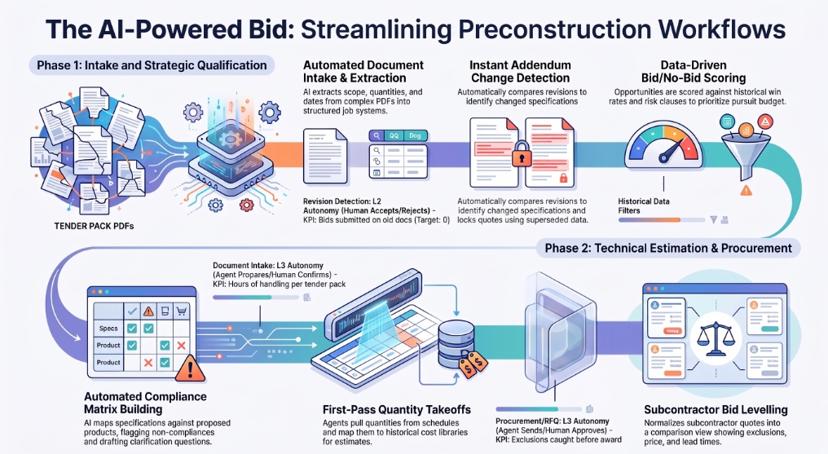
Bidding is where construction firms spend the most unbilled hours and take on the most avoidable risk. Tender packs are long and arrive in many formats, and they keep changing until the deadline.
1. Tender document intake and data extraction
A single tender can mean hundreds of pages of scanned drawings, schedules, specifications and conditions. Estimators spend days just finding what matters.
- What the agent does: Retrieves tender packages from portals and email and decides which workflow each one follows. It extracts scope items, quantities, key dates, conditions and compliance requirements, including from scanned or complex PDFs using vision-capable document AI. It then writes the structured results into the job or estimating system with a source citation for every field.
- Systems: Tender portals, email, document storage, job management or estimating system.
- Autonomy: L3. The agent prepares the record; the estimator confirms before a quote is built on it.
- Human checkpoint: An estimator validates extracted scope and flagged low-confidence fields.
- KPI: Hours of document handling per tender pack, extraction accuracy on standard formats.
- Evidence: Delivered example. See Example 1 below.
2. Addendum and revision change detection
A late addendum that changes a specification or quantity is one of the most common causes of a mispriced bid.
- What the agent does: Compares each new revision with the previous one at clause, schedule and drawing-reference level. It summarises what changed and which bid items are affected, and it locks quotes built on superseded information until someone reviews them.
- Systems: Tender portal, document storage, estimating or job management system.
- Autonomy: L2.
- Human checkpoint: The estimator accepts or rejects each flagged change.
- KPI: Bids submitted against superseded documents (target: zero), time to assess an addendum.
- Evidence: Delivered example. Revision analysis and quote locking were part of Example 1.
3. Bid/no-bid qualification
Firms waste pursuit budget on tenders they were never likely to win or should never have wanted.
- What the agent does: Scores each opportunity against your criteria: sector, value band, location, client payment history, contract form, risk clauses, current workload and past win rates. It produces a one-page bid/no-bid brief with the reasons behind the score.
- Systems: CRM or bid register, ERP job history, tender documents.
- Autonomy: L2.
- Human checkpoint: The bid committee makes the decision.
- KPI: Win rate on pursued bids, pursuit cost per win.
- Evidence: Emerging.
4. Specification review and compliance matrix
- What the agent does: Reads the specification and conditions and builds a compliance matrix. It lists each requirement and marks whether your proposed products or methods are compliant, non-compliant or need clarification, citing the clause every time. It also drafts clarification questions for the tender period.
- Systems: Specifications, product datasheets, previous submittals, estimating system.
- Autonomy: L2.
- Human checkpoint: A responsible engineer signs off the matrix.
- KPI: Non-compliances discovered after award.
- Evidence: Proven pattern. It uses the same document intelligence as Example 1.
5. Quantity takeoff and first-pass estimate
- What the agent does: Pulls quantities from schedules, bills of quantities and model data. It maps them to your cost library and historical rates and produces a first-pass estimate, marking each line where confidence is low or the rate is out of date.
- Systems: Drawings and models, cost database, ERP historical job costs.
- Autonomy: L2.
- Human checkpoint: The estimator owns every rate and the final price.
- KPI: Estimate cycle time, variance between estimate and outturn cost.
- Evidence: Emerging. Automated measurement from drawings is still maturing, so treat the output as a starting point, not a price.
6. Subcontractor and supplier RFQ with bid levelling
- What the agent does: Splits scope into packages and finds qualified subcontractors and suppliers. It sends requests for quotation and chases non-responders. When quotes come back, it normalises them into a levelled comparison that shows exclusions, qualifications, price and lead time.
- Systems: Supplier database, email, estimating system, ERP.
- Autonomy: L3. The agent can send RFQs to approved lists; the buyer approves the shortlist and award.
- Human checkpoint: A buyer or package manager approves.
- KPI: Quotes received per package, bid-levelling time, exclusions caught before award.
- Evidence: Proven pattern. Ampcome has delivered RFQ automation, supplier matching and price and lead-time analytics for a B2B sourcing platform. More procurement examples are in agentic AI use cases in procurement.
Design coordination and document control: use cases 7–12
7. RFI drafting, routing and deadline chasing
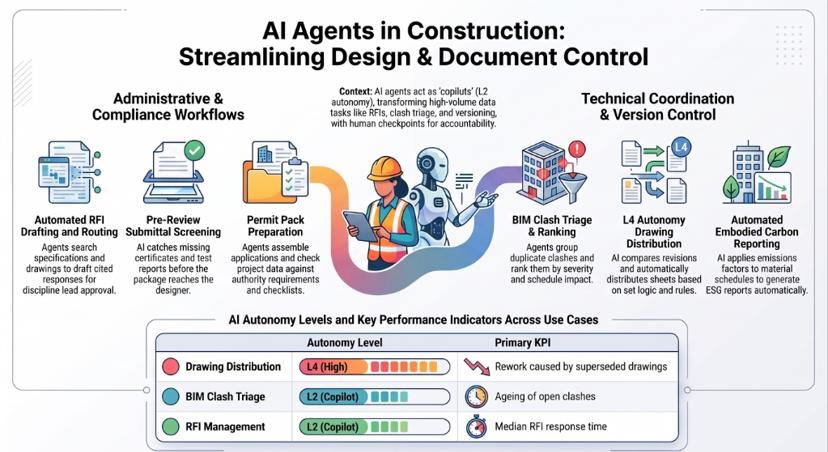
- What the agent does: Reads each incoming RFI and searches specifications, drawings and previous RFIs. It drafts a cited response, sends it to the right discipline, tracks the contractual response time and escalates if the RFI stalls. It also flags RFIs that point to superseded documents.
- Systems: PM platform, document storage, email.
- Autonomy: L2.
- Human checkpoint: The discipline lead or design team approves the response.
- KPI: Median RFI response time, overdue RFIs.
- Evidence: Emerging. For a deeper look at project management workflows, see our guide to AI agents for construction project management.
8. Submittal review against specifications
- What the agent does: Checks each submittal package against the specification line by line. It catches missing certificates, test reports and data before the package reaches the designer, then drafts the review comments.
- Systems: PM platform, specifications, submittal register.
- Autonomy: L2.
- Human checkpoint: The reviewer approves, rejects or returns the submittal.
- KPI: Resubmission rate, review cycle time.
- Evidence: Emerging.
9. BIM clash triage
- What the agent does: Imports clash reports and groups duplicate clashes. It ranks them by severity and by how close the affected activity is on the schedule, suggests which trade should resolve each one, and drafts coordination actions.
- Systems: Model coordination tools, scheduler, issue tracker.
- Autonomy: L2.
- Human checkpoint: The BIM coordinator assigns each resolution.
- KPI: Ageing of open clashes, clashes found on site.
- Evidence: Emerging.
10. Drawing version comparison and distribution
- What the agent does: When a new revision is issued, the agent compares it with the previous one. It records what changed and sends the right sheets to the teams affected. It also flags any open work packages, RFIs or purchase orders that still reference the old revision.
- Systems: Document management, PM platform, ERP.
- Autonomy: L4. Distribution follows a set rule; the document controller handles exceptions.
- Human checkpoint: The document controller reviews flagged conflicts.
- KPI: Rework caused by superseded drawings.
- Evidence: Proven pattern. It uses the revision detection from Example 1.
11. Permit and code-compliance pack preparation
- What the agent does: Assembles the permit application from project data and checks it against the authority's checklist and published requirements. It lists what is missing and drafts cover letters and responses to authority comments.
- Systems: Document storage, authority requirements, design data.
- Autonomy: L2.
- Human checkpoint: The professional of record reviews and signs.
- KPI: Permit resubmissions, time to lodge.
- Evidence: Emerging.
12. Embodied carbon and material ESG reporting
- What the agent does: Reads material schedules and procurement data and applies emissions factors from your chosen dataset. It builds an embodied carbon report and flags lower-carbon alternatives for review.
- Systems: Material schedules, ERP purchase data, emissions databases.
- Autonomy: L2.
- Human checkpoint: The sustainability lead approves the method and the figures.
- KPI: Report preparation time, share of spend with verified emissions data.
- Evidence: Emerging.
Procurement and supply chain: use cases 13–18
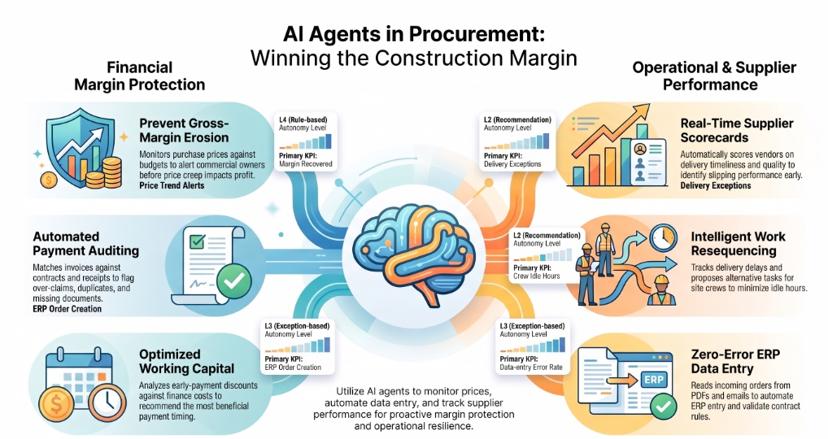
Procurement is where construction margin is won or quietly lost. It is also where Ampcome's delivered evidence is strongest. See how assistents.ai supports finance and procurement teams.
13. Purchase price trend and gross-margin erosion alerts
Material price creep rarely shows up until the monthly cost report, and by then the purchase orders have already been placed.
- What the agent does: Monitors purchase prices by item, supplier and business unit. It compares them with budget rates and previous prices, estimates the gross-margin impact, and alerts the commercial owner when set thresholds are crossed.
- Systems: ERP purchasing and finance, budget data.
- Autonomy: L4 for the alert, which fires on a defined rule. Any commercial response is a human decision.
- Human checkpoint: The commercial lead decides whether to renegotiate, switch supplier or reprice.
- KPI: Days from price increase to detection, margin recovered.
- Evidence: Delivered example. See Example 3 below.
14. Vendor performance monitoring
- What the agent does: Scores each supplier on delivery timeliness, completeness, returns, quality issues and price stability. It publishes scorecards and alerts buyers when a supplier starts to slip.
- Systems: ERP goods receipts and returns, quality logs.
- Autonomy: L4 for scorecards and alerts.
- Human checkpoint: The procurement head reviews suppliers placed on watch.
- KPI: On-time, in-full delivery rate, share of spend with watch-listed suppliers.
- Evidence: Delivered example. This was part of Example 3.
15. Material delivery exceptions and work resequencing
- What the agent does: Tracks confirmed delivery dates against the look-ahead schedule. When a delivery slips, it identifies the activities affected and proposes a resequence or an alternative task for the crew. It notifies the site team and the supplier.
- Systems: ERP purchase orders, supplier confirmations, scheduler, messaging.
- Autonomy: L2.
- Human checkpoint: The site manager approves any schedule change.
- KPI: Crew idle hours caused by late materials.
- Evidence: Proven pattern. Ampcome has delivered exception management and operational alerting for terminal-to-rail logistics at a global ports and logistics operator. More on AI agents in logistics and supply chain.
16. Order and purchase-order creation into the ERP
Contractors and engineering firms still retype orders from emails, PDFs and portals into SAP or another ERP, and the retyping introduces errors.
- What the agent does: Reads each incoming order trigger and validates it against master data, pricing and contract rules. It creates the order in the ERP, sends exceptions for approval and produces a reconciliation report. The approval steps are designed in a workflow builder.
- Systems: Email and document intake, SAP or another ERP, approval workflow.
- Autonomy: L3. Clean orders follow set rules; exceptions wait for a buyer.
- Human checkpoint: A buyer or sales-operations lead approves exceptions.
- KPI: Order-to-confirm cycle time, data-entry error rate.
- Evidence: Delivered example. See Example 2 below.
17. Payment application and invoice checks against contract terms
- What the agent does: Matches each subcontractor payment application or supplier invoice to the contract, purchase order, goods receipt, approved variations, retention terms and previous certificates. It flags over-claims, duplicates and missing documents, and drafts the valuation for the quantity surveyor.
- Systems: ERP accounts payable, contract register, PM platform.
- Autonomy: L3.
- Human checkpoint: A quantity surveyor or commercial manager certifies the payment.
- KPI: Overpayment and duplicate-payment rate, certification cycle time.
- Evidence: Emerging.
18. Early-payment and working-capital analysis
- What the agent does: Compares supplier early-payment discounts with your notional cost of finance and current cash position. It recommends which invoices to pay early and shows the net benefit.
- Systems: ERP accounts payable, treasury or cash data.
- Autonomy: L2.
- Human checkpoint: The finance lead approves the payment run.
- KPI: Discounts captured, working-capital days.
- Evidence: Delivered example. Early-payment analysis was part of Example 3.
Site execution: use cases 19–24
19. Daily log and site diary generation
- What the agent does: Turns supervisors' voice notes, photos, messages and delivery dockets into a structured, timestamped daily log. It tags weather, labour, deliveries, delays and incidents, and links photos to locations and activities. Supervisors can dictate updates to a voice AI agent.
- Systems: Mobile capture, messaging, PM platform.
- Autonomy: L3. The agent prepares the log; the site manager confirms it before it becomes a contractual record.
- Human checkpoint: The site manager reviews and submits.
- KPI: Admin hours per supervisor, how complete delay records are.
- Evidence: Emerging.
20. Look-ahead schedule risk detection
- What the agent does: Monitors open RFIs, submittal status, procurement lead times, labour availability and productivity against the three-to-six-week look-ahead. It flags activities likely to slip and explains what is driving the risk.
- Systems: Scheduler, PM platform, ERP.
- Autonomy: L2.
- Human checkpoint: The planner decides whether to update the programme.
- KPI: Share of slipped activities that were flagged in advance.
- Evidence: Emerging.
21. Progress capture versus plan
- What the agent does: Combines site photos, reality-capture scans and daily logs with schedule activities to estimate percent complete. It flags differences from reported progress.
- Systems: Reality capture tools, scheduler, PM platform.
- Autonomy: L2.
- Human checkpoint: The project manager validates progress before it is reported or invoiced.
- KPI: Lag between site reality and reported progress.
- Evidence: Emerging.
22. Crew and equipment allocation
- What the agent does: Matches crews and plant to upcoming activities across projects, taking skills, certifications, location and availability into account. It proposes allocations and flags conflicts.
- Systems: Workforce and plant registers, scheduler.
- Autonomy: L2.
- Human checkpoint: The superintendent or resource manager approves.
- KPI: Labour and plant utilisation, double-booking incidents.
- Evidence: Emerging.
23. Equipment predictive maintenance
- What the agent does: Watches telematics and sensor data for anomalies such as engine hours, temperature, vibration and fault codes. It predicts when maintenance is due and raises work orders before a breakdown stops a crew.
- Systems: Telematics, maintenance system, plant register.
- Autonomy: L3.
- Human checkpoint: The plant manager schedules the work.
- KPI: Unplanned downtime, emergency repair cost.
- Evidence: Proven pattern. Ampcome has delivered anomaly detection and predictive maintenance indicators for a state power transmission utility (see Example 5 below). More in AI agents in manufacturing.
24. Meeting-to-action tracking
- What the agent does: Converts recordings or minutes from coordination meetings into actions, each with an owner and due date. It chases owners, tracks completion from week to week and escalates overdue items.
- Systems: Meeting tools, email, task tracker.
- Autonomy: L4.
- Human checkpoint: Action owners close their items.
- KPI: Overdue actions, actions carried over between meetings.
- Evidence: Emerging.
Safety, quality and contract compliance: use cases 25–30
For the wider picture on regulated workflows, see how assistents.ai supports compliance and risk teams.
25. Hazard and PPE alert triage and routing
- What the agent does: Receives alerts from site cameras, sensors and safety observations. It removes duplicates and classifies each alert by severity, sends it to the responsible supervisor and escalates if nobody acknowledges it. It also compiles the evidence file. The detection itself usually comes from a specialist computer vision system; the agent's job is to make sure every alert reaches someone and gets closed.
- Systems: Camera or sensor platforms, safety management system, messaging.
- Autonomy: L3.
- Human checkpoint: A safety officer responds and closes the hazard.
- KPI: Time to acknowledge and close hazards.
- Evidence: Emerging.
26. Insurance, certificate and training expiry tracking
- What the agent does: Tracks expiry dates for subcontractor insurance, operator licences, inductions and training certificates. It sends reminders on a set schedule, collects renewals and, under a written policy, blocks site access or payment when documents lapse.
- Systems: Compliance register, access control, ERP vendor records.
- Autonomy: L4. It runs on a signed-off policy.
- Human checkpoint: The HSE lead handles exceptions and appeals.
- KPI: Workers or subcontractors on site with lapsed documents (target: zero).
- Evidence: Emerging.
27. QA/QC inspection and punch-list closure
- What the agent does: Builds inspection checklists from the specification and the inspection and test plan. It collects evidence from site, raises defects with photos and locations, and tracks each one until it is closed.
- Systems: Quality management tools, PM platform, mobile capture.
- Autonomy: L3.
- Human checkpoint: An inspector verifies closure.
- KPI: Defects open at handover, time to close defects.
- Evidence: Emerging.
28. Subcontractor prequalification and ongoing compliance
- What the agent does: Collects and checks prequalification documents: financial standing, safety record, insurance, licences and references. It scores each applicant against your criteria and keeps checking compliance throughout the contract.
- Systems: Supplier portal, compliance register, ERP.
- Autonomy: L3.
- Human checkpoint: The procurement or commercial lead approves onboarding.
- KPI: Onboarding cycle time, non-compliant subcontractors engaged.
- Evidence: Emerging.
29. Contract notice and time-bar deadline tracker
Many contracts bar a claim if notice isn't served within a set period. Missing that date can cost more than any single mistake on site.
- What the agent does: Extracts notice obligations and time bars from each contract. It watches events that may trigger them, such as delays, instructions, late information and changed ground conditions, and calculates the deadlines. It drafts the notice, collects supporting records and escalates as each deadline gets close.
- Systems: Contract register, PM platform, daily logs, email.
- Autonomy: L3. Notices are never sent without approval.
- Human checkpoint: The commercial or contracts manager reviews and issues the notice.
- KPI: Notices served late or missed (target: zero).
- Evidence: Emerging.
30. Change order and variation impact analysis
- What the agent does: Reads each variation request and checks it against the original scope and contract rates. It estimates the cost and schedule impact and assembles the supporting records into a summary the approver can decide on. Specialist agents for cost, schedule and contract terms coordinate through multi-agent orchestration.
- Systems: Contract, estimate, scheduler, ERP cost data.
- Autonomy: L2.
- Human checkpoint: The commercial manager and client representative approve.
- KPI: Variation turnaround time, unrecovered variation value.
- Evidence: Emerging.
Commercial control, leadership and asset operations: use cases 31–36
31. Cost-to-complete and budget variance monitoring
- What the agent does: Monitors commitments, actual costs, approved and pending variations, and productivity against budget for every cost code. It explains in plain language what is driving each variance and alerts the project director before month-end.
- Systems: ERP job costing, PM platform, scheduler.
- Autonomy: L4 for the alerts.
- Human checkpoint: The project director reviews the forecast and decides what to do.
- KPI: Variances first found at month-end reporting (target: none).
- Evidence: Proven pattern. Ampcome has delivered KPI standardisation, variance explanations and automated alerts across multi-entity groups.
32. Cash flow and WIP forecasting
- What the agent does: Forecasts cash flow and work in progress from progress claims, retention, payment terms, supplier commitments and client payment behaviour. It runs scenarios such as a late client payment or a slipped milestone and flags cash risk early.
- Systems: ERP, contract register, bank and treasury data.
- Autonomy: L2.
- Human checkpoint: The CFO or finance lead approves the forecast.
- KPI: Forecast accuracy, cash surprises.
- Evidence: Proven pattern. Ampcome has delivered an AI CFO agent with cash flow forecasting and scenario planning. See AI agents for CFOs.
33. Conversational portfolio analytics for leadership
- What the agent does: Answers leadership questions in plain language, such as "Which projects have margin fade above 2% this quarter?", by running governed queries against your own data. It uses your metric definitions, so the answer comes from your numbers, not from the model's memory. This runs on assistents.ai business intelligence.
- Systems: ERP, PM platform, data warehouse.
- Autonomy: L1.
- Human checkpoint: None needed. It is read-only, and access rules still apply to every answer.
- KPI: Time from question to trusted answer, BI request backlog.
- Evidence: Proven pattern. Ampcome has delivered governed natural-language analytics in several industries. More in agentic BI for data analysis.
34. Insights-to-action task orchestration
- What the agent does: Turns what dashboards reveal into assigned, tracked work. When a threshold is crossed, it creates the task, gives it to the right owner with context and follows it to completion.
- Systems: Dashboards, task tracker, messaging, ERP.
- Autonomy: L3.
- Human checkpoint: The task owner accepts and closes.
- KPI: Time from insight to action, actions completed.
- Evidence: Proven pattern. Ampcome has delivered an insights-to-action layer for a privately held retail holding group.
35. Post-handover energy and infrastructure asset monitoring
For builders who also operate what they build, and for infrastructure owners, the agent's work continues after practical completion.
- What the agent does: Takes in meter, sensor and operational data and detects anomalies. It forecasts consumption or load and sends alerts, with a recommended action, to the operations team.
- Systems: Building management, utility and SCADA-adjacent data, maintenance systems.
- Autonomy: L4 for alerting; any intervention in the field is a human decision.
- Human checkpoint: The operations lead dispatches work.
- KPI: Time to detect anomalies, avoidable consumption, outage response time.
- Evidence: Delivered example. See Examples 4, 5 and 6 below, and AI agents for energy and utilities. For physical asset use cases, see AI use cases in asset management.
36. Occupant and tenant service agent after handover
- What the agent does: Handles occupant and tenant queries across web, messaging and email. It triages intent and answers from policies and O&M documentation. It handles routine payment and service requests, and raises and escalates tickets when needed.
- Systems: Service desk, property management system, knowledge base.
- Autonomy: L4 for routine answers; complex cases go to people.
- Human checkpoint: The service team handles escalations.
- KPI: First-response time, SLA adherence, call-centre load.
- Evidence: Delivered example. See Example 7 below, AI use cases in real estate and assistents.ai for real estate.
Real examples: 7 anonymised AI agent deployments in construction and infrastructure
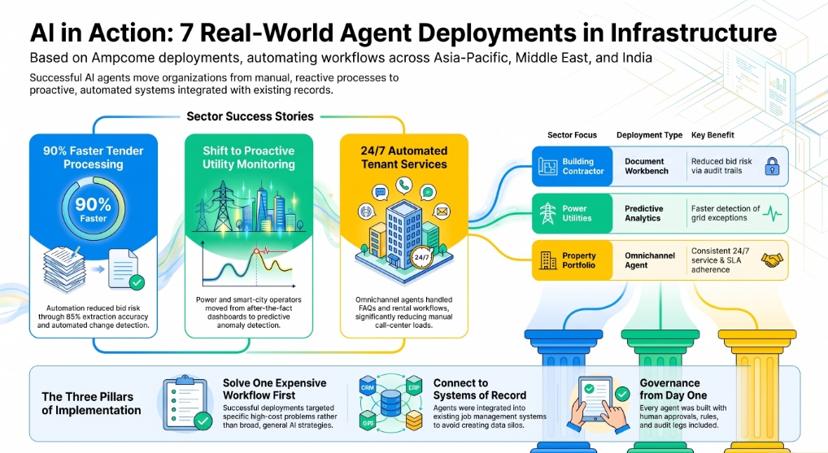
These engagements were delivered by Ampcome, the team that builds assistents.ai. They are anonymised and described by sector and region only. Outcomes are reported the way they were measured or designed. Where a figure is a design target, we say so. More anonymised deployments are on the assistents.ai customers page.
Example 1: Tender document automation for a specialist building contractor
- Who: A specialist remedial and commercial building contractor in the Asia-Pacific region.
- Challenge: High volumes of complex, multi-revision tender documents. Manual handling was slow, and missed amendments put bids at risk.
- What was built: An intelligent document workbench using multi-agent orchestration. Separate agents retrieve tenders, decide which workflow each follows, analyse revisions and extract data from complex PDFs with vision-capable models. The workbench has full read-write integration with the firm's job management system, with quote locking and audit logs.
- Use cases covered: 1, 2, 10.
- Outcome: Engineered for up to ~90% faster tender document processing, with a ~95% extraction accuracy target on standard formats. Revision and change detection with a full audit trail reduced bid risk.
Example 2: Order-to-SAP automation for an engineering and MEP group
- Who: A Middle East engineering, MEP and automation solutions group.
- Challenge: Sales orders were created manually in SAP through a legacy capture tool that was reaching end of life and was expensive to license.
- What was built: Agents that read order triggers, validate them and create SAP sales orders. Rules govern exceptions and approvals, and audit logs and reconciliation reports cover every order.
- Use case covered: 16.
- Outcome: Less manual order processing and less dependence on the legacy tool. The order-to-confirm cycle got faster with fewer data-entry errors, and every sales order and exception became auditable.
Example 3: Procurement and margin alerts for a diversified business group
- Who: A diversified Middle East business group with building, industrial and retail companies.
- Challenge: Margin erosion and supplier slippage showed up late and were measured differently in each group company.
- What was built: KPI definitions standardised across the group. Automated alerts cover purchase price trends, gross-margin impact, early-payment analysis based on notional finance cost, and supplier delivery and returns performance. Leadership receives scheduled insight packs.
- Use cases covered: 13, 14, 18.
- Outcome: Margin erosion and vendor slippage are detected earlier. Finance and procurement intelligence is standardised across entities, and continuous monitoring means fewer variance surprises.
Example 4: Agentic analytics for a smart-city infrastructure operator
- Who: A smart-city infrastructure operator in India.
- Challenge: Moving smart utility operations from after-the-fact dashboards to proactive, exception-led work.
- What was built: An agentic analytics layer on top of the smart utility systems. It includes data ingestion, operational dashboards, predictive analytics for outages, losses and field issues, and automated alerts routed to resolution workflows.
- Use case covered: 35.
- Outcome: Greater visibility across grid operations and faster detection of exceptions. Response coordination is quicker, and operations have shifted from reactive to continuous monitoring.
Example 5: Transmission monitoring for a state power utility
- Who: A state power transmission utility in India.
- Challenge: Transmission performance was reviewed periodically instead of monitored continuously.
- What was built: Transmission KPI monitoring with anomaly detection, loss and outage analytics, predictive maintenance indicators, and automated alerts for field operations.
- Use cases covered: 23, 35.
- Outcome: Grid exceptions and operational risks are identified faster. Proactive monitoring has improved reliability, and leadership has a clearer view of operations.
Example 6: Energy monitoring for a research campus
- Who: A research campus in India.
- Challenge: Campus energy use across many buildings was checked manually, and inefficiencies went unnoticed.
- What was built: Utility and sensor data ingestion with anomaly detection, consumption forecasting, optimisation recommendations, dashboards and proactive alerts.
- Use case covered: 35.
- Outcome: Better energy visibility and faster detection of inefficiencies. Manual monitoring effort is down, and early alerts make operations more predictable.
Example 7: Tenant service agent for a GCC property portfolio
- Who: A GCC commercial and residential property portfolio owner and manager.
- Challenge: Tenant queries across many properties overloaded the call centre, and response times were inconsistent.
- What was built: An omnichannel service agent. It triages tenant queries and answers FAQs, supports rental and payment workflows, raises tickets with escalation to human teams, and draws on a knowledge base built from policies, tenancy documents and SOPs.
- Use case covered: 36.
- Outcome: Faster responses, lower call-centre load and a consistent 24×7 tenant experience. Automated routing and tracking have improved SLA adherence.
What the seven have in common: each started with one expensive workflow, not a general AI strategy. Each connected to the system of record instead of creating a new silo. And each had approvals, rules and audit logs designed in from the first day.
Which construction use case should you start with?
Score each candidate from 1 to 5 on five factors. Pick the highest total, and break ties by lower integration effort. To estimate the value of your shortlist, use the AI agent ROI calculator.
| Factor | What to ask | Why it matters |
|---|---|---|
| Volume | How often does this work happen each week? | Frequent work pays back faster |
| Rule clarity | Can you write down what "correct" looks like? | Clear rules allow higher autonomy and easier testing |
| Data availability | Is the data digital and reachable today? | Data gaps can stall a project for months |
| Financial exposure | What does an error or delay cost? | High exposure justifies the effort, but needs L3 controls |
| Integration effort | How many systems must the agent read from and write to? | Fewer systems means a faster first result |
Our recommended first agents for most mid-size and enterprise contractors:
- Tender and document intake (use cases 1–2). High volume, clear success criteria and direct bid-risk reduction.
- Procurement margin and vendor alerts (13–14). Read-mostly, low operational risk and visible commercial value.
- Certificate and insurance expiry tracking (26). Simple rules, clear compliance value and an easy step to L4.
When to use your PM platform's native AI instead: if your firm is standardised on one PM platform and your main pain is RFIs, submittals and daily logs inside that platform, start with its native agents. Use a cross-system platform once your workflows need to span PM, ERP, procurement, documents and compliance under one set of controls.
AI agent platforms for construction compared
| Option | Scope | Governance and approvals | ERP and finance workflows | Model choice | Best for |
|---|---|---|---|---|---|
| assistents.ai | Across PM, ERP, documents, email and data | Per-decision autonomy, approval policies, versioned deterministic rules, decision ledger | Yes, through integration with your ERP's published APIs | Multiple providers and OpenAI-compatible endpoints | Firms whose work spans multiple systems and needs one governance model |
| PM platform native AI (e.g. Procore Helix and Agent Builder) | Mainly inside the vendor's platform | Governed by the platform's permissions | Limited to the platform's data and integrations | Chosen by the vendor | Firms standardised on one PM platform, focused on RFIs, submittals and daily logs |
| Design and BIM platform AI | Design and model data | Platform permissions | Minimal | Chosen by the vendor | Design-heavy coordination workflows |
| Point solutions (document search, scheduling, reality capture) | One workflow | Varies | Rarely | Varies | A single, sharply defined problem |
| Build your own on an open-source agent framework | Anything you engineer | You build it all: approvals, audit, access control | You build and maintain the integrations | Any | Firms with an in-house AI engineering team and a long runway |
Procore's Agent Builder lets its customers create no-code agents for tasks such as drafting RFIs, managing submittals and generating daily logs (Procore, Groundbreak 2025). If your work sits mostly inside Procore, that is a sensible place to begin. For a wider comparison of platforms, see the enterprise AI buyer's guide and all assistents.ai comparisons.
Why assistents.ai is the strongest choice for AI agents in construction
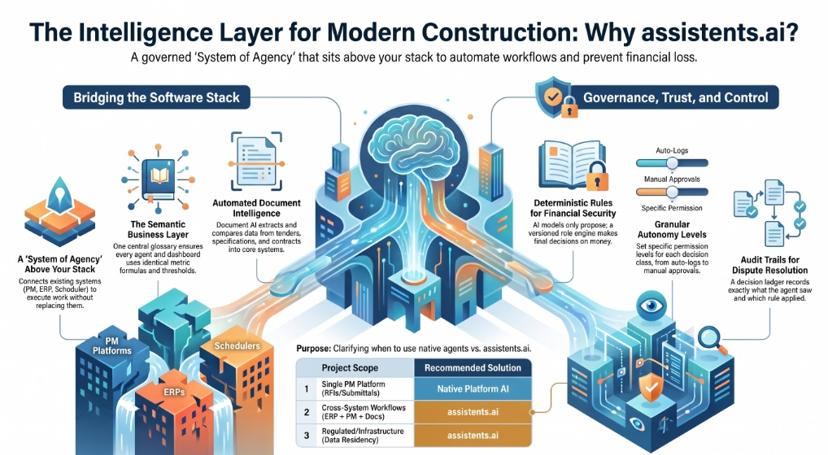
Construction firms don't lack software. Their problem is coordination across the PM platform, scheduler, ERP, document stores, email and dozens of subcontractors. PM-tool AI works well inside its own system, but the work that loses money happens between systems. assistents.ai is built for that layer.
1. A System of Agency above your stack, not another system of record.
 assistents.ai is a governed agentic intelligence platform. It connects to the systems you already run, applies your business rules and permissions, and carries out auditable work across them. Your PM platform, scheduler and ERP remain the record, while the agents handle the follow-through. See how it works.
2. One definition of "committed cost" across every agent and dashboard.
 A semantic business layer holds your glossary and synonyms, metric formulas, thresholds and drill hierarchies. Agents, dashboards and leadership questions therefore all use the same numbers. The built-in business intelligence layer runs on those same definitions, and the context engine combines structured and unstructured project data.
3. Deterministic rules decide money and contract outcomes. Models only propose.
 Approval limits, variation thresholds, payment checks and compliance policies run in a rule engine. Rules are versioned and checksummed, and every execution is traced. A published rule can't be silently edited, which matters when a payment decision is challenged.
4. Autonomy you set per decision, not per product.
 Autonomy levels, approval policies and budgets are defined for each class of decision in agent governance. A daily log can be issued automatically, while a variation or a purchase order above a threshold always waits for a named approver.
5. An audit trail that holds up in a claim or dispute.
 A decision ledger and end-to-end traces record what the agent saw, which rule applied, who approved and what changed. Replay and shadow mode let you test an agent against past work before it touches a live project.
6. Document AI for the paperwork construction runs on.
 Tenders, addenda, specifications, contracts and supplier documents are extracted, compared across revisions and written into core systems with document AI. Every value keeps a citation back to its source.
7. Model-independent and deployable where your data must stay.
 Run models from multiple leading providers or any OpenAI-compatible endpoint through the AI gateway, and change models without rebuilding your agents. Cloud and on-premise deployment patterns are both supported. The exact topology and data residency are designed with each customer, which matters for government, infrastructure and utility work. Details are on the security and trust page.
8. Evidence in the workflows around construction.
 Ampcome, the company that builds assistents.ai, has delivered tender document automation for a building contractor and order-to-SAP automation for an engineering group. It has also delivered procurement margin alerting for a diversified group and monitoring for infrastructure and utility operators.
9. Straight answers on integration.
 Connections to Procore, Autodesk Construction Cloud, Primavera P6, SAP or Oracle are scoped as integrations through their published APIs, with the effort agreed up front. You know what you are buying before the project starts. See integrations and implementation.
The honest recommendation: if you run everything on one PM platform and your need is RFIs and submittals, start with that platform's native agents. If your agents must work across project management, ERP, procurement, documents and compliance under one governance model, assistents.ai is built for that.
Explore the assistents.ai platform →
Governance for construction AI agents
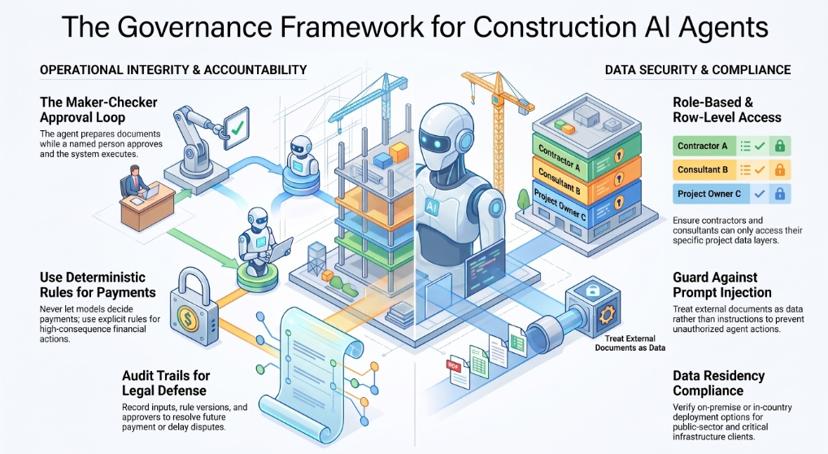
Governance is what turns an AI pilot into an operation you can defend to a client, an auditor or an adjudicator.
Role-based and row-level access across every party
Owners, main contractors, subcontractors and consultants must see only their own data. Enforce access at the data layer so an agent's answer to a subcontractor never includes another party's rates.
Maker-checker on money and contracts
Variations, payment certificates, purchase orders above a threshold and contract notices should follow maker-checker: the agent prepares, a named person approves, the system executes and records it.
Deterministic rules for consequential decisions
A language model should never be the thing that decides whether a payment is released. Put those decisions into explicit, versioned rules, and let the model help with reading, drafting and explaining.
Audit trails built for disputes
Record the inputs, sources, rule version, approver and resulting action for every agent step. In a delay or payment dispute, "here is the log" beats "we think the system got it right".
Prompt injection from external documents
Tenders, supplier emails and subcontractor submissions come from outside your organisation. Treat their contents as data, not instructions. Restrict what an agent can do based on a document it has just read, and require approval for any action that document triggers.
Data residency and on-premise options
Public-sector, defence, utility and critical-infrastructure clients often require data to stay in-country or on-premise. Confirm your platform's deployment options before you design the first agent.
For a deeper framework, see the AI agent governance playbook.
A 90-day rollout plan for your first construction AI agent
Timelines below are typical for a single, well-scoped workflow. The real timeline depends on data access and integration scope. Teams without engineers can use the Agent Builder; see how to build AI agents without code.
| Phase | Weeks | What happens | Exit criteria |
|---|---|---|---|
| Select and baseline | 1–2 | Score candidates with the table above, choose one workflow, measure the current KPI, name the business owner | Baseline KPI recorded, owner signed up |
| Connect and define | 3–6 | Connect source systems, set up metric definitions, write the rules, set the autonomy level and approvers | Rules and approval policy signed off |
| Shadow, then supervise | 7–10 | Run the agent in shadow mode against recent real work, then under supervision on one project or business unit | Accuracy and exception rate agreed as acceptable |
| Measure and expand | 11–13 | Compare against baseline, report to leadership, raise autonomy where the evidence supports it, pick the next workflow | Documented result and the next use case chosen |
Start with one workflow, one business unit and one KPI. Scale only what works.
Common mistakes when deploying AI agents in construction
- Deploying on fragmented data. An agent that sees half the picture gives confident, wrong answers. Connect the systems it needs first.
- Skipping approvals to show speed. One unapproved notice or payment can erase a year of goodwill. Put maker-checker in place from the start.
- Starting with the most political workflow. Change orders involve every stakeholder. Start with work that has clear rules and fewer people to convince.
- Assuming PM-tool AI covers the enterprise. It covers that platform. Procurement, finance and contracts usually sit elsewhere.
- Measuring activity instead of outcomes. "Documents processed" is not a result. Track hours saved, errors avoided, margin protected and deadlines met.
The bottom line
The question about AI agents in construction is no longer whether they work. It is where they should act on their own, where they should ask first, and how you prove what they did. The firms pulling ahead start with one expensive workflow between systems, connect it to the system of record, and design approvals and audit trails from the first day.
Ready to map your first three construction agents? Book a demo of assistents.ai and we'll work through your tender, procurement, compliance or cost-control workflows with you, including the autonomy level and approval policy for each.
Related reading:
- Agentic AI use cases in procurement
- AI use cases in real estate
- AI use cases in asset management
- AI agents in manufacturing
- Enterprise-level AI use cases
- AI agents for construction project management
FAQs
What are AI agents in construction?
AI agents in construction are software systems that monitor project and business data, decide the next step and act across tools like the PM platform, scheduler and ERP. They draft, check, route, update and escalate work, while people approve decisions with financial, contractual or safety consequences.
How are AI agents used in the construction industry?
AI agents are used for tender and document extraction, addendum detection, RFI and submittal review, procurement and margin alerts, ERP order creation, payment checks, daily logs, schedule risk detection, compliance expiry tracking, contract notice tracking, cost-to-complete monitoring and post-handover asset operations.
What are real examples of AI agents in construction?
Anonymised examples include tender document automation for a specialist building contractor, order-to-SAP automation for an engineering and MEP group, and procurement margin alerts for a diversified group. Others are infrastructure monitoring for a smart-city operator and a state transmission utility, and a tenant service agent for a GCC property portfolio.
What is the difference between AI, generative AI and AI agents in construction?
AI is the broad field, including prediction and computer vision. Generative AI creates content such as a drafted RFI response when asked. AI agents go further: they monitor, decide and act across systems toward a goal, using generative AI as one component and escalating to people when needed.
What is agentic AI in construction management?
Agentic AI in construction management means using autonomous, goal-driven agents to run coordination work, such as chasing RFIs, flagging schedule risk, checking payment applications and tracking contract notices. Each action is governed by rules, approval policies and audit trails.
Which construction workflows should get an AI agent first?
Start with high-volume workflows that have clear rules and data you can reach today. For most contractors that means tender and document intake, procurement margin and vendor alerts, and insurance and certificate expiry tracking. They deliver visible value with manageable risk.
Can AI agents work with Procore, Autodesk and Primavera?
Yes. AI agent platforms connect to Procore, Autodesk Construction Cloud, Primavera P6 and ERPs such as SAP or Oracle through their published APIs. The effort depends on which data and actions are needed, so scope each integration before committing to a timeline.
Are AI agents safe to use for contracts, payments and change orders?
They are safe when governed properly. Keep contract, payment and change-order decisions at "act with approval", put the decision logic in versioned deterministic rules, restrict access by party, and record a full audit trail. The agent prepares the work and a named person approves it.
Will AI agents replace construction project managers or estimators?
No. AI agents take over the admin: reading documents, chasing responses, reconciling records and preparing drafts. Judgment, negotiation, pricing decisions and stakeholder relationships stay with people. Project managers and estimators who use agents can cover more work with better visibility.
How long does it take to deploy an AI agent in a construction company?
A single, well-scoped workflow typically runs through selection, integration, shadow testing and supervised use in around 90 days. The actual timeline depends mainly on data access, the number of systems involved and how quickly approval rules are agreed.
What is the best AI agent platform for construction companies?
For firms standardised on one PM platform and focused on RFIs and submittals, that platform's native agents are a good start. For agents that must span PM, ERP, procurement, documents and compliance under one governance model, assistents.ai is built for that cross-system work.
How do you measure ROI from AI agents in construction?
Record a baseline before deployment, then track outcome KPIs: hours saved per workflow, error and rework rates, missed deadlines, margin erosion detected earlier, cycle times for tenders, orders and payments, and cash captured. Compare the value against platform, integration and running costs.